


Seth
Privileged
-
Joined
-
Last visited
Everything posted by Seth
-
Good point
-
My first computer was a Comadore 64.
-
Tables and responsiveness are kind of an oxymoron aren't they?
-
-
Now before some say why don't you reach out to the developers... I want to say that I value this community and I wanted to ask you guys first.
-
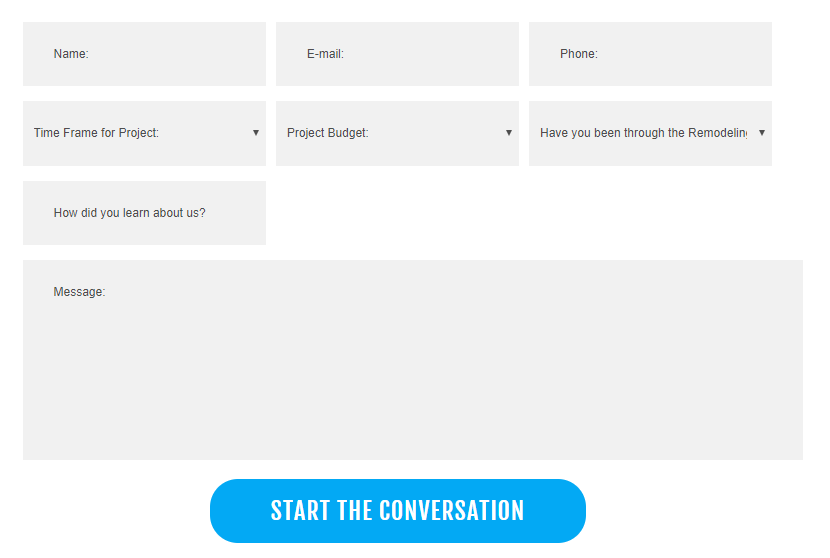
Hi Everyone! I have a site and I'm struggling to get Gravity Forms to look a certain way. https://webdesignstaging.site/firstfloorflow/contact/ As you can see it's the basic form layout. I need to get it to look like this.
-
Hey all https://webdesignstaging.site/firstfloorflow/ I'm trying to get Envira Album here to be square and 250x250. I'm having a devil of a time. Anyone have an idea how to get the thumb to adjust? Thanks
-
wohowowow! Okay.
-
Then again i did it and... well... nothing. .sidebarServicesMenu { list-style-type:none; } or .sidebarServicesMenu ul li { list-style-type:none; } http://gmdev.us/smi/our-services/network-connectivity
-
list-style-type: none; nevermind
-
how do i make the bullets not show though? just in that section?
-
Ahhh, oh wise one. Good thought!
-
Hi all Below is for a sidebar on a site. Right now the HR lines are too far from the text above. How do I fix that? <h2 style="color: #41b6e6;"><strong>SMI SERVICES<br /> </strong></h2> <hr /> <p><a href="../cloud/"><strong>Cloud</strong></a></p> <hr /> <p><a href="../data-center/"><strong>Data Center</strong></a></p> <hr /> <p><span style="color: #ffaa4d;"><strong>Network Connectivity</strong></span></p> <hr /> <p><a href="../network-security/"><strong>Network Security</strong></a></p> <hr /> <p><a href="../consulting-analysis/"><strong>Consulting/Analysis</strong></a></p> <hr /> <p><strong><a href="../customer-care/">Customer Care</a><br /> </strong></p> <hr /> <p> </p>

-
Thank you all so much!
-
Anyone???
-
Trying to get the outside border to go around all the copy including the bullets. What am I missing here? Code: <html> <head> <title>fancy box 2 column bullet list</title> </head> <body> <div style="border: 1px solid #41b6e6; padding:0px;"> <div style="background: #41b6e6; color:#fff; font-weight:bolder;">SMI Network Security Services</div> <div>Some of the key services we provide to help you address your security needs include</div> <div style="width:50%; float:left;"> <ul> <li>Vunerability Management</li> <li>Web Application Security/Firewall</li> <li>DDoS Monitoring & Mitigation</li> <li>Real-time Log Flow Analaysis</li> </ul> </div> <div style="width:50%; float:left;"> <ul> <li>Event Log Management</li> <li>Managed Cloud Security</li> <li>Network-Based Security & Protection</li> </ul> </div> </div> </body> </html>
-
-
-
So I'm building an ecommerce site for a shoe company. They have about 15 products but a lot of variations. I'd like to set each product's price for all variations in one spot and only adjust the stock in the variations area. Is there a way to do this or am I stuck pricing each variation individually.
-
-
-
-
Hey I can't find the CSS style to style this button. You can find it on https://ashleyassists.mystagingwebsite.com/social-media/

-
-


