Designer Karly
Members
-
Joined
-
Last visited
Everything posted by Designer Karly
-
Oh I am sorry about that. I don't have an extensive knowledge of fonts just the ones you would expect Time, Verdana, Aerial etc. I think the design is funky and would suite a bar that's style is similar and upbeat. I also noticed the ribbons reflections aswell, which look nice to. te center reflection looks like it acts as a container for the white text down the middle, was that intentional as it's quite effective.
-
Hey Everyone. Does anyone know if it's possible to have Google Adsense Code working in Newsletters? They would obviously have to be HTML based, though at present it seems copy and pasting the normal google invocation code into my newsletter will not show in a user mailbox be it local or webmail based. Does Google have any plans to release a newsletter friendly version or know if they currently have it as I couldn't find it in my publisher settings. DK.
-
Hi Eskymo. It's definitely an eyecatcher. The reflections look nice and the message i certainly clear. I am slighty unsure wether the font work son the green a) Is the font Times Roman? Not sure it works aswell as others and is the green a little over-powering? It may just be my monitor as i'v had contrast issues for months now. I like the party streams coming from the sides, it's a lovely touch. It's nice i'm just not a BIG fan of that shade of green. DK.
-
Greetings to you Spike. Welcome to the Web Designer Forum, you've done well joining us here, we are a great bunch Enjoy your stay. DK.
-
I have created a search for you in Hotscripts. If you scroll down (Past the yellow sponsored listings) you will see contact scripts galore! In my experience it's good to go for the 5 star ratings or the 5 chilli ratings aswell. Also look how many times it's been downloaded, those 3 are good indictaors. http://www.hotscripts.com/search/16701341.html DK.
-
I came across this, whilst finding out what colour schemes do not work online. It's actually titled Forbidden colour Combinations...says it all really. I thought you would find it quite useful when choosing a colour scheme, funny thing is I actually quite like some of the "Forbidden" combinations...not sure what that says about my tastes. Link to their website: http://www.colourlovers.com/blog/2007/08/2...r-combinations/ DK
-
Hi, I'm looking for some assistance here on what to take to my clients first Face-to-Face meeting. I'm not entirely sure how many people it will be wit, but i'm hoping for some advice what to take with me. I have already got a design I would like to show them, but what other things are they likely to want to look at? I have this vision of me having to take a massive A1 work book and have charts and graphs etc with 100's of web and logo designs for them to see, ready for a BIG presentation. Is all that necessary, can you give me some tips on what to take, say etc? Thank you.
-
Tee hee hee... Welcome aboard Dispel A pleasure to have you as part of this place. Looking forward to reading more of your stuff. DK.
-
Thanks Sebastian. What a very interesting tutorial, i'v been reading through the code and it all makes sense, so I will give it a go tonight after dinner. It will be great to implement it for a website i'm currently working on. DK.
-
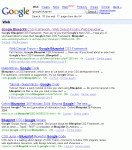
Hey, I found an interesting result this morning whilst doing some random searching. When I Google, Google's New CSS framework Blueprint search term "Google Blueprint" this forum actually appears in both 1st and 2nd position, followed by the actual Google product site. Which I find quite surprising. At the time of writing this, it's correct but not sure how long it will last, I have attached a screenshot as proof if your interested. So well done forum I thought i'd share my finding: DK.
-
Your not far off getting into the top 10 Thomas! Celebrity status looms. B)
-
Yes, I use this website, http://www.winspiration.co.uk/positive.htm which lists positive words, I then thesurus them, which leads to more words under the suggestions section. DK
-
ha ha. I know mine certainly does. Welcome to the forum Niki.
-
I'm the same I create a wireframe in Fireworks and then work the design in that way. The content is all planned before this as I find it much easier to know what i'm designing for, otherwise I take forever designing. DK.
-
That's a good question Liquid... I only have car insurance! To be quite frank, I don't have any insurance for my freelance work and to be honest i'v never even thought about it. Now you mention it, I feel it is something I should have. What if I get sued, what if someone uses my work for their own..where do I stand? This is actually quite a serious topic, I definitely be ringing round for some quotes. Is it a specialist market though? As i'm not exactly sure who to approach for niche Web Design insurance etc. I'll definitely have a google later, does anyone know any mainstream insurance companies that offer this? I would get yourself insured against public liability for definite, but then would need to ask advice for other areas of cover. Good post Liquid. DK
-
Hello John About time you posted an introdution! Nice ot know the forum is helping out, if you need any CSS help just let me or the others know. DK
-
I'm letting a few of my designer friends know, so they should be joining soon
-
The simpsons offcicial move website offers you the chance to be able to choose from thousends of different body parts etc your own Simpsons character. It's really good fun, you can check it out here, the link is at the top "Create your own Simpsons Avatar" Link: http://www.simpsonsmovie.com/main.html Would be fun to see what you have created. Here's me

-
Excellent! Google has recognised my sitemap and it's funtioning correctly. Thank you Dizi
-
Wouldn't it flow from left over the right if you simply add, float: left; and make the width eiterh 100% or enough so it covers both columns this should make it spread across both areas.?
-
Yes I agree with that, like most people in the world it is set as my homepage and almost always delivers what I need.
-
Dizi, that is VERY helpful! Thank you ever so much for such a quick response. I'm gonna try and build it not and let you know how the coding goes.
-
Hi, Does anyone know I would go about creating a Google Friendly Sitemap? It's something to do with XML? If anyone could help I would be REALLY greatful. DK.
-
Nice spec laptop you have their, if your just going to be doing Web Design and nothing to intesive like video production etc then 1 Gig should be fine. I agree with the Firebug extension, as you can edit the website in realtime, i.e if you disable a style in the css firebug window then the style would disable in the browser window, it's so, so useful. You might want to consider a sketchbook for ideas, as you never know when inspiration may hit you and if you have nothing to make a notes with, the idea may be forgotten. You have all the essential tools in Web Premium so that's good, you could FTP via Dreamweaver but you may need a FTP client, a good free one is Filezilla. You may want to use a Local Web Server Setup, WAMP (Windows, Apache, MySQL, PHP) - so you can test server side applications on your laptop. You can download the standaone executable that installs everything for you here. Basically it creates a folder on your pc that you save files to and it acts as a local host without actually having to buy web space it's great for testing your applications without spending money...plus it saves time uploading etc. Hope that helps DK.
-
Well it's quite tricky to be honest as most members here do some great contributions, I wouldn't like to be in your shoes Ben. I might have a recap of the month near the end and send you my top 3. Good luck everyone!