Designer Karly
Members
-
Joined
-
Last visited
Everything posted by Designer Karly
-
Making potential clients aware of your company is I believe a problem for a majority of freelancers especially those just starting out who don't know the ropes. I'm looking for advice really from people who have experienced the same issues and how you overcame them? Do you target local or worldwide companies and what sort of companies do you approach and what successful techniques have you used? Thanks in advance.
-
Welcome to the community repeat-x. Experience with Joomla! That's handy, I may be asking you some questions soon, as i'v been looking how customizable it is. Nice to have you with us. DK
-
-
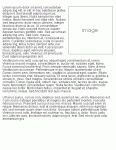
Hi, I have attached an image of an example of what I am trying to achieve. I always need to wrap the text around an image in a web page, I tried floating the image - but the text just goes underneath the image. Can anyone show me the best way align a image to the right of a webpage, so the text wraps around it please? Thanks. DK
-
Thanks! The Tree & Leaf wallpapers are beautiful. Thank you for these, i'v downloaded a few of them, now I just have to try each one to see what I like best. Thanks for those.
-
-
No problem, i'v added you as a friend too! DK
-
What a nice username you have. Welcome to the forum Dana, I certainly have alot of questions about CSS, the people here are great and have certainly helped me out a few times. Hopefully we can help each other along the way. DK
-
Thanks Ben, that's always puzzled me, now I know! I always had a hunch to use <link rel...I guess i'll stick with it. Thanks again. DK
-
Hey Peeps. I always get the options when creating linking to a stylesheet in my .html document with either: 1. @import url("stylesheet.css"); or 2. <link rel="stylesheet" type="text/css" href="stylesheet.css" /> I tend to go for option 2 as when I look at other peoples code they use this method. As curiosity got the better of my I tried the @import url... method and produced the exact same result. So which is best to use and why? *Confused* DK
-
Congratulations SEOLover, you must be over the moon! I agree Ben, I tend to ask for 30% - 40% to get the project started, then the remainder once the project is complete. A year or so back I tried spreading the cost over 12 months so I get a small trickle of income every month (just like a normal salary) - but I got into all sorts of struggles with non-paying clients etc, I would NOT suggest this method it's not worth the hassel. DK
-
Thanks Ben I already have an Adwords account but used another email address when registering and it worked. Now to get advertsing. The keyword research is the tough part but I hope it will be worh it. DK
-
That's good Eskymo, is that for your www.my-igloo.net website? I got $3 for mine, though I don't intend on charging people ever. It's nice to see what your link would be worth any way. DK
-
Cool! Some peculiar items there. I quite liked the look of the Flickr MiniCards, quite snazzy & the Carnivorous Creations Terrarium Kit. Thanks for the link it kept me amused. DK
-
I agree it's a nice and clean design. The blue bars on the left of the front page are a little big for the smaller title but the rest seems nice and fresh. Well done.
-
Thanks Ben, i'm off to www.123-reg.co.uk to buy my domain! You'v been a great help. DK
-
I found this website, it may be of use to you http://www.wiifind.co.uk/buywii.html DK
-
Hey I was wondering are Hypenated domain names viewed by Search engines as less value then say a domain without? For example would, www.my-website.com not be as beneficial to search engines than www.mywebsite.com? I was thinking if there isn't a problem with this then it would open up the gates to allow people to grab domain names that suit their business and have better potential within Search Engines. Can anyone Assist please? DK
-
Nice Ben, I did a bit of searching and found a version that allows you to erase bit's of track if you make a mistake and other handy tools! Quite a time saver! http://www.official-linerider.com/play.html DK
-
As i'm always looking to improve the SEP (Search Engine Position) of my website, i'v taken a shine to putting a link to my website within my Signature on Forums with a high PR. Will this at all benefit me? Or does Google/Other Search engines realise it's a forum signature link thus not counted as a quality backlink? DK
-
Is this for your main "Container" for your webpage? If so, to align in centrally on the page use the following: <div id="container">Example copy here</div> #container { width: 800px; padding: 0; margin: 0 auto; } This should solve your problem, to align copy centrally within a div applying the following: #container { width: 800px; padding: 0; margin: 0 auto; text-align: center} I wasn't sure what you meant so by posting 2 solutions, it should solve your problem, let me know how you get on, ok. DK
-
It works! YES! That was driving me mad! Thank you so very much for the help with this, no doubt i'll be back should i need more help with this. Thank you. DK
-
Hey, I'm having a nightmare figuring out why IE will not set the height of my div box to 4px? Now before CSS I would use tables hack by adding a 1x1px transparent .gif which would allow me to set the height of a table below 10px. As tables are a thing of the past (except for tabulated data of course) - how can I change the height of a div so I can reduce it below IE's defualt 10px? <div id="topbox"></div> #topbox { height: 4px; } Any help would be greatly appreciated. DK
-
You'll be pleased to know that Google Doesn't penalise the size of your H1 tags, just make sure you structure your heading layout properly on the page. For example, you wouldn't want <h1>Title Here<h1><h1>Another Keyword stuffed heading</h1>, as this would be spamming. Your second heading tag should be <h2> then <h3> for example, so it follows a logical pattern. All styling can be made easily within your CSS stylesheet, h1 { font-size: 11px; } DK