mylocaltrades
Members
-
Joined
-
Last visited
Everything posted by mylocaltrades
-
There is not much you can do with the iframe itself (other than style it in your style sheet of course) but there is nothing stopping you from wrapping the iframe around your own custom html.
-
Hi, I am a Drupal developer. I think you are over complicating things here. Drupal is a CMS. Therefore it is unlikely the slider is hard coded into the theme. (although sometimes some themers do this) it is unnecessary. Chances are the slider content is managed through a content type and a view. This means that you can change the view to display am many slides as you wish and add these just as you would adding any other content to the site. Do you have user 1 or at the very least administrator access to the site? Without knowing the website it is hard for me to help further. If you remove your sub theme from the site (normally, sites/all/themes) then you should be good to log back in. I will keep an eye on this thread and if you come back I will assist you further. ***(Update)*** I just checked things out a bit further for you. I notice that you now have the site back up and running here: http://www.arguemax.com/_drupal-7.26/ It looks to me like all your content is there based on Google cached version ( http://webcache.googleusercontent.com/search?q=cache:D7Zbtf-OmwsJ:www.arguemax.com/_drupal-7.26/+&cd=10&hl=en&ct=clnk&gl=uk ). It now just needs theming
-
Google today have updated their toolbar pagerank values. This was very much unexpected in the SEO world and in fact it was thought it was dead. This appears not the case. It is not a metric I consider important these days, though it is nice to see my websites pagerank's increase! How did you do?
-
As per the previous posts, Drupal, Joomla, WP all could do what you require out of the box. I personally am a Drupal developer and out of the box you can set permissions to specific user roles, for example, staff, staffadmin etc so there would be no confusion to the user. In addition you can set up content types with a title, image and body field and a save button. You can use patterns to automatically set the structure of the url per content type. For example: a news content type would auto save as: domainname.com/news/title-of-the-post - Your users would not need to do anything. Also you could create a one page pdf / help page on how to use the site for your users, that way you would not be teaching every person how to use the site. You can also set up a redirect, so you could set up a login page and when the user logs in it takes them to a custom page where by they simple click on "manage content" / "add content" or "help" Hope this helps
-
Other things to think about from an SEO point of view is the site structure, ie url's and make use of tools like Google webmaster tools. for example, if you migrate to wordpress, Drupal etc then the url's could change. If that is the case I would recommend you set up 301 redirects server side, ie, in your .htaccess file. That way in the process of the changeover from a search engine point of view, your users and readers will find the correct page from the old indexed data in the serps. Also I would recommend you use webmaster tools and once you have launched the new site, submit a site map and keep an eye on any errors that may appear and correct them. Other things you need to consider are things like rel=author markup if you currently have this set up, image url's. If you keep a close eye on things there is no reason why your rankings should be affected as ultimately the content will be the same. In fact if you make use of HTML5, CSS3, responsive design etc then I would expect to see an increase overtime. Another way would be to use a CMS like Drupal and use a contributed module like static_page: https://drupal.org/project/static_page import all old pages and continue to expand the content using the cms.
-
-
-
Hi Ben, To be honest I prefer to use Drupal views slideshow module with views and customise the look with css. I have not used the flexslider but you mention you have created the output in views. Did you create it as a page or block? It may just need to place the slideshow views block into a region? If you can upload a screenshot of your view I may be able to help more.
-
You could perhaps take a look at the openchuch distribution. It is a Drupal distribution specifically for churches: https://drupal.org/project/openchurch - there is a demo site here: http://demo.openchurchsite.com/
-
-
The rel=author tag is for your personal profile, ie you are personally the author of a specific piece of content. The rel=publisher tag would be the effectivly tell Google that this Google+ business page is owned by this website. As an example an online magazine / publication would use the publisher tag for the website, blog posts, articles etc would use the author tag being there could be multiple authors. Try using Google webmaster tools, there is a tool to test your markup on specific pages.
-
I agree, the site has most probably been hacked. Check out in Google to see if it is in their index. If not I would also mention to the client that there may well be SEO implications too.
-
You mention cms, using a cms then creating static pages there are only easy ways. If you want to learn new things why not check out Drupal.org - you will certainly find this something you can get your teeth into! That way you can learn many things without reinventing the wheel. hope this helps.
-
Sorry for the delay in jumping in on this one so late. I am a Drupal developer, I have of course built sites in wordpress but I do find for more complex sites wordpress is quite limited. I agree that Drupal has a longer learning curve than wordpress. If one is to consider using Drupal you must start off with a framework mindset, focusing on what you can build with it rather than focusing on what you can do with it. As of Drupal 7 image support is in core and from the up coming Drupal 8, the wysiwyg editor and many more features like the powerful views module will be in core (out of the box) I could not disagree more, check out Drupal commerce showcase: http://www.drupalcommerce.org/showcase - there is also a kickstart Drupal commerce distribution which can help with build time for new developers - https://drupal.org/project/commerce_kickstart Hope this helps
-
By default for individual fields in drupal you use find the id then the class. For example: #id .class-field-example{ width:20%; }
-
-
You do not need to touch the lock.inc file. Take note of "Access denied for user 'kensha'@'localhost'" This error is saying that Drupal can't access the database. Go to sites/default and change the database information in the settings.php file
-
If you want something out of the box which you can get stared right away then customise to suit I would check out the Drupal commons distribution http://drupal.org/project/commons
-
This is CSS3, It will simply layout your content into two columns. just add it to your style sheet
-
Try this: #content { -moz-column-count:2; /* Firefox */ -webkit-column-count:2; /* Safari and Chrome */ column-count:2; -moz-column-gap:40px; /* Firefox */ -webkit-column-gap:40px; /* Safari and Chrome */ column-gap:40px; }
-
Sorry to jump in late on this one. Not sure if you have now resolved this Fran, but I think this is exactly what you would be after - http://drupal.org/project/openfolio it's a drupal distribution designed specifically for your project
-
I think the nearest you will find without custom coding is: http://drupal.org/project/commerce_custom_product This Drupal module has a few functions out of the box but I think this would be the most relevant "allows you to sell customizable products that require customer input when added to the cart. Use cases for this functionality include: Business cards that require contact information and a logo upload."
-
You could try using Mono open source http://www.mono-project.com/Main_Page
-
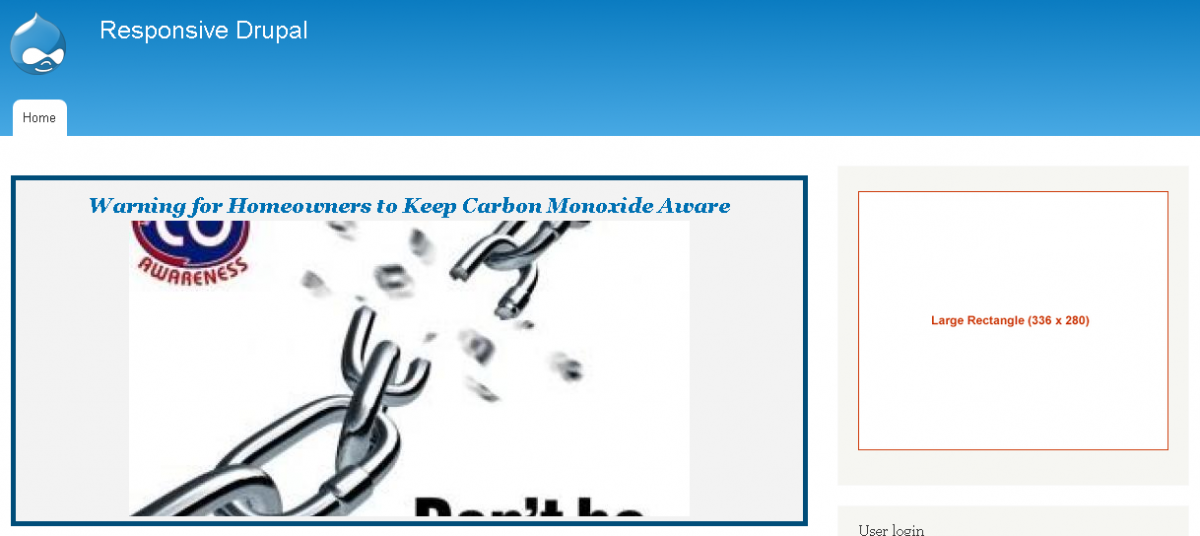
I have just updated my personal website with my own custom responsive theme with a responsive slideshow. I am after any feedback on how the slideshow renders on different displays. I have used the absolute css property for my title overlay and i would also like feedback on how this renders too. My css for this is: #block-views-slideshow-block .views-field-title { font-weight:bold; font-style:oblique; padding:0px; font-size:100%; position:absolute;top:5px; text-align: center; background-color:rgba(355, 355, 355, 0.; padding: 6px; } the website: http://www.garypratten.co.uk/
-
I am currently working on creating a responsive slideshow. Or to elaborate a little more, I have created one and I am looking for ideas on the look / design of it. I don't have a set look in mind and hopefully this is where the community here comes in! it would be great if you peeps would have any ideas on expanding on my quite frankly awful looking style To be fair I have been working on creating and ensuring the slideshow is fully responsive. This is where my knowledge lays, the actual design / how things look is not my strong point. Any thoughts or suggestions greatly received! I will be releasing this as a sub theme on Drupal eventually and I am happy to add your name/s to the developers list. This is my current code for the slide show: #block-views-slideshow-block { border: 5px solid #004d79; background-color: #f3f3f3; } #block-views-slideshow-block .views-field-title { font-weight:bold; font-style:oblique; text-align:center; padding:0px; font-size:150%; background:transparent; } #block-views-slideshow-block .views-field-field-image { text-align: center; } .views-slideshow-cycle-main-frame{ position: relative !important; width: 100% !important; height: auto; } .views-slideshow-cycle-main-frame-row{ width: 100% !important; } I have also attached how the slideshow looks currently in two views.