Harry_028
Members
-
Joined
-
Last visited
-
Ah brilliant, thanks guys. I'm sure I tried the overflow-x: hidden attribute and it didn't work?? Maybe I only tried overflow: hidden. Never mind, it does now. Thanks for all your help!
-
-
I've built a responsive website using Bootstrap 3 and although everything works fine, my client has said that "the pages wobble when scrolling on mobile view". I had a look and it seems that the pages do not stay fixed when scrolling vertically, that is to say that they move a little left and right to the point that the left hand side of any text is missing and you have to manually scroll the page back to it's original position. I've looked at the container width and the padding and margins on all elements and they seem fine. Anybody have any ideas as to how to solve this? The website is here so you can check on your mobile devices as well. http://mharrisondesign.co.uk/tests/kh_responsive/kaitlinhoward_news.html Thanks!
-
-
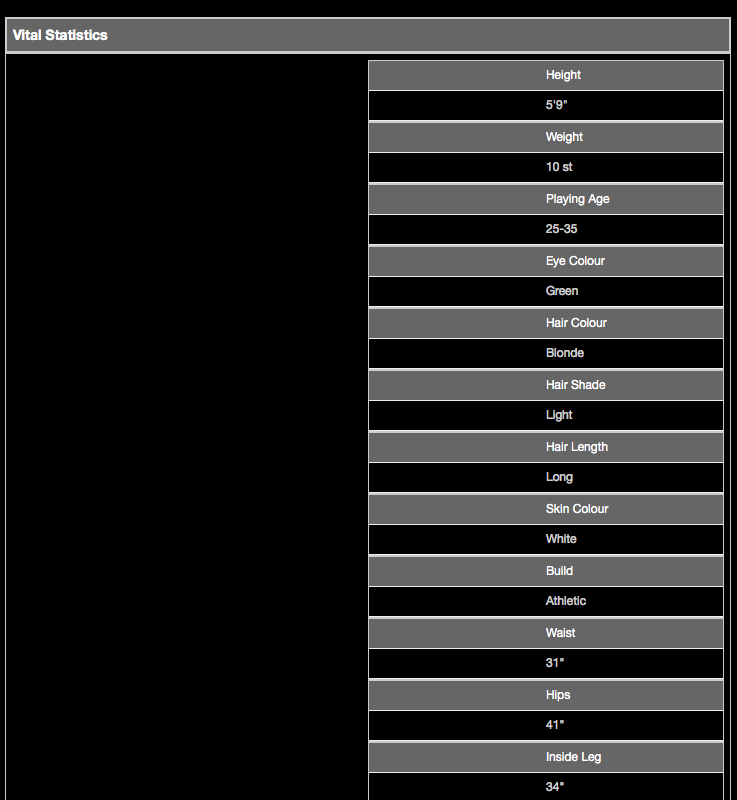
Hi. I'm trying to get my table to format in a particular way in desktop view and tablet but only change in mobile. Currently the table consists of two columns, the left with data the right a picture. This looks fine in desktop view but when I collapse the screen size to tablet size, the left hand column sits on the right of the holding table and the image disappears. I want the format to stay the same as for desktop in tablet view but for the left column to span the full width of the screen in mobile. I know that I've probably got the CSS wrong but I can't figure out how to rectify it. It's driving me bonkers. See attached images for what I'm seeing. Thanks! Here's the CSS: .table_text_hayley { color: #CCCCCC; text-decoration: none; font-size: 85%; } .tableHeader { color: #ffffff; background-color:#666666; } @media only screen and (max-width: 768px) { .vitalPic {display:none; } } @media only screen and (max-width:320px) { .fullWidth {width:100%; } } Here's the HTML: <table width="100%"> <tr> <td class="fullWidth"> <!--stats table --> <table id="table4" border="0" cellspacing="0" cellpadding="0" class="fullWidth"> <tr class="table_text_hayley"> <td class="tableHeader">Height</td> <td>5'9"</td> </tr> <tr class="table_text_hayley"> <td class="tableHeader">Weight</td> <td>10 st</td> </tr> <tr class="table_text_hayley"> <td class="tableHeader">Playing Age</td> <td>25-35</td> </tr> <tr class="table_text_hayley"> <td class="tableHeader">Eye Colour</td> <td>Green</td> </tr> <tr class="table_text_hayley"> <td class="tableHeader">Hair Colour</td> <td>Blonde</td> </tr> <tr class="table_text_hayley"> <td class="tableHeader">Hair Shade</td> <td>Light</td> </tr> <tr class="table_text_hayley"> <td class="tableHeader">Hair Length</td> <td>Long</td> </tr> <tr class="table_text_hayley"> <td class="tableHeader">Skin Colour</td> <td>White</td> </tr> <tr class="table_text_hayley"> <td class="tableHeader">Build</td> <td>Athletic</td> </tr> <tr class="table_text_hayley"> <td class="tableHeader">Waist</td> <td>31"</td> </tr> <tr class="table_text_hayley"> <td class="tableHeader">Hips</td> <td>41"</td> </tr> <tr class="table_text_hayley"> <td class="tableHeader">Inside Leg</td> <td>34"</td> </tr> <tr class="table_text_hayley"> <td class="tableHeader">Hat Size</td> <td>22"</td> </tr> <tr class="table_text_hayley"> <td class="tableHeader">Dress Size</td> <td>14</td> </tr> <tr class="table_text_hayley"> <td class="tableHeader">Chest Size</td> <td>38"</td> </tr> <tr class="table_text_hayley"> <td class="tableHeader">Shoe Size</td> <td>6</td> </tr> </table> <!--stats table ends --> </td> <td class="vitalPic" valign="top"><img align="right" class="img-responsive" src="pics/vital_stats.jpg" alt="Vital Statistics pic" /></td> </tr> </table>


-
-
Hey guys. Thanks for the replies. I've checked my add ons and there doesn't seem to be anything untoward although FF does freeze so I can't scroll or select anything on my add ons page. This has happened to me before so I deleted FF but that was a year and a half or so ago so I think I'll do a malware check as you suggested. Thanks!
-
-
-
Hey guys. I've just downloaded Firefox (v26.0) from the Mozilla website to use on my 24" imac and there's a menu along the top that looks Greek or Russian but the rest of the site seems to be in English. Whenever I click on anything, the page freezes. This happened to me that last time I tried downloading Firefox on this machine about a year or so ago but it doesn't do it on my MacBook? Do I have some weird virus? See attached images. Thanks!


-
Hi. Does anyone know how to stack elements in a particular order? Please see the attached. Image 1 shows an email in a desktop client. Image 2 shows how it will look in a mobile using media queries. You will notice that the image sits above the text in the mobile version (2) but to the right on a desktop client (1). The text and button share a table that is aligned left, the image is also aligned left so they are forced aligned but in a mobile they are made to fall under one another and stack. The problem is I want the image to appear ABOVE the text in the mobile environment. Can this be done? Please bare in mid that is for an email and needs to work across the board so CSS in the head to control this may not be applicable. Thanks!


-
I am completely new to asp and have never really looked at it before but I have just been handed a job to update a website and add some new pages to it. The only thing is, the whole site is made up of asp files which is a little different to HTML files and what I'm used to. So I decided to download all of the pages from the FTP on to my desktop, but none of the pages were showing any styling. Then I thought that maybe this was because it wasn't hooked up to a server so I uploaded all the files to my FTP under my test directory. I tried navigating towards it online but it just shows the list of all the pages that I've uploaded. There isn't even an index file in there. I saw somewhere that you need an IIS server or something which is PC based? I work on a mac and, as you can tell, I don't really know how to get it working on my FTP or working on my desktop. I mean, how do you preview the site? Do you have to work off a test server all the time? PS, I am running an Apache server if this helps? Thanks for any advice you can share.
-
Ahh, cool, I'll give them a whirl. Thanks.
-
Yes. I have been tasked to build an email for a client, but he would like to be able to update the content himself, sort of like a CMS style system so he can at least update text and images. Is this possible to do?
-
hi. Does anyone know if there is something out there that can be used to update an email by the client? I have a job where I am going to build an email using media queries and the client would like to be able to update the content himself. Thanks!
-
Yeah. The default password is root but they recommend you change the password to something more secure anyway. Tried with no password but it just says it can't find the file.
-
Hi. I hope someone can help with this because it's driving me mad. I did this on my work computer, no problem. However, I cannot get this to work on both my iMac or Macbook Pro at home. I would like to install a local server on my machine so I can teach myself Wordpress without the hassle of installing stuff on my web host account. So, I have downloaded MAMP to my machine but when I come to actually install it and I want to change my password using Terminal, whenever I try to put in my existing password to approve the changes, it suddenly won't let me type anything. I get to this point: Last login: Fri Sep 21 19:05:16 on ttys000 oxflap014:~ markharrison$ /Applications/MAMP/Library/bin/mysqladmin -u root -p password [thx3r5t] Enter password: Weirdly, I actually get the confirmation homepage telling me that it is running so why can I not alter information through Terminal? I'm running 10.5.8 on my iMac (for which I've downloaded a backdated version) and 10.6.8 on my MacBookPro. Is there something else I should be doing? I've taken instructions from this article: http://www.dwuser.com/education/content/why-you-need-a-testing-server-and-how-to-do-it/ (Scroll down to the section "Installing MAMP" for the section I am using.) Thanks!
-
Probably not a good idea. CHeck out this article: http://www.campaignmonitor.com/blog/post/2432/do-image-maps-work-in-html-ema/
-
Hi guys. I've been reading a lot about media queries for email in mobile devices but there are a couple of questions that I can't seem to find an answer to. Media queries seem to use CSS, which is something that is frowned upon in the email world as some email clients ignore anything in the head. My question is, how do you get round this? Having been building emails for over 2 years, I have used inline styling throughout and nested tables, but media queries seem to suggest that you can't use nested tables as the design needs to be quite fluid so elements can collapse. Our emails are quite designed and structured so how do you get round this? Thanks everyone!
-
Hi guys. Does anyone know if you can create a shape in Photoshop using Actions? I recently bought a Bundles DVD of action scripts that allow me to create 3D creations of CDs, book jackets and DVDs for portfolio pieces but what I'd really like to do is be able to create a shape with extra information in ie "20 books" or "buy now". However, when I create the shape and enter the text, then play it back, it won't create the text or shape. I've attached a file to show you what I mean. Any ideas? Thanks!