kanger
Privileged
-
Joined
-
Last visited
-
Hello I was just wondering how easy it is to integrate Paypal with Woocommerce on WordPress. Is PayPal standard ok to use in terms of security? I watched a video and it said to check php requirements etc, but does anyone else have any other tips? Is the sandbox testing all straightforward? Can you test with your own credit card? Any tips much appreciated Thanks in advance
-
-
Hello I'm toying with the idea of buying a chrome book and I was just wondering if anyone has had much success doing all their web design work online. I have a desktop, so this would just to enable me to code or design whilst watching tv downstairs. Think there are online FTP things, but just wondering if people have managed without files or with just using various apps. Any ideas for useful apps gratefully appreciated. Thanks Vicky
-
Hello All, I'm just wondering, in the past I've done fresh new sites for clients and have yet to redesign or work on a site that already exists. Can I ask how you all deal with putting up the new / test website whilst working on it? I'm asking because a client already has a domain and wordpress installed so it would be a case of installing a new theme. I am happy developing it all locally on wamp, but then once I install the theme there will still be changes to make in the admin area of wordpress and so forth, during these changes do you have a redirect stating under maintenance? It's probably simple but I'm just not clear in my head how to have the old site displaying whilst installing new? I would be really interested to know how people tackle this. Many thanks in advance Vicky
-
Hello all I've been asked for a daily / hourly rate for a job I've enquired about...here is some of the spec: What do people usually put as their hourly / daily rate? I used to do contract work at £13.20 per hour but felt I was underselling myself a bit...any thoughts? Web designer/developer Are you a recent graduate looking for experience or a junior looking for a new challenge? Knowledge of the latest trends in web/interface design is essential, as you will be designing websites and developing them into fully functional sites. Typical tasks would include: Creating wireframes and designs in illustrator/photoshop Adapting Parallax scrolling themes Theme building for Wordpress Design and coding of HTML emails Interface design for Apps Good knowledge of HTML/CSS, Wordpress, MS products, Photoshop and Illustrator is required. Also the Adobe software of Dreamweaver, Muse and Edge would be useful but not essential. Thanks in advance Vicky
-
-
Hi Guys It was a Windows Update that was messing everything up... this article sorted it in case anyone else has same issue: http://www.datamirage.nl/blog/font-corruption-windows-update-kb3013455/
-
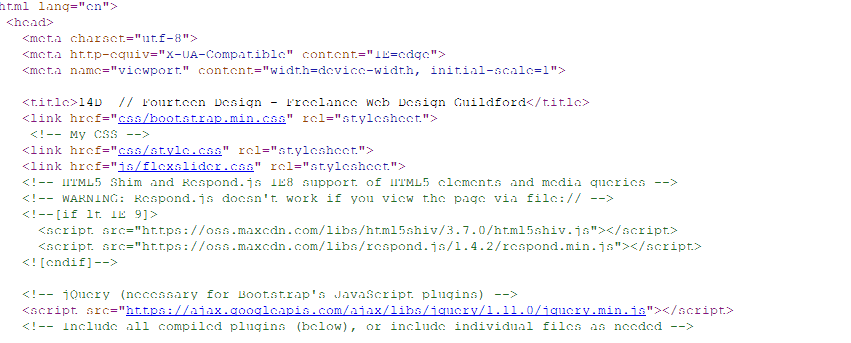
Anyone had issues with code looking funny? In both Notepad ++ and in browser when I view source my code is all faint and unreadable. Have attached a screenshot, any idea what's wrong or how to fix? Thanks in advance Vicky

-
Hello I was wondering if anyone could help out... I'm trying to include a flip sponsor wall on a website page (http://tutorialzine.com/2010/03/sponsor-wall-flip-jquery-css/) The flip wall uses a couple of javascript files (that depend on JQuery and Jquery UI) and I think I've registered them and enqueued them..but it doesn't seem to be working: I am using Virtue Wordpress theme. In the scripts.php file I have put in the following: wp_register_script('modernizr', get_template_directory_uri() . '/assets/js/vendor/modernizr.min.js', false, null, false); wp_register_script('kadence_plugins', get_template_directory_uri() . '/assets/js/plugins.js', false, '237', true); wp_register_script('kadence_main', get_template_directory_uri() . '/assets/js/main.js', false, '237', true); wp_register_script('flip-script', get_template_directory_uri() . '/assets/js/flip-script.js', array('jquery', 'jquery-ui'), false, null); wp_register_script('jquery-flip', get_template_directory_uri() . '/assets/js/jquery.flip.min.js', array('jquery', 'jquery-ui'), false, null); wp_enqueue_script('jquery'); wp_enqueue_script('jquery-ui'); wp_enqueue_script('jquery-flip'); wp_enqueue_script('flip-script'); wp_enqueue_script('modernizr'); wp_enqueue_script('masonry'); wp_enqueue_script('kadence_plugins'); wp_enqueue_script('kadence_main'); This is what I'm getting in the page source code in the <head> section... <script type='text/javascript' src='http://localhost/wordpress/wp-includes/js/jquery/jquery.js?ver=1.11.1'></script> <script type='text/javascript' src='http://localhost/wordpress/wp-includes/js/jquery/jquery-migrate.min.js?ver=1.2.1'></script> <script type='text/javascript' src='http://localhost/wordpress/wp-content/themes/virtue/assets/js/vendor/modernizr.min.js'></script> For some reason it isn't including the flip scripts, I'm not sure I have added the $deps argument correctly? i.e. they are dependent on JQuery and JQuery UI. Any ideas or any help much appreciated Thanks in advance. Vicky
-
I know this is a bit 'tut tut' but sort of go along with the theory that for learning it is ok (once working we can buy professional packages), but does anyone know the best place to get a free version of Adobe Illustrator and InDesign. I have windows vista and 32bit system. Thanks in advance
-
-
Hello I've come across this issue before and I've forgotten how to fix it... basically on this page: http://fourteendesign.com/new_portfolio/ if you scroll down to the portfolio section the links to 'visit site' within green buttons aren't working and when I look at it the code is showing as: <li> <button class="btn btn-success"> Text - Visit Test Site Text - Empty Text Node I've tried making the element display:block and with zoom:1 but that made no difference. Anyone know how to fix this? many thanks in advance
-
-
Thanks Junior, I'm not interested in the gallery though, I'm interested in how the images slide in from the sides as that section of page is scrolled to. I want to make two divs slide in from right and left as I scroll down to them
-
Hey all I was wondering if there is a demo online somewhere that uses the effect on this website with bootstrap... the website is here: http://html5up.net/big-picture it uses skel.js framework I want to recreate the work section effect where the images slide in from left and right, is there a bootstrap plugin that does this or any tutorials out there to help with this? I have a site that uses bootstrap framwork and I don't want to add skel framework to it. many thanks in advance for any thoughts / info
-
sorry, Nock, could I pick your brain once more.... is it ok to have the email address (that form sends to) within the php code, will spam bots be able to see it? thanks
-
Thanks Nock, I've got it working nicely now