babrees
Members
-
Joined
-
Last visited
Everything posted by babrees
-
I value my privacy. To much to reply here, you would have to look into google and see and know what they're up to.
-
Clever and novel and nice, but not practical. I was lost in watching it and the rest of the website disappeared.
-
Personally, I would never sign in using Google. Perhaps alternative methods of sign up/in, especially just by email
-
Thank you! Host has come back and said he missed the fact that the server was under a heavy load!! All is good now.
-
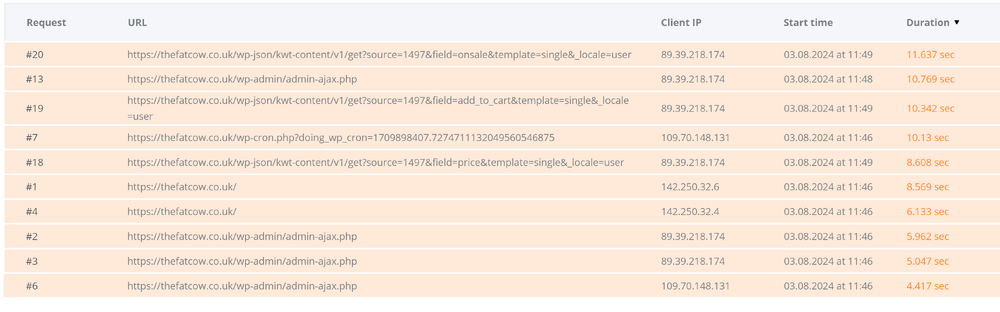
My sites appear to have slowed down, more so since yesterday, after mysql went down for a very brief time. Host says can't see any problems and it loads quickly from their location, although pagespeed insights states performance of 58. Told me to run php x-ray, which I did but I don't understand the results - what they mean nor what I'm supposed to do! The top line reports " "https://thefatcow.co.uk/wp-json/kwt-content/v1/get?source=1497&field=onsale&template=single&_locale=user" and the following lines are just as mysterious to me. Can anybody help?
-
Thank you. I have over 16 years of experience in developing websites, so do not need a WYSIWYG. I am now using Atom. Thanks Robert.
-
Morning! I'm making the transition from PC to Mac and don't want to purchase a new version Dreamweaver. Can anybody recommend an alternative? I'm more interested in the ease for coding, and the way Dreamweaver helps speed up your coding. I rarely, if ever, look at the WYSIWYG. Don't mind paying a reasonable budget cost. Cheers
-
I do find it interesting that the site switched back to default twentyfifteen theme and NO plugins, in other words a first default install of Wordpress, STILL shows speed issues in Google PageSpeed Insights (link given by BrowserBugs above)
-
Thanks folks. Now taking it offline while I work on it and take into consideration your comments!
-
I've got 23 plugins active. wp-types (toolset), bbpress, contact form, cookies notice, woocommerce, sitemap, scroll to top, top 10, security, backup, smush, optimize, spam shield
-
Thanks for the link BrowserBugs! I didn't intend keeping the lowercase on hover and have now changed it. Sorry, i was messing around with it and stopped for a cuppa, which must have been when you looked dp8 - can you elaborate on "Layout is quite basic definitely need improvement." please. I realise it is difficult to see layout with no content, in particular you cannot see how the home page will look when a slideshow and different sections with text and images are added. Is that what you meant? Or do you just not like the rest of it?
-
of course! Thanks Mike. Any comments on the design/layout so far?
-
OK, this is VERY early days! Site is on WordPress and is very heavy with plugins, more than I would like to use but.... Would love to hear your thoughts, particularly on the speed of the site - is it too slow? I can't always tell as I live in the country and my connection speed can be a bit haphazard, so not sure if it's me or the site!! Also, drop down sub menu - I'm still trying to get the background white, although not succeeding so far! http://fuerteventuranow.com/ Cheers
-
HUH! Thanks I use firefox but found they have the same thing! [sigh] I really must try to keep up to date with new stuff! Yeah, I know, it's probably not that new!
-
Not sure if this was the right section to post! What's the best way to test the speed of a website? I tried http://tools.pingdom.com, but it gave me two completely different results within a couple of minutes of each other. Cheers
-
OK, I found their website but my software reported a malicious threat! But that may be a false alarm as it's a Chinese website. Without knowing what the admin panel is like it's difficult to advise anything, but you may not be able to alter the title of the page. However, this page (http://ahtravelchina.cn/a/chanpinjieshao/gaoduanlvyou/2014/0825/106.html), for instance, has the title "China Tourism", but that wording is not shown on the actual page, so where you have entered that in the pages' admin section is presumably where you can change it? As for colours, on that same page the colour of the text is controlled by the class .products_detailcontent at line 729 of styles.css.
-
Does it use any sort of CMS script? Do you have an admin panel at all? How you change the content really depends on the answers to these questions. What colours did you want to change?
-
yeah, I know. But, as I said, he's already a client and has just renewed his hosting for that site. I think I'll let him know that I am rather put out and ask him to clarify the exact situation. He did say he would let me know when it was done so guess he wants me to upload it for him so will charge him steeply for doing that!
-
Update on the above!!! Having written several times to the client, showing the changes I made and asking them how they wanted to proceed, ie with a black background or the lighter site and any other changes he might want. After over two months of ignoring my emails he now tells me that he has a friend redesigning the site as he wasn't keen on what I had done. He hopes I don't mind (!) and will let me know when it's done!!!!! argh! Now, I didn't charge him a deposit as he was already a client with two websites that I built (can't say designed as they were to his spec and I hate them!) and host. So I'm rather peeved to suddenly get this. Admittedly he has always been extremely poor at communication. I am waiting until tomorrow before replying so that I calm down a bit <G> I don't know any other details, have no idea if his friend is a designer or developer and don't know what he means that he will let me know when it's done. I am guessing that he might want me to upload it to the server for him. I have drafted a reply but just wondered how people here might reply to him.
-
-
Hi. A client has just sent me an image of a QR code that will take people straight to their website requesting I put it on the website. I admit I have no idea about these codes, but if it is something to send people direct to the website when scanned, what is the point of putting it actually on the site?
-
argh! Somebody managed to get into my wordpress site and has been sending out spam using my contact form. I had some spammers sign up and guess I was too slow in removing them Obviously I have removed them now, changed my password, taken my contact form down for now and taken further precautions. The emails show that they come from a false email (item@mydomain.co.uk). I don't know how it works or how they do it now they don't have access to my contact form, but is there anything I can do to stop them continuing to send out emails using my domain?
-
-
Thanks Nick. Sometimes you have to bite the bullet and do what you want to do <G>
-
In the past I have used scripts from here http://www.dynamicdrive.com/dynamicindex14/index.html and they were always good. Your site doesn't appear to have a slide show script of holding image on there at the moment, so I can't tell what was wrong. Your image 013.jpg is a background image not a slide show.