babrees
Members
-
Joined
-
Last visited
-
I value my privacy. To much to reply here, you would have to look into google and see and know what they're up to.
-
Clever and novel and nice, but not practical. I was lost in watching it and the rest of the website disappeared.
-
babrees changed their profile photo
-
Personally, I would never sign in using Google. Perhaps alternative methods of sign up/in, especially just by email
-
Thank you! Host has come back and said he missed the fact that the server was under a heavy load!! All is good now.
-
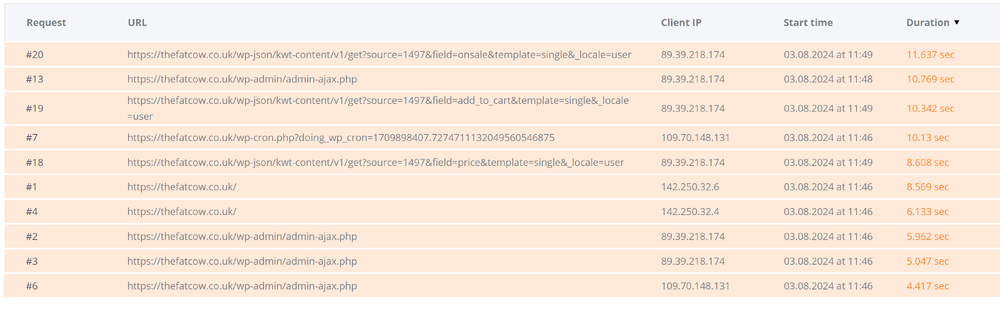
My sites appear to have slowed down, more so since yesterday, after mysql went down for a very brief time. Host says can't see any problems and it loads quickly from their location, although pagespeed insights states performance of 58. Told me to run php x-ray, which I did but I don't understand the results - what they mean nor what I'm supposed to do! The top line reports " "https://thefatcow.co.uk/wp-json/kwt-content/v1/get?source=1497&field=onsale&template=single&_locale=user" and the following lines are just as mysterious to me. Can anybody help?
-
Thank you. I have over 16 years of experience in developing websites, so do not need a WYSIWYG. I am now using Atom. Thanks Robert.
-
-
Morning! I'm making the transition from PC to Mac and don't want to purchase a new version Dreamweaver. Can anybody recommend an alternative? I'm more interested in the ease for coding, and the way Dreamweaver helps speed up your coding. I rarely, if ever, look at the WYSIWYG. Don't mind paying a reasonable budget cost. Cheers
-
I do find it interesting that the site switched back to default twentyfifteen theme and NO plugins, in other words a first default install of Wordpress, STILL shows speed issues in Google PageSpeed Insights (link given by BrowserBugs above)
-
Thanks folks. Now taking it offline while I work on it and take into consideration your comments!
-
I've got 23 plugins active. wp-types (toolset), bbpress, contact form, cookies notice, woocommerce, sitemap, scroll to top, top 10, security, backup, smush, optimize, spam shield
-
Thanks for the link BrowserBugs! I didn't intend keeping the lowercase on hover and have now changed it. Sorry, i was messing around with it and stopped for a cuppa, which must have been when you looked dp8 - can you elaborate on "Layout is quite basic definitely need improvement." please. I realise it is difficult to see layout with no content, in particular you cannot see how the home page will look when a slideshow and different sections with text and images are added. Is that what you meant? Or do you just not like the rest of it?
-
of course! Thanks Mike. Any comments on the design/layout so far?
-
OK, this is VERY early days! Site is on WordPress and is very heavy with plugins, more than I would like to use but.... Would love to hear your thoughts, particularly on the speed of the site - is it too slow? I can't always tell as I live in the country and my connection speed can be a bit haphazard, so not sure if it's me or the site!! Also, drop down sub menu - I'm still trying to get the background white, although not succeeding so far! http://fuerteventuranow.com/ Cheers
-
HUH! Thanks I use firefox but found they have the same thing! [sigh] I really must try to keep up to date with new stuff! Yeah, I know, it's probably not that new!
-
Not sure if this was the right section to post! What's the best way to test the speed of a website? I tried http://tools.pingdom.com, but it gave me two completely different results within a couple of minutes of each other. Cheers