


j5-payne
Members
-
Joined
-
Last visited
Everything posted by j5-payne
-
What do you think? I need to put the content in and finish the other pages but what is your first impression of the index. The website is for a private hospital so i went for the calm look? Also i know it should not be posted here - that logo i put in at the top (not the actual one) when you make it transparent why does the graphic have white bits around it. Visit My Website
-
-
Cheers i will try this later.
-
-
No that did not work either - i just put float left and it worked - just the padding of the text is moving it down so taking that out.
-
cheers dizi will try that now.
-
-
If you visit my website again i have uploaded how it looks now. When you hover over the background is at the same level as the text as i have padded down the text and this background gets padded down to any suggestions to stop this? Website
-
I really like your site. Your graphics catch the eye to. I would add more content to the homepage though and i would also change the color of the links to make them stand out more which will make the headings stand out more. Good work!
-
which grey background? the main center part, or the background behind the logo and flash or in the content boxes? I will give it ago though. Nice site by the way!
-
Its the lightbox effect. Its very simple to use. http://www.dynamicdrive.com/dynamicindex4/lightbox/index.htm
-
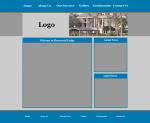
What do you think of this design? Any suggestions would be greatly appreciated. The image will be flash showing off the building. Its the center bit i think needs some work on? Would it be better if it was created first?
-
Yeah seeing if anyone would give me a better understanding. But will keep trying. Cheers for this post will try this now.
-
I want it looking like the link below. The header and the navigation all have rounded corners. this site
-
I want to create a navigation with images? So how do i make the corners rounded so it looks better? I was trying the images as background images but the image is coming up the same size as the text and not the actual size of the image!? Any tutorials to help on the net? Or any good sites to help you make a good navigation feel and look? Cheers.
-
That because the home one has a rounded corner so i thought i would have to create the other ones separately?
-
Yeah go to Here it is
-
I have now uploaded the website which i have started to create. I have a link in place but i want a background image i have created to be behind it and its not working. Would be really helpful if some one could say? I tried following a link which was posted but i could not do it for this site. Visit My Website Help would be really appreciated. <!DOCTYPE html PUBLIC "-//W3C//DTD XHTML 1.0 Transitional//EN" "http://www.w3.org/TR/xhtml1/DTD/xhtml1-transitional.dtd"> <html xmlns="http://www.w3.org/1999/xhtml"> <head> <meta http-equiv="Content-Type" content="text/html; charset=iso-8859-1" /> <title>Sherwood Lodge - Weston Super Mare</title> <link rel="stylesheet" type="text/css" href="css.css" /> </head> <body> <div id="global"> <img class="logo" src="photoshop/logo.jpg" alt="Logo to be placed here" width="233" height="85" border="0" /></a> <ul id="globalNav"> <li> <a href="index.html">Home</a> </li> </ul> </div> </body> </html> /* CSS Document */ body { background-color: #dde8f3; background-image: url(photoshop/top_look.jpg); background-repeat: repeat-x; margin-top: 0px; margin-right: auto; margin-bottom: 0px; margin-left: auto; } #global { width: 980px; margin-top: 0px; margin-right: auto; margin-bottom: 0px; margin-left: auto; border: solid 1px #000000; } img.logo { float: left; margin-top: 5px; margin-right: 0pt; margin-bottom: 0pt; margin-left: 0px; } img.nav { float: left; margin-top: 106px; margin-right: 0pt; margin-bottom: 0pt; margin-left: 0px; } ul#globalNav { margin-top: 30px; margin-right: 0px; margin-bottom: 1px; margin-left: 0px; padding-top: 0px; padding-right: 0px; padding-bottom: 0px; padding-left: 0px; width: 650px; list-style-type: none; list-style-image: none; list-style-position: outside; float: left; clear: both; } #globalNav li a { background-image: url(photoshop/nav_back.jpg); background-repeat: repeat-x; } css.css index.html
-
Well cheers for the criticism. The colours are exactly what they wanted as it follows the kit colour. The layout is what they wanted as well. And in my eyes to do well at what your doing you must deliver what you are asked for. Fair enough it could be better but it does it job!
-
I have to keep the scrolling text as that is what the rugby club wants. Or i would take it down. Thank you for your other bit of advice.
-
I know it does not validate but i am going to go through and sort it out. What do you think about it? Visit My Website
-
I have been looking into what NoFollow means in front of a link. I have read that it means Google can follow the link but not not cache the link for link building. Is this true or no?
-
Say i have a 3 column layout and the center column has more content in than the left and right column and expands in height more than the others. How do i get the left and right column expand with the centering column? Or the other way round if the left has more content how do i make the center and right expand with the column? Any suggestions or tutorials would be appreciated.
-
Did you see all the code in that it was well messy. I want a tutorial as i will learn more than ripping another one off!
-
Anyone know where i can get some code to create a drop navigation list which works in ie6?
