


sash_oo7
Privileged
-
Joined
-
Last visited
-
-
-
 sash_oo7 reacted to a post in a topic:
position: absolute ... but used for an entire website layout?
sash_oo7 reacted to a post in a topic:
position: absolute ... but used for an entire website layout?
-
hello friends, I was following a youtube video on making a s tudent management system with codeigniter3 but i am stuck at some point when i click on edit on view students page..its showing me the details of same student whatever student i choose here is the code for view viewStudents.php <?php include('inc/header.php');?> <div class="container mt-2"> <h2>Students</h2> <hr> <?php echo anchor('admin/dashboard','BACK',['class'=>'btn btn-warning']);?> <div class="table-responsive"> <table class="table table-hover"> <thead> <tr> <th scope="col">Student Name</th> <th scope="col">College Name</th> <th scope="col">Course</th> <th scope="col">Email</th> <th scope="col">Gender</th> <th scope="col">Action</th> </tr> </thead> <tbody> <?php if(count($students)){ ?> <?php foreach ($students as $student){?> <tr> <td><?php echo $student->studentname; ?></td> <td><?php echo $student->collegename; ?></td> <td><?php echo $student->course; ?></td> <td><?php echo $student->email; ?></td> <td><?php echo $student->gender; ?></td> <td> <?php echo anchor("admin/editStudent/{$student->id}","Edit",['class'=>'btn btn-light']);?> <?php echo anchor("admin/deleteStudent/{$student->id}","Delete",['class'=>'btn btn-danger']);?> </td> </tr> <?php } ?> <?php } else {?> <tr> <td>No Record found</td> </tr> <?php } ?> </tbody> </table> </div> </div> <?php include('inc/footer.php');?> editstudent.php (view) <?php include('inc/header.php');?> <div class="container mt-2"> <?php echo form_open('admin/createStudent',['class'=>'form-hoizontal']);?> <h3 class="text-center display-4">EDIT STUDENT</h3> <hr/> <?php if($msg = $this->session->flashdata('message')){ ?> <div class="row"> <div class="col-md-6"> <div class="alert alert-dismissible fade show alert-success"> <button type="button" class="close" data-dismiss="alert">×</button> <?php echo $msg;?> </div> </div> </div> <?php } ?> <div class="row"> <div class="col-md-6"> <div class="form-group"> <div class="row"> <div class="col-md-3"> <label for="studentname" class="mt-2">Student name:</label> </div> <div class="col-md-9"> <!-- <input type="text" class="form-control" placeholder="User name" id="username"> --> <?php $data = array( 'type' => 'text', 'name' => 'studentname', 'value' => set_value('studentname',$studentData->studentname), 'placeholder' => 'Enter Studentname', 'class' => 'form-control' ); echo form_input($data); ?> </div> </div> </div> </div> <div class="col-md-6"> <?php echo form_error('studentname','<div class="text-danger mt-2">','</div>');?> </div> </div><!--row--> <div class="row"> <div class="col-md-6"> <div class="form-group"> <div class="row mt-3"> <div class="col-md-3"> <label for="email" class="mt-2">College Name:</label> </div> <div class="col-md-9"> <select class="form-control" name="college_id"> <option value="<?php echo $studentData->college_id; ?>"><?php echo $studentData->collegename; ?></option> <?php if(count($colleges)) { ?> <?php foreach ($colleges as $college){?> <option value="<?php echo $college->college_id;?>"><?php echo $college->collegename;?></option> <?php } } ?> </select> </div> </div> </div> </div> <div class="col-md-6"> <?php echo form_error('college_id','<div class="text-danger mt-4">','</div>');?> </div> </div><!--row--> <div class="row"> <div class="col-md-6"> <div class="form-group"> <div class="row mt-3"> <div class="col-md-3"> <label for="email" class="mt-2">Email address:</label> </div> <div class="col-md-9"> <!-- <input type="email" class="form-control" placeholder="Enter email" id="email"> --> <?php $data = array( 'type' => 'email', 'name' => 'email', 'value' => set_value('email'), 'placeholder' => 'Enter Email', 'class' => 'form-control' ); echo form_input($data); ?> </div> </div> </div> </div> <div class="col-md-6"> <?php echo form_error('email','<div class="text-danger mt-4">','</div>');?> </div> </div><!--row--> <div class="row"> <div class="col-md-6"> <div class="form-group"> <div class="row mt-3"> <div class="col-md-3"> <label for="gender" class="mt-2">Gender:</label> </div> <div class="col-md-9"> <!-- <input type="email" class="form-control" placeholder="Enter email" id="email"> --> <select class="form-control" name="gender"> <option value="">Select</option> <option value="Male">Male</option> <option value="Female">Female</option> </select> </div> </div> </div> </div> <div class="col-md-6"> <?php echo form_error('gender','<div class="text-danger mt-4">','</div>');?> </div> </div><!--row--> <div class="row"> <div class="col-md-6"> <div class="form-group"> <div class="row"> <div class="col-md-3"> <label for="course" class="mt-2">Course:</label> </div> <div class="col-md-9"> <!-- <input type="text" class="form-control" placeholder="User name" id="username"> --> <?php $data = array( 'type' => 'text', 'name' => 'course', 'value' => set_value('course'), 'placeholder' => 'Enter Course', 'class' => 'form-control' ); echo form_input($data); ?> </div> </div> </div> </div> <div class="col-md-6"> <?php echo form_error('course','<div class="text-danger mt-2">','</div>');?> </div> </div><!--row--> <div class="row"> <div class="col-md-6"> <!-- <button type="submit" class="btn btn-dark float-right">Register</button> --> <div class="float-right"> <button type="submit" class="btn btn-dark">ADD STUDENT</button> <?php //echo form_submit('Register', 'Register',"class='btn btn-dark'"); ?> <?php echo anchor('welcome','GO BACK',['class'=>'btn btn-warning']);?> </div> </div> </div> <?php echo form_close(); ?> </div> <?php include('inc/footer.php');?> i have joined college table and students table and getting the id of student model queries.php <?php class Queries extends CI_model { public function getRoles() { $roles = $this->db->get('tbl_roles'); if($roles->num_rows() > 0){ return $roles->result(); } } public function getColleges() { $colleges = $this->db->get('tbl_college'); if($colleges->num_rows() > 0){ return $colleges->result(); } } public function registerAdmin($data) { return $this->db->insert('tbl_users',$data); } public function chkAdminExist() { $chkAdmin = $this->db->where(['role_id' => '1']) ->get('tbl_users'); if($chkAdmin->num_rows() > 0){ return $chkAdmin->num_rows(); } } public function adminExist($email,$password) { $chkAdmin = $this->db->where(['email' => $email, 'password' => $password]) ->get('tbl_users'); if( $chkAdmin->num_rows() > 0 ){ return $chkAdmin->row(); } } public function makeCollege($data) { return $this->db->insert('tbl_college',$data); } public function registerCoAdmin($data) { return $this->db->insert('tbl_users',$data); } public function viewAllColleges() { $this->db->select(['tbl_users.user_id','tbl_users.email','tbl_college.college_id','tbl_users.username','tbl_users.gender','tbl_college.collegename','tbl_college.branch','tbl_roles.rolename']); $this->db->from('tbl_college'); $this->db->join('tbl_users', 'tbl_users.college_id = tbl_college.college_id'); $this->db->join('tbl_roles', 'tbl_roles.role_id = tbl_users.role_id'); $users = $this->db->get(); return $users->result(); } public function insertStudent($data) { return $this->db->insert('tbl_students',$data); } public function getStudents($college_id) { $this->db->select(['tbl_students.id','tbl_college.collegename','tbl_students.studentname','tbl_students.email','tbl_students.gender','tbl_students.course']); $this->db->from('tbl_students'); $this->db->join('tbl_college', 'tbl_college.college_id = tbl_students.college_id'); $this->db->where(['tbl_students.college_id' => $college_id]); $students = $this->db->get(); return $students->result(); } //public function getStudentRecord($id) public function getStudentRecord($id) { /* $this->db->select(['tbl_college.college_id','tbl_college.collegename','tbl_students.id','tbl_students.email','tbl_students.gender','tbl_students.studentname','tbl_students.course']); $this->db->from('tbl_students'); $this->db->join('tbl_college', 'tbl_college.college_id = tbl_students.college_id'); */ //$this->db->where(['tbl_students.college_id' => $id]); // $student = $this->db->get(); // return $student->result(); /* $this->db->select(['tbl_college.college_id','tbl_college.collegename','tbl_students.id','tbl_students.email','tbl_students.gender','tbl_students.studentname','tbl_students.course']); */ $this->db->select(['tbl_college.college_id','tbl_college.collegename','tbl_students.id','tbl_students.email','tbl_students.gender','tbl_students.studentname','tbl_students.course']); $this->db->from('tbl_students'); $this->db->join('tbl_college', 'tbl_college.college_id = tbl_students.college_id'); $students = $this->db->get(); return $students->row(); } } ?> here is the code for controller admin.php <?php defined('BASEPATH') OR exit('No direct script access allowed'); // class Welcome extends CI_Controller { class admin extends My_Controller { public function dashboard() { //echo 'dashboard'; /* if(!$this->session->userdata('user_id')){ return redirect('welcome/login'); } */ $this->load->model('queries'); $users = $this->queries->viewAllColleges(); /* echo '<pre>'; print_r($users); echo '</pre>'; exit(); */ $this->load->view('dashboard',['users'=>$users]); } public function addCollege() { //echo 'addcollege'; $this->load->view('addCollege'); } public function addCoadmin() { //echo 'addCoadmin'; $this->load->model('queries'); $roles = $this->queries->getRoles(); $colleges = $this->queries->getColleges(); // print_r($roles); // exit(); $this->load->view('addCoadmin',['roles'=>$roles,'colleges'=>$colleges]); //$this->load->view('addCoadmin'); } public function addStudent() { //echo 'addStudent'; $this->load->model('queries'); $colleges = $this->queries->getColleges(); $this->load->view('addStudent',['colleges'=>$colleges]); //$this->load->view('addStudent'); } public function createCollege() { //echo 'create college'; $this->form_validation->set_rules('collegename','College Name','required'); $this->form_validation->set_rules('branch','Branch','required'); $this->form_validation->set_error_delimiters('<div class="text-danger">','</div>'); if($this->form_validation->run()){ echo 'validation passed'; $data = $this->input->post(); /* $collegename = $this->input->post('collegename'); $branch = $this->input->post('branch');*/ $this->load->model('queries'); //$collegeExist = $this->queries->collegeExist($collgename,$branch); if($this->queries->makeCollege($data)){ $this->session->set_flashdata('message','College Created Successfully'); }else{ $this->session->set_flashdata('message','Failed to Create College '); } return redirect('admin/addCollege'); }else{ //echo validation_errors(); $this->addCollege(); } } public function createCoadmin() { //echo 'create coadmin'; $this->form_validation->set_rules('username','Username','required'); $this->form_validation->set_rules('college_id','College','required'); $this->form_validation->set_rules('email','Email','required'); $this->form_validation->set_rules('gender','Gender','required'); $this->form_validation->set_rules('role_id','Role','required'); $this->form_validation->set_rules('password','Password','required'); $this->form_validation->set_rules('confpwd','Password Again','required|matches[password]'); $this->form_validation->set_error_delimiters('<div class="text-danger">','</div>'); if($this->form_validation->run()){ //echo 'validation passed'; $data = $this->input->post(); $data['password'] =sha1($this->input->post('password')); $data['confpwd'] =sha1($this->input->post('confpwd')); /* echo '<pre>'; print_r($data); echo '</pre>'; exit(); */ $this->load->model('queries'); if($this->queries->registerCoAdmin($data)){ $this->session->set_flashdata('message','Co Admin Registered Successfully'); }else{ $this->session->set_flashdata('message','Failed to Register Co Admin '); } return redirect('admin/addCoadmin'); }else{ //echo 'validation error'; //echo validation_errors(); $this->addCoadmin(); } } public function createStudent() { //echo 'create coadmin'; $this->form_validation->set_rules('studentname','Studentname','required'); $this->form_validation->set_rules('college_id','College Name','required'); $this->form_validation->set_rules('email','Email','required'); $this->form_validation->set_rules('gender','Gender','required'); $this->form_validation->set_rules('course','Course','required'); $this->form_validation->set_error_delimiters('<div class="text-danger">','</div>'); if($this->form_validation->run()){ echo 'validation passed'; $data = $this->input->post(); /*$data['password'] =sha1($this->input->post('password')); $data['confpwd'] =sha1($this->input->post('confpwd')); */ /* echo '<pre>'; print_r($data); echo '</pre>'; exit(); */ $this->load->model('queries'); if($this->queries->insertStudent($data)){ $this->session->set_flashdata('message','Student Added Successfully'); }else{ $this->session->set_flashdata('message','Failed to Add Student '); } return redirect('admin/addStudent'); }else{ //echo 'validation error'; //echo validation_errors(); $this->addStudent(); } } public function viewStudents($college_id) { //echo 'view college'; //echo $college_id; $this->load->model('queries'); $students = $this->queries->getStudents($college_id); $this->load->view('viewStudents',['students'=>$students]); } public function editStudent($id) { $this->load->model('queries'); $studentData = $this->queries->getStudentRecord($id); /* echo '<pre>'; print_r($studentData); echo '</pre>'; exit(); */ $this->load->view('editStudent',['studentData'=>$studentData]); // $this->load->view('editStudent'); //echo 'editStudent'; echo $id; } public function __construct() { parent::__construct(); if(!$this->session->userdata('user_id')){ return redirect('welcome/login'); } } } here is the screenshot of what i see ..when i click edit for different students i have echoed the id of 2 students you can clearly see at the top left but their details ae showing same on the edit page any help will be appreciated..thanks i was missing the where clause in queries.php in getStudentRecord function here is the updated code queries.php <?php class Queries extends CI_model { public function getRoles() { $roles = $this->db->get('tbl_roles'); if($roles->num_rows() > 0){ return $roles->result(); } } public function getColleges() { $colleges = $this->db->get('tbl_college'); if($colleges->num_rows() > 0){ return $colleges->result(); } } public function registerAdmin($data) { return $this->db->insert('tbl_users',$data); } public function chkAdminExist() { $chkAdmin = $this->db->where(['role_id' => '1']) ->get('tbl_users'); if($chkAdmin->num_rows() > 0){ return $chkAdmin->num_rows(); } } public function adminExist($email,$password) { $chkAdmin = $this->db->where(['email' => $email, 'password' => $password]) ->get('tbl_users'); if( $chkAdmin->num_rows() > 0 ){ return $chkAdmin->row(); } } public function makeCollege($data) { return $this->db->insert('tbl_college',$data); } public function registerCoAdmin($data) { return $this->db->insert('tbl_users',$data); } public function viewAllColleges() { $this->db->select(['tbl_users.user_id','tbl_users.email','tbl_college.college_id','tbl_users.username','tbl_users.gender','tbl_college.collegename','tbl_college.branch','tbl_roles.rolename']); $this->db->from('tbl_college'); $this->db->join('tbl_users', 'tbl_users.college_id = tbl_college.college_id'); $this->db->join('tbl_roles', 'tbl_roles.role_id = tbl_users.role_id'); $users = $this->db->get(); return $users->result(); } public function insertStudent($data) { return $this->db->insert('tbl_students',$data); } public function getStudents($college_id) { $this->db->select(['tbl_students.id','tbl_college.collegename','tbl_students.studentname','tbl_students.email','tbl_students.gender','tbl_students.course']); $this->db->from('tbl_students'); $this->db->join('tbl_college', 'tbl_college.college_id = tbl_students.college_id'); $this->db->where(['tbl_students.college_id' => $college_id]); $students = $this->db->get(); return $students->result(); } //public function getStudentRecord($id) public function getStudentRecord($id) { /* $this->db->select(['tbl_college.college_id','tbl_college.collegename','tbl_students.id','tbl_students.email','tbl_students.gender','tbl_students.studentname','tbl_students.course']); $this->db->from('tbl_students'); $this->db->join('tbl_college', 'tbl_college.college_id = tbl_students.college_id'); */ //$this->db->where(['tbl_students.college_id' => $id]); // $student = $this->db->get(); // return $student->result(); /* $this->db->select(['tbl_college.college_id','tbl_college.collegename','tbl_students.id','tbl_students.email','tbl_students.gender','tbl_students.studentname','tbl_students.course']); */ $this->db->select(['tbl_college.college_id','tbl_college.collegename','tbl_students.id','tbl_students.email','tbl_students.gender','tbl_students.studentname','tbl_students.course']); $this->db->from('tbl_students'); $this->db->join('tbl_college', 'tbl_college.college_id = tbl_students.college_id'); $this->db->where(['tbl_students.id' => $id]); $students = $this->db->get(); return $students->row(); } } ?>


-
-
-
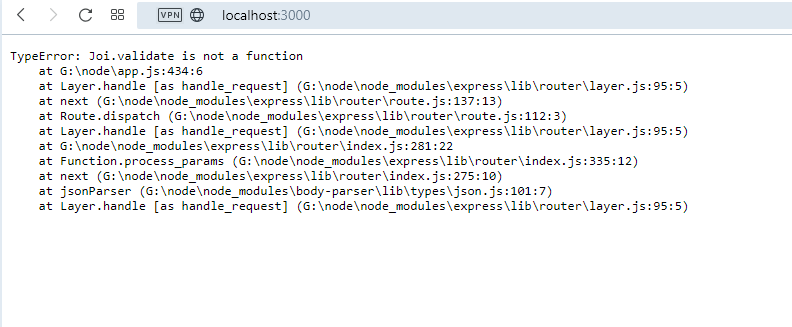
hello friends, Still new to node I was follwing a tutorial on how touse Joi9 validation with node express but i am getting this error here is my code app.js const express = require('express'); const path = require('path'); const Joi = require('joi'); const bodyParser = require('body-parser'); const app = express(); //const hostname = '127.0.0.1'; app.use('/public',express.static(path.join(__dirname,'static'))); app.use(bodyParser.urlencoded({extended:false})); app.use(bodyParser.json()); //const port = 3000; app.get('/',(req,res)=>{ res.sendFile(path.join(__dirname,'static','index.html')); }); app.post('/',(req,res)=>{ console.log(req.body); const schema = Joi.object().keys({ email: Joi.string().trim().email().required(), password: Joi.string().min(5).max(10).required() }); Joi.validate(req.body,schema,(err,result)=>{ if(err){ console.log(err); res.send('an error occured'); } console.log(result); res.send('succesfully posted data'); }) }); app.listen(3000); and index.html inside static folder <!DOCTYPE html> <html> <head> <meta charset="UTF-8" /> <title>Html</title> <style> /* Forms */ [type=text], [type=email], [type=url], [type=password], select, textarea { display: block; padding: .5rem; background: transparent; vertical-align: middle; width: 100%; max-width: 100%; border: 1px solid #cdcdcd; border-radius: 4px; font-size: .95rem; } [type=text]:focus, [type=email]:focus, [type=url]:focus, [type=password]:focus, select:focus, textarea:focus { outline: none; border: 1px solid #1E6BD6; } select { -webkit-appearance: none; -moz-appearance: none; background: url(data:image/png;base64,iVBORw0KGgoAAAANSUhEUgAAABIAAAAJCAYAAAA/33wPAAAAvklEQVQoFY2QMQqEMBBFv7ERa/EMXkGw11K8QbDXzuN4BHv7QO6ifUgj7v4UAdlVM8Uwf+b9YZJISnlqrfEUZVlinucnBGKaJgghbiHOyLyFKIoCbdvecpyReYvo/Ma2bajrGtbaC58kCdZ1RZ7nl/4/4d5EsO/7nzl7IUtodBexMMagaRrs+06JLMvcNWmaOv2W/C/TMAyD58dxROgSmvxFFMdxoOs6lliWBXEcuzokXRbRoJRyvqqqQvye+QDMDz1D6yuj9wAAAABJRU5ErkJggg==) 100% no-repeat; line-height: 1 } label { font-weight: 600; font-size: .9rem; display: block; margin: .5rem 0; } /* Other */ * { box-sizing: border-box; } html { -webkit-font-smoothing: antialiased; padding: 1rem; } .container { max-width: 600px; margin: 0 auto; padding: 0 1rem; } /* Button */ [type=submit] { display: inline-block; vertical-align: middle; white-space: nowrap; cursor: pointer; margin: .25rem 0; padding: .5rem 1rem; border: 1px solid #1E6BD6; border-radius: 18px; background: #1E6BD6; color: white; font-weight: 600; text-decoration: none; font-family: sans-serif; font-size: .95rem; margin-top:1rem; } </style> </head> <body> <div class="container"> <form action="/" method="POST" id="form"> <label for="email">Email</label> <input type="email" id="email" placeholder="Email Address"> <label for="password">Password</label> <input type="password" id="password" placeholder="Password"> <input type="submit" value="Submit"> </form> </div> <script src="https://code.jquery.com/jquery-3.6.0.min.js" integrity="sha256-/xUj+3OJU5yExlq6GSYGSHk7tPXikynS7ogEvDej/m4=" crossorigin="anonymous"></script> <script> </script> </body> </html>
-
-
hello friends, I was trying to show a message using node server but when i typed localhost:3000 in my browser it shows nothing here is my code const http = require('http'); const server = http.createServer((req,res)=>{ res.write('hello world from node js'); res.end(); }); server.listen('3000');
-
switch to a good CMS like wordpress
-
<!DOCTYPE html> <html> <head> <style> .message_wrapper { display:flex; background-color:dodgerblue; flex:100%; flex-direction:column; } .message_wrapper_inner { flex:100%; display:flex; } .message_img_container { flex:10%; display:flex; align-self:flex-start; justify-content:center; padding:8px; } .message_img{ width:50px; height:50px; border-radius:50%; background-color:orange; } .message_container { flex:90%;; background-color:grey; padding:8px; } </style> </head> <body> <div class="message_wrapper"> <div class="message_wrapper_inner"> <div class="message_container"> <p>Lorem ipsum dolor sit amet, consectetur adipiscing elit. Vivamus et velit tempor, vulputate turpis id, condimentum libero. Vivamus sed consectetur eros. Nunc sed posuere eros, ut vulputate dolor. Interdum et malesuada fames ac ante ipsum primis in faucibus. Donec ut nunc semper, lacinia dolor eu, hendrerit ex.</p> </div> <div class="message_img_container"> <div class="message_img"></div> </div> </div> <div class="message_wrapper_inner"> <div class="message_img_container"> <div class="message_img"></div> </div> <div class="message_container"> <p>Lorem ipsum dolor sit amet, consectetur adipiscing elit. Vivamus et velit tempor, vulputate turpis id, condimentum libero. Vivamus sed consectetur eros. Nunc sed posuere eros, ut vulputate dolor. Interdum et malesuada fames ac ante ipsum primis in faucibus. Donec ut nunc semper, lacinia dolor eu, hendrerit ex.</p> </div> </div> </div> </body> </html> see live https://codepen.io/sash_007/pen/yLVyYpQ
-
-
Hello friends I want to know can i install react running thsi command on G drive instead of C for insttaling react in default C: is this as said here https://www.w3schools.com/react/default.asp C:\Users\Your Name>npm install -g create-react-app but what if i do like this G:\react>npm install -g create-react-app and then create react application there G:\react>npx create-react-app myfirstreact the reason i am asking this becoz in future if i want to set up reactapplication in another drive say F: can i do that without any issue? or first times i always need to install on C drive first? after that i can access globally?
-
jdoepro reacted to a post in a topic:
Whats the best way to check large css file for parts breaking up the css?
-
you can try running your website in sucuri to check for malwares https://sitecheck.sucuri.net also try using any cdn ..freeone is cloudflare
-
Are you using wp custom post? Could be Flush WordPress Permalinks issue!! ok try this Step 1: In the WordPress admin area, go to “Settings > Permalinks” Step 2: Click “Save Changes” Step 3: Permalinks and rewrite rules are flushed.
-
w3c css validator https://jigsaw.w3.org/css-validator/ you can paste your css directly or can paste css link there and fix the errors one by one that show up there
-
i can see in your file path for scss file you named styles.scss and for css file you named style.css ? make both names similar and try to compile again like below --sass watch assets/scss/styles.scss assets/css/styles.css.
-
the *{} selects all elements and all it's children elements where html{} only selects the <html> element see example <!DOCTYPE html> <html> <head> <style> html { border: solid 2px orange; } * { border: solid 2px green; font-size: 1.2em; } </style> </head> <body> <ul> <li>one</li> <li>two</li> <li>three <ul> <li>one</li> <li>two</li> <li>three</li> </ul> </li> </ul> <p>lorem ipsum</p> </body> </html>
-
Hello friends, I am trying to make a button color switcher but somehow its not working although i see no error in the console here is the code <!DOCTYPE html> <html lang="en"> <head> <title>Bootstrap Example</title> <meta charset="utf-8"> <meta name="viewport" content="width=device-width, initial-scale=1"> <link rel="stylesheet" href="https://maxcdn.bootstrapcdn.com/bootstrap/3.4.1/css/bootstrap.min.css"> <script src="https://ajax.googleapis.com/ajax/libs/jquery/3.5.1/jquery.min.js"></script> <script src="https://maxcdn.bootstrapcdn.com/bootstrap/3.4.1/js/bootstrap.min.js"></script> </head> <body> <div class ="container text-center"> <h2 id="changeMyColor">Challenge4: Change Color of buttons</h2> <br><br><br> <div class="row" style="border:1px solid black;padding:10px;min-height:80px;" id =""> <div class="col-md-2 col-xs-12"> <form> <div class="form-group"> <select class="form-control" name="backdrop" id="background" onchange="colorChange(this)"> <option>Random</option> <option>Red</option> <option>Green</option> <option>Reset</option> </select> </div> </form> </div> <div class="col-md-10 col-xs-12"> <div class="row"> <div class="col-md-3"> <button class="btn btn-info">Whoa!</button> </div> <div class="col-md-3"> <button class ="btn btn-danger">Yahoo!</button> </div> <div class="col-md-3"> <button class="btn btn-warning">Google!</button> </div> <div class="col-md-3"> <button class="btn btn-success">Facebook!</button> </div> </div> </div> </div> </div><!--container end--> </body> </html> and here is the javascript main.js //Challenge 4 color change let all_buttons = document.getElementsByTagName('button'); // console.log(all_buttons); //my_buttons = Array.from(all_buttons); // console.log(my_buttons); let copyAllButtons = []; for(let i = 0;i< all_buttons.length;i++){ copyAllButtons.push(all_buttons[i].classList[1]); } function colorChange(buttonThingy){ console.log(buttonThingy.value); if(buttonThingy.value === 'red'){ buttonsRed(); }else if(buttonThingy.value === 'green'){ //buttonsGreen(); }else if(buttonThingy.value === 'random'){ //buttonsRandom(); }else if(buttonThingy.value === 'reset'){ //buttonsReset(); } } function buttonsRed(){ /* copyAllButtons.forEach(function(button){ button.classList.remove(all_buttons[i].classList[1]); button.classList.add('btn-danger'); }); */ for(let i = 0; i<all_buttons.length;i++) { all_buttons[i].classList.remove(all_buttons[i].classList[1]); all_buttons[i].classList.add('btn-danger'); } } console.log(copyAllButtons); All i want to do is replace the second btn class in each button and replace with btn-danger but somehow its not working
-
thanks everyone i seem to have fixed it used button submit instead of input type submit here is the cf7 admin code <div class="row"> <div class="col-md-6"> <label> [text* your-name placeholder "Name"] </label> </div> <div class="col-md-6"> <label> [email* your-email placeholder "Email"] </label> </div> <div class="col-md-12"> <label> [text your-subject placeholder "Subject" ] </label> </div> <div class="col-md-12"> <label> [textarea your-message placeholder "Message"] </label> </div> </div> <h6 class="center-text mtb-30"><button type="submit" class="btn-primaryc plr-25"><b>SEND MESSAGE</b></button></h6>
-
-
Hello friends, I have been trying to styling the contact form 7 here https://webdesigncut.com/wordpress/luigis/contact/ so far everything works apart from the submit button styling hee is the css i added .wpcf7-form-control-wrap { position: relative; display:block; } .wpcf7 input[type=submit] { position: relative; text-align: center; height: 55px; line-height: 50px; background: #EF0031; color: #fff; border-radius: 3px; z-index: 1; } .wpcf7 input[type=submit]:after { content: ''; position: absolute; bottom: 0; left: 0; right: 0; height: 3px; background: #1F8330; z-index: -2; -webkit-transition: all .1s ease-in; transition: all .1s .1s ease-in; } .wpcf7 input[type=submit]:before { content: ''; position: absolute; bottom: 0; left: 0; right: 0; height: 3px; background: #1F8330; z-index: -2; -webkit-transition: all .1s ease-in; transition: all .1s .1s ease-in; } .wpcf7 input[type=submit]:hover { color:#111; } .wpcf7 input[type=submit]:hover:after { height:100%; } .wpcf7 input[type=submit]:hover:before { height:100%; border:1px solid #1F8330; }
-
sash_oo7 reacted to a post in a topic:
Simple search popup with vanilla js only works on small screen
-
whichever element you want to center inside a container simply you need to make that container display flex and if you want to align any item center horizontally.. just need to say justify-content:center and if you need to center vertically align-items:center and if you need absolute center need to use both justify-content:center and align-items:center <div class="container"> <h1>Some text</h1> </div> <div class="container2"> <h1>Some text</h1> </div> <div class="container3"> <h1>Some text</h1> </div> .container{ height:500px; background:#efefef; display:flex; width:40%; margin:10px auto; justify-content:center; } .container2{ height:500px; background:#efefef; display:flex; width:40%; margin:10px auto; align-items:center; } .container3{ height:500px; background:#efefef; display:flex; width:40%; margin:10px auto; justify-content:center; align-items:center; }


