Camiiillle
Members
-
Joined
-
Last visited
-
it's coming soon
-
I by accident solved it by adding in css p{ font-style:italic; font-weight:bold; } That was font that I generated on cufons site.. (Myriad Pro bold italic) BUT it still doesn't work for classes sooo strange Thx for help mteam Your code also works (tried on h5+h4 )
-
Please help me, this is ridiculous... I've installed cufon and everything works perfectly everywhere (Opera, Chrome, IE) - except firefox (!) <script type="text/javascript"> Cufon.replace('h6'); Cufon.replace('.something'); Cufon.replace('p'); </script> Does anyone know why first line works (my font is correctly display - also in firefox) and others don't? It seems like firefox doesn't like class or even paragraph <p>? THX!
-
Hello:) I just got website's html code to change.. It displays nicely in mozilla but not in EI The problem might be in this: <div id="one" idx="1" class="taby active" onClick="window.location='publication2.html'"> Has anyone got idea how I can replace idx? - and not writing many jquery code? Thx for all your help!
-
Thank you guys!
-
I don't want containers to flow;p but text inside them to be in two lines;p
-
what do you mean? I don't think float alone will help I was thinking maybe conditions.. if number of tabs is something and their width is something then words start to locate above themselves;p hmm or tables?
-
I'm not sure I've chosen correct forum's section;p I'm html coder - but still - my code will be used by cms-makers Anyway: there's no theme, cms is from scratch I guess.
-
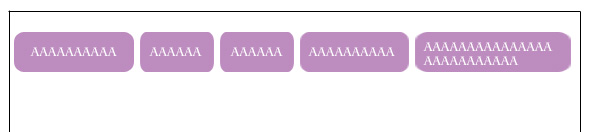
Hello I really might need some help... So I've got main box - with limited width. User with CMS can add as many buttons as he likes... And these buttons are created from three parts- so they can adjust to content. While there is no more space for buttons: last button should become "two-storey" - with two lines of text... Has anybody got an idea how I can achieve that? Any help really appreciated! (I'm front-end guy not cms-maker;p)

-
Elephant is terrific but the background behind him is completely flat.. It seems like he's floating in the mid-air.. I would put some shadows beneath this white "base" + behind jumbo24.co.uk sign.. and maybe a gradient on the background wouldn't be such a bad idea? but that just my suggestions nice job anyway
-
In my opinion horizontal scroller is absolutely fine It's sooo much better than this flash websites that take ages to load;/ but if I were you I wouldn't go for any other backgrounds than grey or black.. Photography portfolios are shown on monochromatic colors for a reason.
-
If you put these: .blahblah { opacity:0.6; filter: alpha(opacity=60); -ms-filter:"progid:DXImageTransform.Microsoft.Alpha(Opacity=60)"; backgrond-color:black; } it would make your div semi-black in every browser (firefox/ei6,ei7,ei8 - for sure) So you can you use it as a bigger div - as a border + a menu in smaller div. There might be a small problem though : inheritence;( If you think this solution would be ok you can check out this link: http://www.stevenyork.com/tutorial/pure_css_opacity_and_how_to_have_opaque_children
-
wow! thanks everybody -> Wickham that really helped! awesome
-
hello:) I came upon this problem during making one site.. I've got header/ content /footer - (they not in any bigger div) I need to put footer - (20px high, black stripe with dots lol) always on the bottom - in every screen resolution.. Putting relative dives or tables with height:100% doesn't work;( Do I need a script for this? Or is there maybe easier solution? Any help really apreciated!