


muffintop
Members
-
Joined
-
Last visited
Everything posted by muffintop
-
Cool, thanks! Just downloaded the Sketchbook app. What kind of stylus do you recommend? I've been looking through some different "sketch book" type apps. I would like to find one that allows me collect creative ideas on the go. Preferably something that allows me to take pictures, sketch, and write notes. Know of any?
-
I purchased my first iPhone and I'm looking for some great apps for designers. What does everyone here use?
-
Yeah, my boss is aware of the situation. Usually we won't proceed without at least some constructive feedback or example sites to go off of, but this client is one of our enterprise clients. They're some what "famous" and apparently too busy to be involved. I've been instructed to just try a different style and go from there. Let's see how this goes...
-
Yeah. Unfortunately, I can't fire this client since it's a project at work. The good news is the client has a limit on the revisions provided. Maybe she'll start telling me what she wants when they begin to run out.
-
I sent out a questionnaire before starting the project that asked for sites she likes, but she left them blank.
-
I've been getting a lot of vague, unclear feedback from my client and I'm sure what to do with it. When I present her with a design, she says things like, "I'm just not happy with this." I tried going through the layout and asking her specific questions to pinpoint what she doesn't like. Most of her answers were, "I'm not sure." So then I tried sending her a few sample sites of varying styles to see if she likes any of them. Surprisingly, she wouldn't commit to liking or disliking any of them. Finally she says, "I don't really know what I like, but I just know that the design you created isn't it." What can I do get constructive feedback?
-
Google asked people in Times Square: “What is a browser?”
-
YESS!! YouTube Will Be Next To Kiss IE6 Support Goodbye
-
For browser testing this is wonderful: http://www.xenocode.com/Browsers/.
-
Agreed!! This post lists out different types of problem clients and tips on how to deal with them: 12 Breeds of Client and How to Work with Them.
-
I learned front end coding about a year and a half ago and I've never used an image map. I've always just used background images and positioned/floated elements where I need them. When is it better to use an image map and when is it better to use a background image?
-
P-p-p-p-poker face. She's a lyrical genius. Kidding.
-
Thanks for the feedback! The dynamic content shouldn’t matter if the code that’s generated by the shopping cart software is valid, but unfortunately it’s not. I only have access to the template html file and template style sheet with this software. I’ve gone through these files to make sure the code is valid. When I run them through a validator without the shopping cart software, they pass (html valid and css valid). I'm trying to follow up with this client to see if fixing these errors have made a difference on his end, but he hasn't been answering my phone calls...
-
These are great as well. 35 Absolutely Useful Firefox Plugins For Web Designers And Developers
-
Ever since the new video card was installed, I have to select view>proof colors every time I open a document. Quite frustrating. I just googled the issue and it appears to be a conflict with the video card settings. http://frankieloscavio.blogspot.com/2008/05/how-to-fix-color-profile-colors.html
-
Thanks so much!! My proof mode was on but my proof setup was set to working CMYK for some reason. I changed it to Monitor RGB. (view>proof setup). I appreciate your help!
-
This book was helpful when I was first learning CSS. It's a little dated now but still good. CSS Mastery: Advanced Web Standards Solutions (Paperback)
-
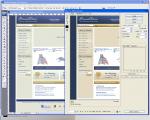
Yesterday my IT department at work installed a new video card for my monitor. The next day the strangest thing happened when I went to save a file in Photoshop using save for web. The colors changed significantly while saving the file as a jpeg. Has this ever happened to anyone else?
-
Thanks for the feedback! Validating is definitely a great suggestion. The design is coded on top of shopping cart software, so it will not validate with the dynamic content. When I remove the html and CSS from the software and run it through a validator, everything validates (site without shopping cart software). What should I do next? Should I just try coding it in a different way? I've never come across an error that I wasn't able to reproduce.
-
Hi everyone! I'm new to this forum! In fact this is my very first forum! Forgive me if this is not the appropriate place for my post. I coded a site for a client and he sent screen shots of errors in FF3 when running Vista. I've tested the site on multiple machines running the Vista and FF3 and I'm unable to replicate the errors. My client has cleared his cache and is still seeing problems. Help! Is it possible that something on only his machine is causing the errors? Can multiple tool bars and add-ons cause sites to render improperly in a browser? This is the site and this is the screen shot he sent me. Any feedback is greatly appreciated. Thank you!
