Skip to content
View in the app

A better way to browse. Learn more.

Web Designer Forum

A full-screen app on your home screen with push notifications, badges and more.

To install this app on iOS and iPadOS
  1. Tap the Share icon in Safari
  2. Scroll the menu and tap Add to Home Screen.
  3. Tap Add in the top-right corner.
To install this app on Android
  1. Tap the 3-dot menu (⋮) in the top-right corner of the browser.
  2. Tap Add to Home screen or Install app.
  3. Confirm by tapping Install.

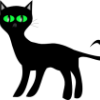
GIMP image

Featured Replies

Hey guys....


Just wanted to show some ppl that gimp isn't that bad.


My 9 yr old step-daughter made this image with very little input from me. Ok, so it's not a masterpiece but I think there is hope for us all :)


Ahhh.. Thats Lovely.


Don't know what Gimp is though?????

  • Author

LOL free equivalent to photoshop etc. Look here > GIMP :)

Aw bless................just goes to show............So easy to use, even an 9 year old can do it.

I think Gimp is a program you either love or hate!

With that said, the nine year old may have talent!

Excellent stuff - well done that 9yr old. That's better then me and I'm 33 a little bit older than that :D

Create an account or sign in to comment

Account

Navigation

Search

Search

Configure browser push notifications

Chrome (Android)
  1. Tap the lock icon next to the address bar.
  2. Tap Permissions → Notifications.
  3. Adjust your preference.
Chrome (Desktop)
  1. Click the padlock icon in the address bar.
  2. Select Site settings.
  3. Find Notifications and adjust your preference.