caraewilton
Privileged
-
Joined
-
Last visited
Everything posted by caraewilton
-
Thank Jane. Although wp show posts does not do quite what I need, I did find Custom Views which is perfect, although I did have to buy the pro version so as to display custom posts and fields. Working example of that I want here: http://www.courtney.co.za/subjects/mathematics-9709/ That said, would still love to know how to write the shortcode to achieve this, if anyone know how :-)
-
Hi JAck. Thank you for the response. I have already what you suggest ... http://www.courtney.co.za/booklevel/a-level/ list of all books for a level students or here http://www.courtney.co.za/booksubjects/biology/ a list of all books relating to the subject biology. The reason I want the shortcode is so on certain pages, say were we discuss the subject A-Level biology, I can place the little thumbnail and book title relating to that particular pages content. Any thoughts?
-
Hi, hoping someone can help me. I have created a custom post type called "books". I neede a shortcode to display a thumbnail image of the featured image and the name of the post. Both being so you can click them and you will go to the post page. The shortcode must be able to display a specific post according to post id, so something like this: [listbook id="2456"] I have tried a few hundred things and am just not managing to do this. The basic html structure would be something like this: <dl class="book"> <dt><a href="#">thumbnail</a><dt> <dl><a href="#">Book Title</a><dd> </dl> Just learning wordpress and PHP and finding this project beyond my abilities!
-
Okay, I have managed the following which is working ... <?php if ( have_posts() ) : ?> <header class="page-header"> <h1 class="page-title">The Courtney Team</h1> </header> <?php $posts = query_posts( $query_string . '&orderby=title&order=asc' ); ?> <?php while ( have_posts() ) : the_post(); ?> <div class="blog-post-repeat"> <article id="post-<?php the_ID(); ?>" <?php post_class(); ?>> <header class="entry-header"> <h3 class="post-title"><a href="<?php the_permalink(); ?>" rel="bookmark"><?php the_title(); ?></a></h3> <div class="postmeta"> <div class="post-date"><?php echo get_post_meta( get_the_ID(), 'designation', true ); ?></div> <div class="post-categories"> <?php $terms = get_the_terms( $post->ID , 'team_category' ); if ( $terms != null ) { foreach( $terms as $term ) { $term_link = get_term_link( $term, 'team_category' ); echo ' | <a href="' . $term_link . '">The ' . $term->name . ' Team</a>'; unset($term); } } ?> </div> <div class="clear"></div> </div> <div class="post-thumb"><a href="<?php the_permalink(); ?>"><?php the_post_thumbnail('thumbnail', array('class' => 'alignleft') ); ?></a></div> </header> <div class="entry-summary"> <?php echo content( of_get_option('blogpostexcerptlength') ); ?> <p class="read-more clear"><a href="<?php the_permalink(); ?>">Read full biography</a></p> </div> </article> <div class="spacer20"></div> </div> <?php endwhile; ?> <?php study_circle_pro_pagination(); ?> <?php else : ?> <?php get_template_part( 'no-results', 'archive' ); ?> <?php endif; ?> Specifically to pull the custom_post categories I am using the following: <?php $terms = get_the_terms( $post->ID , 'team_category' ); if ( $terms != null ) { foreach( $terms as $term ) { $term_link = get_term_link( $term, 'team_category' ); echo ' | <a href="' . $term_link . '">The ' . $term->name . ' Team</a>'; unset($term); } } ?> So now I have the categories displaying, I would like to know, is this the best method?
-
Hi. i am building a team section for my site. I have created a custom post section called team, with a taxonomy. All I want to do is display the category for each post on my archive page. <ul><?php $customPostTaxonomies = get_object_taxonomies('team'); if(count($customPostTaxonomies) > 0) { foreach($customPostTaxonomies as $tax) { $args = array( 'orderby' => 'name', 'show_count' => 1, 'pad_counts' => 0, 'hierarchical' => 1, 'taxonomy' => $tax, 'title_li' => '' ); wp_list_categories( $args ); } } ?> </ul> <?php $args = array( 'post_type' => 'team', 'posts_per_page' => $show, 'post__not_in' => get_option('sticky_posts'), 'orderby' => 'title', 'order' => 'asc' ); $loop = new WP_Query( $args ); ?> <?php while ( $loop->have_posts() ) : $loop->the_post();?> <article id="post-<?php the_ID(); ?>" <?php post_class(); ?>> <header class="entry-header"> <a href="<?php the_permalink(); ?>"><?php the_post_thumbnail('thumbnail', array( 'class' => 'alignleft' ) ); ?></a> <a href="<?php the_permalink(); ?>" rel="bookmark"><?php the_title(); ?></a> <?php echo esc_html( get_post_meta( get_the_ID(), 'designation', true ) ); ?> </header> <?php echo content( of_get_option('teammemberlength') ); ?> <p class="read-more"><a href="<?php the_permalink(); ?>"><?php echo of_get_option('blogpostreadmoretext'); ?></a></p> </article> <?php endwhile; ?> Any thoughts?
-
Thanks Pete Prosper The site is for my sister who is into art, craft and poetry... She is an amazing person who has an inspirational story to tell, so this is my sort of way of encouraging her. I am just not sure about the design .. I want something that reflects the craft side of her work but can still be a good base for showing art work and such. I just can't help feeling that it looks dated... perhaps it is the fixed width look of yesterday ... not sure. Also, I wish I could get some of her poetry and stuff as that will make it a journey, if you will and I am a big believer in copy is king, so maybe that is what is bugging me....
-
Thanks Zed... You are an ace! I have the site now here: http://www.jacqueline-edwards.com/ Still waiting on the copy, but perhaps some people could take a look and give me some thoughts ref the design aspects.
-
anyone?
-
Any thoughts would be greatly appreciated :-)
-
I really like it, speed wise it loaded quickly first time for me and the vector works brilliantly. I do agree with Fran ref the banner text.
-
Cool zed, thanks for the heads up :tv (2): Can someone please check if the ipad glitch is still happening with the menu...
-
Hi Can you please have a look at my design: http://www.chouselive.co.za/je/root/ and let me know what you think. Any advice or suggestions would be greatly appreciated. Please don't look to closely at the copy, this still needs to be reworked. Thanks Cara
-
Thanks for the great advice. You have given me some excellent pointers to take back to the drawing board. Must say this has been one of the more difficult projects I have tackled as there is so little content to work around and I have had to use given logos etc which makes things more difficult. That said the thoughts and ideas given by you guys is practical and well pointed so feel I have a track to get back to. Many thanks.
-
Thanks andy. There is something about the design that just sits off centre with me although I am not sure what. It may be the metalic background but the guy specialises in steel so trying to get that across. You are correct about the menu. Like I say something just is not working but I can't put my finger on it. Grrrrr
-
Hi guys Please can you have a look at this page that I have been working on and give me your thoughts and Ideas? Link Thanks
-
I like the overall look in terms of design. The only thing I would try, is making the backround image fixed so that when you scroll down, the "page" slides over the top of the background rather than the entire thing move. Just feel it would be less distracting.
-
So pleased that you have found the links useful. Baie Dankie Chris!
-
I am not sure about netobjects but when I started out I spent a lot of time analysing the templates found at freecsstemplates. Basically I downloaded one I liked then use notepad to edit them. Once I got a better understanding of html and css I started trying to make my own.
-
Glad it works for you. The original jquery code is not mine though, you can find the original here.
-
Which option are you going to use... the css popup option or the jquery tabs option?
-
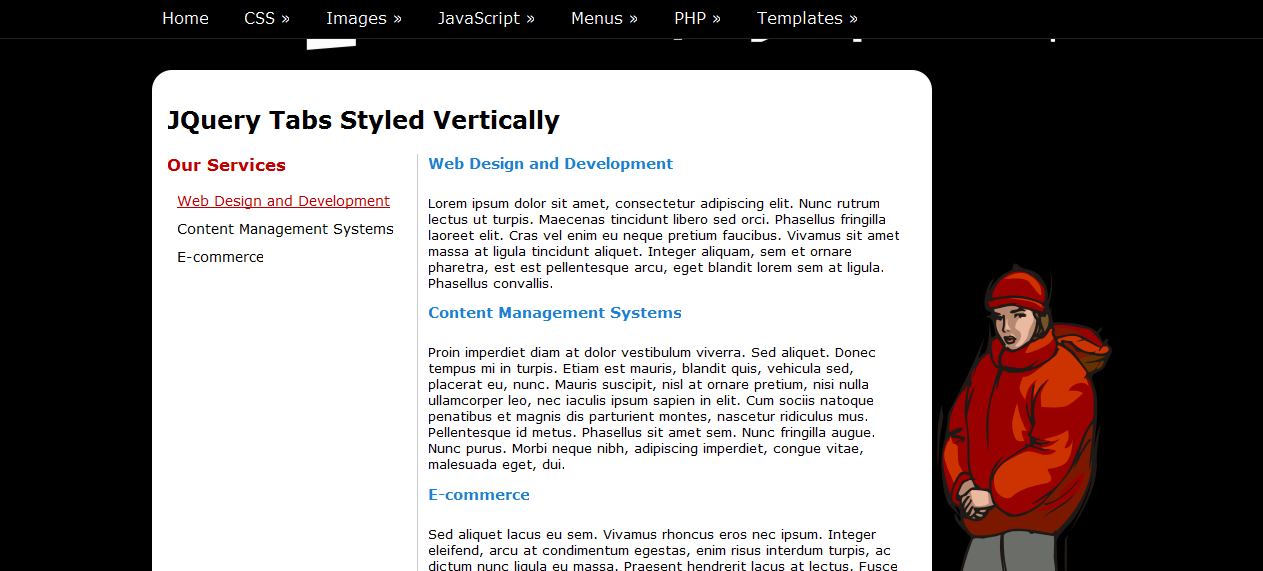
Hello. Okay I have got the following to work rather nicely in firefox, although have not tested it extensively. Basically I have taken a simple jquery script used for creating tabs within a web page and styled it to display the content to the right of the links. You will first need the jquery library found on their web site. Next you need this little jquery script: $(document).ready(function () {$('#tabs').tabify();});(function($){$.fn.extend({tabify:function(){function getHref(a){hash=$(a).find('a').attr('href');if(hash)return hash.substring(0,hash.length-4);else return false}function setActive(a){$(a).addClass('active');if(getHref(a))$(getHref(a)).show();else return false;$(a).siblings('li').each(function(){$(this).removeClass('active');$(getHref(this)).hide()})}return this.each(function(){var a=this;$(this).find('li a').each(function(){$(this).attr('href',$(this).attr('href')+'-tab')});function handleHash(){if(location.hash)setActive($(a).find('a[href='+location.hash+']').parent())}if(location.hash)handleHash();setInterval(handleHash,100);$(this).find('li').each(function(){if($(this).hasClass('active'))$(getHref(this)).show();else $(getHref(this)).hide()})})}})})(jQuery); Now style the CSS .tab-container{ padding: 0 0 10px 0; border-bottom:1px #ccc solid; } #tabs{margin:0;padding:0;width:250px; float:left; display:inline; font-size:.9em;} #tabs h3{ padding: 0 0 10px 0; margin: 0px; color:#BF0000; } #tabs ul{margin:0;padding:0;} #tabs li{padding:0;margin:5px 0;list-style-type:none;} #tabs li a {color:#000; margin:0;padding:3px 10px;display:block;text-decoration:none;} #tabs li a:hover{color:#BF0000; text-decoration: underline;} #tabs li.active a{color:#BF0000; text-decoration: underline;} .tabcontent {width:479px; border-left:1px #ccc solid; padding:0 10px; margin:0; font-size:.8em; float:right; display:inline} .tabcontent h3{padding: 0 0 10px 0; margin: 0px; color:#2080D0;} Lastly the html: <div class="tab-container"> <div id="tabs"> <h3>Our Services</h3> <ul> <li class="active"><a href="#tabs-1">Web Design and Development</a></li> <li><a href="#tabs-2">Content Management Systems</a></li> <li><a href="#tabs-3">E-commerce</a></li> </ul> <div class="clear"></div> </div> <div id="tabs-1" class="tabcontent"> <h3>Web Design and Development</h3> <p>Lorem ipsum dolor sit amet, consectetur adipiscing elit. Nunc rutrum lectus ut turpis. Maecenas tincidunt libero sed orci. Phasellus fringilla laoreet elit. Cras vel enim eu neque pretium faucibus. Vivamus sit amet massa at ligula tincidunt aliquet. Integer aliquam, sem et ornare pharetra, est est pellentesque arcu, eget blandit lorem sem at ligula. Phasellus convallis.</p> </div> <div id="tabs-2" class="tabcontent"> <h3>Content Management Systems</h3> <p>Proin imperdiet diam at dolor vestibulum viverra. Sed aliquet. Donec tempus mi in turpis. Etiam est mauris, blandit quis, vehicula sed, placerat eu, nunc. Mauris suscipit, nisl at ornare pretium, nisi nulla ullamcorper leo, nec iaculis ipsum sapien in elit. Cum sociis natoque penatibus et magnis dis parturient montes, nascetur ridiculus mus. Pellentesque id metus. Phasellus sit amet sem. Nunc fringilla augue. Nunc purus. Morbi neque nibh, adipiscing imperdiet, congue vitae, malesuada eget, dui.</p> </div> <div id="tabs-3" class="tabcontent"> <h3>E-commerce</h3> <p>Sed aliquet lacus eu sem. Vivamus rhoncus eros nec ipsum. Integer eleifend, arcu at condimentum egestas, enim risus interdum turpis, ac dictum nunc ligula eu massa. Praesent hendrerit lacus at lectus. Fusce fringilla ligula in ligula. Curabitur auctor risus id orci. Sed neque nibh, adipiscing non, feugiat posuere, congue vel, enim. Vivamus id velit. Proin pharetra odio vitae est. Fusce vel augue. In tellus erat, condimentum eu, rutrum eu, euismod at, lacus. Sed sit amet nunc a justo pellentesque pellentesque. Aenean est mauris, rutrum sit amet, feugiat et, blandit quis, lectus. Lorem ipsum dolor sit amet, consectetur adipiscing elit. Aliquam ac mauris. Mauris lobortis. Integer ullamcorper quam at neque.</p> </div> <div class="clear"></div> </div> I have attached some screen shots so you can get an idea of how it would look. The fourth screenshots shows what happens if javascript is disabled, basically all the content is visible and the links act like links to an anchor.


-
You could try addapting a tabs script so that the menu is a vertical menu, floated to the left and the content floated to the right. I'll have a look and see if I can get it to work. If I can, I post it here for you
-
The Gimp is an excellent application and if you take the time to learn how to use it, you can produce work which is on a par with what could have been produced by PS. WeBuilder is an excellent code editor. Well worth the $40 odd dollars. (I even purchased a copy it is so good!) I personally use Corel Draw for most of my graphic needs, but it is still rather expensive
-
try making the width 802px.
-
Hi. On looks, colors and over all professional feel, the second site wins hand down in my opinion. I think the first one is the better coded site as it uses css for layout and an external stylesheet. It does have one or two errors though, but these could easily be fixed.