Demonolith
Privileged
-
Joined
-
Last visited
Everything posted by Demonolith
-
Is it better to stop using pixels as a unit altogether (line-height, font-size, letter-spacing, margin, padding etc.)?
-
Thanks rbrtsmith, I added the following CSS: .priestyear { font-size: 25px; line-height: 0.8; } And replaced <span style="font-size: 25px; line-height: 0.25;">1892</span> with <div class="priestyear">1892</div></div> Why is it preferable not to use pixels when it comes to line-height?
-
Thanks again, tried out the 'linear' with differing time parameters and concluded that what it originally was suited best! I seem to be having an issue on one page with spacing between lines. If I use <!DOCTYPE html> the spacing between the name and year is to wide whereas if I use <!DOCTYPE html PUBLIC "-//W3C//DTD XHTML 1.0 Transitional//EN" "http://www.w3.org/TR/xhtml1/DTD/xhtml1-transitional.dtd"> it appears as it should. I've illustrated this issue in the attachment. <div class="priestswrapper"> <a href="#frgnelson" id="gnelson"></a> <img style="float: left;" src="images/history/parish-priests/frgeoergenelson.png" width="155" height="226" alt="Fr. George Nelson" /> <div class="priestdetailswrapper"> <div class="priestname">FR. GEORGE NELSON<br /> <span style="font-size: 25px; line-height: 20px;">1892</span></div> <div class="priestdetails"> <strong>Born: </strong>1845 in Cardonagh, Donegal <div class="parishpriestsspacer"></div> <strong>Ordained: </strong>1871 in Sessions, France <div class="parishpriestsspacer"></div> <strong>Died: </strong>23<sup>rd</sup> February, 1920 in Carncorn<br /> (Castlederg Parish) </div> <!-- priestsdetails --> </div> <!-- priestdetailswrapper --> </div> <!-- priestwrapper --> <div class="pagetop"><a href="#topofpage" id="totop">PAGE TOP <sup>▲</sup></a></div> .parishpriestsspacer { height: 10px; } .priestswrapper { width: 600px; margin: 30px 0 0 82px; } .priestdetailswrapper { width: 420px; float: left; } .priestname { font-family: Oswald, "Arial Black", Gadget, sans-serif; font-size: 31px; letter-spacing: 1px; margin-top: 10px; color: #FFF; background: #575974; padding: 0 10px 9px 10px; } .priestdetails { font-family: 'arialnarrow', 'Arial Narrow', Arial, sans-serif; font-size: 18px; float: left; line-height: 18px; margin: 10px 0 0 10px; }
-
Thanks guys, I've added the following script and it now works. <script> (function($) { $( document ).ready(function() { $('a[href^="#"]').on('click', function(event) { var target = $( $(this).attr('href') ); if( target.length ) { event.preventDefault(); $('html, body').animate({ scrollTop: target.offset().top }, 1000); } }); }); }(jQuery)); </script><!-- Smooth Scroll --> However, is there a way to make the scroll move more fluidly by slowing it down as it begins / ends a scroll? I don't quite follow what you are saying about the dev tools console rbrtsmith - how can I access it?
-
I've tried that code exclusively Nillervision, but now I get no smooth scroll and items don't jump to the right place - have I inserted the code wrong? <script> $('a[href^="#"]').on('click', function(event) { var target = $( $(this).attr('href') ); if( target.length ) { event.preventDefault(); $('html, body').animate({ scrollTop: target.offset().top }, 1000); } }); </script><!-- Smooth Scroll --> <a href="#frjquinn" id="frjquinn">FR. J. QUINN</a> • <a id="frjquinn"></a> Here's the page - I've only changed the first row of the menu for now.
-
How should I add PHP that (not very well-versed, sorry!)? I have joined the form to the external page contactus.php: <?php $formurl = "http://www.nialldevlin.com/contact.html" ; $thankyouurl = "http://www.nialldevlin.com/thankyou.html" ; $uself = 0; $headersep = (!isset( $uself ) || ($uself == 0)) ? "\r\n" : "\n" ; $name = $_POST['Name'] ; $email = $_POST['Email'] ; $telephone = $_POST['Telephone'] ; $comments = $_POST['Comments'] ; $http_referrer = getenv( "HTTP_REFERER" ); $subject = "[Greencastle Parish Website] New message from $name"; $comments = "This message was sent from:\n" . "$http_referrer\n" . "------------------------------------------------------------\n\n" . "Name: $name\n" . "Email: $email\n" . "Telephone: $telephone\n" . "------------------------ COMMENT(S) ----------------------\n\n" . $comments . "\n\n------------------------------------------------------------\n" ; mail("nialldevlin@hotmail.com", $subject, $comments, "FROM: info@greencastleparish.com" . $headersep . "Reply-To: \"$name\" <$email>" . $headersep . "X-Mailer: chfeedback.php 2.07" ); header( "Location: $thankyouurl" ); exit ; ?>
-
On this page how can I make the menu with names scroll smoothly?
-
Thanks Nillervision and BrowserBugs, that works great. Should I be overly concerned with how clicking to go to the top of the page adds #topofpage to the URL?
-
-
Thanks Skateside, I've swapped that script with the following and it now works fine - the replacement is a little bulky, but it works, <script> // Smooth scroll for in page links - http://wibblystuff.blogspot.in/2014/04/in-page-smooth-scroll-using-css3.html // Improvements from - http://codepen.io/kayhadrin/pen/KbalA $(function() { var $window = $(window), $document = $(document), transitionSupported = typeof document.body.style.transitionProperty === "string", // detect CSS transition support scrollTime = 1; // scroll time in seconds $("a[href*=#]:not([href=#])").on("click", function(e) { var target, avail, scroll, deltaScroll; if (location.pathname.replace(/^\//, "") == this.pathname.replace(/^\//, "") && location.hostname == this.hostname) { target = $(this.hash); target = target.length ? target : $("[id=" + this.hash.slice(1) + "]"); if (target.length) { avail = $document.height() - $window.height(); if (avail > 0) { scroll = target.offset().top; if (scroll > avail) { scroll = avail; } } else { scroll = 0; } deltaScroll = $window.scrollTop() - scroll; // if we don't have to scroll because we're already at the right scrolling level, if (!deltaScroll) { return; // do nothing } e.preventDefault(); if (transitionSupported) { $("html").css({ "margin-top": deltaScroll + "px", "transition": scrollTime + "s ease-in-out" }).data("transitioning", scroll); } else { $("html, body").stop(true, true) // stop potential other jQuery animation (assuming we're the only one doing it) .animate({ scrollTop: scroll + "px" }, scrollTime * 1000); return; } } } }); if (transitionSupported) { $("html").on("transitionend webkitTransitionEnd msTransitionEnd oTransitionEnd", function(e) { var $this = $(this), scroll = $this.data("transitioning"); if (e.target === e.currentTarget && scroll) { $this.removeAttr("style").removeData("transitioning"); $("html, body").scrollTop(scroll); } }); } }); //@ sourceURL=pen.js </script><!-- Smooth Scroll -->
-
When I make that change the page validates fine, but clicking on one a 'PAGE TOP' link no longer works. I'll leave it that way for now to demonstrate.
-
It does work, but when I pass it through W3C Validator as it currently is I get the following warning. Sorry, I should have clarified that that was the issue in my original post.
-
I'm changing a site from <!DOCTYPE html PUBLIC "-//W3C//DTD XHTML 1.0 Transitional//EN" "http://www.w3.org/TR/xhtml1/DTD/xhtml1-transitional.dtd"> to <!DOCTYPE html> I understand that I must remove the name tag from an anchor so that it validates properly through W3C Validator, but in doing so it the anchor ceases to work. Following guidelines I changed my code from <a name="topofpage id="topofpage"></a> <div class="pagetop"><a href="#topofpage">PAGE TOP <sup>▲</sup></a></div> to <h1 id="topofpage"></h1> <div class="pagetop"><a href="#topofpage">PAGE TOP <sup>▲</sup></a></div> Here is the page itself (code on line 75 and 119). Why is this not working for me?
-
Thanks rbrtsmith, appreciate the help. I found a jQuery plug-in called bValidator that allows me to add and customise error messages - I get the following when I run the page through W3C Validator though. Is there a way to stop these message while keeping bValidator? Other than this it seems to be working fine.
-
-
Through the guidance of a tutorial I have been able to add a 'hint' pop-up to a field within a contact form I put together using CSS. However, I'd like to know how to add an 'error' pop-up for each field similar to how the BBC has when you attempt to register an online account with them [https://ssl.bbc.co.uk/id/register]. The CSS I used to create the 'hint': .form_hint::before { content: "\25C0"; /* left point triangle in escaped unicode */ color:#575974; position: absolute; top:1px; left:-6px; } .contact_form input:focus + .form_hint {display: inline;} .contact_form input:required:valid + .form_hint {background: #28921f;} /* change form hint color when valid */ .contact_form input:required:valid + .form_hint::before {color:#28921f;} /* change form hint arrow color when valid */ The HTML for the form: <form name="myform" class="cssform contact_form" action="contactus.php" method="post"> <div class="field" style="margin-top: 8px;"> <label id="Name">Name*</label> <input name="Name" type="text" id="name" value="" /> </div> <!-- field --> <div class="field"> <label id="Email">Email*</label> <input name="Email" type="text" id="email" value="" /> <span class="form_hint"><strong>Example</strong><br />name@something.com</span> </div> <!-- field --> <div class="field"> <label id="Telephone">Telephone<span style="color: #FFF;">*</span></label> <input name="Telephone" type="text" id="telephone" value="" /> </div> <!-- field --> <div class="field"> <label id="Comments">Comment(s)*</label> <textarea name="Comments" style="width: 304px;" cols="0" rows="5" id="enquiries"></textarea> </div> <!-- field --> <div class="submitwrapper"> <div class="inforequired"><em>*Information is required</em></div> <div class="submitbutton"><img onclick="verify()" src="images/contact-us/submit.png" alt="Submit" /></div> </div> <!-- submitwrapper --> </form> The page with the form: http://nialldevlin.com/contactus.html Hope I've included all the necessaries!
-
Is this possible?
-
I have a Fancybox gallery that spans 2 pages, the gallery is placed below some text on each page. How can I have the second page open where the gallery begins rather than at the top of the page so that users aren't confused (on lower resolutions they would not even see the gallery appear)? Here are the pages with the gallery: http://nialldevlin.com/blessingofpets.html http://nialldevlin.com/blessingofpets2.html
-
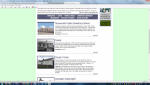
I'm using IE 11 and FF 32.0.3. I realise I'm using a lot of inline styles and will try to refrain from doing so if it'll cause problems. <!DOCTYPE html PUBLIC "-//W3C//DTD XHTML 1.0 Transitional//EN" "http://www.w3.org/TR/xhtml1/DTD/xhtml1-transitional.dtd"> <html xmlns="http://www.w3.org/1999/xhtml"><!-- InstanceBegin template="/Templates/mainwithsidebar.dwt" codeOutsideHTMLIsLocked="false" --> <head> <meta http-equiv="Content-Type" content="text/html; charset=utf-8" /> <!-- InstanceBeginEditable name="doctitle" --> <title>A History of Education in Greencastle Parish</title> <!-- InstanceEndEditable --> <script type="text/javascript" src="http://ajax.googleapis.com/ajax/libs/jquery/1.5.1/jquery.min.js"></script> <script src="Scripts/AC_RunActiveContent.js" type="text/javascript"></script> <!-- Flash Map --> <script src="Scripts/smooth.pack.js" type="text/javascript"></script> <!-- Smooth Scroll --> <script type="text/javascript" src="Scripts/Fancybox/fancybox_params.js"></script> <script type="text/javascript" src="Scripts/jquery-1.6.1.min.js"></script> <script type="text/javascript" src="Scripts/Fancybox/jquery.easing.1.3.js"></script> <script type="text/javascript" src="Scripts/Fancybox/jquery.fancybox-1.2.1.pack.js"></script> <script type="text/javascript"> /* <![CDATA[ */ $(document).ready(function() { $("a.iframe").fancybox(); }); $(document).ready(function() { $("a.yesopen").fancybox(); }); function MM_swapImgRestore() { //v3.0 var i,x,a=document.MM_sr; for(i=0;a&&i<a.length&&(x=a[i])&&x.oSrc;i++) x.src=x.oSrc; } function MM_preloadImages() { //v3.0 var d=document; if(d.images){ if(!d.MM_p) d.MM_p=new Array(); var i,j=d.MM_p.length,a=MM_preloadImages.arguments; for(i=0; i<a.length; i++) if (a[i].indexOf("#")!=0){ d.MM_p[j]=new Image; d.MM_p[j++].src=a[i];}} } function MM_findObj(n, d) { //v4.01 var p,i,x; if(!d) d=document; if((p=n.indexOf("?"))>0&&parent.frames.length) { d=parent.frames[n.substring(p+1)].document; n=n.substring(0,p);} if(!(x=d[n])&&d.all) x=d.all[n]; for (i=0;!x&&i<d.forms.length;i++) x=d.forms[i][n]; for(i=0;!x&&d.layers&&i<d.layers.length;i++) x=MM_findObj(n,d.layers[i].document); if(!x && d.getElementById) x=d.getElementById(n); return x; } function MM_swapImage() { //v3.0 var i,j=0,x,a=MM_swapImage.arguments; document.MM_sr=new Array; for(i=0;i<(a.length-2);i+=3) if ((x=MM_findObj(a[i]))!=null){document.MM_sr[j++]=x; if(!x.oSrc) x.oSrc=x.src; x.src=a[i+2];} } function MM_openBrWindow(theURL,winName,features) { //v2.0 window.open(theURL,winName,features); } /* ]]> */ </script> <!-- InstanceBeginEditable name="head" --> <!-- InstanceEndEditable --> <style type="text/css"> body,td,th { font-family: Arial, Helvetica, sans-serif; } body { background-color: #d9ffdb; margin-top: 0px; } </style> <link rel="icon" href="http://www.greencastleparish.com/favicon.ico" type="image/x-icon" /> <link rel="stylesheet" type="text/css" href="CSS/template.css" media="screen" /> <link rel="stylesheet" type="text/css" href="Scripts/Fancybox/jquery.fancybox.css" media="screen" /> <link rel="stylesheet" href="Webfonts/ArialNarrow/stylesheet.css" type="text/css" charset="utf-8" /> <link href='http://fonts.googleapis.com/css?family=Oswald:400,300,700' rel='stylesheet' type='text/css'/> <!-- InstanceBeginEditable name="css" --> <link rel="stylesheet" type="text/css" href="CSS/historyofeducation.css" media="screen" /> <!-- InstanceEndEditable --> <style type="text/css"> a:link { text-decoration: none; } a:visited { text-decoration: none; } a:hover { text-decoration: none; } a:active { text-decoration: none; } </style> </head> <body> <a name="topofpage" id="topofpage"></a> <div id="main-div"> <div class="wrapper"> <div class="topbanner">WELCOME TO THE GREENCASTLE PARISH WEBSITE</div> <!-- InstanceBeginEditable name="bannerimg" --> <img src="Images/History/Education/banner.png" alt="Greencastle Parish" /><!-- InstanceEndEditable --> <!-- InstanceBeginEditable name="menu" --> <div class="menucntr"> <div class="menubtn" style="padding-left: 8px;">HOME</div> <div class="menubtn">HISTORY</div> <div class="menubtn">NEWS SHEET</div> <div class="menubtn">PARISH EVENTS</div> <div class="menubtn">MINISTRY GROUPS</div> <div class="menubtn">YOUNG PEOPLE</div> <div class="menubtn">SCHOOL</div> <div class="menubtn">GUESTBOOK</div> <div class="menubtn">LINKS</div> <div class="menubtn" style="border-right: none;">CONTACTS</div> </div> <!--menucntr--> <!-- InstanceEndEditable --> <!-- InstanceBeginEditable name="body" --> <div class="bodywrapper"> <div class="heading">A History of Education in Greencastle Parish</div> <div class="maintext"> In Greencastle parish there were five schools. Greencastle, Cashel, Crock, Ligatraght (Coneyglen) and Broughderg. <div style="height: 5px;"></div> These schools were built in the early 1800s and had two classrooms with two entrance halls and playground. <div style="height: 5px;"></div> The classroom had an open grate. Parents took a load of turf each year for the fires and some children carried a few daily. <div style="height: 5px;"></div> There was little money to spare on the upkeep of the school. There were no caretakers so the teachers had to put on school fires as well as sweep the rooms daily and do the dusting. <div style="height: 5px;"></div> According to today’s standards, school furniture and equipment was meagre consisting mainly of some long modern desks which held 8 to 10 children as well as a large cupboard, high desk and store for the teacher. <div style="height: 5px;"></div> Toilets were outdoors and near the turf shed at the back (no indoor sanitation). Water was carried from neighbouring houses. <div style="height: 5px;"></div> The assistant teacher taught the infants as well as classes one, two and three. The Principal taking classes four, five and six. Children started school at five years old and left after their 14<sup>th</sup> birthday. <span class="clicktojumptext">Click on a name to jump directly to it</span> </div> <!-- maintext --> <div class="anchornames" style="font-size: 18px;"> <a href="#greencastle">GREENCASTLE</a> • <a href="#cashel">CASHEL</a> • <a href="#crock">CROUCK / CROCK</a> • <a href="#coneyglen">CONEYGLEN (LIGATRAGHT)</a> <br /> <a href="#broughderg">BROUGHDERG</a> • <a href="#ourladyoflourdes">OUR LADY OF LOURDES</a> • <a href="#schoolclosures">SCHOOL CLOSURES</a> </div> <!--anchornames --> <div class="schoolwrapper"> <a name="greencastle" id="greencastle"></a> <a class="yesopen" href="Images/History/Education/greencastle.png" rel="fancybox[gallery]" title=""> <span class="roll"></span> <div class="imgborder"><img alt="" src="Images/History/Education/greencastle-s.png" /></div> </a> <div class="schooldetailswrapper"> <div class="schoolname">Greencastle Public Elementary School</div> <div class="schooldetails"> Education records show that this school was established in January 1862. The first Principal was Michael Clarke, next appointment CJ Donnelly (1887 – 1929) followed by J.A. Rodgers and Bernard O’Boyle, Maurice Rodgers, Michael J. McElduff, John Ward, Malachy McAleer, Miss Mary Morris, Jenny McAleer, Mary O’Kane Kelly and Alice Keenan. <div style="height: 5px;"></div> <span style="font-family: 'arialnarrow_bold', 'Arial Narrow', Arial, sans-serif; font-size: 14px;">Photograph:</span> <span style="font-size: 14px;">Christina Morris</span> </div> <!-- schoolsdetails --> </div> <!-- schooldetailswrapper --> </div> <!-- schoolwrapper --> <div class="pagetop"><a href="#topofpage">PAGE TOP <sup>▲</sup></a></div> <div class="schoolwrapper"> <a name="cashel" id="cashel"></a> <a class="yesopen" href="Images/History/Education/cashel.png" rel="fancybox[gallery]" title=""> <span class="roll"></span> <div class="imgborder"><img alt="" src="Images/History/Education/cashel-s.png" /></div> </a> <div class="schooldetailswrapper"> <div class="schoolname">Cashel</div> <div class="schooldetails"> Cashel School was established in 1886. The first Principal was Solomon Morris with his wife acting as assistant teacher, other teachers were Rhona Morris, Sara Collins, Cissie Fox, Mary Gormley, Mary Keenan, Miss Sally, Rose O’Hagan, Kathleen Donaghy, Mrs. Long and Frances McCrory. <div style="height: 5px;"></div> <span style="font-family: 'arialnarrow_bold', 'Arial Narrow', Arial, sans-serif; font-size: 14px;">Photograph:</span> <span style="font-size: 14px;">Mickey Fox</span> </div> <!-- schoolsdetails --> </div> <!-- schooldetailswrapper --> </div> <!-- schoolwrapper --> <div class="pagetop"><a href="#topofpage">PAGE TOP <sup>▲</sup></a></div> <div class="schoolwrapper"> <a name="crock" id="crock"></a> <a class="yesopen" href="Images/History/Education/crock.png" rel="fancybox[gallery]" title=""> <span class="roll"></span> <div class="imgborder"><img alt="" src="Images/History/Education/crock-s.png" /></div> </a> <div class="schooldetailswrapper"> <div class="schoolname">Crouck / Crock</div> <div class="schooldetails"> The first reference to Crock School dates back to 30<sup>th</sup> November, 1886. The Education Board approved a grant of £224 to accommodate 120 children. The house was to be built with one room and the land was leased from Mr. C. Morris. Fr. G. Nelson appointed manager, an extension added in 1892. <div style="height: 5px;"></div> <span style="font-family: 'arialnarrow_bold', 'Arial Narrow', Arial, sans-serif;">Teachers:</span> Patrick McAleer was appointed principal in January 1888 assisted by William Sharkey. Other teachers in Crock were Master Rodgers, Susan Rodgers, Miss Brigid Monaghan, Miss Celia McConnell, Miss Mary Josephine Clarke, Miss Monaghan, Mrs. Mary Sally, Peter A. McCullagh, Alice Keenan and Catherine Donnelly. </div> <!-- schoolsdetails --> </div> <!-- schooldetailswrapper --> </div> <!-- schoolwrapper --> <div class="pagetop"><a href="#topofpage">PAGE TOP <sup>▲</sup></a></div> <div class="schoolwrapper"> <a name="coneyglen" id="coneyglen"></a> <a class="yesopen" href="Images/History/Education/coneyglen.png" rel="fancybox[gallery]" title=""> <span class="roll"></span> <div class="imgborder"><img alt="" src="Images/History/Education/coneyglen-s.png" /></div> </a> <div class="schooldetailswrapper"> <div class="schoolname">Coneyglen (Ligatraght)</div> <div class="schooldetails"> Established to educate the children of the employees of Dorvail Farm. <div style="height: 5px;"></div> The patron of the school is E Greer Esq. It dates from 1861. It always had Catholic teachers. <div style="height: 5px;"></div> The school closed in 1961; one hundred years after it opened. <div style="height: 5px;"></div> <span style="font-family: 'arialnarrow_bold', 'Arial Narrow', Arial, sans-serif;">Teachers:</span> Francis Kelly (resigned in December 1878). Pat Conway, Michael Morton (1880), Miss Mary A. Conway, Miss Margaret Bradley, Miss A. Conway, Mr. Maurice Rodgers, Miss Brigid Monaghan, Mrs. Sally (nee Kelly), Miss Kathleen McCullagh, Miss Mary McCullagh.</div> <!-- schoolsdetails --> </div> <!-- schooldetailswrapper --> </div> <!-- schoolwrapper --> <div class="pagetop"><a href="#topofpage">PAGE TOP <sup>▲</sup></a></div> <div class="schoolwrapper"> <a name="broughderg" id="broughderg"></a> <a class="yesopen" href="Images/History/Education/broughderg.png" rel="fancybox[gallery]" title=""> <span class="roll"></span> <div class="imgborder"><img alt="" src="Images/History/Education/broughderg-s.png" /></div> </a> <div class="schooldetailswrapper"> <div class="schoolname">Broughderg</div> <div class="schooldetails"> Broughderg National School was set up in 1829. A report shows 36 male and 24 female pupils on the roles. The teachers were Robert and Pat Conway and paid £5-10s (five pounds and ten shillings) for six months. <div style="height: 5px;"></div> A new school was built in 1910. Built on a new site, a 1921 report states average numbers of pupils on roll was 56. <div style="height: 5px;"></div> <span style="font-family: 'arialnarrow_bold', 'Arial Narrow', Arial, sans-serif;">Teachers:</span> Miss Eileen Loughran, Miss McGurk, Mr. McGlynn, Miss Bradley, Miss Mary McConnell and Miss Lucy McCullagh (all Principals). Miss Annie Kelly, Miss Annie Toner, Miss Sheila Campbell, Miss Mary O’Neill, Miss Rita Loughran, Miss Mary McCullagh, Miss Sarah Donnelly, Miss Margaret Lynch, Alice Keenan, and Mrs. Sarah Warnock (assistant teachers). </div> <!-- schoolsdetails --> </div> <!-- schooldetailswrapper --> </div> <!-- schoolwrapper --> <div class="pagetop"><a href="#topofpage">PAGE TOP <sup>▲</sup></a></div> <div class="schoolwrapper"> <a name="ourladyoflourdes" id="ourladyoflourdes"></a> <a class="yesopen" href="Images/History/Education/ourladyoflourdes.png" rel="fancybox[gallery]" title=""> <span class="roll"></span> <div class="imgborder"><img alt="" src="Images/History/Education/ourladyoflourdes-s.png" /></div> </a> <div class="schooldetailswrapper"> <div class="schoolname">Our Lady of Lourdes</div> <div class="schooldetails"> When Our Lady of Lourdes Primary School Greencastle opened in September 1980 all other schools in the parish closed. <div style="height: 5px;"></div> <span style="font-family: 'arialnarrow_bold', 'Arial Narrow', Arial, sans-serif;">Teachers:</span> Peter A. McCullagh (Principal), Mrs. Rose O’Hagan (Vice Principal), Mrs. Catherine Donnelly, Mrs. Marie Bradley, Mrs. Sarah Warnock and Alice Keenan. </div> <!-- schoolsdetails --> </div> <!-- schooldetailswrapper --> </div> <!-- schoolwrapper --> <div class="pagetop"><a href="#topofpage">PAGE TOP <sup>▲</sup></a></div> <div class="schoolwrapper"> <a name="schoolclosures" id="schoolclosures"></a> <div class="schooldetailswrapper" style="width: 739px;"> <div class="schoolname">School Closures</div> <div class="schooldetails"> At the beginning of the 1960s secondary education changed the picture for primary schools. The transfer of pupils at eleven years of age reduced the primary school population by half. St. Colm’s in Draperstown was one of the earlier secondary schools. Children from Broughderg and Crock transferred to Draperstown travelling on the newly introduced school bus service between Broughderg and Draperstown. </div> <!-- schoolsdetails --> </div> <!-- schooldetailswrapper --> </div> <!-- schoolwrapper --> <div class="pagetop"><a href="#topofpage">PAGE TOP <sup>▲</sup></a></div> </div> <!-- bodywrapper --> <!-- InstanceEndEditable --> <div class="mainsidebarcntr"> <div class="mainsidebarbtn">LATEST UPDATES</div> <div class="mainsidebarbtn">NEWS SHEET</div> <div class="mainsidebarbtn" style="font-size: 14px; line-height: 16px; padding: 9px 0 11px 0;; border: none;">SERVING OUR PARISH<br />VOLUNTEER SCHEDULE</div> <img style="margin-bottom: 10px;" src="Images/Sidebar/dorvillepics.png" width="127" height="227" alt="Dorville Mass Rock Gathering" /> <img style="margin-bottom: 10px;" src="Images/Sidebar/cemeteryplan.png" width="127" height="70" alt="Dorville Mass Rock Gathering" /> </div> <div class="copyrightwrapper"> <div class="copyright">© Greencastle Parish 2014. All rights reserved</div> <div class="comigo">Designed, created and maintained by Comigo Web Design</div> </div> <!-- copyrightwrapper --> </div> <!--wrspper--> </div> <!--main-div--> </body> <!-- InstanceEnd --></html> Adding the .roll class to the img tag causes the hover effect to mess up as seen in the attached image. The span tag I originally used along with the guidelines provided by Wynn seem to cause the hover effect to work properly Are span tags a bad idea though and would it matter if I change it to a div tag? If I remove either of the following jQuery it stops Fancybox from functioning. <script type="text/javascript" src="http://ajax.googleapis.com/ajax/libs/jquery/1.5.1/jquery.min.js"></script> <script type="text/javascript" src="../Scripts/jquery-1.6.1.min.js"></script> The page checks out fine through W3C validation.
-
Thanks nfc212, but it's still the same with FF and IE - though with the magnifying glass over the image permanently. I do notice now though that although the hover in fact does appear (with rbrtsmth's code), it does so in the wrong area i.e. it appears to the far right of the page rather than over the image.
-
Thanks for your response rbrtsmth. I've removed the jQuery and added the hover state to my stylesheet but it still isn't working in Firefox. I've also noticed that upon refreshing the page in IE the hover states no longer work on all images except the 2nd one (they're all duplicates at the moment). In some cases I prefer using inline e.g. if I want to add a margin to one instance of a div I use in multiple areas or change the letter spacing on one paragraph. Is using an external stylesheet exclusively only beneficial to the web designer?
-
I've been using a jQuery script to make an image rollover effect on a website - it works fine in Chrome, Safari and Internet Explorer but not in Firefox (it simply does not appear). Does HTML5 and CSS3 work in older browsers? My website: http://nialldevlin.com/historyofeducation.html <script type="text/javascript"> $(function() { // OPACITY OF BUTTON SET TO 0% $(".roll").css("opacity","0"); // ON MOUSE OVER $(".roll").hover(function () { // SET OPACITY TO 70% $(this).stop().animate({ opacity: .7 }, "slow"); }, // ON MOUSE OUT function () { // SET OPACITY BACK TO 50% $(this).stop().animate({ opacity: 0 }, "slow"); }); }); </script> <!-- Image Rollover --> span.roll { background:url(../Images/magnify.png) center center no-repeat #575974; position: absolute; width: 199px; height: 147px; z-index: 10; margin: 5px 0 0 5px; } <a class="yesopen" href="Images/History/Education/greencastle.png" rel="fancybox[gallery]" title=""> <span class="roll" ></span> <img class="imgborder" style="float: left; border: solid 5px #575974; margin-right: 10px;" alt="" src="Images/History/Education/greencastle-s.png" /> </a>
-
Thanks, I'll give that a go.
-
Cheers, what would be the best approach i.e. software to use etc.?
-
The resulting code is terrible rbrtsmith!