Try_it_and_see
Members
-
Joined
-
Last visited
-
I have a text area that contains text. After a button is clicked, this text is put into a div with spans for each word for styling purposes. For example, the text could say "Hello World!" This will be split into 3 spans, one for each word and one for the space in between the words. Now, if a user selects part of the text in the text area I need to detect which spans contain the string that has been selected. So the user could select from the 'o' from 'Hello' up to the 'o' from 'World'. In this example, spans 1, 2 and 3 have been selected. How can I detect this? You'd think this would be simple but I'm struggling to find a way to do it. Here are some variables I've set up: text - contains all of the text from all of the spans, so the same as the text area value words - an array containing all the text split up into words start - the index of the start of the selection within the text end - the index of the end of the selection within the text selection - a substring between start and end containing the selection selectionSplit - an array containing the selection split up by spaces beforeSelection - contains the string that appears before the start of the selection, up to but not including the selection textToSelectionEnd - contains the string before and including the selection Taking these variables into account, is there a way I can detect which spans contain the selection?
-
 fisicx reacted to a post in a topic:
Issue with text areas and line breaks. Differentiating between automatic line breaks and user-entered line breaks
fisicx reacted to a post in a topic:
Issue with text areas and line breaks. Differentiating between automatic line breaks and user-entered line breaks
-
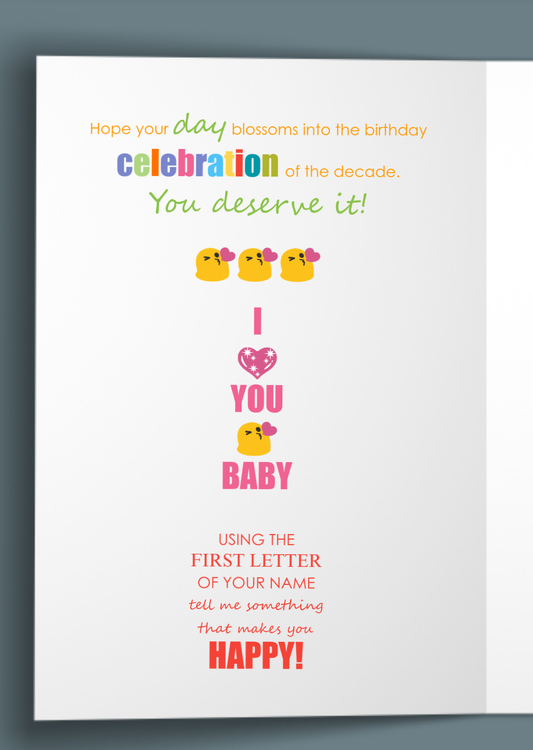
@fisicx Thanks. I've created a work around now. By setting the white-space to nowrap, this ignores all of the automatic line breaks but doesn't ignore the user-added line breaks when creating the spans and line divs. So this puts the string with automatic line breaks all into one line and then puts the user-added line breaks into separate lines. Then I run the function again with the white-space set to initial, and this second pass catches the automatic line breaks and puts them into separate lines. So after two passes of the function all of the lines are in separate divs and every character is in a span of its own, which leaves me free to style every single character and line however I want. Works really well! The reason I needed this is because without each line of text being in separate divs, if you had one large font on the first line, it made every single line big as well. Now I can have a large font on one line and all the other lines are spaced normally. Here's a screenshot of it working. It's for a customized greetings card website I'm working on. This is just a random test on the inside left of a card. The promising thing is, if you try emulating that on mobile on funky pigeon you'd have a real hard time as it's almost impossible to select single characters. And on moonpig, forget it, you can't even have individual character styling on moonpig, you can only change the styling for the whole block of text. On mine, it's easy to do this. Very happy!
-
The spans are created by getting the string that has already been displayed in a div then splitting it up into spans. But the automatic line breaks have already gone into the string at this point, so they are carried into the spans. Maybe there's a way to get around this by using a dummy div with a much wider width so that no line breaks will be added, then use that to create the spans. I think it's probably best to remove this question as there is too much missing info for it to make sense to anyone.
-
Simply speaking, I'm working on a JavasScript website that allows users to enter text into a text area. After clicking a button, the text area text is displayed on a separate part of the screen. But it isn't displaying the way I want it displayed. The best way to describe the issue is to give an example, so here's an example. This is the text the way it is meant to look: USING THE FIRST LETTER OF YOUR NAME TELL ME SOMETHING THAT MAKES YOU HAPPY! In the above example, the user has added line breaks at the end of each line. But this is how it is displaying after the button is clicked: USING THE FIRST LETTER OF YOUR NAME TELL ME SOMETHING THAT MAKES YOU HAPPY! There is a line break after "TELL ME" that has been added automatically. This is where the automatic line break would occur if the user had not added line breaks, but since the user has added line breaks this automatic line break is not wanted. How can I prevent this line break from occurring yet still allow automatic line breaks if the user doesn't add line breaks? In other words, the text might have a mix of automatic line breaks and user-added line breaks, but the position of the automatic line breaks should be re-calculated if the user has added a line break. Edit: I forgot to mention that there is a function that splits each character of the string into spans so that each character can have its own styling, font, size and colour. Also each line is automatically wrapped in a div so that the line heights can be customized to fit the height of the font. This is where the issues begin. If I bypass these functions the text is displayed correctly. So for some reason, when the spans and divs containing each line are created, the automatic line breaks are being added in the wrong place. Edit: I've narrowed the issue down to the function that puts all the spans into separate divs for each line. The function that creates the spans in the first place seems to be OK. Here is the function. Side and instance can be ignored here. Only lineNumber is important. function textLineWrap(side, instance) { for (let lineNumber = 1; lineNumber <= 15; lineNumber++){ // The spans are labelled in numerical order. The index increases wherever there is a line break. First check if that line exists: if (document.querySelector('.inner' + side + instance + 'line' + lineNumber )){ // This gets all the spans with the same line number and splits them up. let $cardHolders = $('.inner' + side + instance + 'line' + lineNumber ).unwrap('.inner' + side + instance + 'lineNumber' + lineNumber ); // wrap let $slice = $cardHolders.slice(0,$cardHolders.length); $slice.wrapAll('<div class="inner' + side + instance + 'lineNumber' + lineNumber + '" />') } } } Hope that makes sense! I'm using JavaScript with PHP, HTML and CSS.
-
fisicx reacted to a post in a topic:
Best way to send hundreds of variables from page to page without taxing the server in PHP (or JavaScript)?
-
Well yes, assuming I can find a printer that can produce a quality card without having to wait 10 minutes, the only thing stopping it from being a success would be marketing. I have a bit put aside for marketing but it's insignificant compared to funky pigeon. One thing on my side though is the fact I can produce motion graphics myself, so I can make an ad but I'll have to pay to get it seen. Another thing I can do is charge less than funky pigeon. Last time I checked they charge £5.99 plus £1.45 for postage, so that's £7.99 for an A4 card. I could charge at least one pound less than that and still make a decent profit, though I won't know for sure until I get exact figures. I've also thought about how I can offer a genuine USP but I haven't got the definitive answer yet. I've had a few general ideas. About local printers, I had a card printed out from Max Spielmann and the quality was really bad. Even their logo on the back of the card was really poor quality, and they charged £5.99 for it. They have a cheek charging that. I'm not sure if they offer an online service. If they don't you'd have to take your photos to them on a device, which is not always ideal. Most small businesses are competing with the big names. There seems to be hundreds of people selling posters and prints on eBay, a service which big companies offer. The amount of companies offering personalized greetings cards is relatively small compared to other print services, probably because it's expensive to get a website that can do that. If I can get a small piece of that pie there's a small chance it could work. But even if it doesn't it's been a great project to work on and it's helped me through a tough time personally.
-
Jo 90 reacted to a post in a topic:
Best way to send hundreds of variables from page to page without taxing the server in PHP (or JavaScript)?
-
I'm guessing people want personalized cards since moonpig and funkypigeon are very successful businesses. The owner of moonpig was a dragon on Dragon's Den. I'm not sure what Canva is or how it can do the same as what I'm going to offer? I'm assuming my site will be much easier to use than Canva for personalizing cards and sending them to the customer? Perhaps Canva would be better suited to people who don't mind spending more time on the design, whereas mine will be better suited to people who just want to click on photos and upload them quickly without having to think about the design at all.
-
@fisicx Thanks! I'll post the url when live but I have a lot more work to do yet. At the moment I have just over 50 card templates designed. I guess I need to get that up to around 100+ before I can go live. Plus (a big plus!) I haven't actually got a printer yet! I'm still researching this. I don't actually know if there's a viable business in this but I'm hoping there is. My preliminary research seems to suggest there is, due to being able to charge a higher price for the personalized element of the cards. In the meantime I can share a video of the site if you're interested. I'll update this thread when I have the video available.
-
Try_it_and_see reacted to a post in a topic:
Best way to send hundreds of variables from page to page without taxing the server in PHP (or JavaScript)?
-
Sorted! I have now stored my 200+ MySql columns in one JSON MySql column, which is faster to access. These are transferred to client side localStorage when the page first loads and the page is then built in JavaScript. The user's uploaded photos are also stored client side in IndexedDB during customization and will then be transferred to the server if a purchase is made, along with the variables. So the customization process with all the variables and photos is all handled client side now. I'm assuming this is the best way to do it but of course I'll have to wait and see how it all works when on a live server.
-
-
@jpeters8889 Thanks for replying. I like the sound of your idea. It sounds similar to what I already have but perhaps taking up less space. At the moment I have a table with a row for each individual variable, such as pic1_left, pic1_top, pic1_width, text1_font etc. And I allocate a row with a unique identifier number in a separate table to each user as they edit a card. Those rows get deleted after a day if the user hasn't purchased the card or placed it in the basket. I've never used JSON files but it sounds like it would work well for what I need. My only questions would be, would each variable within the JSON file be easy to access and change? And would the benefits of switching to the JSON method be worth the work of changing what is already working well? I mean, would the way I have it working now cause enough performance issues to justify the switch?
-
Try_it_and_see reacted to a post in a topic:
Best way to send hundreds of variables from page to page without taxing the server in PHP (or JavaScript)?
-
@fisicx Thanks for replying! Sorry I should have explained, the site allows users to customize photo greetings cards, much like moonpig. The variables store the positions and sizes of the photos and text along with the content of the text. Some templates have 15 photos, so lots of variables needed. The user is unaware of all this of course, they just see the card template. I might be able to trim a few variables here and there but most are needed. The only time all the variables are accessed is when the card template is first displayed. Then it's only the variables associated with whatever element is being edited. The database is accessed every time the user changes something, such as uploads a photo or edits the text, and also when the user navigates to another page, such as the inner part of the card. I was thinking it would be better if these changes were stored some other way and then if the user purchases a card the data could be stored in the database only at the end. Or is the way I've already done it OK?
-
I'm working on a website that uses over 200 variables that need to be sent from page to page. Each variable holds a small amount of data. The largest is probably a text string of around 200 characters. I use WordPress for part of the site but not all of it, so the variables need to be sent to WordPress at some point. I already have it working in PHP but I use a MySql database to store the variables. The variables change often, so there are queries happening often. Apparently this would not work well if the site had many users. So my question is, what would be the best way to store and transfer over 200 variables from page to page on a website without it being too taxing on a server? I'm using PHP but could possibly use JavaScript. I'm assuming JavaScript localStorage would be the best option, since the variables would be stored locally, but it would be hard for me to convert my site to pure JavaScript. I tried it yesterday and got quite far but some aspects were tricky for me, since I am only a hobby coder. I could do it if it was essential but I'd rather use PHP if I could. It would set me back a while. Other options I'm aware of are SESSION variables and POST variables. Out of the two I'm assuming POST variables would be better. Would over 200 POST variables be taxing on the server if there were many users online? Another option would be cookies, but I think I'd have to store lots of my variables in a few cookies not to exceed the cookie limit. Would this be feasible? Any help would be greatly appreciated! Thanks!