brianx
Members
-
Joined
-
Last visited
-
-
Yes ludicrous because a) the user knows that it is full screen because he pressed the full screen button and doesn't need to be told it is now full screen like a little child and b) because if he can open the viewer he knows how to escape full screen and c) he isn't blind so why so large and clunky? In the screengrab I posted, the captioning totally obscured the item it was describing! Constantly. At no point did we get an unobstructed view. Does anyone seriously contend that captions are better placed over the video than below it? At least Amazon videos allow you to adjust the size and colour of captions. That is progress.
-
-
Thanks for that explanation. So it is just a design decision not a technical issue? All websites such as BBC and Sky new also use this design so I thought it was a must-do. Do you remember the ludicrous notice plastered over the video telling you to press ESC to exit full screen? Some person, somewhere, a real living human being, must have made that decision originally. Did no one question it? Did no one wonder if it was needed? Eventually the public began to complain and now the notice is still there but more discrete and smaller. But still superimposed over the video itself. It's the fact that real people, designers, create this video player standard and actually think it is a good plan, that gets to me. Sorry for being rude or obstreperous but finding the person who came up with this is my goal and when I find him I'll string him up! LOL. 🙂
-
-
-
-
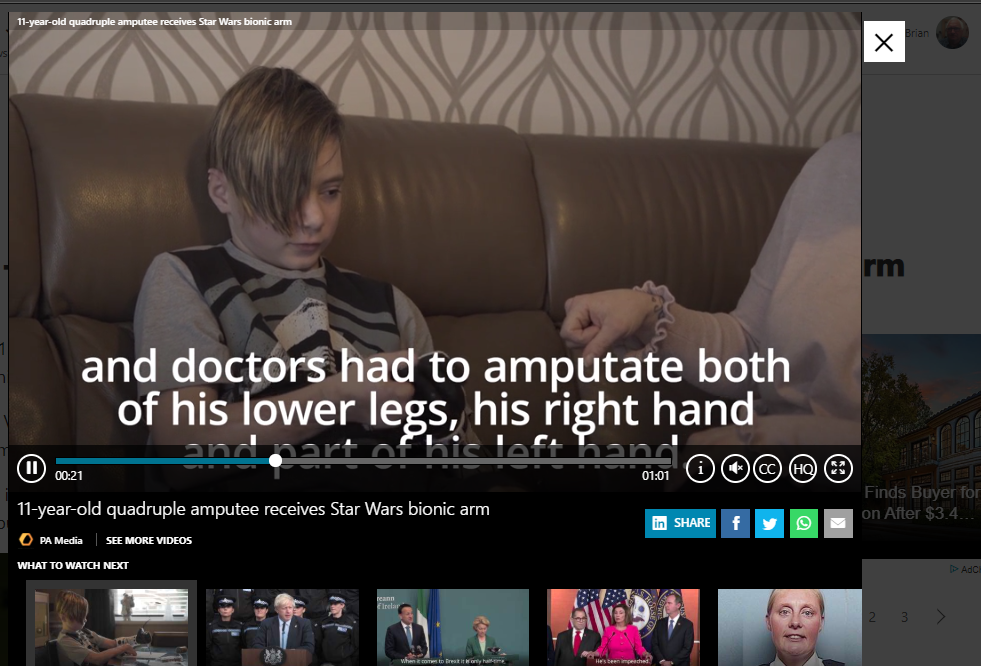
The screen grab above illustrates my query which is why in-line videos such as this have to be obscured by captions and controls? As you can see it doesn't work very well and is increasingly annoying. I am not a designer or programmer but am familiar with wordpress. My question is why can not the video be in its own frame/window with space below within an overall window to place controls, captions and so on? I remember the complaints just a couple of years ago when designers plastered "Press ESC to exit full screen" right in the middle of the video. I too complained and received a very sniffy reply from a designer who clearly didn't live in the real world. Well he turned out to be a dinosaur and everyone started being a bit more sensible by placing the prompt at the top and far smaller. although to be honest why does anyone need that prompt anyway? I would be grateful for an answer as to whether this is some sort of relic from the old days or if there is some technical reason, or if it is just designers being bloody minded!
-