
Skip to content
View in the app

A better way to browse. Learn more.

Web Designer Forum

A full-screen app on your home screen with push notifications, badges and more.

To install this app on iOS and iPadOS
  1. Tap the Share icon in Safari
  2. Scroll the menu and tap Add to Home Screen.
  3. Tap Add in the top-right corner.
To install this app on Android
  1. Tap the 3-dot menu (⋮) in the top-right corner of the browser.
  2. Tap Add to Home screen or Install app.
  3. Confirm by tapping Install.

irfansarwani

Members
  • Joined

  • Last visited

Everything posted by irfansarwani

  1. I have verified Upwork account but i don't have enough skills to work on Upwork. let me know if you are interested.
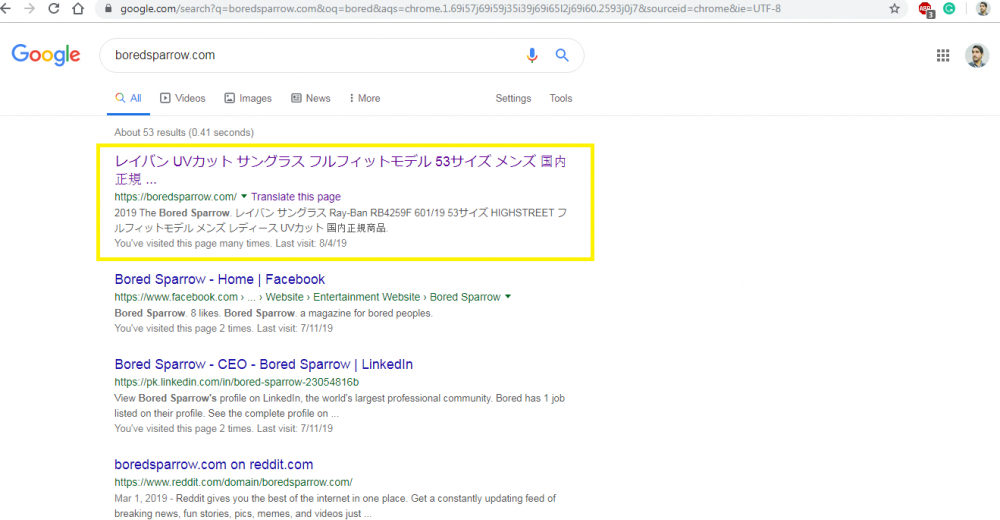
  2. HI For some strange reason, Google showing the wrong title for my website. my site's title is in English and its showing Chinese Kindly see the attachment. I would really appreciate the help.
  3. Not necessarily a snack per day, but I’ll cut up a grilled cheese sandwich and go with that while working.
  4. If you are still looking for the logo. leave me a message and I will provide you some sources that make a logo on really cheap price.
  5. Hello and welcome to the forum. Remember one rule no spamming
  6. Can you share logo requirements from the client?
  7. I am unable to play the videos. When I click the Play button its say " This video is unavailable".
  8. Hello Everyone My name is Irfan Khan and I am new here. This is my first post here. I have little knowledge about Frond end development and SEO. I am looking forward to learning from forum. Thanks

Account

Navigation

Search

Search

Configure browser push notifications

Chrome (Android)
  1. Tap the lock icon next to the address bar.
  2. Tap Permissions → Notifications.
  3. Adjust your preference.
Chrome (Desktop)
  1. Click the padlock icon in the address bar.
  2. Select Site settings.
  3. Find Notifications and adjust your preference.