amolrajput
Members
-
Joined
-
Last visited
Everything posted by amolrajput
-
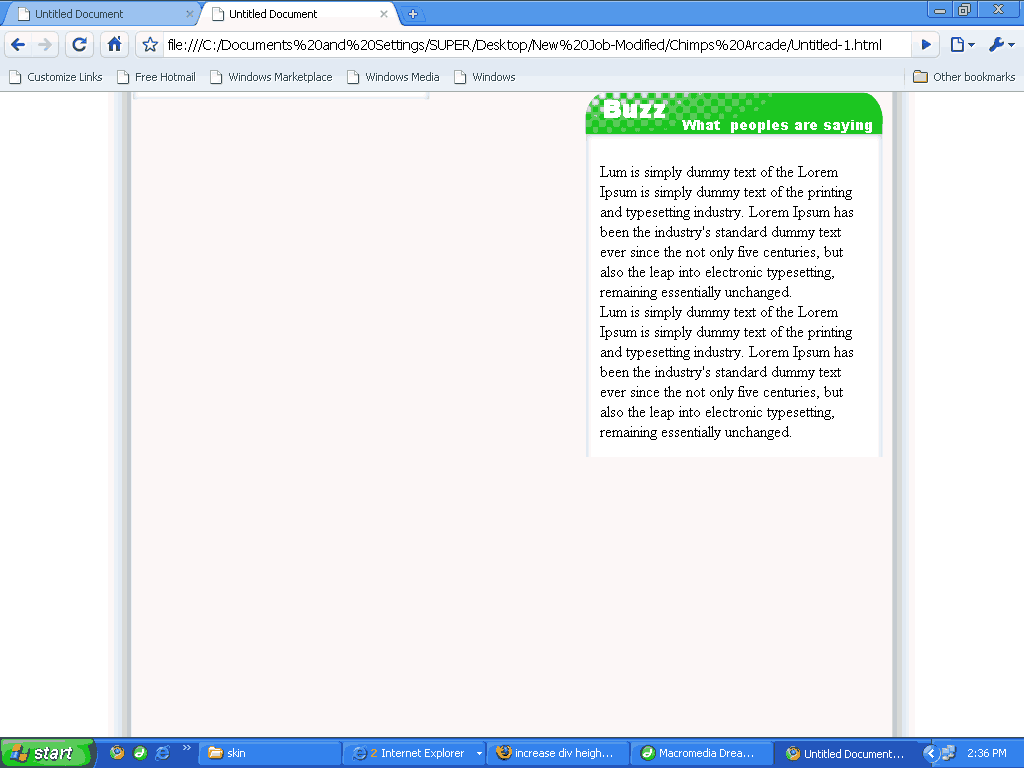
Hi Badmotherz this div buzz_box_mid (<div class="buzz_box_mid") is not increasing height. this div increases height if I add only text there. If I add my content then it is not rising height.........????????? see the image
-
Thnks Elite I set it to auto. But it is not working. My problem is I want the div height to grow and shrink depending on what's in the box. Does it grow automatically or needs some Javascript also,but sorry I don't know Javascript. It clears IE7 test but not working in FireFox3.0 <div id="right_content"> <div class="buzz_box_up"> <div class="buzz_box_mid"> <!--pic01 start--> <div class="buzz_wrapper"> <img src="skin/images/pic01.jpg" alt="" width="48" height="48" class="pic" /> <div class="top"> <div class="buzz_text"> <span class="title">I Blogger!</span><br /> Lum is simply dummy text of the Lorem Ipsum is simply dummy text of the printing and typesetting industry. Lorem Ipsum has been the industry's standard dummy text ever since the not only five centuries, but also the leap into electronic typesetting, remaining essentially unchanged.</div> </div> </div> <!--Pic 01 Ends--> <!--pic02 start--> <div class="buzz_wrapper"> <img src="skin/images/pic02.jpg" alt="" width="48" height="48" class="pic" /> <div class="top"> <div class="buzz_text"> <span class="title">Umrao Jaan </span><br /> Lum is simply dummy text of the Lorem Ipsum is simply dummy text of the printing and typesetting industry. Lorem Ipsum has been the industry's standard dummy text ever since the not only five centuries, but also the leap into electronic typesetting, remaining essentially unchanged.</div></div> </div> <!--Pic 02 Ends--> <!--pic01 start--> <div class="buzz_wrapper"> <img src="skin/images/pic01.jpg" alt="" width="48" height="48" class="pic" /> <div class="top"> <div class="buzz_text"> <span class="title">I Blogger!</span><br /> Lum is simply dummy text of the Lorem Ipsum is simply dummy text of the printing and typesetting industry. Lorem Ipsum has been the industry's standard dummy text ever since the not only five centuries, but also the leap into electronic typesetting, remaining essentially unchanged.</div> </div> </div> <!--Pic 01 Ends--> </div> <div class="buzz_box_dn"></div></div> </div> My Css Code: #right_content { BACKGROUND-POSITION: 50% top; FLOAT: right; BACKGROUND-IMAGE: url(../images/Buzz.gif); WIDTH: 298px; MARGIN-RIGHT: 9px; PADDING-TOP: 41px; BACKGROUND-REPEAT: no-repeat; } .buzz_box_up { BACKGROUND-IMAGE: url(../images/Buzz_Box_up.gif); WIDTH: 298px; PADDING-TOP: 14px; BACKGROUND-REPEAT: no-repeat; HEIGHT: 14px } .buzz_box_mid { BACKGROUND-IMAGE: url(../images/Buzz_Box_Middle.gif); BACKGROUND-REPEAT: repeat-y; padding: 10px; } .buzz_wrapper{ display: block; width: 280px; clear: both; } .pic { margin-left: 2px; margin-top: 0px; position: absolute; } .top{ background-image: url(../images/Buzz_angle.gif); background-repeat: no-repeat; margin-bottom: 10px; float: right; width: 75%; margin-top: 0px; } .title{ margin-bottom: 0px; font-weight: bold; font-size: 14px; font-family: Geneva, Arial, Helvetica, sans-serif; } .buzz_text{ width: 89%; float: right; background-color: #6AF160; font-family: Geneva, Arial, Helvetica, sans-serif; font-size: 12px; color: #000000; z-index: 20; padding: 5px; } .buzz_box_dn { BACKGROUND-IMAGE: url(../images/Buzz_Box_Dn.gif); WIDTH: 298px; BACKGROUND-REPEAT: no-repeat; HEIGHT: 8px }

-
HI Forum; How can I increase div height automatically whenever I adding text or any ther content there ? which conditions I apply in css to overcome this problem?
-
My programmer Friend Vishwesh told me to develope like that otherwise I don't like frames. Only because, if there is need to change or add some menu or otherthings that will easy in frame structure. we have to change only one page not every. thats why I choose FFFFFFFFFRamesssssss!!!!!!
-
God Bless You My Child someone will answer ur question very soon!!! oooooooooooohh !!
-
Namskar Cyberfriend I'm Amolsingh from Mumbai, 1) SearchIn 2) Bharat Ek Khoj 3) Discover India 4) SearcHind 5) Way To India ( suggested by My Friend Ameya) ok but what exactly you dreaming about ur search engine in what direction, first that is very important. If it is clear then we can suggest you more closer name to ur thinking !
-
Thank You MolotovRuss I am realy mad about flash work and flash sites. Realy very attractive but simple. very nice find man thank you once again !! Amolsingh Rajput
-
Can anyone tell me why there is gap between middle & footer frame. IE shows small gap while other browser like Firefox & Netscape Nevigator showing big space ! Why ? <!DOCTYPE html PUBLIC "-//W3C//DTD XHTML 1.0 Frameset//EN" "http://www.w3.org/TR/xhtml1/DTD/xhtml1-frameset.dtd"> <html xmlns="http://www.w3.org/1999/xhtml"> <head> <meta http-equiv="Content-Type" content="text/html; charset=iso-8859-1" /> <title>IOL PCTV User Profile Frame</title> <script src="skin/js/menuscript.js" type="text/javascript"></script> </head> <frameset rows="88,482,*" framespacing="0" frameborder="no" border="0"> <frame src="top.html" name="header" scrolling="No" noresize="noresize" id="header" /> <frameset cols="305,*" frameborder="no" border="0" framespacing="0"> <frame src="user_page_new.html" name="leftFrame" scrolling="No" noresize="noresize" id="leftFrame" /> <frame src="user_ac/userprofile.html" name="content" id="content" /> </frameset> <frame src="footer.html" name="footer" scrolling="No" noresize="noresize" id="footer" /> </frameset> <noframes><body>Soory! Your browser does not handle frames!! </body> </noframes></html> Footer frame height is 20px. Plz see attachment. Thank You Amolsingh Rajput

-
Welcome Lee I welcome to u on forum. And Happy Diwali to u. Enjoy crackers. Enjoy Sweets. Festival of Lights. Hope this may give you happiness cheers in life & Bright new year. Graphic Designer Amolsingh Rajput
-
Oh Thanks A Lot !! Xual But I think u don't understand my question ? I want my sub-menu over the main menu i.e overlapping position ! I think u thought menu setting problem is there? but realy thanks for ur efforts for my question. Today, while searching for "css menus" in google I find what dizi gave in her post, i.e cssplay.com link. I realy thanks Both of u Dizi & Xual thnks & Rgrds Amolsingh Rajput
-
Can Any one Answer ?
-
Follow this link : http://www.metamorphozis.com/free_templates/free_templates.php this will help u a lot to get out of table mode i mean to ENTER the world of CSS div world. On that link page u will find these words Download All Free CSS Website Templates in One ZIP-file! Around 7 mb I suggest Just Explore n learn all css examples. Go Get It !!! Now !!!!! Amolsingh Rajput
-
Wow Realy Very Tough Question !!!!!!!! No One have answer? Great Going Forum Thanks Forum !! & all those who added me & I added whom in frnd list Thanks Once Again Amol Deeply Hurt
-
Hello Jason Welcome to the Great World oF Web Designer's and Coder's. * Great World * Great People * Great Help * Enjoy your tour with Great Coder's n' Designer Once Again Welcome Home Graphic Designer Amolsingh Rajput
-
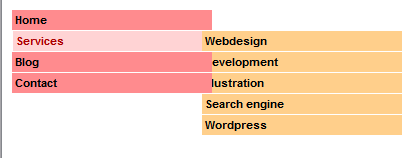
Dear Friends I hav got a problem: PLZ DNLOD the attachment & see my problem that How do I set sub menu over the main menu? I set 190px from Left. Tell me what to do here? what I am missing in script? HTML CODE <ul> <li><a href="#">Home</a></li> <li><a href="#">Services</a> <ul> <li><a href="#">Webdesign</a></li> <li><a href="#">Development</a></li> <li><a href="#">Illustration</a></li> <li><a href="#">Search engine</a></li> <li><a href="#">Wordpress</a></li> </ul> </li> <li><a href="#">Blog</a> <ul> <li><a href="#">Webdesign</a></li> <li><a href="#">Development</a></li> </ul> </li> <li><a href="#">Contact</a></li> </ul> CSS CODE body { behavior: url(csshover.htc); } a { color: #000; text-decoration: none; } ul { list-style: none; margin: 0; padding: 0; width:200px; } ul li { font: bold 11px/16px arial, helvetica, sans-serif; height:100%; background:#ff8b8e; border-bottom:1px solid #fff; position: relative; float:left; width:100%; } ul li ul li{ background:#ffcf8b; } ul li a{ display:block; padding: 2px 3px; } ul li a:hover { color: #a00; background: #ffd3d4; border-right:1px solid #fff; border-left:1px solid #fff; } ul li ul li a:hover{ background: #ffedd3; border-left:1px solid #fff; } ul ul { position: absolute; top: 0; display:none; } ul li:hover ul{ display: block; left:190px; } Well this is tutorials from one of the site. Thnks Amolsingh Rajput
-
I have just add name "Memories" but all kind of pic i.e my favorite will be there.
-
When I was join this forum I was unaware of B'day. When I interact many times I felt that someone is celebrating B'day. But who one is that ? Oh its our forum website .... ok dude belated Happy BirthDay Ben Cheer Man ur & members efforts are working , Great Going !! hey I want Party ? where is my cake ? U forgot me to call on party ? just kidding great Smileys Great BirthDay ! Live Long !! Amolsingh Rajput
-
Hello Tom Good Morning This is Good Morning here in India. Well, I saw your website. First of all I would like to suggest u to change your home page bcos it is not so attractive. Website needs Simple But Creative ! No Colors are there ! Even your Header is also not colorful ! what is this ? Looking like sadness all over. This is not to much comment but what I saw I Frankly told u. Second thing, ur Forum page is OK. but where can I find Home Button ? The best thing is what we need to attract user to our site ! Do that ! Christopher Bishop is our our webdesignerforum's member log on his site & take a look for resouces about color. His site is http://www.cibgraphics.com/resources.php?id=1 I belive that U can do better job. Best oF LucK. Have A Nice Day Amolsingh Rajput
-
Hi MolotovRuss, Thanks to give this link. I think they put all the power of imagination & creativity to present the work thru website in Great Flash, I think so !! Why ? Bcos I'm Bollywood Films lover Person. Thats why? I was not just see elbow.com but travel all the website created by http://www.thecreativecorporation.co.uk/ . Realy there creation, presentation of idea, imagination all the things are very Great. I think everyone must see atleast one time there work. I don't know how u find this site but realy cool man !! Thanks Once Again !! Amolsingh Rajput
-
Oh Sorry Dizi & Rachael I was forget to check CSS file. I'm giving attachment here Plz Check this. Thanks Amolsingh Rajput Errors.bmp
-
Oh Thanks Dizi !! I will search javascript marquee. U give me Solution about Problem No. 2 & 3 But What about Problem 1 ? How can I solve that ? "Found 1 errors in external css files" IE 5.0, IE 5.5, IE 6.0 Thanks Once Again Dizi Amolsingh Rajput
-
Hello Friends I have got some problem.When I check for browser support in Dreamweaver 8.0 I have got following messages : Problem 01 "Found 1 errors in external css files" IE 5.0, IE 5.5, IE 6.0 Problem ! Tell Me How to Fix ? is there any special trick ( I Mean Html Code) to solve this problem. Problem 02 The MARQUEE tag is not supported.Netscape Navigator 6.0 Html>> <marquee direction="up" scrolldelay="75" height="240px" behavior="scroll"> Problem 03 Unsupported value for the direction attribute of the marquee tag. IE 5.0, IE 5.5, IE 6.0 Html>> <marquee direction="up" scrolldelay="75" height="240px" behavior="scroll"> Can I solve above Maequee Problem 2 & 3 by using other code for " Contineus Scrolling Text "? If is there any, Plz write here or Give me link here. Thanks Amolsingh Rajput
-
Hello Friends I'm using IE 7 ,Apple Safari 3.1.2 and FireFox 3.0.1. My menu contains flash buttons(.swf files but not .swt file). My question is Menu's are not displaying in line. Only two of five are in line & other 3 are below the line. This problem is happenning only in firefox.What can I do for that ? Image :Plz check the attachment file Thanks. my html codes are as follows : <div id="top"> <div id="menu"> <div class="menulist"><a href=""> <object classid="clsid:D27CDB6E-AE6D-11cf-96B8-444553540000" codebase="http://download.macromedia.com/pub/shockwave/cabs/flash/swflash.cab#version=7,0,19,0"'>http://download.macromedia.com/pub/shockwave/cabs/flash/swflash.cab#version=7,0,19,0"'>http://download.macromedia.com/pub/shockwave/cabs/flash/swflash.cab#version=7,0,19,0"'>http://download.macromedia.com/pub/shockwave/cabs/flash/swflash.cab#version=7,0,19,0"'>http://download.macromedia.com/pub/shockwave/cabs/flash/swflash.cab#version=7,0,19,0" name="home" width="128" height="29" id="home"> <param name="wmode" value="transparent" /> <param name="movie" value="skin/images/flash/Buttons/Home.swf" /> <param name="quality" value="high" /> <embed src="skin/images/flash/Buttons/Home.swf" wmode="transparent" width="128" height="29" quality="high" pluginspage="http://www.macromedia.com/go/getflashplayer"'>http://www.macromedia.com/go/getflashplayer"'>http://www.macromedia.com/go/getflashplayer"'>http://www.macromedia.com/go/getflashplayer"'>http://www.macromedia.com/go/getflashplayer" type="application/x-shockwave-flash" name="home"></embed> </object></a></div> <div class="menulist"><a href=""> <object classid="clsid:D27CDB6E-AE6D-11cf-96B8-444553540000" codebase="http://download.macromedia.com/pub/shockwave/cabs/flash/swflash.cab#version=7,0,19,0" name="pctv" width="128" height="29" id="pctv"> <param name="wmode" value="transparent" /> <param name="movie" value="skin/images/flash/Buttons/Pctv.swf" /> <param name="quality" value="high" /> <embed src="skin/images/flash/Buttons/Pctv.swf" wmode="transparent" width="128" height="29" quality="high" pluginspage="http://www.macromedia.com/go/getflashplayer" type="application/x-shockwave-flash" name="pctv"></embed> </object></a></div> <div class="menulist"><a href=""> <object classid="clsid:D27CDB6E-AE6D-11cf-96B8-444553540000" codebase="http://download.macromedia.com/pub/shockwave/cabs/flash/swflash.cab#version=7,0,19,0" name="channels" width="128" height="29" id="channels"><br /> <param name="wmode" value="transparent" /> <param name="movie" value="skin/images/flash/Buttons/Channels.swf" /> <param name="quality" value="high" /> <embed src="skin/images/flash/Buttons/Channels.swf" wmode="transparent" width="128" height="29" quality="high" pluginspage="http://www.macromedia.com/go/getflashplayer" type="application/x-shockwave-flash" name="channels"></embed> </object></a></div> <div class="menulist"><a href="http://www.iolbroadband.tv/"> <object classid="clsid:D27CDB6E-AE6D-11cf-96B8-444553540000" codebase="http://download.macromedia.com/pub/shockwave/cabs/flash/swflash.cab#version=7,0,19,0" name="vod" width="128" height="29" id="vod"><br /> <param name="wmode" value="transparent" /> <param name="movie" value="skin/images/flash/Buttons/Vdo.swf" /> <param name="quality" value="high" /> <embed src="skin/images/flash/Buttons/Vdo.swf" wmode="transparent" width="128" height="29" quality="high" pluginspage="http://www.macromedia.com/go/getflashplayer" type="application/x-shockwave-flash" name="vod"></embed> </object></a></div> <div class="menulist"><a href="about us_css.html"> <object classid="clsid:D27CDB6E-AE6D-11cf-96B8-444553540000" codebase="http://download.macromedia.com/pub/shockwave/cabs/flash/swflash.cab#version=7,0,19,0" name="about_us" width="128" height="29" id="about_us"><br /> <param name="wmode" value="transparent" /> <param name="movie" value="skin/images/flash/Buttons/About Us.swf" /> <param name="quality" value="high" /> <embed src="skin/images/flash/Buttons/About Us.swf" wmode="transparent" width="128" height="29" quality="high" pluginspage="http://www.macromedia.com/go/getflashplayer" type="application/x-shockwave-flash" name="about_us"></embed> </object></a></div> </div></div> Well, there is code for Search button also but here I have removed from above code. Css Code : #top { position:absolute; left:305px; top:0px; width:684px; height: 88px; z-index:2; background-repeat: no-repeat; margin: 0px; padding: 0px; background-image: url(../images/menu.jpg); } #menu { padding-top: 5px; padding-right: 0px; padding-bottom: 0px; padding-left: 24px; text-align: center; } #menu .menulist { float:left; width:130px; height:30px; text-align:center; padding: 0px; display: inline; } Thanks Plz answer !! Image.bmp
-
how can I export to .swt file with flash 8 for Dreamweaver.This is button templete used to add in Dreamweaver for web pages. Flash 8 does not have this facility. Can anyone suggest me how can I fix the problem?
-
Hallo Brother, I have a Question? How can I export an image at 32 bit depth in png form thru photoshop cs2 ? where as i find this is not posssible. Is there any plug-in or other setting to export an (sliced) image at 32 bit depth with any format like .jpg/.png/.gif etc etc.... I find all this details when I right click the image & go in Properties>>Summary. Plz Give me info about this. Here is example ..Download & see its Prop>>Summary.