shorg
Members
-
Joined
-
Last visited
-
I'd suggest you study design, typography and usability principles a bit before you get down to business. You'll find great inspirational resources and docs at smasingmagazing.com, webdesignerdepot.com or alistapart.com, just to name a few. No offense but imho your site is not yet ready to be evaluated against professional criteria. The comments here are really helpful and they allow you to fix a few glitches here and there but still it won't make you have a clear concept of how to communicate your message to your visitors. I hope you don't mind my being honest. What really hurts my eyes is the typography (or the lack thereof). As the guys pointed out already, a typical mistake rookies make is throwing in all the effects you can get. Less is more. Lavalamp under dropshadow, harsh gradients throughout...we are not in the 90's any more. Older fellows will prolly remember the dark era when the inner bevel-drop shadow combo dominated the web. "I have thrown in some -moz and -webkit drop shadows in some divs, I think they look quite nice in the right browsers. What do you guys think?" – Matter of fact, i think they look just horrible. Vulgar. If you use drop shadow at all, it's supposed to be subtle and barely visible and you need to deliberately pick the colors. So try to develop a sense for fine details.
-
SOLVED wmode=transparent
-
I have an embedded flash video on my page, along with a highslide (jquery) based gallery. The thing is that when you click an image, the modal window will appear behind the video box. I can't give it a z-index since the div containing the video must be part of the page flow and can't be absolutely positioned. And it won't work anyway. I wonder if there's any other way to send the embedded object backwards in the stack. Bunch of thanks in advance.
-
Since the market is saturated, i'm sure you'll find an affordable developer. You can post it in the Looking to hire topic. Without specs, it's hard to tell how much they'd charge. Make it look like a real project, regardless of the budget. Sketch out the site structure, write down precisely & explicitely the functions and capabilities your website should provide etc.
-
Hey mate, with zero dev background and experience, i doubt this is a suitable job for you. You'll find a bunch of sites out there that provide streaming music but they are all — and i mean all — professionally designed bespoke systems and not makeshift joomla hacks. You don't even have any specifications available. If you need this site badly, i'd suggest you hire someone from this forum. I mean a pro. No offense dude, but your questions suggest that you don't have the faintest clue how web applications work.
-
In fact, most of the CMS platforms ship with a bunch of free themes and skins. WP allows you to install a theme right from the server, you don't even download anything to your local machine. A great part of the clients, typically small businesses, are perfectly happy with the off-the-shelf themes. Free themes definitely lend an air of cheapness to the site but they don't mind it, content is king. On the other hand, in the pre-CMS era you could also download full static templates (with those ridiculous XHTML and CSS W3C badges in the footer) or even flash templates for that matter, and yet it didn't kill the web design industry. Sites like templatemonster are still thriving and i suppose they are making a big $$$. I think you should focus on clients who actually understand the importance of a unique design that stands out.
-
I could use a little help with wordpress permalinks on localhost. I'm on W7, apache 2.2/php5, WP3. I've commented out the mod_rewrite line and set AllowOverride all in httpd.conf and restarted apache multiple times. Yet if i set my permalinks to other than default, i'll get a 404 for all the posts and pages. It does write the .htaccess file when i change the permalink settings but the urls are broken all the same. I really have have no idea what else could be done to fix it. I wouldn't mind sticking with the default setting on local for dev purposes, but a forum extension, simple press, will not run at all, due to permalink glitches.
-
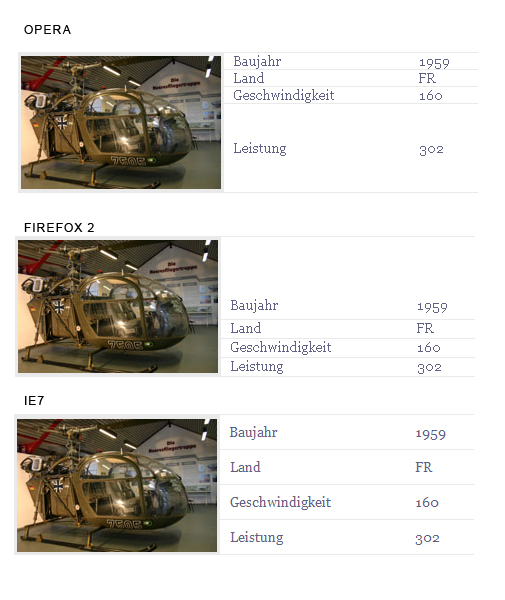
I have a table with a rowspan in one of the cells, the problem is that it's rendered differently in each and every browser. See img below. Actually IE is the only one that renders it properly. Any way to fix it? http://www.hubschraubermuseum.de/exponate

-
Can you post a link or html/css? Anyway don't use DW to embed flash. It generates a fat and ugly js. Use swfobject instead. It's not only valid and a lot cleaner but also removes the annoying border from your movie in IE (normally you need to click on the movie to activate it first)
-
I guess it is the table width (650px), div #content apparently begins right under div #left but they are supposed to be inline. Try to assign the dimensions i did in my div based layout. I guess if you make your table a few px narrower it'll just snap in. However there's no reason to use tables here. Table has one thing over divs: vertical align. You should decide if it's worth all the trouble. Table is not evil or something, i don't hate it, it's simply not the right way to do layouts. Table is to display tabular data, that's it. What you have here is not tabular data. OK i did the vertical alignment with line-height, which is also not a nice way to handle it but you can use padding instead. Crosshair cursor came from a separate css, it isn't there now.
-
Sorry dude, your css is a real mess and so is your html. I've put together a div based layout for you (see attached zip). It makes no sense debugging your existing site, i suggest you rebuild it from scratch. The stuff i did might be a good foundation but you can choose a different approach. There are a few things however that you should keep in mind: - It's never a good practice to blend divs with tables, once you go for divs try to build up your wireframe without using tables - Don't position divs absolutely or relatively unless you have a very good reason to do so. This is why your layout is screwed up in the first place. Positioned elements are removed from the document flow. - 150px for border is just gross. It's no way to do columns. If you need equal height cols the most commonly used method is what's known as faux columns (that's what i used here) but you can get the column height with js and set all heights accordingly. This sucks if your visitor happens to browse with js turned off. - Don't use a transitional DTD - If you set <a> to display:block within a <li>, give it explicit dimensions, otherwise it may add extra whitespace and screw up your layout in IE6 - A little typography: stick to a single typeface. you can use a different one e.g. for H1 but swapping from verdana to trebuchet is unprofessional - Usability: forget the crosshair cursor, it's confusing for most users, esp. when it's supposed to be a pointer. it'll make you lose customers - Don't add style to the body when you have an external css attached to your html - Check if floated objects need to be cleared (see fix in css) As i see this is a downloaded or generated css with some copyright stuff included. It's ok to use templates sometimes but css is no rocket science really, you better learn it on your own, you'll have more control over your sites and less garbage in your code. antenna.zip
-
Forget 800x600. I normally make my layouts 960px wide. Looking at my own stats i must say that over 50% of my visitors are still using 1024x768 so you can't just ignore lower resolutions. But if your 800x600 visitors can't afford to upgrade to a better graphics card and a bigger display they probably can't afford your products or services either, so don't worry about losing them. You can optimize for handheld but that's a different story.
-
min-width is not supported by IE but if your markup is ok three is no need to use it. Here's a nice post on clearing floated elements that will probably fix your problem http://www.positioniseverything.net/easyclearing.html
-
-
Hi Dizi, here's the link http://www.coroflot.com/creativeseeds/2008...io_websit_1.asp Ok the post focuses on the consistency of your portfolio site in the first place but the question is valid nonetheless.