Kirk Freeman
Members
-
Joined
-
Last visited
-
-
-
-
Hi Guys, I've designed a layout, very beginner i realise. It works so far in most browsers, yet it wont work in Safari. The area with the main content in is supposed to scroll (as you will see in chrome, firefox, IE etc.). The issue is, when it is opened in Safari, the content from the scrolling div, decides to wonder off over the top of the rest of the layout! The website address is http://www.burgatefarmhouse.co.uk I would really appreciate some advice with this, as i have looked over it and am failing to see the problem, even though i am sure it is minor. I think it may have something to do with the div tags. Thank you for any help Here is the code... ***THE HTML*** <!DOCTYPE html PUBLIC "-//W3C//DTD XHTML 1.0 Transitional//EN" "http://www.w3.org/TR/xhtml1/DTD/xhtml1-transitional.dtd"> <html xmlns="http://www.w3.org/1999/xhtml" <html xmlns:fb="http://ogp.me/ns/fb#"> <head> <meta http-equiv="Content-Type" content="text/html; charset=utf-8" /> <meta name="description" content="Burgate Farmhouse, 2 beautiful self catering holiday cottages in the New Forest. Long and short breaks available, late booking discount also available. Special offers on our site." /> <meta name="keywords" content="New,Forest,Short,Long,Breaks,Self,Catering,Holiday,Cottage,Beautiful,Discount,Value" /> <meta name="author" content="Yorspec & Christine Bennett" /> <link rel="stylesheet" href="CSS/burgatestyle.css" /> <link rel="stylesheet" href="CSS3 Menu_files/css3menu1/style.css" type="text/css" /><style>._css3m{display:none}</style> <link rel="shortcut icon" href="Images/favicon.ico" /> <title>Burgate Farmhouse | Self Catering Cottages in the New Forest | New Forest Accomodation</title> </head> <!--Web Design by Yorspec - www.yorspecdesign.co.uk--> <body> <div id="fb-root"></div> <div id="fb-root"></div> <script>(function(d, s, id) { var js, fjs = d.getElementsByTagName(s)[0]; if (d.getElementById(id)) return; js = d.createElement(s); js.id = id; js.src = "//connect.facebook.net/en_GB/all.js#xfbml=1"; fjs.parentNode.insertBefore(js, fjs); }(document, 'script', 'facebook-jssdk'));</script> <div id="navbar"> <center><ul id="css3menu1" class="topmenu"> <li class="topmenu"><a href="index.html" title="Homepage" style="height:16px;line-height:16px;">Home</a></li> <li class="toproot"><a href="accommodation.html" title="Accommodation" style="height:16px;line-height:16px;"><span>Accommodation</span></a> <ul> <li><a href="littlethatch.html" title="Little Thatch">Little Thatch (Sleeps 2-4)</a></li> <li><a href="wishingwell.html" title="Wishing well">Wishing Well (Sleeps 6)</a></li> <li><a href="gamesbarn.html" title="Games barn and garden">Games Barn & Garden</a></li> </ul></li> <li class="toproot"><a href="prices.html" title="Prices and Availability" style="height:16px;line-height:16px;"><span>Prices & Availability</span></a> <ul> <li><a href="thatchprice.html" title="Little Thatch Prices">Little Thatch (Sleeps 2-4)</a></li> <li><a href="wishprice.html" title="Wishing well prices">Wishing Well (Sleeps 6)</a></li> <li><a href="booking.html" title="How to book">How To Book</a></li> </ul></li> <li class="topmenu"><a href="location.html" title="Location and Directions" style="height:16px;line-height:16px;">Location & Directions</a></li> <li class="topmenu"><a href="attractions.html" title="Things to see and do" style="height:16px;line-height:16px;">Things to see & do</a></li> <li class="toplast"><a href="aboutus.html" title="About us, and testimonials" style="height:16px;line-height:16px;">About Us & Testimonials</a></li> </ul></center> </div> <div id="mainwrap"> <div id="contentwrap"> <BR /> <center><div id="paperbanner"> <div id="specialoffers"></div> </div></center> <div id="content"> <div id="farmhouseimage"></div> <p><strong><h2>Self catering accomodation - 2 Holiday Cottages in the New Forest</h2></strong><BR /> Burgate Farmhouse is a 15th century thatched listed property in Fordingbridge, Hampshire. It is close to the New Forest National Park. <BR /><BR /> There are two self catering cottage wings of the farm house. Little Thatch, which will sleep two to four people and Wishing Well, which will sleep six people. <BR /><BR /> The large Games Barn in the grounds has a skittle alley, pool table, table tennis table, dart boards and lots of children’s toys. Dogs are welcome here, and Little Thatch has an ideal back garden/yard area, which is totally secure. With cots and high chairs available as well as much more baby and toddler equipment, the little ones will feel at home too. <BR /><BR />The pretty half acre garden is available for all to enjoy. with a summerhouse, Barbeque, garden furniture, swings & foot- ball net. Parking on site is plentiful, offering you peace of mind during your stay. We have free Broadband WiFi for all guests. Short breaks are available from Nov to May, short breaks are sometimes possible in main season. See the bottom of this page for ‘Special Offers’. Late availability discounts are available and credit or debit cards are accepted. <BR /><BR /> <center><img src="Images/paymentlogo.png" /></center><BR /><BR /> <center><iframe width="815" height="480" src="http://www.youtube.com/embed/QvplJcaushI?rel=0" frameborder="0" allowfullscreen></iframe></center> </p> </div> </div> </div> <div id="promoboxeswrap"> <div id="promoboxleft"><div id="accreditations"></div></div> <div id="promoboxmiddle"><center><strong>Christine Bennett<BR /> Burgate Farmhouse<BR /> Fordingbridge, New Forest<BR /> Hampshire, SP6 1LX<BR /> 01425 655909<br /> 07837 052645</strong></center></div> <div id="promoboxright"> <div id="promoboxrighttext">See more of Burgate Farmhouse with Flickr and YouTube, or ‘like’ us on facebook.</div> <div id="fblikebox"><iframe allowtransparency="yes" frameborder="0" src="http://www.facebook.com/plugins/like.php?href=http%3A%2F%2Fwww.facebook.com%2Fburgatefarmhouse&send=false&layout=box_count&width=450&show_faces=false&action=like&colorscheme=light&font&height=90"></iframe></div> </div> </div> </body> </html> ***An then the CSS*** @charset "utf-8"; /*Web Design By Yorspec - All rights reserved*/ /*www.yorspecdesign.co.uk for Web Design and Hosting*/ body { margin:0px; padding:0px; background-image:url(../Images/backgroundimage.png); font-family:Arial, Helvetica, sans-serif; color:#525252;} p { font-family:Arial, Helvetica, sans-serif; color:#525252;} h2 { font-family:Arial, Helvetica, sans-serif; font-size:18px; color:;#525252;} #navbar { width:901px; height:45px; margin:0 auto; background:url(../Images/navbarbg.png) no-repeat; padding-bottom:40px;} #mainwrap { clear:both; width:901px; height:653px; margin:0 auto; background:url(../Images/contentbg.png) no-repeat; padding-bottom:20px; padding-top:8px;} #contentwrap { clear:both; width:870px; height:630px; overflow:scroll; margin:inherit; overflow-y: scroll; overflow-x: hidden;} #content { width:815px; margin:0 auto;} #promoboxeswrap { clear:both; width:901px; height:150px; margin:0 auto; background:url(../Images/Promoboxes.png) no-repeat; padding-bottom:20px;} #paperbanner { width:878px; height:180px; margin:0 auto; padding-right:10px; background:url(../Images/specialofferspaper.png) no-repeat;} #farmhouseimage { float:left; clear:both; width:325px; height:208px; background:url(../Images/farmhouse.png) no-repeat; padding-right:25px; margin-bottom:5px;} #promoboxleft { float:left; width:265px; height:130px; padding-top:10px; padding-left:10px; padding-bottom:10px; padding-right:10px;} #promoboxmiddle { float:left; width:272px; height:130px; padding-top:17px; padding-left:24px; padding-bottom:10px; padding-right:20px; font-family:Arial, Helvetica, sans-serif; font-size:16px;} #promoboxright { float:left; width:276px; height:130px; padding-top:10px; padding-left:14px; padding-bottom:10px; padding-right:10px; overflow:hidden;} #specialoffers { height:170px; width:220px; float:right; padding-right:100px;} #promoboxrighttext { width:276px; height:50px;} #fblikebox { clear:both; margin-top:13px; width:50px;} #accreditations { margin:0 auto; width:270px; height:120px; background:url(../Images/accreditations.png) no-repeat;}
-
-
-
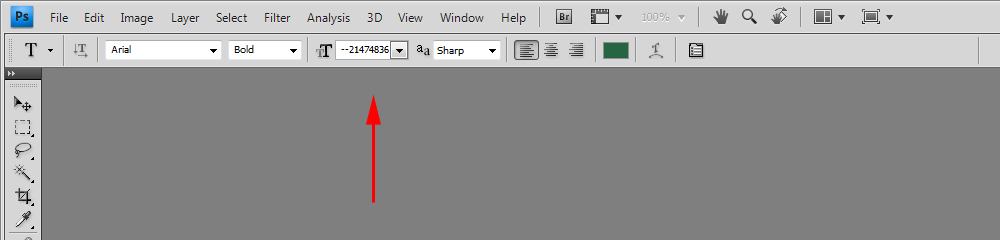
When trying to use my text tool in Adobe Photoshop CS4, the text i am typing is not showing. When i looked to see why not, i noticed the font size was set to --21474836.,(. I've tried changing it, but it wont allow it and bounces right back to that value. Please can someone help me... :-) Many Thanks, Much love!

-
-
Problem solved! True Gent, thanks for taking the time to investigate, i appreciate it hugely. Learn something new every day with web design
-
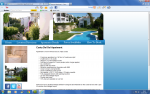
So... Did a layout, and have come to find that it's fin on safari and google chrome, but when opened on IE, it justifies my whole site to the left, as shown in the image i have attached... I have searched my coding for errors, but dont seem to be able to figure out why it is doing this, if anyone can help, id be hugely grateful, i think it is an error with something in the CSS, as it is affecting every page, however, i've inserted a page of html from the homepage as well, so if anyone can see problems with that, please criticise it, it's frustrating me to death! Thanks all Kirk <!DOCTYPE html PUBLIC "-//W3C//DTD XHTML 1.0 Transitional//EN" "http://www.w3.org/TR/xhtml1/DTD/xhtml1-transitional.dtd"> <html xmlns="http://www.w3.org/1999/xhtml"> <head> <meta http-equiv="Content-Type" content="text/html; charset=utf-8" /> <link rel="stylesheet" type="text/css" href="style.css" /> <title>Jaramar Apartment - Costa Del Sol - Short Breaks - Spain</title> </head> <body> <div id="header"></div> <div id="navbar"><img src="images/linkblank.png" width="980" border="0" usemap="#Map" /> <map name="Map" id="Map"> <area shape="rect" coords="49,10,116,40" href="index.html" target="_self" alt="Home" /> <area shape="rect" coords="153,8,354,42" href="location.html" target="_self" alt="" /> <area shape="rect" coords="390,9,566,40" href="details.html" target="_self" alt="" /> <area shape="rect" coords="607,9,776,40" href="prices.html" target="_self" alt="" /> <area shape="rect" coords="827,6,997,41" href="booking.html" target="_self" alt="" /> </map> </div> <div id="contentwrap"> <div id="rightcontent"> <h1>Costa Del Sol Apartment</h1> <div style="font-size:16px; font-family:Arial, Helvetica, sans-serif;"><p>Apartment to rent in Riviera Del Sol, Mijas Costa</p></div> <br /> <div id="homelist"> <ul> <li>2 bedroom apartment on 1st floor in 'townhouse style' </li> <li>2 bathrooms (1 en-suite)</li> <li>Sleeps 4 in 2 twin bedded rooms </li> <li>Sofa bed in lounge for 2 more people (extra charge applies)</li> <li>Air-conditioned</li> <li>Balcony with sea views</li> <li>Attractive swimming pool & gardens with BBQ</li> <li>Close to beach & all amenities</li> <li>Close to Miraflores Golf Course </li> <li>Sky satellite, LCD TV, DVD player, CD/radio cassette </li> <li>Fully equipped kitchen with washing machine </li> <li>25 mins from Malaga Airport</li> <li>Flexible start days</li> <li>15% discount available on car hire</li> </ul> </div> <br /> <p>Riviera del Sol is situated midway between Fuengirola and Marbella on the Costa del Sol and is just 25 minutes from Malaga Airport.<BR /><BR /> This air-conditioned 2 bedroom, 2 bathroom apartment is fully equipped and furnished for up to 6 people. The apartment is privately owned. It is just a 5 minute walk from the beach, bars, restaurants, supermarket, shops, taxi rank, bus stops etc. It is set in its own gated enclosure and surrounded by mature trees and beautiful gardens around the swimming pool.</p> <br /> <h1>Special Offers...</h1> <p><i>--- Keep your eyes peeled for special offers --- </i><BR /><BR /> <img src="payment_logo.jpg" /></p> </div> <div id="leftcontent"><img src="images/sideimg1.gif" /><BR /><br /> <img src="images/sideimg2.gif" /><BR /><BR /> <!--Social Media Links (Icons)--> <a href="http://www.facebook.com/rivieradelsolapartment" target="_new"><img src="images/facebook.png" alt="Find us on Facebook!" /></a> <a href="http://www.twitter.com/jab627"><img src="images/twitter.png" alt="Follow us on Twitter" /></a> <a href="http://www.youtube.com/cmbennett123"><img src="images/youtube.png" alt="Watch us on Youtube" /></a> <a href="http://www.flickr.com/photos/christinemarybennett/" target="_new"><img src="images/flickr.png" alt="See our images on Flickr!" /></a> <!--End of Social Media Links--> <BR /><BR /> <h2>Contact us...</h2> <p>Christine Bennett<BR /> Burgate Farmhouse<br /> Burgate, Fordingbridge<BR /> Hampshire, SP6 1LX<BR /> England<BR /> 01425 655 909<BR /> 07837 052 645</p><BR /> <small><a href="mailto:admin@burgatefarm.freeserve.co.uk">admin@burgatefarm.freeserve.co.uk</a></small> </div> </div> <div id="footer"><center> © www.rivieradelsol-apartment.co.uk<BR /> </center></div> </body> </html> THE CSS body { margin:0px; padding:0px; background:url(images/background.png) repeat-x; background-color:#0072b5;} h1 { font-family:Arial, Helvetica, sans-serif; font-size:22px;} h2 { font-size:16px; font-family:Arial, Helvetica, sans-serif;} p { font-family:Arial, Helvetica, sans-serif; font-size:14px;} a:link { text-decoration:underline; color:#000000; border:none;} #header { margin:0 auto; background:url(images/layout_01.png) no-repeat; height:270px; width:1018px;} #navbar { margin:0 auto; height:57px; width:1018px; background:url(images/layout_02.png);} #contentwrap { margin:0 auto; background:url(images/layout_03.png) repeat-y; width:1018px; overflow:hidden; padding:0px;} #rightcontent { margin:0 auto; width:66%; float:right; padding-right:30px; padding-bottom:15px;} #leftcontent { margin:0 auto; width:25%; float:left; padding-left:45px; padding-bottom:15px;} #footer { clear:both; width:960px; margin:0 auto; color:#ffffff; font-weight:bold; } #homelist ul { list-style-image:url(images/blackngreybullet.png); font-family:Arial, Helvetica, sans-serif; font-size:14px;} #footer a:link {text-decoration:none; color:#ffffff;} #footer a:active {text-decoration:none; color:#ffffff;} #footer a:visited {text-decoration:none; color:#ffffff;} #footer a:hover {text-decoration:line-through; color:#ffffff;} #locationendcontent a:link { text-decoration:underline; color:#0000FF;} #locationendcontent a:active { text-decoration:underline; color:#0000FF;} #locationendcontent a:hover { text-decoration:underline; color:#0000FF;} #locationendcontent a:visited { text-decoration:underline; color:#0000FF;}
-
-
You got Skype or similar?
-
Problem Solved!
-
So i'm building a basic website, I'm half of the way through this page, and for some reason my footer is'nt using the full width of the page. It does in my Dreamweaver, but for some reason, it isn't in browsers. Might be a good opportunity to grab some criticism on my coding. Any constructive criticism is very appreciated! Any help would be sound Thanks Here's the CSS body { margin:0px; padding:0px;} @font-face { font-family:"bickham"; src:url(BickhamScriptPro-Regular.otf); } #navbarwrap { width:100%; height:80px; background:url(Images/topbg.png) repeat-x;} #navbar { margin:0 auto; width:900px; height: 80px;} #headerwrap { width:100%; height:258px; background:url(Images/headbg.png) repeat-x;} #header { margin:0 auto; width:900px; height:258px;} /*Header Signature that reads 'Jordan Kinsey'*/ #signature { width:50%; height:auto; float:left; padding-left:40px; padding-top:70px; } /*Image of Jordan sitting on header*/ #headerimage { width:40%; height:258px; float:right; padding-right:22px; padding-top:10px;} #maincontentwrap { clear:both; width:900px; margin:0 auto; overflow:hidden; padding-top:55px; padding-bottom:55px;} #leftcontent { width:40%; font-family:Arial, Helvetica, sans-serif; float:left; padding-top:50px;} #rightcontent { width:40%; float:right;} #footerwrap { overflow:hidden; width:100%; height:78px; background:url(Images/bottombg.png) repeat-x;} And the HTML... <!DOCTYPE html PUBLIC "-//W3C//DTD XHTML 1.0 Transitional//EN" "http://www.w3.org/TR/xhtml1/DTD/xhtml1-transitional.dtd"> <html xmlns="http://www.w3.org/1999/xhtml"> <head> <meta http-equiv="Content-Type" content="text/html; charset=utf-8" /> <link rel="stylesheet" type="text/css" href="styles.css" /> <title>Jordan Kinsey - Modelling Portfolio</title> </head> <body> <div id="navbarwrap"> <div id="navbar"><img src="Images/navbar.png" border="0" usemap="#Map" style="padding-top:15px;" /> <map name="Map" id="Map"> <area shape="rect" coords="3,16,4,33" href="#" /> </map> </div> </div> <div id="headerwrap"> <div id="header"> <div id="signature"><img src="Images/signature.png" /></div> <div id="headerimage"><img src="Images/Jordan.png" height="245" /></div> </div> </div> <div id="maincontentwrap"> <div id="leftcontent">Hi, thanks for dropping by and welcome to my portfolio.<BR /><BR /> Let me introduce myself! My name is Jordan Kinsey and i would like to start a career in modelling.<BR /><BR /> I was recently spotted and was asked to take part in a photo-shoot, as a result of this i now have a portfolio filled with different shots, backgrounds and clothes. <BR /><BR />I loved doing the photo-shoot, it was very exciting and something i would love to look forward to in the future. My goal is to become a model for magazines, posters or advertising. So take a look at my portfolio and see what you think.</div> <div id="rightcontent"><center><img src="Images/homepageimagew.png" /></center></</div> </div> <div id="footerwrap"><Center>copyright sentence</Center></div> </body> </html>
-
2 Addresses, one personal, one business, with a couple of forwarders!
-
Was 10px radius, but then i set it to zero and it made no difference!
-
What do you mean?
-
I haven't given IE9 a fair trial yet to be honest, so i shan't slag it off yet! But i think my favourite has to be safari!