Alluziion
Privileged
-
Joined
-
Last visited
Everything posted by Alluziion
-
Curious. You talk a lot on your portfolio about having multiple "teams" but there only seems to be one individual identity throughout? A nice page though and welcome to the forum.
-
Hi Aida and welcome to WDF The blog looks good and my main suggestion from a quick glance would be to utilise the page more effectively on large screens as some of the content feels a little squished and convoluted. I feel some additional spacing around sections would benefit the design. As for traffic, you're helping with that right now by creating a backlink here on the forum lol. I'm no SEO expert so I can't give you any thorough advice but good copywriting and use of keywords and common search terms will help rank you higher on search engines. You could always try and trade advertising spots with other bloggers as well as a free alternative to purchasing advertising space.
-
Okay, so after some research I managed to fix the problem by adding a session variable called "last_regen" and incrementing it each time a session is started and once the counter reaches 10, I regenerate the session id and delete the previous one to prevent fixation. However, I noticed something odd... whenever I loaded the page, the counter was incrementing 3 times (which would explain why the SID wasn't matching and logging me out). I've toyed around and I'm not sure why this is happening. The secure session function is only being executed once but it's incrementing the session variable 3 times... and it's not looping because I've tested it with output which only occurs once... If anyone knows why this happening I'd love to know. I'm guessing it has something to do with session callbacks but I'm surprised it would cause the execution of the incrementation code three times
-
Tested in both Chrome and Firefox and the problem is consistent in both. However, it seems that the culprit is session_regenerate_id(true). It would seem as though the browser is sometimes searching for the previous session id. Going to do some research into this and try to find a solution that doesn't involve compromising security by keeping previous session id's... maybe slightly delaying the previous id deletion would do the trick I'll report back with a solution if I find one for anyone else that encounters this issue.
-
So I'm working on a project and everything has been going smoothly and then today my sessions would randomly destroy themselves, and I say randomly with emphasis. In some cases I'd log in and and I'd be logged out upon refresh, other times I might navigate a page or two before being logged out and sometimes I could refresh or navigate 20+ times before being logged out and I'm running out of ideas as to why this is happening. My php.ini is using the default cookie settings so the session shouldn't be destroyed until the browser resets or until it is manually destroyed and I only have session_destroy() in my logout script which is definitely not being accessed at any time I have experienced this random logout. I've also looked over my code to make sure there's nothing strange going on and I can't seem to find anything out of the ordinary. What's confusing me most is the randomness... I mean, I can stay on the same page and refresh a few times and it will log me out with no script or settiing being altered during that time so why does one page load not log me out and then an identical page load does? I'm using the following session script which is being called once at the beginning of each page. function sec_session() { $session_name = 'user_login'; $secure = false; // change this to true on a HTTPS $http_only = true; if(ini_set('session.use_only_cookies', 1) == false) { exit(); } // COOKIES $cookie_params = session_get_cookie_params(); session_set_cookie_params( $cookie_params['lifetime'], $cookie_params['path'], $cookie_params['domain'], $secure, $http_only ); // SESSION INITIATION session_name($session_name); session_start(); session_regenerate_id(true); } I am completely baffled so any help would be greatly appreciated.
-
Validation is often much more straight forward than it seems. For starters, there are some HTML input types that can help with validation before the form is even posted such as type="email" which will check whether the input follows a valid email structure (basically whether it contains @) and notify the user if it does not. Browser support for these types are limited but unsupported browsers fallback to "text" anyway so every little helps. There's also min and max attributes that are useful for number type inputs. Utilise PHP functions such as trim, preg_match/replace, isset, empty, filter_var and is_int to validate the characters of the form data. Sanitise by stripping tags and escaping quotes. Bind parameters where necessary during database input. If you're unaware of any of these concepts or functions, take some time to look over their official documentation on PHP.net. But personally, I'm not a big fan of Contact Forms anyway. Also, you stated KNOCK's reply wasn't helpful but he provided help before that post and then realised that it would probably be more effective for you to read a good tutorial and study the code they use until you understand why it's being use - it's an effective way to learn rather than teaching yourself insecure or bad practices. How's your contact form coming along anyhow? P.S. Got to the end noticed that the last post is a week ago :|
-
But why? Why do they refuse to use that extra space? Having used HTML and CSS for over a decade I constantly feel that it's so far behind its own requirements. I used elements identifiers just to make it easier to identify which styles are affecting which elements but I often use them in development anyway. I'll often use different classes with the same names for different elements to prevent having to remember or document more classes than are necessary; just my way doing things. I would also never change a div to a section, if I found myself needing to do that then it would mean that I'd made a mistake in the planning phase. Nevertheless, thanks for the reply
-
Just create a folder and have a basic file structure. For example... Sandbox (folder) <--- doesn't matter what you name it css (folder) img (folder) js (folder) <--- may not need this immediately but may as well make it index.html (html file) Inside your css folder you'll save your .css file(s), your img folder will contain your images and your js folder will contain any javascript files. This is the basic file structure for a basic website which is probably all you'll need getting started. When you start toying with PHP, the file structure will become much more complex but I'm assuming that's a little while off yet. You can open an index.html file from any web browser and it will display it as a web page so that you can see your efforts. I'd also recommend a decent text editor - http://brackets.io/]Adobe's Brackets is a good choice as well as [url=http://sublimetext.com[/ur]. These are, imo, the two best text editors on the market for web development and they are both free (Sublime has a paid and free version).
-
No problem. I very rarely stop by these forums these days but if you have any more questions or run into any problems along the way, come back and I'm sure someone will be around to help.
-
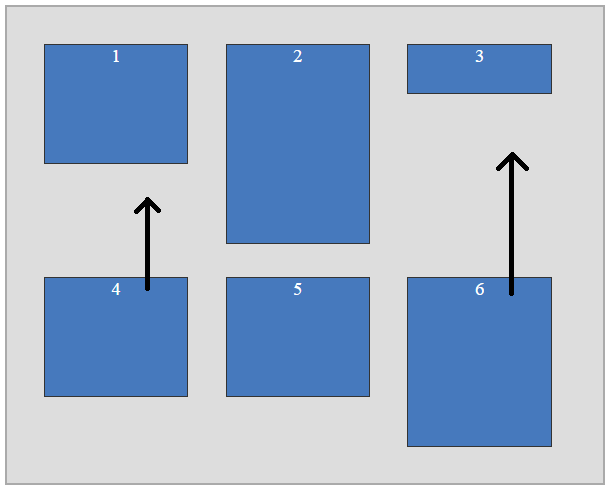
So a few times I've run into this problem and I simply want to know why this happens... Why won't boxes 4 and 6 position themselves under boxes 1 and 3 respectively with just the margin separating them? It appears as empty space but it's as though the baseline of the largest box (box 2) sets the vertical precedence for the other boxes. Of course, changing the vertical align of boxes 1 and 3 to bottom positions them at the base of the largest box but I can't seem to lift the lower boxes up. Is there a way to do this? Or is this just the way the DOM works? and if so - why? Here's a Fiddle if anyone wants to have a play around... https://jsfiddle.net/3wpc6agm/
-
Try this https://jsfiddle.net/sysgn9pe/3/ Regardless, the fact that you're using such a fancy menu but don't know how it works suggests that you downloaded from a website or copied it from a tutorial. I'd strongly suggest studying the code and learning what's happening as well as our mine and NOCK's adjustments provide the changes you desire.
-
I personally learnt form books but with so many choices and revisions, it can be difficult to find a good resource. I'd advise checking out Codecademy if you haven't already - it's a fun, interactive and effective way of learning with a self-fulfilling reward system. Use this coupled with websites such as W3 Schools and PHP.net for reference and documentation and you should be on your way to getting a decent foundation in place. My most important advice for anyone setting out to learn to code is to learn what the code is doing and I really can't stress that enough. Don't just accept that the code you write is "doing something", make sure you know what that "something" is and you'll become a much better developer throughout your practices. Furthermore, don't rush it. As your learning new techniques, elements and code constructs, think about how they could be used and make a small sandbox site where you can play around with what you've learnt and create something that YOU would ENJOY creating. Lastly, learn HTML & CSS before languages like Javascript, SQL and PHP. Good Luck!
-
Is this a responsive or mobile website? If not then I wouldn't worry too much about the website breaking in a browser that looks less than 300px. The problem appears to be that the browser isn't wide enough to accommodate the three explicitly sized list-items forcing the last child down a level in order to maintain its given 100px width. The only overflow property I see is that on your #SearchBar and a value of auto shouldn't cause this problem.
-
Hmm that is odd... Not sure why it's happening but that fix seemed to work Although to get it working perfectly I had to use a few media queries as well xD tedious stuff. Anyway, thanks both and it's nice to see you again 4li4s and welcome the forum Panda, enjoy your stay! (y)
-
Did you use the reset that I suggested? Also, do you have a link or screenshot so we could see a visual example?
-
I have no idea why, but upon resizing the window and scrolling along the x-axis, my background colour halts where the edge of the window was. I remember encountering this problem sometime in the past but can't remember how I fixed it. I also get a thin gap on the right side when opened on an iPad despite my content being wrapped with a 992px width. http://alluziionfx.com/test/calum/index.html Any help would be appreciated (y)
-
^ This. But I'd recommend using a CSS Reset
-
-
I learnt HTML and CSS using the Head First book as well! I love the layouts, interactivity, subtle humour and lively element that doesn't make it too boring; in fact, it's the only HTML/CSS book that I've read. I love the style but it's a shame that there's not many up-to-date books available from HeadFirstLabs at the moment As for your career, as webdesigner93 pointed out, Web Development and Web Design are different fields as I'll explain below. In larger corporations you may sometimes get three different roles... Web Designers - exactly what it says on the tin. Usually specialise in graphic design and may be great Photoshop experts and illustrators. They are often graphic designs with knowledge in creating websites, posters, flyers, business cards and all that sort of stuff. Some web designers have very little knowledge of code but in such a competitive industry, this is difficult to get away with unless you're a truly amazing designer. Front-End Developers - focus on converting the designers design into a functioning website. Often highly skilled with the latest revisions of HTML, CSS and Javascript, these guys/ladies basically take a design, turn it to code and add a bit of life and behaviour. Just like designers though, in most Front-End Developers should also be decent designers and should also have a basic knowledge of back-end development so that they can synergise with back-end developers more efficiently. Back-End Developers - focus on creating most of the function that occurs behind the scenes, think of it as the bottom of an iceberg, the enormous part that you know is there but only catch a mere glimpse of it here and there. This field requires great logic and not a great deal of creativity as most (if not all) of what they do is code in various programming and scripting languages such as ASP, PHP, Java(script), Ruby, SQL, OOP etc. In a competitive industry, many will also be skilled in languages such as C, C++, C#, Python etc. There is often overlap between these fields, especially in smaller companies or freelancers who sometimes are often skilled in all of these fields but may not excel in any at the same level as someone who has the time to specialise in one (although that doesn't mean that you don't get the rare but occasional genius who excels at all areas); but also, if you're a fan of psychology then you'll also recognise the whole "left brain - right brain" concept is basically illustrated above. As for a degree, I'm starting my BSc Web Development in September (with the option to switch to Mobile Development or Computer Science to keep my options open) so won't be able to provide a great deal of information until then but from my research and speaking to various members here (Andy helped me a lot!), it seems as though a degree in design isn't as useful as a degree in development as I've always believed that creativity is a natural talent and although techniques and methods can be taught, you can't teach someone to be more creative and there's more than enough resources available without paying £9,000/year on a degree. However, University is a great experience and I believe that if you have the option to go there at some point in your life then you should definitely take it as it will probably be your best memories and years! Seriously.
-
-
I always use it and having been doing so for quite some time now; it has a tonne of useful features. I write it using SublimeText 2 - you can download a package so that it recognises the syntax. It definitely boosts productivity once you get used to it although it's annoying opening the ruby console whenever I decide to use it but that only takes a few seconds anyway so I'm just being fussy
-
I only avoid them for content as I stated above as it's difficult to read, especially at smaller sizes. I still use serif fonts for some headings or other large text forms with few words.
-
The text looks much better! The links would be done in HTML whilst any resizing will be done in the CSS. For example: h1 { font-size: 1em; }
-
May be we should look through the murder archives up until now, maybe this thread could be vital evidence
-
Stay away from serif fonts for content. I wouldn't dive into custom fonts but stick with the basic sans-serif fonts such Arial and Verdana. I would also push the 5 location names in the bottom-right box over to the left so their consistent with the others or maybe even centre them all so that they're consistent with the bottom-left box.