ZaLiTH
Members
-
Joined
-
Last visited
Everything posted by ZaLiTH
-
To close this thread off... While I appreciate the amount of work that's gone into the whole Mimosa package, it quite simply doesn't gel with my workflow. In researching the implementation of another of my projects, I found Partial.js to be an almost almost perfect starting point. While it's not even that same type of system as Mimosa, I prefer starting off with a clean slate and adding only the functionality I want / need in my app.
-
Heh, just my luck.. Small discovery, watching my project folder while Bower installs something, it appears to download a Git repo, extract the files it needs, then clear the temporary download folder... While this still doesn't fix my problem, it is still somewhat applicable to my question; I can't see a way to install anything with this that isn't listed in the Bower list of available downloads.
-
Unfortunately I don't see much NodeJS activity in these parts, so I'm taking a chance here.. But I'd like to avoid adding yet another forum subscription to my already long list, so I'm hoping someone here with a better understanding of JavaScript can point me in the right direction? For reference, my current code for this project can be found here, to which I've just pushed my latest changes for clarity. I'm rather new to NodeJS, not quite so new to the concept of AMD style JavaScript, but I can't figure out what's going on here. In case you're not familiar with the boilerplate I used, the generated website's index file is in the `/views` folder, and the rest of the published web app is built inside the `/assets/javascripts/app/` folder[1]. So, with a standard NodeJS setup, the command... npm install <module> ...would install the chosen module to the `/node_modules` folder, and using... require("<module>"); ...inside a Node app module file would know where to load it from thanks to it's own environment. With my current setup (boilerplate source), npm installs the module as expected, but I can't load it from within my app folder [1]. In case it makes any difference, in this particular case I'm trying to install nano. I've checked both the Mimosa documentation in case this is a framework-related issue, but I see no mention of how to load standard NodeJS modules (only `mimosa-<module>` is available). Then I checked the Bower docs in case it's to do with the copy/install/download system, but that left me even more confused. If I try change any of the module dependencies set in `bower.json`, it ends up pulling the original boilerplate into my project again, overwriting my initial files and therefore the app itself. Any bright ideas? I'm itching to get on with this project, but I can't until I work a way around this.
-
Fair points, and very valid as well.. I thought I'd mentioned in my OP that the majority of what I'm doing with this VPS is literally just to have my own little playground and to gain experience. I am already quite familiar with combining and minifying stylesheets and script files served from within the web app's folder, I guess part of this was just to see if I could... The Nginx idea is an interesting one, I've looked at it before, but I was still playing with PHP more than anything else at that stage, so I decided to stick with Apache. It honestly didn't even cross my mind for this particular case until you mentioned it though.. It should at the very least be an interesting experiment though, so I'll probably play around with that. The majority of points listed on that Yahoo page you linked to actually just come down to plain logic, however they are explained very nicely in that particular page. So, I think before I go too much further with any of this, I must first sit and read through it, brush up on the core ideas again, and then start making plans after that. Thanks for the tips..
-
While driving to work this morning, I had an idea for how I could do this.. The basic idea is to have a simple page on my assets sub-domain with functions that accept an array of file names, then process those and return the end result, rather than trying to catch all URLs and then process them. I'll play around with this tonight when I get home and see how it turns out.
-
I've been playing around with my VPS the last couple days, I decided to split my web project into sub-domains instead of relying on sub-folders.. But I'm not entirely sure how to go about implementing my latest idea. I would prefer to be left to actually code it myself, but I need some help with working out what I need to make the code do.... So, on with the topic at hand.. I've set up an 'assets' sub-domain, which I'm planning to use for serving assets that are common to my other projects (Twitter Bootstrap, jQuery libraries, branding images, etc). However, instead of simply serving the requested file or files, I'd like to see if I can get my 'assets' sub-domain to combine and minify the requested files. My current idea involves using a PHP-based server-side app that only runs when an asset is requested; at which point it will process the requested files (for example: combine, minify, gzip, etc..) and serve them back to the browser. Perhaps it could even cache the processed files and serve them directly if the source files haven't been changed... But, for all my Googling skills, all I could find was information on how to implement things like this in a self-contained app running off one domain (and more WordPress-related results than I care to count). So I'm not entirely sure how to set up something like this... Anyone have any suggestions for this? I suspect all I need is a starting point for the logic, after that the rest of it should theoretically fall into place quite easily.
-
@BlueDreamer, I'd hazard a guess and say it's more likely to be from simple misuse rather than laziness... Comparing a well planned stylesheet to one with what feels like each rule in multiple places, each overriding another while hugging an !important clause; the former is actually less work anyway. I have found uses for it though, but I don't think I've ever needed more than one or two !important rules at most in a full site. Even then, I think those cases were simply to override unwanted CSS borders or rounded corners. @WebTam, this template was built on top of the Gantry framework, but I'm not sure where exactly all these rule importance modifiers came from in the first place... I don't use pre-made themes myself either, but I have a friend who's brilliant at the designing sign and learning the coding side, but she gets stuck with it sometimes and sends some work my way (such as in this case). @Alluziion, talking of external stylesheets and !important, another time it may come in handy is when the order in which stylesheets load isn't quite as it should be. But even in that situation, it's still very hacky. I'd rather fix the load order of the stylesheets anyway. I just find it shocking how little pride and effort so many people put into the code they write..
-
So, this is a bit of a two-part post... On the one hand, this could serve as a "don't do this! ever!" sort of message, and also I think I might need to rant... Just a little bit. First things first, I've blurred the identifying comment at the top of the sheet (I do have some decency), but take note of a few things in this screenshot first: For those of you who don't know Sublime, the sidebar on the right is a thumbnail scrollbar that in this case is showing about three quarters of the document. All the little light blocks in that scrollbar are matches for the '!important' rule I have selected on line 16. This particular document is imported at the core of a collection of .less files in a "custom website template". Why do this? Seriously?? This makes it virtually impossible to create any sort of personalised website based on this theme, especially since it always includes these files. Please, I beg everyone who reads this.. Please put a bit more planning into your stylesheet layout and avoid abusing the !important rule? It's hell for us freelance coders to have to fix the template before we can start fixing the customer's site (which is what we should be doing).

-
My apologies for double posting, can't edit the message I posted last night.. I just found a DNS health checking service at www.intodns.com, which amongst other things, told me: If I understand this correctly, this means I also need to have ns1 and ns2 set up as A records pointing to my VPS IP in my AfriHost DNS panel, since that's handling DNS for boxofgrief.co.za. Is that assumption correct? Edit: Yay! The A records worked. Happy dance time... Must admit most of this does still go a bit over my head, but considering it's just a hobby, it's already been a very educational ride so far.

-
So... IS accepted my update request, and the change has now taken effect, but something seems to have gone quite badly awry now... If you try access gecco.org.za, Chrome gives me "Error 137 (net::ERR_NAME_RESOLUTION_FAILED): Unknown error." (FF and IE just fail to load the page). I was pretty sure I had everything ready to go, but apparently not. The DNS settings for my domain have the following records: The ns1 and ns2 records were already there, I didn't need to add them myself. I'm not sure what to try next. Any suggestions?
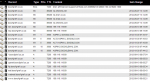
-
Ah, ok cool. Looking at the DNS management in my AfriHost panel, it already has ns1.boxofgrief.co.za and ns2.boxofgrief.co.za with the correct IP... So that actually makes it really simple then. I'll put through my DNS update request for the gecco.org.za domain now quickly and see if they like it. Thanks Chris, you have an uncanny knack for making things sound so simple.
-
Hi JaCEnt, I'm not sure if I can use AfriHost's name servers for this, they don't know anything about the gecco.org.za domain... When I log into my clientzone, I can only add/edit records for my personal domain (boxofgrief.co,za), I can't add other domains to the list. If my idea of running a name server on my box doesn't work out, I'll check on the possibility of managing the gecco.org.za DNS from my clientzone as well. What I would ultimately like (partly because I have a VPS with the required capabilities and partly because I'm a bit of a control freak), is have IS's records point to my own name server (perhaps using ns1.boxofgrief.co.za for example), so I can control DNS for gecco.org.za from there. Currently gecco.org.za is going to a friend's NS (ns1.crc.za.net, ns2.crc.za.net), from which point it's being directed to my VPS's IP address. He has immigrated though and is trying to shut down his server, so I need to get IS to direct requests to my server directly, instead of going through his first. Not sure if that clarifies my reasoning for this request? re:P.S. DOTT was an awesome game, I actually still play it now and then, but Purple has been my avatar of choice for more years than I care to remember.
-
Before you read too far through this post, please note I am very new to the web server management scene, I'm not looking to build a run a website hosting business or anything like that, I'm simply trying to help a local NPO with a website. Good old charitable work and all that.. So, with that out of the way, here is what I currently have to work with... A private VPS with BlueVM (based in USA) with a single static IP address Two domain names registered (more details below) AfriHost handle my domain (boxofgrief), and with my DNS Management control panel in their clientzone I've directed the domain to my VPS, so I've got no issues there. The top level DNS record for the NPO's domain (gecco.org.za) is managed by Internet Solutions (let's just call them 'IS') here in South Africa. Although I don't have any sort of control panel access, it's easy enough to update that, all I need to do is send them an email with the new details (which they validate before updating). However, this is where I'm getting stuck. If I'm not mistaken, I should be able to use the root zone in BIND on my VPS to setup a small name server, add records for the NPO's domain, and then simply get IS to use the name server from my domain. Correct? Before I go requesting changes though, I just want to check that what I want to do can actually be done. If you can help me and need more info first, please let met know.. I'm running Webmin (with VirtualMin) on my server, but I do also have SSH access as well. Anyone feel like helping me out here?
-
Thanks for the detailed response, I'm still learning my way around Joomla's structure, but I do follow what you're saying.. Unfortunately I don't have time to look into this right now (I'm moving house this weekend), but once I've settled into my new place I'll tackle this again and see what comes of it. Hopefully I can do that early next week.
-
As the title suggests, I'm looking for a way to add a new field to articles created with K2 in Joomla. The site I'm working on is using Joomla 2.5.6, and a custom front end theme. If possible, I would like to add the new field (called 'subtitle') into the admin template directly below the default 'title' field. From there I can pull it into the front end template and display the title/subtitle in the various places they're used. Does anybody know offhand how I can accomplish this? Or perhaps have a handy link to a tutorial that covers this? Just for the record, I did find a post here that seems to cover what I need.. But I tried it just now and it didn't seem to work, not sure if I did something wrong or if it simply won't work for the latest versions of Joomla (post is dated April 2011).
-
I hate to nag, but every other forum post or article I've found mention of this problem either goes by ignored completely or gets closed before a solution is found.. And I still haven't had any replies to the question I asked on the WP forum. Anyone got any ideas as to why a custom image size is affecting the built-in image editor...? There are thumbnails that need to be fixed and they're really starting to annoy me now.
-
Ok, it seems the code I added to my theme's functions.php file is causing the problem. Testing locally, if I remove the code and upload an image, the built-in image editor uses the correct image, but with this code included, the image editor uses my custom 400x240px image. The code I'm using is really straight forward: if ( function_exists( 'add_image_size' ) ) { add_image_size( 'homepage-slider', 400, 240, true ); } So, since this code is somehow causing the image editor problem, how should I add my custom image size then?
-
Not really sure how to make my question any more clear though; the image displayed in the image editor in WordPress is not the original image I uploaded. So when I try to crop an image in WordPress, it only lets me crop from my custom image size, instead of from the original file. Unfortunately I can't remove the code for the custom image size (400x240) from the live site, it's used for the images on the home page slider, which is built dynamically using featured images from various pages. I'll have to download the theme and test that locally instead.. I'm pretty busy at work at the moment though, but I'll try that a bit later and see what happens. Thanks.
-
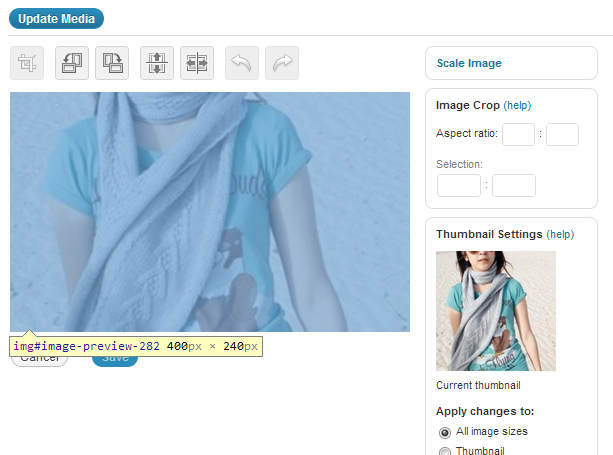
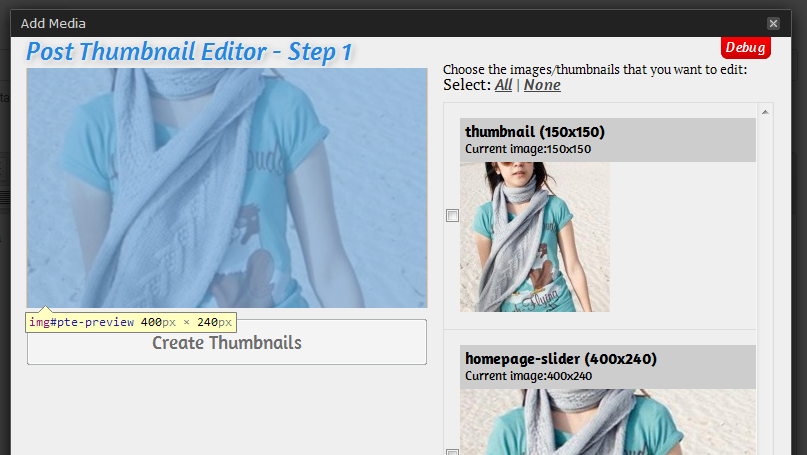
About a month back I asked for help with this problem in the WordPress forums, but unfortunately I've had absolutely no replies yet. Details of the issue can be found here, but I'll summarise the issue here to make it easier. Basically, when I try edit an image (specifically to crop it), the source image in the editor is definitely not the original image that I uploaded. It's using an image size that I set up manually for images used on the home page of the site, but all the code for the editor seems to be pointing to the original image correctly, as far as I can tell anyway. Attached are two snips of the default editor and a plugin called 'Post Thumbnail Editor', as you can see, the 'source image' problem affects both the plugin and the default editor. The blue overlay and image size are from having Chrome Inspector open, to show that it's the actual IMG tag that has that size set. I don't even know where to start looking for the problem, any suggestions on what to try...?


-
Keep in mind just like the <label for="something">, form elements are identified with $_POST[] by their 'id', not their 'name'.. To keep things simple, I normally keep the input name and id the same. In your form you've got: <input type = "text" id = "fullname" class ="detail" name ="fname"/> While in regprocess.php, you've got: $fname = $_POST['fname']; This is looking for a value posted from an element like (take note of 'id'): <input type = "text" id = "fname" class ="detail" name ="fname"/> If you're using Chrome, open Chrome Inspector, select the 'Network' tab, submit the form and check for a POST entry to 'regprocess.php'. In there you'll be able to see the names and values of the entries that are posted when the form is submitted. Edit: On a slightly different note, and not to be rude, but you really don't need so many comments in your code... It actually makes it more difficult to read. Better use of indents and white space would be much easier to follow when you come back to this code in 6 months' time, for example: <div id="formWrap"> <h1>Register</h1> <div id="form"> <form action="regprocess.php" method="post" id="register_form" > <div class="row"> <div class="label"> <label for="username">Username</label> </div> <div class="input"> <input type="text" id="username" class="detail" name="username"/> </div> <div class="context">Only letters and numbers are allowed</div> </div> <div class="row"> <div class="label">Email</div> etc.....
-
For the benefit of anybody else who decides to read through this, I did have a small problem with the last part of the query... While the 'WHEN THEN' section was correctly excluding items in the array with a value of '0' (see the value setting for the options in the form), the variable I imploded to build the 'WHERE' part of the statement was being difficult. Instead of trying to filter out an array in two separate areas, I decided to use unset() to remove items from the array where their value was '0'. I first prepare the array as follows: $newValues = $_POST["appVerID"]; // array([storeAppVersionID] => [fk_ApplicationVersionID]) foreach ($newValues as $key => $value) { if ($value == '0') { unset($newValues[$key]); } } $storeAppVersionIDs = implode(",",array_keys($newValues)); This removes all entries from the array where the value is '0'. After which, I do the following: if (count($newValues) != 0) { // SQL statement $queryString = "UPDATE [AES_StoreAppVersions] SET [fk_ApplicationVersionID] = CASE [storeAppVersionID]\n"; foreach ($newValues as $key => $value) { $queryString .= " WHEN ".$key." THEN ".$value."\n"; } $queryString .= "END WHERE [storeAppVersionID] IN (".$storeAppVersionIDs.")"; // Prepare query $stmt = $dbh->prepare($queryString); } This way, any of the submitted <select> elements that have a value of '0' are not included in the array when $queryString is built. So only items that need to be updated are actually included in the update statement.
-
To be honest, I did consider using foreach, but trying to get a comma in between each of them for the "WHERE [x] IN (1,2,3,4)" section wasn't working for me. I think I've just managed to get it working with a combination of implode() and array_keys() though. To build the query, I've now got: $queryString = "UPDATE [AES_StoreAppVersions] SET [fk_ApplicationVersionID] = CASE [storeAppVersionID]\n"; foreach ($newValues as $key => $value) { if ($value != 0) { $queryString .= "WHEN ".$key." THEN ".$value."\n"; } } $queryString .= "END WHERE [storeAppVersionID] IN (".implode(",",array_keys($newValues)).")"; Which correctly generated the following script (): UPDATE [AES_StoreAppVersions] SET [fk_ApplicationVersionID] = CASE [storeAppVersionID] WHEN 1839 THEN 2 WHEN 4688 THEN 24 WHEN 7537 THEN 30 WHEN 10386 THEN 12 WHEN 13235 THEN 17 END WHERE [storeAppVersionID] IN (1839,4688,7537,10386,13235) I know I didn't take any of the suggestions as they were intended, but in the end I did manage to get it working.
-
Sorry, but I don't really see how that helps me.. If you look through my last reply again, you'll see the values I need for the 'where' clause in my SQL statement are already being passed to 'update.php' in an array when I submit the form, but they are the keys in an associative array. I just need to figure out how to get just the keys listed in string format in order to concatenate that string to the end of my $queryString variable for the SQL query. Here's an example of the associative arrays that I'll be using: array { 1839 => 2 4688 => 24 7537 => 30 10386 => 12 13235 => 17 } The keys (1839, 4688, etc) are [storeAppVersionID], the values (2, 24, etc) are [ApplicationVersionID]. Any idea how I can pull just the keys into a string from this array?
-
I think I've made some good progress, I've been reading up on different ways to use $_POST and I found something very interesting.. I've altered the form to use the following line for creating the <select>s: <select name="appVerID[<?php echo($apps["StoreAppVersionID"]); ?>]"> In the generated form, I now have a form with the following basic structure (typed out, not copied): <select name="appVerID[8]"> <option value="0">--select a new version--</option> <option value="1">New Version 1</option> <option value="2">New Version 2</option> <option value="3">New Version 3</option> </select> <select name="appVerID[12]"> <option value="0">--select a new version--</option> <option value="4">New Version 1</option> <option value="5">New Version 2</option> <option value="6">New Version 3</option> </select> The value="0" options are used to filter out entries that don't need to be updated. Now when the form is submitted, I can put these entries into an array using the following: $newValues = $_POST["appVerID"]; $queryString = "UPDATE [AES_StoreAppVersions] SET [fk_ApplicationVersionID] = CASE [storeAppVersionID]\n"; foreach ($newValues as $key => $value) { if ($value != 0) { $queryString .= "WHEN ".$key." THEN ".$value."\n"; } } $queryString .= "END"; While this in itself will generate a SQL query that will update the values I want, the table currently has nearly 16000 rows, so without limiting the UPDATE statement to only the rows that need to be updated would put unneeded strain on the server... I still need to get the array keys into the 'WHERE [storeAppVersionID] IN (".$arrayKeys.")' line of the query. The closest I've got so far is the following query: UPDATE [AES_StoreAppVersions] SET [fk_ApplicationVersionID] = CASE [storeAppVersionID] WHEN 17 THEN 2 WHEN 2866 THEN 24 END WHERE [storeAppVersionID] IN (1) But it needs to be: UPDATE [AES_StoreAppVersions] SET [fk_ApplicationVersionID] = CASE [storeAppVersionID] WHEN 17 THEN 2 WHEN 2866 THEN 24 END WHERE [storeAppVersionID] IN (17, 2866) I tried using array_keys($newValues), but whether I try it straight, or with print, or with print_r, I can't get it to output as a string to include in $queryString. Any suggestions here? Edit: Sorry Dino, didn't see your reply before I posted. I was trying to do this without having to send yet another data field with the submitted form, I already have all the required data being sent, I just need to catch it correctly in 'update.php'.
-
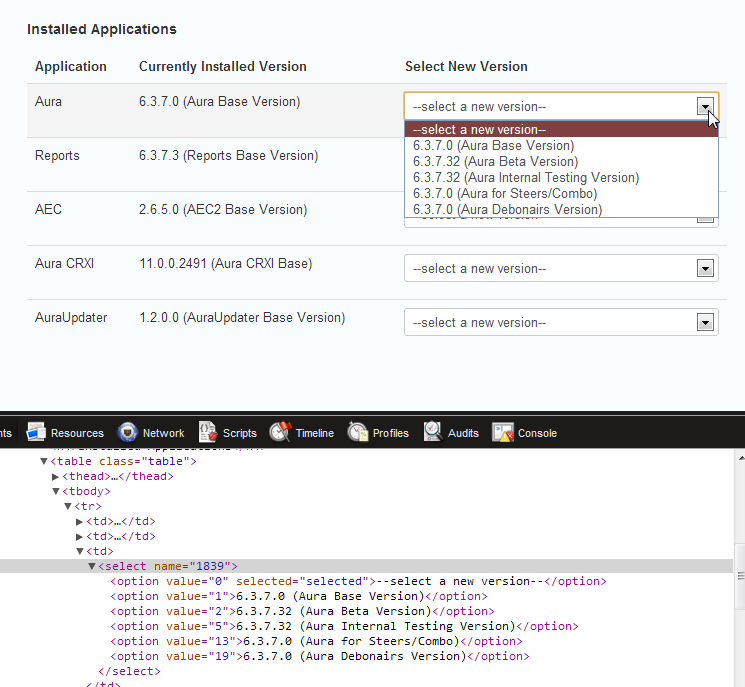
Hi Dino, For the application versions yes, it is a drop down list. Here's a snip of the page when the form loads: Not sure if this makes any difference to the actual problem at hand, but just for your information I'm submitting the forms using JS in order to prevent the page from reloading. <script type="text/javascript"> $("form").submit(function(){ var str = $(this).serialize(); $.post('includes/update.php', str, function(result){ $.jGrowl(result); }) return(false); }); </script> Each form is submitted along with a 'formID' field to identify the source form, at which point a switch statement sets up the SQL query that should be used, and all the code to run the query and return a response is at the end. The problem I'm having is with trying to link the newly selected ApplicationVersionID (but not a unique field in the DB table I'm trying to update) with the current StoreAppVersionID (which is a unique field). But when I try use the StoreAppVersionID as the name for the <select>, I can't find it with checking $_POST[] values from inside update.php... I don't know how to do that if the name of the item is generated dynamically.