Sharetops
Members
-
Joined
-
Last visited
-
I actually use ASP.NET so I've not used PHP for a fair few years, although looking around there appears to be a few. This one http://www.phpcaptcha.org/ looks like it is quite easy to integrate into your web site (see the quickstart guide). Its a case of adding a couple of lines of code to your form processing code file to check that the code that the user entered matches the image that was generated.
-
I believe that its something to do with default margins, borders and padding not being the same across browsers. try explicitly setting them all manually to 0px
-
I suppose it depends on what level of protection you require. We opted for Captcha because it offers a very good level of anti-spam protection. I have a few other suggestions if you dont want to go the Captcha route: 1) Have a preset number of questions (maybe 10-20) with preset one word answers that the user can type, such as what colour is the sea, 2) Display a word with one letter missing that the user has to type in 3) Display an easy maths question such as what is 1+3 4) Display a line and ask the user to guess the angle of the line 5) Display a colour and ask the user to type the name of it (Issues for colour blind people or people using monochrome displays) 6) Play the sound of a number or word and ask the user to type it in (Issues for deaf people or if the user has no access to sound) The only issue with most of the above is that they are quite easy to get around for a computer
-
A couple of things to check: 1) Does the web site run fine using the local server? 2) Does the web site you are uploading to support .NET? 3) Check which version of .NET your provider is using. Many dont use the latest and you may find that you have to downgrade to 2.0 Without knowing what the error was I dont think we can help you much further.
-
I'm not sure that what you are wanting to do is possible as the UserControl gets included into your page class as a data member Can you make the method that you need to access in the container class a static?
-
Take a quick look here, although, I still have many problems with caching using the latest version of Firefox, using private browsing is the only way I seem to be able to fix it.
-
Your existing site looks tidy, although it probably has a fair few too many ads. I like the general layout and colour scheme (Im partial to blue ). I particularly like the menu down the left hand side; looks very cheerful. I do have an issue with switching to the newsletter though. The format seems to change and the page takes around 5 seconds to load making me feel like I've gone to a different web site for a split moment. Your new home page layout is better than your old one by the way.
-
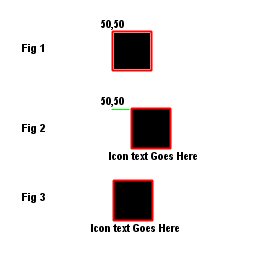
Hi Wickham, Thanks for the suggestion but if you set the position of the div to absolute and remove the width and height information from the div then you will find that it does not work as I explained in my previous examples. The position of the image is moved so that it is centered inside the div and no longer appears at 50,50 Mat
-
In my humble opinion it looks pretty good. I dont lilke red much in web sites but you've done a great job of combining iit with the black and greys. The ads are also well integrated, not sure if thats a good or bad thing though as they are very subtle.
-
unfortunately that wont work for me. I've attached a diagram that shows whats happening: Figure 1 - This is the image inside the div before text is added. Note that it is in the correct place Figure 2 - This is the image with the text added to the div, as you can see the image has been moved so that it is centered in the div (not what I want) Figure 3 - This is what I actually need. I need the image to absolutely remain where I position it and not move, I then need the text to display directly under the image but center justified on the horizontal I could very easily accomplish this if I had static image icon sizes, but ufortunately I wont have this information so I cannot use any kind of static sizing
-
If you've got a fair bit of time and you want to roll your own solution then you would need a backend database that tracks the products and messages that are left by users. You can then query this database and generate markup to display in your products pages. If you've got the stomach for it then I would recommend rolling your own solution and not relying on third party controls / code as you keep complete control over what is displayed and how it is displayed.
-
I would recommend ASP.NET with C# as its more portable and the code is decoupled from the markup. It also ties in really well with Silverlight in case your interested in adding any nice RIA type features. The only down sides are: * Windows servers are a bit more expensive to hire * .NET is a beast with a big learning curve
-
Did they send you the pin number out to your registered address yet? I believe they hold back the payments until you have entered it at the Adsense site. Im still waiting for mine 3 weeks on.
-
Hi Everyone, Just thought I would post this site I came across that lists thousands of web directories along with its PR rating www.web-directories.ws The niche section may be of particular interest Hope it helps Mat
-
Sorry I forgot to add the page tags. What you describe still causes the image to move so that it is no longer at position 50,50> I basically want the image to remain at exactly position 50,50 on screen whilst the text aligns itself to the bottom of the image and centered on the horizontal.