m33ra
Members
-
Joined
-
Last visited
Everything posted by m33ra
-
I just tried to download ModX but no luck. I am on a MAC so perhaps that is the issue?
-
Thank you for the links. I have been on those sites but I cannot see the coding for the menu bars - sorry for my ignorance. I can only see the demo menu but no coding? Thanks for any help.
-
My button on my menu bar needs to have one drop down and another sub drop down button - any ideas what best to use to code this myself please? I am after simplicity please and would happily give up on spry if an alternative html code perhaps for that many sub menus could be found. Thanks and sorry for being a pain
-
Thing is I need to have a template driven site as the menu will change often. CS4 offers that option - when it works With your suggestion of JQuery - can I create a template with it and any future changes to it will be applicable sitewide? Thanks.
-
Both Firefox and IE. Not aware if Javascript is involved
-
Hi all. I am so lost. I cannot move forward with this one http://www.webdesignerforum.co.uk/topic/40205-spry-drop-down-menu-wont-preview-well-locally/page__p__254340#entry254340 Any help would be highly valued.
-
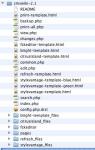
Thanks Andyl. I have downloaded the full CMSWIKI from: http://aplikacja.info/cmswiki/Download The full download above gives the pages I have attached a screenshot of (please see attachment). As mentioned above, my site is HTML. I will have specific members to have access to pages they can edit online - will these members need a login page and if so is this page in the download? Once their login is accepted, they get taken to the WIKI pages I presume right? Bearing that in mind, which page from the template ought I use as member's area? Also, which compulsory pages will I need for online editing to take place? Can I amend the page titles? Sorry I am a bit confused about how CMS works exactly hence the dumb questions again
 Is CMS integrated within Dreamweaver CS4? All I usually see on my screen is HTML and CSS. Pardon my ignoranceA search box like the one at the top of the page to the right.Hi there.. I would like your expertise in putting a search box inside my site. Thanks for your helpCreated a template and named it index.dwt. The spry drop down menu works fine when tested locally. I then created a child page from this template and named it index.html. When I test the page locally the spry menu does not work at all. When tested live it works fine. Why is it that I cannot test this page locally please? I really need to be able to test it locally often with every change I make to it. Another site I created, it was never an issue to be unable to test locally so I am really stuck here as to what I am doing wrong.Hi all. I am hoping to have a page for members to be able to upload photos and amend the comments attached to their photos. I need a log in button that allows new members to register or current members to just log in. I have no experience of doing this and would appreciate expertise from you guys on here please. Thanks. Using: Dreamweaver CS4. Edit/Delete MessageI take it this question has not yet been answered? I am also looking for a search box for within my website. Thanks for any help on this.I perhaps ought to have mentioned that what I have pasted above is from Dreamweaver and the page is not on the net, so the validator is of no use to me for the time being Wickham - but thanks for the input.<!DOCTYPE html PUBLIC "-//W3C//DTD XHTML 1.0 Transitional//EN" "http://www.w3.org/TR/xhtml1/DTD/xhtml1-transitional.dtd"> <html xmlns="http://www.w3.org/1999/xhtml"> <!-- DW6 --> <head> <!-- Copyright 2005 Macromedia, Inc. All rights reserved. --> <title>DERBY HINDU MANDIR GEETA BHAWAN</title> <meta http-equiv="Content-Type" content="text/html; charset=ISO-8859-1" /> <link rel="stylesheet" href="mm_spa.css" type="text/css" /> <meta name="keywords" content="Derby Hindu Temple, Derby Hindu Mandir, Derby, Hindu, Mandir, UK, England, Shiva, Sharma, Derbyshire, Pear Tree, pear tree, indian, Hinduism, bhajan, bhojan, Hanuman, Chalisa, krishna, yoga, language classes, charities, hall hire, weddings, hanuman, geeta bhawan, geeta, bhawan, meera shah, meera, shah"> <meta name="description" content="Welcome to Derby Hindu Mandir, Pear Tree Road, Derby, DE23 6QA, Derbyshire, UK"> <meta http-equiv="Content-Type" content="text/html; charset=iso-8859-1"> <style type="text/css"> <!-- #middle { position:absolute; width:475px; height:277px; z-index:1; left: 398px; top: 139px; } .style6 { color: #FFFFFF; font-family: Verdana, Arial, Helvetica, sans-serif; } .style7 { font-size: 16px; color: #FEAD01; font-weight: bold; } .style8 {color: #FFFF00; } .style9 { font-size: 24px; color: #FF9C6C; font-style: italic; font-weight: bold; } #Layer1 { position:absolute; width:108px; height:115px; z-index:2; left: 439px; top: 6px; } #Layer2 { position:absolute; width:221px; height:42px; z-index:2; left: -209px; top: 375px; } .style12 {color: #00FF33; font-size: xx-small; font-family: Verdana, Arial, Helvetica, sans-serif; } #blackborder { position:absolute; width:8px; height:510px; z-index:2; left: 784px; top: 135px; background-color: #220103; } #orangeborder { position:absolute; width:9px; height:374px; z-index:3; left: 787px; top: 137px; background-color: #FF080E; } #Layer3 { position:absolute; width:791px; height:106px; z-index:4; left: 2px; top: 643px; visibility: visible; } #Layer4 { position:absolute; width:200px; height:115px; z-index:5; } #god1 { position:absolute; width:120px; height:326px; z-index:5; left: 662px; top: 137px; } body { background-color: #FFFFFF; } a:hover { color: #0FF; } #thought { position:absolute; width:106px; height:26px; z-index:6; left: -10px; top: 441px; } #Layer6 { position:absolute; width:200px; height:115px; z-index:34; left: -198px; top: 136px; } #Layer7 { position:absolute; width:144px; height:115px; z-index:35; left: 0px; top: 139px; } #Layer8 { position:absolute; width:200px; height:50px; z-index:36; left: 581px; top: 354px; } #Layer9 { position:absolute; width:94px; height:34px; z-index:37; left: 143px; top: 551px; } .style13 { color: #00FF00; font-weight: bold; } #Layer10 { position:absolute; width:73px; height:62px; z-index:37; left: 172px; top: 229px; } .style15 {color: #00FF00; font-weight: bold; font-size: 12px; } #Layer11 { position:absolute; width:88px; height:66px; z-index:38; left: 164px; top: 328px; } a:link { color: #FF0; } .style17 {color: #00FFFF; font-weight: bold; font-size: 12px; } #SEO { position:absolute; width:177px; height:31px; z-index:39; left: 614px; top: 585px; } .style18 {color: #FF0000} body,td,th { font-size: 11px; color: #FF0; position: absolute; left: auto; top: auto; right: auto; bottom: auto; clip: rect(auto,auto,auto,auto); } a { font-weight: bold; font-size: 11px; } #apDiv1 { position:absolute; width:146px; height:48px; z-index:39; left: 321px; top: -49px; } #apDiv2 { position:absolute; width:200px; height:97px; z-index:39; left: 577px; top: 160px; } #apDiv3 { position:absolute; width:56px; height:37px; z-index:1; left: -287px; top: -2px; } #apDiv4 { position:absolute; width:367px; height:115px; z-index:40; left: 198px; top: 156px; } #apDiv5 { position:absolute; width:200px; height:115px; z-index:41; left: 168px; top: 436px; } #apDiv6 { position:absolute; width:200px; height:115px; z-index:41; left: 578px; top: 465px; } #apDiv7 { position:absolute; width:46px; height:43px; z-index:42; left: 149px; top: -41px; } #apDiv8 { position:absolute; width:155px; height:115px; z-index:42; left: 216px; top: 490px; } #apDiv9 { position:absolute; width:116; height:23px; z-index:43; left: 161px; top: 430px; } #apDiv10 { position:absolute; width:200px; height:115px; z-index:44; left: 179px; top: 426px; } #apDiv11 { position:absolute; width:153px; height:115px; z-index:43; left: -1px; top: 133px; } .style131 {color: #00FF00; font-weight: bold; font-size: 13px; } #Layer { position:absolute; width:77px; height:72px; z-index:37; left: 360px; top: 682px; } --> </style> </head> <body background="mm_bg_red.gif" text="#FFFF00" link="#00FFFF" alink="#00FFFF"> <div id="Layer8"><a href="http://www.radhakrishnamandir.net/templates/rhuk_solarflare_ii/images/~krishnamandir.swf" target="_blank"><img src="cooltext94026544.gif" alt="Virtual Aarti" width="192" height="50" border="0" /></a></div> <div id="blackborder"></div> <div id="Layer3"> <table width="792" height="20" border="0" cellpadding="0" cellspacing="0"> <tr bgcolor="#FF080E"> <td width="180"> </td> <td colspan="4" height="19" id="dateformat"> </td> </tr> </table> <div align="center"><span class="style12">Website designed & maintained by </span> <div id="apDiv1"><a href="http://www.facebook.com/home.php?#/group.php?gid=59024898813" target="_blank"><img src="find_us_on_facebook_badge.gif" width="144" height="44" alt="FACEBOOK" /></a></div> </div> <div align="center"><span class="style12"> Meera Lynn (formerly Shah)<br /> Copywright owned by Derby Hindu Mandir</span></div> <div align="right"><br /> </div> </div> <div id="Layer5" style="position: absolute; left: 5px; top: -19px; width: 140px; height: 16px; z-index: 1; background: #220103;HOME <div id="Layer6"></div> <div id="Layer30" style="position: absolute; left: 0px; top: 109px; width: 793px; height: 1px; z-index: 26; background: #FF9900"><img src="mm_spacer.gif" alt="" width="1" height="1" border="0" /></div> <table border="0" cellspacing="0" cellpadding="0"> <tr bgcolor="#220103"> <td width="35" colspan="2" rowspan="2" nowrap="nowrap"><img src="mm_spa_photo1.jpg" alt="Header image" width="215" height="109" border="0" /></td> <td width="308" height="55" nowrap="nowrap" id="logo" valign="bottom">DERBY HINDU MANDIR</td> <td width="176" rowspan="2"><img src="mm_spa_photo2.jpg" alt="header image 2" width="176" height="108" border="0" /></td> <td width="94" rowspan="2"> </td> </tr> <tr bgcolor="#220103"> <td height="54" nowrap="nowrap" id="tagline" valign="top">Pear Tree Road, Derby </td> </tr> <tr bgcolor="#FF9900"> <td colspan="5"><img src="mm_spacer.gif" alt="" width="1" height="1" border="0" /></td> </tr> <tr bgcolor="#FF080E"> <td colspan="5"><img src="mm_spacer.gif" alt="" width="1" height="2" border="0" /></td> </tr> <tr bgcolor="#FF9900"> <td colspan="5"><img src="mm_spacer.gif" alt="" width="1" height="1" border="0" /></td> </tr> <tr bgcolor="#FF080E"> <td width="180"> </td> <td colspan="4" height="18" id="dateformat">|| HOME||</td> </tr> <tr bgcolor="#FF9900"> <td colspan="5"><img src="mm_spacer.gif" alt="" width="1" height="1" border="0" /></td> </tr> <tr bgcolor="#FF080E"> <td colspan="5"><img src="mm_spacer.gif" alt="" width="1" height="2" border="0" /></td> </tr> <tr bgcolor="#FF9900"> <td colspan="5"><img src="mm_spacer.gif" alt="" width="1" height="1" border="0" /></td> </tr> </table> <div id="apDiv2"><a href="hallhire.html"><img src="wedding3.jpg" width="200" height="133" alt="Wedding" /></a><br /> </div> <div id="apDiv4"> <table width="358" border="1" align="right"> <tr> <th width="348" height="22" valign="top" scope="col"><p align="left" class="subHeader style6"><span class="pageName">OM NAMAHA SHIVA</span><br /> </p> <p align="left" class="subHeader style6"> You are most welcomed to the Derby Hindu Mandir website. </p> <p align="left" class="subHeader style6"> </p> <p align="left" class="pageName"><u>Thought of the day:</u></p> <p align="left" class="subHeader style6">Illness is not cured by saying the word "medicine," but by taking medicine. Enlightenment is not achieved by repeating the word "God" but by directly experiencing God.</p> <p align="left" class="subHeader style6"><span class="pageName"><strong><br /> Jai Shri Krishna</strong></span></p> <p align="left" class="style17"> </p></th> </tr> </table> </div> <div id="apDiv6"><a href="language.html"><img src="hindi.jpg" width="200" height="133" alt="Hindi Class Award 2008" /></a> <div id="apDiv7"><img src="wow_2.gif" width="60" height="44" /></div> </div> <table width="144" border="1" align="left" cellpadding="0" cellspacing="0" bgcolor="#220103" id="navigation bar"> <tr> <td bgcolor="#FB1315"></td> </tr> <tr> <td valign="top"><iframe src="http://free.timeanddate.com/clock/i1jd07uw/n136/tluk/fn4/fs11/fcfff/tcf00/pcff0/ftb/tt0/tm1/ts1" frameborder="0" width="158" height="17"></iframe> <br /> <img src="derbyhindutemplebanner2" width="144" height="36" align="middle" /></td> </tr> <tr> <td width="146"><a href="index.html" target="_self" class="style8">HOME</a></td> </tr> <tr> <td><a href="trustees.html" target="_self" class="style8"><u> TRUSTEES</u></a></td> </tr> <tr> <td><a href="openinghours.html" class="style8">OPENING HOURS</a></td> </tr> <tr> <td><a href="aartitimetable.html" target="_self" class="style8"> AARTI TIMETABLE</a></td> </tr> <tr> <td><a href="events.html" target="_self" class="style8">EVENTS AT THE MANDIR</a></td> </tr> <tr> <td><a href="language.html" target="_self" class="style8">LANGUAGE CLASSES</a></td> </tr> <tr> <td><a href="yogaclasses.html" target="_self" class="style8">YOGA CLASSES </a></td> </tr> <tr> <td><strong><a href="hallhire.html" target="_self" class="style8">HALL HIRE/MARRIAGE</a></strong></td> </tr> <tr> <td><strong>NEWSLETTER</strong></td> </tr> <tr> <td><a href="announcements.html" class="style8"><strong>ANNOUNCEMENTS</strong></a></td> </tr> <tr> <td><a href="kidspage.html" class="style8">KIDS PAGE </a></td> </tr> <tr> <td><strong><a href="photoalbum.html" class="style8">PHOTO ALBUM</a></strong></td> </tr> <tr> <td><strong><a href="hinducalendar.html" target="_self" class="style8">HINDU CALENDAR</a></strong></td> </tr> <tr> <td><a href="thoughtoftheday.html" target="_self" class="style8">THOUGHT OF THE DAY</a></td> </tr> <tr> <td><a href="guestbook.html" class="style8">GUESTBOOK</a></td> </tr> <tr> <td><a href="contact.html" class="style8">CONTACT US</a></td> </tr> <tr> <td><strong><a href="ukculturalevents.html" class="style8">UK CULTURAL EVENTS</a></strong></td> </tr> <tr> <td nowrap="nowrap"><strong><a href="localbusinesssupport.html" class="style8">LOCAL BUSINESS SUPPORT </a></strong></td> </tr> <tr> <td><strong><a href="links.html" target="_blank" class="style8">LINKS</a></strong></td> </tr> <tr> <td align="center" valign="middle"><div align="left"> <strong>RECENT EVENTS</strong><a href="photoalbum.html?action=view¤t=5a8cc37d.pbw" target="_blank"><img src="durgamaagarbaa1" alt="Durgaa Maa Na Garba April 2009" width="100" height="116" border="2" align="absmiddle" /></a></div></td> </tr> </table> <div id="Layer"> <p><img src="updated.gif" alt="" width="60" height="40" align="middle" /><br /> <span class="style131"> 30 July 2009 </span></p> <p align="left"> </p> <p align="left"> </p> </div> </body> </html>Here is some background information: I am using Dreamweaver CS4 as my only web design software. I have created a site of 20 pages. The navigation is inside a table which itself is inside an AP Div layer (as it makes for better maneuverability around the page). I have used this same navigation table across all 20 pages. The table looks fine within Dreamweaver but when previewed in the browser all the rows are squashed together and appear to be beneath the last row. Therefore only the last row of the 20 rows of that table is visible. I do not know what settings I have made to cause this as it was working fine not so long ago. I do recall tweeking something but I cannot reverse it now. Help please! Will post codes up below. Many thanks.Hi all. I am new to your great set up here and hope some of your knowledge will come my way over the course of my better web design ambition.