Cloudy
Members
-
Joined
-
Last visited
Everything posted by Cloudy
-
Hi guys, I've created a menu in CSS and two items display just fine but one seems out of place. I can't figure out why, here's a picture: And my css for that portion is: p:first-letter{ text-transform: uppercase; } p { color: #424242; font-family: "Adobe Caslon Pro", "Hoefler Text", Georgia, Garamond, Times, serif; letter-spacing:0.1em; text-align:center; margin: 40px auto; text-transform: lowercase; line-height: 145%; font-size: 14pt; font-variant: small-caps; } TWITTER HEADLINE font-family: "Adobe Caslon Pro", "Hoefler Text", Georgia, Garamond, Times, serif; font-style: italic; color: #424242; } a { font-style: normal; font-variant: small-caps; text-decoration: none; color: #afafaf; font-size: 14px; } .desc { position:absolute; right:280px; top:0px; } .pic{ float:left; margin:0 15px 15px 0; border:5px solid white; width:200px; height:250px; } .pic a{ width:200px; height:250px; text-indent:-99999px; display:block; } div.nomargin{ margin-right:0px; } #container{ width:890px; margin:20px auto; } .contact { position:absolute; right:0px; top:0px; } .about { position:absolute; right:140px; top:0px; } Yes, it's messy but I just want it to work for now! Any ideas anyone? Thanks!

-
HM Customs and Revenue tend to have very reliable records when it comes to new businesses
-
Great set of links! You've filled my weekend
-
Just for a quick comparison of Mint and Ubuntu, I think that Mint have been very clever in packaging the distro with all the media codecs you'll probably need (flash, libdvdcss, good, bad, and ugly sets, etc) and has a few nifty tools but is still a bit shaky compared to Ubuntu. Ubuntu is slightly less pretty (though this is due to change in the upcoming 9.10 release) but highly stable and in my opinion, much nicer than Mint due to this. All the software is the same minus a few Mint-specific tools (Mint Backup for example) which aren't all that needed anyway. The menu system is also a bit nicer than the applet that Mint have coded for their release. Personally I'd just grab 9.04 (www.ubuntu.com) and customise it a little. I run it on my lappy with Gnome-Do in the "Docky" mode (making it like the dock bar seen in OS X), a nice wallpaper and the standard menu. Very quick on a Dell D420 and is capable of running Dreamweaver 8 and comes packaged with Pidgin (though I use emesene over this) and all the other tools you need. Everything else is just a "sudo apt-get install" away! Anyway, thought I'd butt in and let you know -Cloudy
-
Hey tbmo, welcome to the community! Everyone seems friendly here so I should imagine that you shall fit right in! -Cloudy
-
Thanks for taking a look at it DesignByNinjas! I'm at work right now but will try patching it up when I get home! I take it was just the margin that was causing errors? -Cloudy
-
Thanks for the nice welcome guys! Good to see that the forum is so active and friendly
-
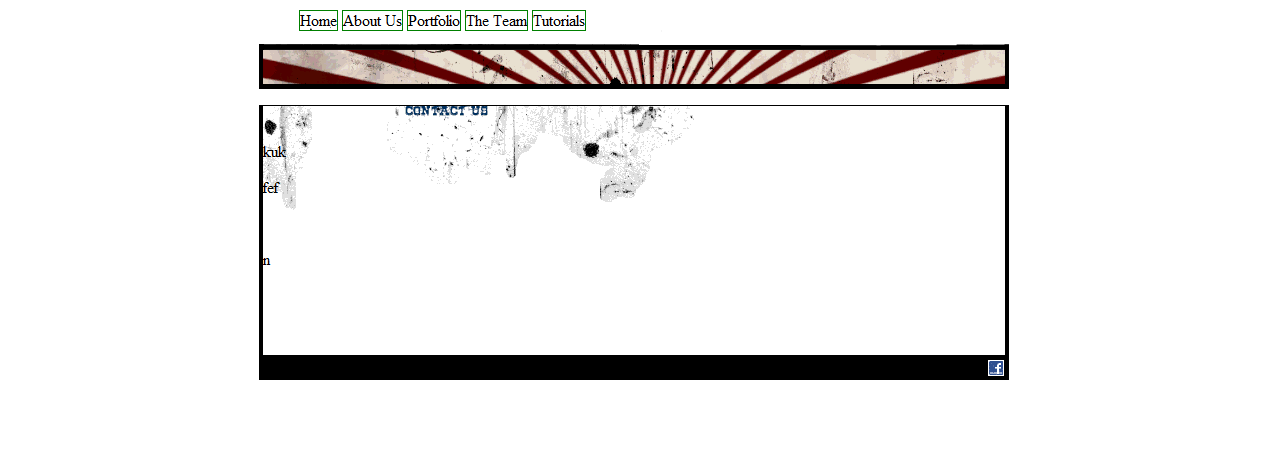
Hi again, I have resolved most of my CSS issues but one remains! This time, the footer appears separated from the content box and I have no idea why. The issue isn't there in Firefox provided I don't put too much content on the page. In IE it appears automatically. You can check the site out here: http://www.clansman-code.co.uk or if you are too lazy, a screenshot is here: CSS is as follows: #pagewrapper { width:750px; margin:0 auto; } #header { width:750px; height:79px; background:url(../img/header-bg.png) no-repeat #fff; } #maintitle { text-indent:-999px; background:url(../img/clansman-code-logo.gif) no-repeat; height:34px; width:322px; float:left; margin:0 0 0 10px; } #navbar.ul { float:right; height:30px; width:auto; } #navbar li { display:inline; border:1px solid green; height:30px; } .navbar-home { background: height:30px; text-indent:-999px; } .navbar-about-us { background:url(../extra/Clansman%20Code_files/about.gif) height:30px; text-indent:-999px; } .navbar-portfolio { background:url(../extra/Clansman%20Code_files/portfolio.gif) height:30px; text-indent:-999px; } .navbar-the-team { background:url(../extra/Clansman%20Code_files/the-team.gif) height:30px; text-indent:-999px; } .navbar-tutorials { background:url(../extra/Clansman%20Code_files/tutorials.gif) height:30px; text-indent:-999px; } #content { width:742px; background-color:#ccc; min-height:250px; height:Sauto; overflow:visible; background:url(../img/content-bg.gif) top center no-repeat; border-left:4px solid #000; border-right:4px solid #000; } #footer { float:right; height:15px; width:740px; text-align:right; padding:5px; background-color:#000; } #footer img { border:0px; } and my html is as follows: <!DOCTYPE html PUBLIC "-//W3C//DTD XHTML 1.0 Strict//EN" "http://www.w3.org/TR/xhtml1/DTD/xhtml1-strict.dtd"> <html xmlns="http://www.w3.org/1999/xhtml"> <head> <title>Some keywords here - Clansman Code</title> <meta http-equiv="Content-Type" content="text/html; charset=utf-8" /> <meta http-equiv="Content-Language" content="en-GB" /> <meta name="author" content="Clansman Code" /> <meta name="resource-type" content="document" /> <meta name="robots" content="index, follow, archive" /> <meta name="googlebot" content="archive" /> <meta name="description" content="Clansman Code stuff" /> <meta name="keywords" content="I,like,keywords" /> <link rel="stylesheet" type="text/css" media="screen" href="css/index.css" /> <link rel="stylesheet" type="text/css" media="screen" href="css/accessibility.css" /> </head> <body> <div id="pagewrapper"> <div id="header"> <a href="/" title="Some keywords here - Clansman Code"><h1 id="maintitle">Clansman Code</h1></a> <ul id="navbar"> <li class="navbar-home">Home</li> <li class="navbar-about-us">About Us</li> <li class="navbar-portfolio">Portfolio</li> <li class="navbar-the-team">The Team</li> <li class="navbar-tutorials">Tutorials</li> </ul> </div> <div id="content"> </div> <div id="footer"> <a href="http://www.facebook.com/"><img src="img/facebook-icon.gif" alt="Find us on Facebook" /></a></div> </div> </body> </html> Sorry to have to ask this but I still have a lot to learn when it comes to CSS. Thanks! -Cloudy
-
Hi ReaperWD, I'm currently putting together my portfolio website as I've been more interested in doing work for clients than getting my own stuff up! Hopefully my site shall be up this week , I'll PM you the link? If you fancy grabbing a pint Traxor then I'll show you the pubs in Edinburgh that don't rip off Fringe tourists! I may ask you for a few tips on web design though! Just PM me at some point and I'll give you my number! -Cloudy
-
Hi all, My pseudonym is Cloudy due to the often grey and dull weather found here in Edinburgh. I work part-time in a computer shop in Procurement and am waiting for my exam results to find out if I have matched my offer for studying Law at Edinburgh University. I like PHP and other web technologies so have decided to create my own business offering development services to companies. Already I have had contracts with a photography website and a student nights company. I have joined WDF in order to be more in touch with the community and to further my skills. It seems that this forum is excellent! Hope to see you around, Cloudy
-
I'm new to CSS and would love to see a copy of the book! Send via PM? -Cloudy
-
Hmm it fits together perfectly when I remove all the <p>s. Anth Winter, I'll PM you the site details!
-
Hey, Taking the height:79px; out of the CSS means that the header disappears and the content box and top bar are pulled close together. Leaving it in does mean that the heights are equal! Thanks for bringing those mistakes to my attention, I've corrected them and added a "width:auto;" to the float. And yes, everything is showing itself in the correct position which is somewhat encouraging! Do you think grouping the header image and the content box in one div may solve the issue? -Cloudy
-
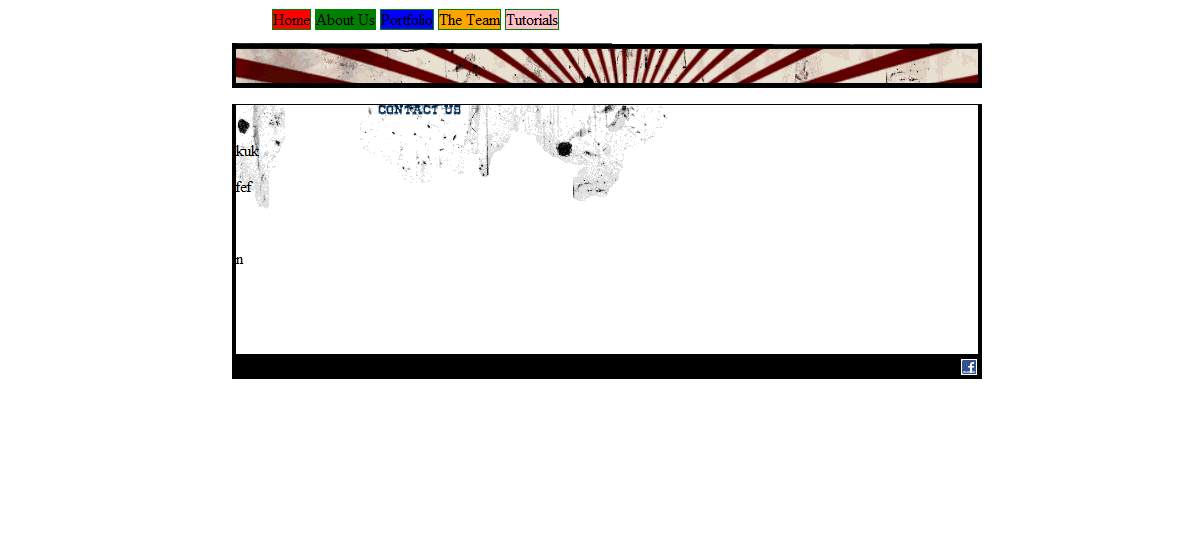
That makes me feel a bit better, I feel like I'm being a complete idiot with this! The red striped image is called header-bg.png, the coloured backgrounds appear as follows: So it should really be working...

-
Sorry, I should have thought to give a fuller view! I've attached the file below, ignore the weirdly placed navbar, it's because I haven't got the logo designed yet! Thanks for being so patient! -Cloudy
-
Sure! HTML: <!DOCTYPE html PUBLIC "-//W3C//DTD XHTML 1.0 Strict//EN" "http://www.w3.org/TR/xhtml1/DTD/xhtml1-strict.dtd"> <html xmlns="http://www.w3.org/1999/xhtml"> <head> <title>Test</title> <meta http-equiv="Content-Type" content="text/html; charset=utf-8" /> <meta http-equiv="Content-Language" content="en-GB" /> <meta name="author" content="El Interneto" /> <meta name="resource-type" content="document" /> <meta name="robots" content="index, follow, archive" /> <meta name="googlebot" content="archive" /> <meta name="description" content="Ooh content!" /> <meta name="keywords" content="I,like,keywords" /> <link rel="stylesheet" type="text/css" media="screen" href="css/index.css" /> <link rel="stylesheet" type="text/css" media="screen" href="css/accessibility.css" /> </head> <body> <div id="pagewrapper"> <div id="header"> <a href="/" title="Testing"><h1 id="maintitle">Test</h1></a> <ul id="navbar"> <li class="navbar-home">Home</li> <li class="navbar-about-us">About Us</li> <li class="navbar-portfolio">Portfolio</li> <li class="navbar-the-team">The Team</li> <li class="navbar-tutorials">Tutorials</li> </ul> </div> <div id="content"> <p> </p> <p>kuk</p> <p>fef</p> <p> </p> <p>n</p> </div> <div id="footer"> <a href="http://www.facebook.com/"><img src="img/facebook-icon.gif" alt="Find us on Facebook" /></a></div> </div> </body> </html> CSS: #pagewrapper { width:750px; margin:0 auto; } #header { width:750px; height:79px; background:url(../img/header-bg.png) no-repeat #fff; } #maintitle { text-indent:-999px; background:url(../img/logo.gif) no-repeat; height:34px; width:322px; float:left; margin:0 0 0 10px; } #navbar.ul { float:right; height:30px; } #navbar li { display:inline; border:1px solid green; height:30px; } .navbar-home { background:url(../img/home.gif); height:30px; text-indent:-999px; } .navbar-about-us { list-style-image:url(../img/about-us.gif); height:30px; text-indent:-999px; } .navbar-portfolio { list-style-image:url(../img/portfolio.gif); height:30px; text-indent:-999px; } .navbar-the-team { list-style-image:url(../img/the-team.gif); height:30px; text-indent:-999px; } .navbar-tutorials { list-style-image:url(../img/tutorials.gif); height:30px; text-indent:-999px; } #content { width:742px; background-color:#ccc; min-height:250px; height::auto; overflow:visible; background:url(../img/content-bg.gif) top center no-repeat; border-left:4px solid #000; border-right:4px solid #000; } #footer { float:right; height:15px; width:740px; text-align:right; padding:5px; background-color:#000; } #footer img { border:0px; } Thanks for the help so far! -Cloudy
-
Hi there, I'm not amazing with CSS (learning!) and have run into a bit of a problem. Two actually. 1) I can't get the header and site content divs to stick together. There always seems to be this gap between them: 2) The menu images are really messed up due to dodgy CSS. I can't figure out how to get it to display in a list. CSS is as below: #navbar li { display:inline; border:1px solid green; height:30px; } .navbar-home { list-style-image:url(../img/home.gif); height:30px; text-indent:-999px; } .navbar-about-us { list-style-image:url(../img/about-us.gif); height:30px; text-indent:-999px; } .navbar-portfolio { list-style-image:url(../img/portfolio.gif); height:30px; text-indent:-999px; } .navbar-the-team { list-style-image:url(../img/the-team.gif); height:30px; text-indent:-999px; } .navbar-tutorials { list-style-image:url(../img/tutorials.gif); height:30px; text-indent:-999px; } Any CSS gurus want to give a newbie a hand? Thanks! -Cloudy

-
Ok I can understand how to make the checkbox delete function work. I guess editing would just be a modified version of the submission form but using update rather than insert? As for the colours, how would I link to the posting to a variable storing the colour? I understand the pseudocode that you showed me but as for implementing the full thing, well I'm a bit hesitant. I'll be flicking through php.net and a couple of books tonight - hopefully I shall create something vaguely decent! -Cloudy
-
Hi there guys, I've been lurking here a while but as I have a question, I may as well use the forums properly! Basically I'm sick of the way we handle returns at work. We fill everything out onto a spreadsheet and then set the colour to indicate its status (red = closed, green = in progress, etc etc). So I'm planning on writing a basic PHP tool to allow everything to be entered on a web page and then saved to DB and displayed again. In theory it's pretty simple, 12 input fields that are posted to the db and a form with a DB query to display everything. I'm not amazing at PHP but I think I could handle it. My difficulty comes with the prettier features such as changing the colours and ordering the lists by progress. The status of jobs need to be changed and the colour along with it. The display page would need to have an option "Order by open returns", "Order by closed returns", "Order by In Progress". In addition to this I would need to code in a delete function in case we cancelled a return and an edit function if we needed to add details. It is with these areas that I am stuck. Does anyone have any advice? Thanks guys! -Cloudy