syrus69
Members
-
Joined
-
Last visited
-
-
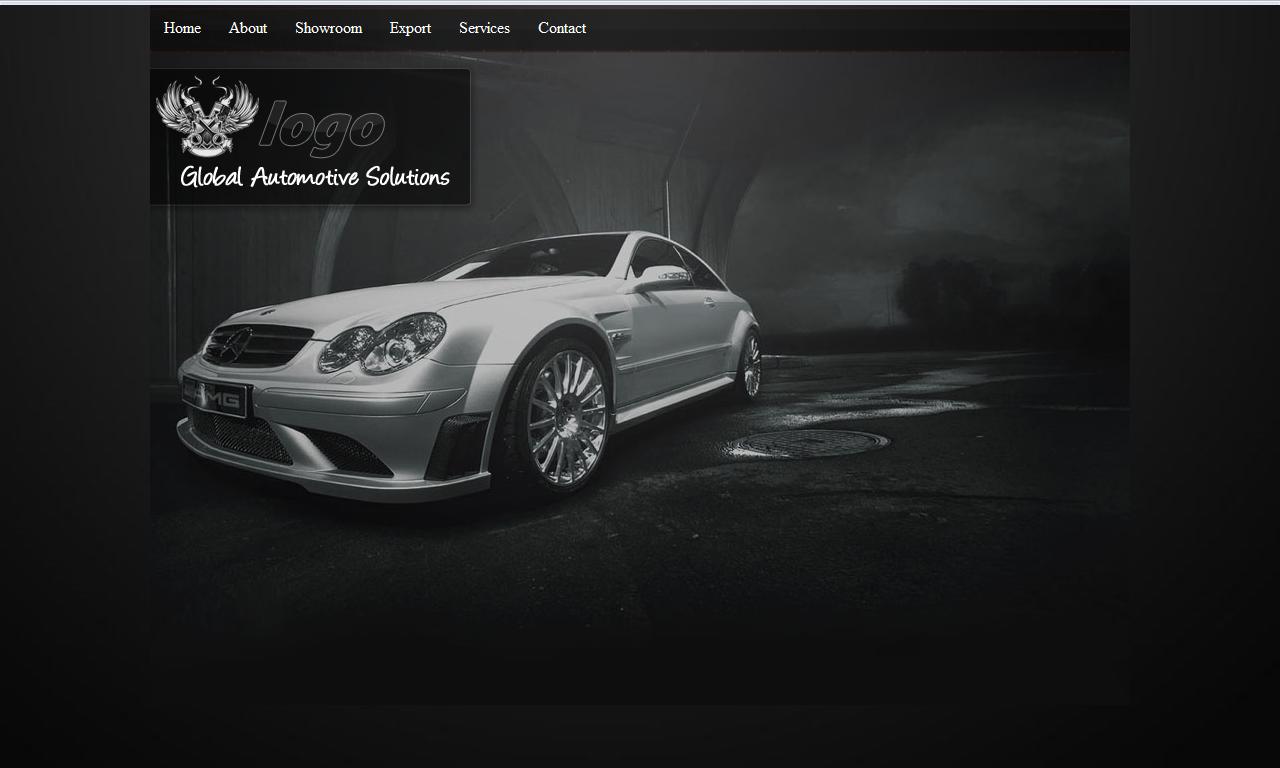
okay thanks guys for all your imputs and links, i have been messing around with this little layout/mockup, looked good while i was designing it and seems to have lost something, (its just a basic layout and background for a home page) still need to add loads of things, but would appreciate your feedback thus far

-
thanks for the quick reply guys. Mooncat you made some really good points about dark websites and i will try and implement those when designing this one, i will be sure to post up some pics of my progress. i am trying to balance a corporate yet fun racing feel (was thinking of using some vectors) also with regards to the background, rather than a solid colour or gradient, what do you guys think about me using some sort of race track/road texture... also has any one got any good links to textures? cheers syrus
-
was thinking, have not designed any dark websites as of late, well since my recent client has asked for one but trying to get back into designing a dark website seem to be a bit stuck, the website in question is a performance car and parts website, so looking around for some inspiration
-
thanks Taylor for the input screens are not complete yet will be adding images to the blank screen, (the website is still being designed) yep the recently launched will be a section of the sidebar where projects are shown. with reference to the image text, will be using siFR or cufon to replace the text unless some one knows of any other method footer is going to get a make over, just stuck for ideas at the mo cheers guys will update this thread as changes have been made Syrus Lev, Cheers mate, just sent you an email
-
Thanks Lev for the input, yeah i was thinking of heading down the grunge retro look, but decided on the clean corporate look instead, but unfortunately have not had time to change the logo yet but will be next on my list BTW Lev, i got your pm and you should have an email from tomorrow, just been very busy getting new contracts speak soon syrus
-
thanks for the input guys, yeah the footer defo needs changing will look into it and change it, will also look at optimising the images, The £150 offer is only valid for a limited time (normally priced at £349) includes custom made CMS custom website design 12 months free hosting and domain name
-
have spent the afternoon putting together a base for my new website, but kinda of stuck in a creative block, any feed back would be great, The content is all paragraphs i have pulled from the web, just to fill the gaps, here is the site Test site
-
hiya, i have marked the things you need to change, you need to change them with your new site settings and locations, also is your new site on the same host? as when migrating some of my clients sites to different hosts, things could get problematic due to different PHP and Mysql versions hope this helps Syrus <?php define('HTTP_SERVER', 'http://custombats.co.uk'); <--//change this--> define('HTTP_CATALOG_SERVER', 'http://custombats.co.uk'); <--//change this--> define('HTTPS_CATALOG_SERVER', 'http://custombats.co.uk'); <--//change this--> define('ENABLE_SSL_CATALOG', 'false'); define('DIR_FS_DOCUMENT_ROOT', '/home/customb3/public_html/shop/'); <--//change this--> define('DIR_WS_ADMIN', '/shop/admin/'); define('DIR_FS_ADMIN', '/home/customb3/public_html/shop/admin/'); <--//change this--> define('DIR_WS_CATALOG', '/shop/'); define('DIR_FS_CATALOG', '/home/customb3/public_html/shop/'); <--//change this--> define('DIR_WS_IMAGES', 'images/'); define('DIR_WS_ICONS', DIR_WS_IMAGES . 'icons/'); define('DIR_WS_CATALOG_IMAGES', DIR_WS_CATALOG . 'images/'); define('DIR_WS_INCLUDES', 'includes/'); define('DIR_WS_BOXES', DIR_WS_INCLUDES . 'boxes/'); define('DIR_WS_FUNCTIONS', DIR_WS_INCLUDES . 'functions/'); define('DIR_WS_CLASSES', DIR_WS_INCLUDES . 'classes/'); define('DIR_WS_MODULES', DIR_WS_INCLUDES . 'modules/'); define('DIR_WS_LANGUAGES', DIR_WS_INCLUDES . 'languages/'); define('DIR_WS_CATALOG_LANGUAGES', DIR_WS_CATALOG . 'includes/languages/'); define('DIR_FS_CATALOG_LANGUAGES', DIR_FS_CATALOG . 'includes/languages/'); define('DIR_FS_CATALOG_IMAGES', DIR_FS_CATALOG . 'images/'); define('DIR_FS_CATALOG_MODULES', DIR_FS_CATALOG . 'includes/modules/'); define('DIR_FS_BACKUP', DIR_FS_ADMIN . 'backups/'); define('DB_SERVER', 'localhost'); define('DB_SERVER_USERNAME', 'xxxx'); define('DB_SERVER_PASSWORD', 'xxxxx'); define('DB_DATABASE', 'xxxx'); define('USE_PCONNECT', 'false'); define('STORE_SESSIONS', 'mysql'); ?>
-
loxley, thanks for the input will have at look at those issues and get them sorted The Images are down to the submitters, do you think i should take screen shots of my own ? cheers
-
hi guys, just want some feedback on my css gallery, the site is still new (under a month old) and i will be upgrading the design all feedback welcome here is the link foralltosee.co.uk
-
i have just recently been working on a clients site which is powered by ensepro they asked me just to redesign their site and from my first impression ensepro is a real contender for the future of ecommerce did not get a chance to browse through all the software but from what i saw i liked have worked with osc site prior and will be recommending ensepro to future clients whom are seeking ecommerce
-
took another look with fresh eyes and think i have it sorted now ! hopefully ? if it looks okay in ie 6 or 7 please let me know thanks
-
hi guys having a little hickup with my layout in IE looks okay in FF here is a link the parent div has a relative style and the boxes in that div are positioned absolute here is a segment of the css #blurbs{ /* parent div*/ position:relative; margin: 10px auto; width:978px; height: 215px; } #contentControl{ position:absolute; width:310px; height:214px; background-image:url(../images/contentcontrol.png); background-repeat: no-repeat; background-position: center top; float:left; } #contentControl .inner{ position:relative; top:70px; left:160px; width: 120px; height: 80px; text-align:left; font-size:14px; } #bookingManager{ position:absolute; display:block; width:310px; height:214px; left:334px; background-image:url(../images/bookingmanager.png); background-repeat: no-repeat; background-position: center top; } #bookingManager .inner{ position:relative; top:70px; left:160px; width: 120px; height: 80px; text-align:left; font-size:14px; } #menuManager{ position:absolute; width:310px; height:214px; left:668px; background-image:url(../images/menumanager.png); background-repeat: no-repeat; background-position: center top; display:inline: } #menuManager .inner{ position:relative; top:70px; left:160px; width: 120px; height: 80px; text-align:left; font-size:14px; } #contentControl a.more{ position:absolute; top:160px; left:210px; background:url(../images/more.png) no-repeat 0 0; width:85px; height:35px; line-height:24px; overflow:hidden; margin:0; text-indent:-9000px; outline:none; } #contentControl a.more:hover{ background-position:0 -35px; } #bookingManager a.more{ position:absolute; top:160px; left:210px; background:url(../images/more.png) no-repeat 0 0; width:85px; height:35px; line-height:24px; overflow:hidden; margin:0; text-indent:-9000px; outline:none; } #bookingManager a.more:hover{ background-position:0 -35px; } #menuManager a.more{ position:absolute; top:160px; left:210px; background:url(../images/more.png) no-repeat 0 0; width:85px; height:35px; line-height:24px; overflow:hidden; margin:0; text-indent:-9000px; outline:none; } #menuManager a.more:hover{ background-position:0 -35px; } #bookingManager h1{ display:none; } #contentControl h1{ display:none; } #menuManager h1{ display:none; } thanks in advanced
-
seemed okay to me