


GusGF
Members
-
Joined
-
Last visited
-
I should have said I'm using the auto-save feature in VS Code and to save my sanity I've turned this off which is doing the job. But is there another or better way?
-
......and I've no idea what the hell I'm doing. 😬 Okay let me explain I'm going back over a Wordpress course I did on Udemy where the now AWOL instructor implemented a automated workflow for us to use whereby anytime we typed PHP or JS the webpage would reload automatically, and it's working, actually it's working too fast for me. This time round for some reason it's driving me bonkers cos when I'm writing my code the page is recompiled before I can even finish typing a complete line of code! A parse error is then generated and I have to manually refresh the page when I'm done to clear the error as it doesn't get automatically refreshed due to the error, which sort of defeats the purpose of the automation. The automated workflow was basically implemented by doing the following: I've installed 2 files package.json & webpack.config.js into my theme folder Then I ran npm run devFast Then by changing functions.php we got the WP theme to use the Node generated assets. Node serves up all of the JavaScript and CSS within one single bundled file, bundled.js I've no idea where to start in asking for help with this so thought I'd start here in this forum. As I say any help with this would be appreciated even if you just signpost me. I'm also using Local by Flywheel to host the site locally and this has been a great tool. webpack.config.js

-
-
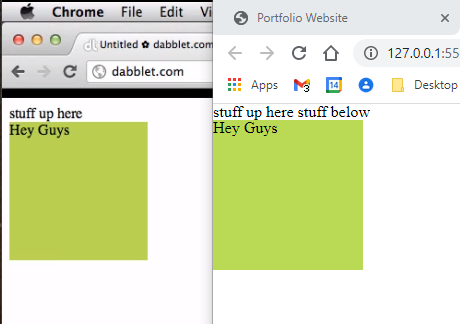
I looked at the video you posted the link to in your reply and I've heard of that site before and it does look good so it's stuck in my bookmarks. One thing I noted from the video @5:02 Even though I had the same code as Chris I had a different outcome, not a biggy. Image on the right is mine, using p tags sorted it out.
-
Okay I missed that condition i.e. that a parent (as there can be many) must not have position static if it is to contain the absolute child element otherwise it uses the HTML element. An omission (W3Schools left this little caveat out too) to catch out the unsuspecting and throw them into absolute confusion. I also made the error of not setting/uncommenting the absolute element position helper properties i.e. top, bottom, right, left, in my example. After reading your reply and using the helper properties it's now making sense.
-
I'm going back to basics and doing a HTML/CSS course on Udemy and conveniently enough the tutor is avoiding the whole 'position' property thing and only touching on it when needed. I thought well lets have a closer look at this cos if I'm doing web design I need to understand this stuff. So I've looked at w3schools and freecodecamp and still can't find a good tutorial explaining how the position property works. When I try some of the examples it doesn't seem to follow how they've explained it works. 'Position' property has got to be one of the most confusing topics I've ever come across. I'm asking, no begging is there a clear, concise and thorough resource which deals with this topic properly without confusing the student and is actually correct? Or should I just go and bang my head off of the nearest wall? This is one of the examples which doesn't seem to follow the explanation given: According to freecodecamp an absolutely positioned element is relative to its parent. An element with position: absolute is removed from the normal document flow. It is positioned automatically to the starting point (top-left corner) of its parent element. If it doesn’t have any parent elements, then the initial document <html> will be its parent. The coordinates of an absolute positioned element are relative to its parent if the parent also has a non-static position. Otherwise, helper properties position the element relative to the initial <html>. See code below 'removed from the normal document flow' okay what exactly does this mean? Does this mean all parents to this element are no longer parents because that's what it's behaving like? When I run the example below the blue box falls outside the 'container' parent I gave it, Why? The blue box is also not positioned automatically to the starting point (top-left corner) of its parent element or any parent for that matter, as it was explained it should be. What am I missing here? <!DOCTYPE html> <html> <head> <link rel="stylesheet" href="/cssreset-meyers.css"> <style> .box-orange { position: static; background: orange; width: 100px; height: 100px; } .box-blue { background: lightskyblue; height: 100px; width: 100px; position: absolute; /* top: 0px; left: 0px; */ } .container { border: black solid 1px; position: static; } </style> </head> <body> <div class="box-orange"></div> <div class="container"> <div class="box-orange"></div> <div class="box-blue"></div> </div> </body> </html>
-
-
-
-
This is a bit of a shot in the dark but maybe someone out there has an answer. I'm doing a course on Wordpress and we are using Axios instead of using JQuery in our JS. An example statement is below. const response = await axios.post(universityData.siteURL + "/wp-json/wp/v2/note/", ourNewPost) All works fine but what I don't understand is the structure / content of 'response'. How do I interrogate 'response'? I had assumed for instance if I did console.log('Axios response: ' + response.data) I'd get a nicely laid out JSON like OO output in the Chrome console panel. But all I see is: Axios response: [object Object] I can do console.log(response.data.title.raw) and I get something sensible back. But how else do I see all the content/structure of response so I can access other parts of response?
-
Okay strangely no plugin for VS Code but there are plenty of alternatives.
-
Thank you and yes I'm aware of this. It was only really to practice building menus with html/css that I was using the piece of code. But thank you for pointing this out
-
-
Told you I was a numpty 🤣
-
Below in the CSS the second selector contains attributes for margin. The first 'margin' attribute doesn't work while the second which does the same thing as far as I can see does. The only difference is it's more explicit. This is simple stuff I know but it's doing my head in as to why either won't work. A second question about posting in these forums. When I post a code extract like below the cursor gets stuck inside the code block and I want to post a second block or just type below. How do I get the cursor out of the code block to type outside of it? I know I can post several empty lines and then just paste in the middle but there must be a proper way. div ul { display: flex; } div ul li { width: 150px; height: 20px; background-color: darkseagreen; margin; 0px 10px; margin-right: 10px; } <!DOCTYPE html> <html lang="en"> <head> <meta charset="UTF-8"> <meta name="viewport" content="width=device-width, initial-scale=1.0"> <title>Document</title> <link rel="stylesheet" href="EricMeyer.css"> <link rel="stylesheet" href="style.css"> </head> <body> <div> <ul> <li><a href="#">One</a></li> <li><a href="#">Two</a></li> <li><a href="#">Three</a></li> </ul> </div> </body> </html>
-
A bit late I know but thank you rbrtsmith & Jack for great advice and this is a thread i will be coming back to read up on. Thanks again
-
Wow lots of good information there, won't pretend I fully understand but I do get the gist. I can clearly see the point of removing elements of the WP dashboard and probably the closest I've come to that is rewriting default queries for custom posts. I've learnt a bit about JSON and setting up custom URLs for populating search overlays. All interesting stuff, the WP jigsaw is slowly falling into place. Thanks
-
Is Webpack the way to go or is Gulp still a viable alternative?
-
I'm not sure why you are telling me this, AGAIN??? Somehow you've assumed I'm developing/debugging a live site when I clearly stated in the first line of my very first posting: I'm here to learn from you guys as I've no experience commercially with WP. I'm using gulp & VSC to develop and compile frontend javascript. So I'm curious how do you manage your front end javascript when your developing, how are you checking it?

