Skip to content
View in the app

A better way to browse. Learn more.

Web Designer Forum

A full-screen app on your home screen with push notifications, badges and more.

To install this app on iOS and iPadOS
  1. Tap the Share icon in Safari
  2. Scroll the menu and tap Add to Home Screen.
  3. Tap Add in the top-right corner.
To install this app on Android
  1. Tap the 3-dot menu (⋮) in the top-right corner of the browser.
  2. Tap Add to Home screen or Install app.
  3. Confirm by tapping Install.

jojeangel

Members
  • Joined

  • Last visited

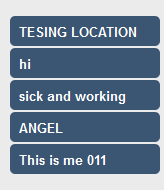
  1. Good Morning People , I am having weried problem which really effect my design my layout ...etc , the issue is that I choose the following #3A5673 , in deskto browser the color as i want , when in say desktop browser i mean over windows machine and Mac Machine over Firefox , Safari , Chrome , IE , ...etc as shown in below picture However, the website when i am using it over IPAD the colour totally shade diffrently which is the below I am using ASP.NET 4.5 over server IIS7 , 2008 R 2 So , any body knows how to fixt that and make them with same shade , I know it look silly request but is important to me , so thank you in advance , and help

Account

Navigation

Search

Search

Configure browser push notifications

Chrome (Android)
  1. Tap the lock icon next to the address bar.
  2. Tap Permissions → Notifications.
  3. Adjust your preference.
Chrome (Desktop)
  1. Click the padlock icon in the address bar.
  2. Select Site settings.
  3. Find Notifications and adjust your preference.