


pedRs
Members
-
Joined
-
Last visited
-
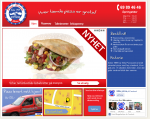
Hi guys, I'm really stuck here. I'm no experienced web designer as you probably can see, and I'm currently out of ideas on what I can do to make this front page look good. There is something with it that makes it look unfinished. Please BE hard, I really need to hear it! I'd like to see comments on everything - general layout - color scheme(note that I haven't made the logo) - font usage - what can I do with that sidebar to make it look fresh? It has two purposes; the top unordered list tells pros about the company like fast delivery, delivery area, every ten pizza for free etc.. The second part tells some company history. - anything to mention about the menu? - rotating banner in the middle? Please feel free to give me some feedback and inspiration!
-
Great tips! Thank you
-
Thank you Wickham! This saved my day The problem with IE not displaying the logo also disappeared. The URL works fine even without any changes. Thanks again!
-
-
Hi guys, I'm new to everything around CSS and HTML. I've been dealing with this project at school where we learn some basic css. Mainly I have two issues: 1. Somehow the ID " #nav a:hover,a:active" is affecting all links on my page. Whats wrong? 2. My logo is not displaying in IE, but displays properly in chrome and firefox. What is it that IE don't like and are there any workarounds? (3. Any other things to point out? Maybe you have some tips for solving problems better.) CSS: http://pastebin.com/QEErD7Cz HTML: http://pastebin.com/sJ69yrD1 I'm also uploading all the code files for those of you who prefer that. Looking forward to some feedback. Cheers! project-files.zip

