jackniksmith18
Members
-
Joined
-
Last visited
-
Hi D, If you look at my markup, above (just posted) my code is all inside a container called floattop ? is that what you mean? On changing my positioning to absolute my bar went a little crazy and everything has disappeared? Any ideas what ive done wrong haha ?
-
Sorry for the late reply, was away from my computer yesterday. Anyway here is my dodgy markup lol thanks again. <!-- Start Top Fixed Banner --> <div id="floattop"> <div id="topsearch"> <?php get_search_form(); ?> </div> <div class="login"> <?php wp_loginout(); ?> </div> <div class="login"> <?php wp_register('', ''); ?> </div> <div class="topsocial"> <img src="<?php bloginfo('template_directory'); ?>/library/images/fb.png" title="" alt="" /> </div> <div class="topsocial"> <img src="<?php bloginfo('template_directory'); ?>/library/images/gplus.png" title="" alt="" /> </div> <div class="topsocial"> <img src="<?php bloginfo('template_directory'); ?>/library/images/twitter.png" title="" alt="" /> </div> <div class="topsocial"> <img src="<?php bloginfo('template_directory'); ?>/library/images/youtube.png" title="" alt="" /> </div> <div id="homeicon"> <img src="<?php bloginfo('template_directory'); ?>/library/images/homeicon.png" title="" alt="" /> </div> <div id="nav2" class="nav"> <?php wp_nav_menu( array('menu' => 'topmenu' )); ?> </div> </div> <!-- End Top Fixed Banner -->
-
Hi guys, Im adding a top bar to my site, basically it will be a fixed bar that has just a few functions so the user doesn't have to scroll right back to the top all time. Its going okay but I've hit a bit of a problem. basically when the browser window is resized all the divs on the bar seem to overlap my search box. This usually wouldn't be a problem but my site resizes itself on iphones,ipads etc so this needs to look right. Ive tried all sorts of random code, adding float, clear tags etc but cannot figure this out. As you can proberly see from the code below, CSS isn't my strong point. PICTURES OF PROBLEM Before After CSS #floattop { background-color: black; width: 100%; height: 39px; z-index: 1000; position:fixed; left:0px; right:0px; overflow:hidden; } #topsearch { width:30%; margin: 0px auto; min-width:200px; max-width:300px; position:relative; } .topsocial { position:relative; top:-30px; float:right; margin-right:2px; padding-right:5px; margin-left:2px; } #homeicon { float:left; position:relative; top:-36px; } .login { position:relative; top:-32px; float:right; vertical-align:middle; margin-right:2px; margin-left:2px; color:white; margin-right:4px; } .login a { color:white; } #topnav { display:block; float:left; margin: 0 auto; height:42px; position:relative; top:-20px; } Any help would be greatly appreciated. Thanks in advance Jack
-
Hi Guys, Ive just began using a new theme called Lighty. Its a great theme and uses a headline slider. The headline slider uses categories to display its content, ive told the slider to display only items in the review category. But heres my problem... I have a custom post type called Reviews, I would like to get all mt latest reviews to display onto the headline slider. Even when I told my custom post type to use the categories taxonomy and selected the reviews category for my cpt they still dont display. Does anybody have any ideas on how I could merge my custom post type categories and post categories into one ? Thanks in advance. Jack
-
Hi, Ive just been doing a little mock of a new design I thought of. Its still basic but any improvements/thoughts would be helpful. Is it good or bad? Thanks Jack
-
Hey thanks for the reply, the name really came around after brainstorming what we would be doing and who we are. So obviously we review and write articles about games, films etc. Hence CRITICS and UNKNOWN because we are new at what we do, Unknown to the world. Thats really were the name come about. Ive been toying with a few new ideas today such as a question mark and globe in-between, but still nothing is setting in place. Any ideas ?? Much Appreciated Jack
-
Hi guys, I've been running an entertainment site for the last four months (critics unknown), it's been going quite well so I've decided to give my basic logo a change. But that's we're it stops; trying to come up with a striking but professional logo is harder than I thought. I have tried playing on the word critics and unknown, tried a variation of fonts, colours you name it but still nothing. My question is to you professionals out there, we're would you start, can you come up with any quick examples or just any pointers for a novice graphic designer such as myself. Thanks in advance, will appreciate any advice. Jack www.criticsunknown.com
-
Hi, thanks for the reply, I somehow fixed my own problem not how lol , creating a child theme? sorry would you be able to explain to me what you mean by this or how I would go about creating one. Thanks alot to you all for helping me out here Jack
-
Hi mate sorry no live link atm, I will try and get one sorted ASAP, firebug? never used it, will look into it now thanks
-
Hi guys, okay i have managed to create the front-page.php as described earlier, but have ran into another problem and for the life of me cant figure out what I have done wrong. On the home page the footer and article div's are fine all in place etc. But on every other page they are all off center? Were could this mistake of happened? Thanks Jack
-
-
-
Hi, sorry for the confusion I did start with just a barebones/skeleton theme. Cheers for the advice Jack
-
Hi mate cheers for that awesome advice just what I was looking for.
-
Hi, if i was to create a home.php how exactly would I go about linking it? im a complete novice in PHP. Thanks Jack
-
Hi thanks mate, im going to take a look at drupal in the morning see if its any easier
-
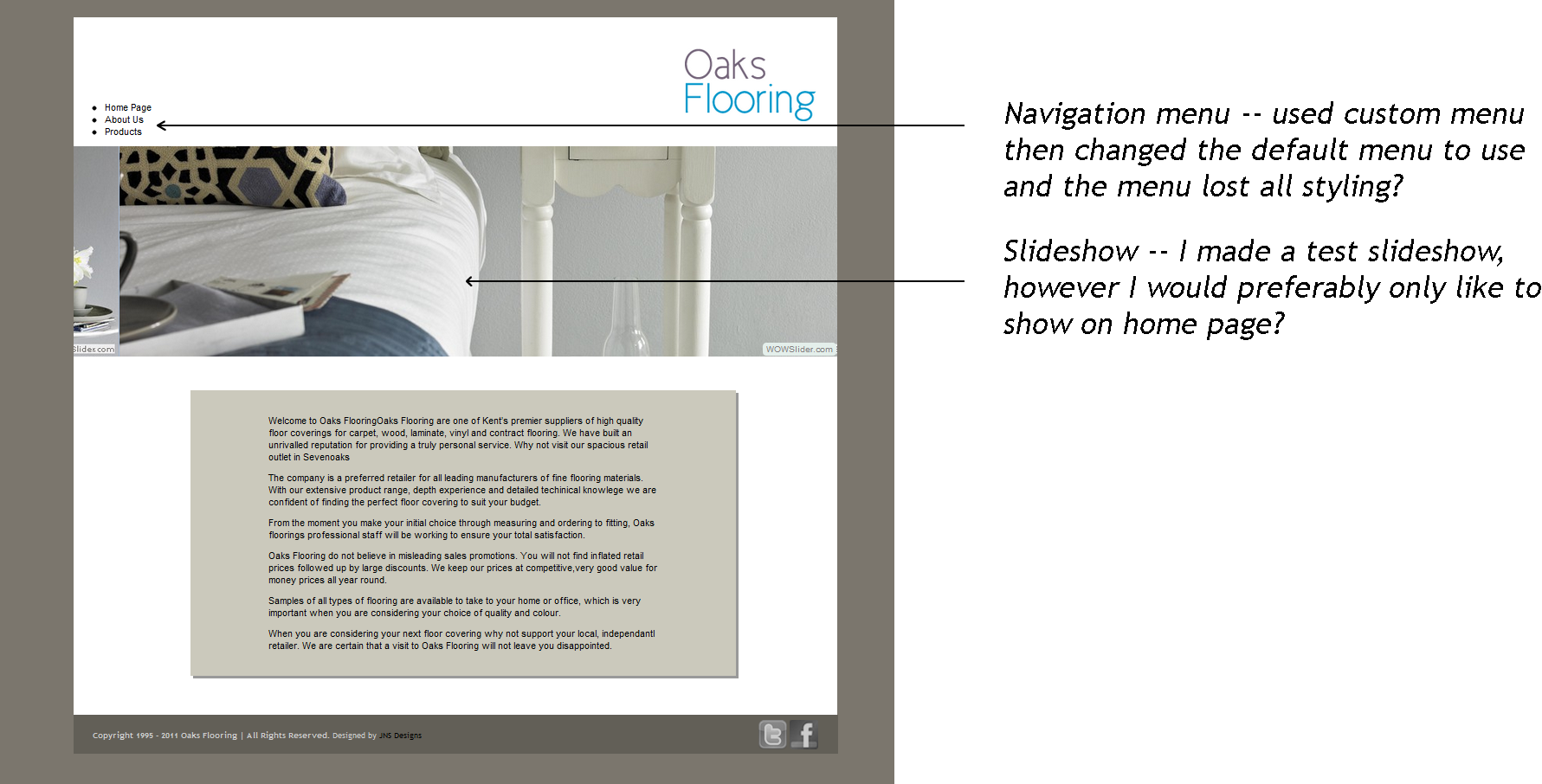
Hi guys, I have recently been tasked to redesign my dads very old website, he wanted to be able to change things without having to call me every time. So I decided to go with wordpress. I have very little experience with PHP so you can imagine I was a little lost, so far I have managed to do okay but have come stuck. Can you Help 1. Being a website and not a blog, I would like to be able to have a homepage with a slideshow just on that page and no others. I have managed to add a slideshow but obviously its stuck to all pages. 2. When using a Wordpress custom menu, it loses all styling that was applied to the original navigation. HEADER.PHP <!DOCTYPE html> <html <?php language_attributes(); ?>> <head> <meta charset="<?php bloginfo( 'charset' ); ?>" /> <title> <?php wp_title (); ?> </title> <link rel="profile" href="http://gmpg.org/xfn/11" /> <link rel="stylesheet" type="text/css" media="all" href="<?php bloginfo( 'stylesheet_url' ); ?>" /> <link rel="pingback" href="<?php bloginfo( 'pingback_url' ); ?>" /> <?php /* * Add this to support sites with sites with threaded comments enabled. */ if ( is_singular() && get_option( 'thread_comments' ) ) wp_enqueue_script( 'comment-reply' ); wp_head(); wp_get_archives('type=monthly&format=link'); ?> </head> <body> <div id="wrapper"> <div id="header"> <a href="<?php bloginfo('url'); ?>/"><img src="<?php bloginfo('template_directory'); ?>/images/oakslogo.png" border="0" alt="XXX" /></a> </div> <?php wp_nav_menu( array('menu' => 'Navigation' )); ?> STYLE.CSS /* Theme Name: OaksFlooring Theme URI: http://oaksflooring.co.uk Description: CMS theme for wordpress Author: Jack Smith Author URI: Version: 1.0 */ body{ font-family: Arial, Helvetica, Georgia, Sans-serif; font-size: 12px; background: #7B766D; color: #000000; } a:link, a:visited{ text-decoration: none; color: #000000; } a:hover{ color: #5f5f5f; } h1 { font-size: 54px; } h3 { font-size: 24px; } #wrapper { margin-top:10px; width:980px; height:auto; background-color:#FFF; margin:auto; } #header { position:relative; left:785px; top:40px; } #navigation{ position:relative; top:-122px; background-color:#625F57; width:940px; height:32px; text-align:center; font-family:trebuchet ms; text-decoration:none; font-size:13px; display:block; } .nav ul{ list-style:none; } .nav li{ position:relative; text-align:center; display:inline-block; } .nav a{ display:block; text-decoration:none; color:#fff; padding:0 15px 10px 0; font-size:13px; font-weight:bold; } .nav ul ul{ display:none; position:absolute; top:100%; left:0; float:left; z-index:99999; background: #212121; } .nav ul ul ul{ top: 30%; left:100%; background: #343434; } .nav ul ul a{ height:auto; line-height:1em; padding:10px; width:130px; } .nav li:hover > a,.nav ul ul:hover > a{ color:#ccc; } .nav ul li:hover > ul{ display:block; } #blog{ width:700px; height:auto; background-color:#CBC9BC; position:relative; right:-50px; box-shadow:4px 4px #999; } #blogwrap { padding-top:20px; padding-left:100px; padding-right:100px; padding-bottom:20px; font-size: 12px; } #slideshow { width:980px; height:271px; background-color:#b0c4de; } .sidebar{ float: left; width: 200px; margin: 0 0 0 10px; font-size: 14px; list-style: none; } #footer{ clear: both; width:982px; height:50px; background-color:#625F57; position:relative; top:50px; left:-101px; font-size:10px; } #footertext{ padding-top:10px; font-size:10px; font-family:trebuchet ms; position:relative; right:-25px; color:#CCCCCC; line-height: 12px; } #footersocial { position:relative; left:855px; top:-35px; } .gravatar{ float: right; } .comments-template{ margin: 10px 0 0; padding: 30px 0 0; } .comments-template ol{ margin: 0; padding: 0 0 15px; list-style: none; } .comments-template ol li{ margin: 10px 0 0; line-height: 18px; padding: 0 0 10px; border-bottom: 1px solid #ccc; } .comments-template textarea{ width: 500px; } .wp-caption { background-color: #f3f3f3; border: 1px solid #ddd; -khtml-border-radius: 3px; -moz-border-radius: 3px; -webkit-border-radius: 3px; border-radius: 3px; /* optional rounded corners for browsers that support it */ margin: 10px; padding-top: 4px; text-align: center; } .wp-caption img { border: 0 none; margin: 0; padding: 0; } .wp-caption p.wp-caption-text { font-size: 11px; line-height: 17px; margin: 0; padding: 0 4px 5px; } PAGE.PHP <?php get_header(); ?> <div id="slideshow"> <?php wowslider(3); ?> </div> <div id="blogwrap"> <div id="blog"> <?php if(have_posts()) : ?><?php while(have_posts()) : the_post(); ?> <div class="post"> <h3><a href="<?php the_permalink(); ?>"></a></h3> <div id="blogwrap"> <div class="entry"> <?php the_content(); ?> </div> </div> </div> <?php endwhile; ?> <div class="navigation"> <?php posts_nav_link(); ?> </div> <?php endif; ?> </div> <?php get_sidebar(); ?> <?php get_footer(); ?> Any advice you guys could give me would be most appreciated. I have attached a images to show what im talking about Thanks alot Jack