PumpkinHead
Members
-
Joined
-
Last visited
-
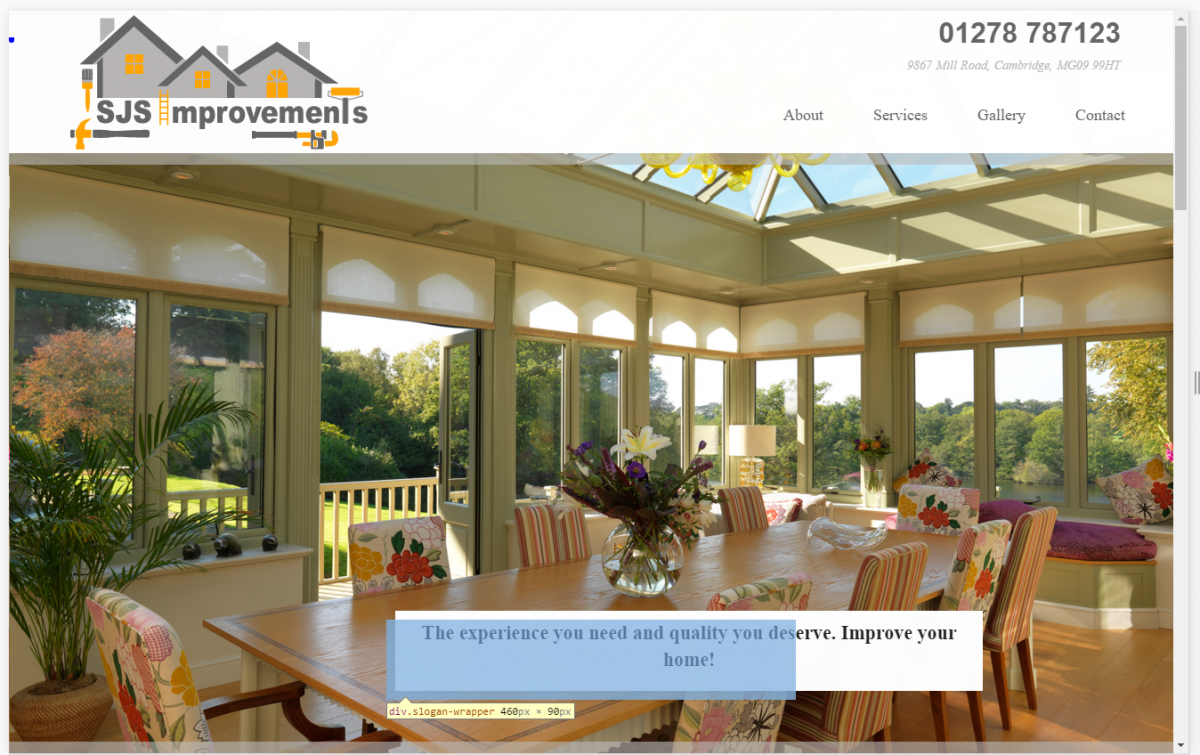
Hello all Iv been making a website and have a fixed bar at the top of the site: pic1 .navBar position: fixed height: 160px width: 100% background: image: url(/assets/img/trans1.png) z-index: 999 -webkit-transition-duration: 5s /* Safari */ transition-duration: 5s &:after display: block position: absolute content: '' height: 13px width: 100% background: url(/assets/img/trans2.png) repeat bottom: -13px left: 0 .barContaner height: 160px width: 1200px margin: 0 auto font: family: "Times New Roman", Times, serif the problem is that when I scroll down I have some images and the images hover over the bar it is only these 4 images. I have a hover layer on top of the so they are set to position: relative and have played with the z-index but does not help pic2 shows the problem. section#gallery background: #ccc .box .proImg position: relative background: #ffa500 height: 100% img width: 100% span height: 100% width: 100% color: red position: absolute top: 0px left: 0px &:hover display: block background-color: #FFA500 opacity: 0.4 .textBox background-color: #FFA500 color: #000 padding: 10px 20px margin: 0 0 40px 0 a color: white font: size: 22px family: "Times New Roman", Times, serif &:hover color: black p color: white .imgHover position: absolute top: 0px left: 0px and the html navbar .navBar .barContaner .logo .houses.houses1 .roof.roof1 .windows.windows1 .left.left1 .center.center1 .right.right1 .brush .hammer.hammer1 .ladder.ladder1 .roller.roller1 .text.text1 .wench.wench1 .info a(href="tel:01278 787123") 01278 787123 br span 9867 Mill Road, Cambridge, MG09 99HT nav ul li: a(href="#about").about About li: a(href="#services").services Services li: a(href="#gallery").gallery Gallery li: a(href="#contact").contact Contact and the hoving images section#gallery .row .contaner .col.col--8-of-12 h3 Our projects .col.col--4-of-12 h3 Our Rewiews .col.col--4-of-12 .box .proImg img(src="http://baconmockup.com/400/400" alt="g1") span .textBox a Dolore consectetur anim lorem. p consequat ad pastrami nisi cow eu alcatra. .box .proImg img(src="http://baconmockup.com/400/400") span .textBox a Dolore consectetur anim lorem. p consequat ad pastrami nisi cow eu alcatra. .col.col--4-of-12 .box .proImg img(src="http://baconmockup.com/400/400") span .textBox a Dolore consectetur anim lorem. p consequat ad pastrami nisi cow eu alcatra. .box .proImg img(src="http://baconmockup.com/400/400") span .textBox a Dolore consectetur anim lorem. p consequat ad pastrami nisi cow eu alcatra. .col.col--4-of-12 p Swine ea venison laborum turkey cupim. Tri-tip quis consequat anim cupim hamburger. Sunt ground round voluptate turkey landjaeger labore sed ut cupidatat consequat tenderloin proident eiusmod spare ribs laboris. Incididunt ullamco cillum meatball fugiat bresaola. p Prosciutto non tenderloin, dolor cupidatat alcatra nisi anim minim shank biltong meatloaf ball tip. Nulla non esse, flank chicken alcatra tenderloin consectetur deserunt. Landjaeger short loin pariatur, do reprehenderit andouille fatback pork kielbasa beef irure ut dolor veniam shank. Sint voluptate tail dolore fatback tenderloin. #contact .row .contaner .col.col--12-of-12 p Prosciutto non tenderloin, dolor cupidatat alcatra nisi anim minim shank biltong meatloaf ball tip. Nulla non esse, flank chicken alcatra tenderloin consectetur deserunt. Landjaeger short loin pariatur, do reprehenderit andouille fatback pork kielbasa beef irure ut dolor veniam shank. Sint voluptate tail dolore fatback tenderloin. Thanks hope some one can


-
Hello I have been making themein WordPress using the JetPack plugin and the Full Background Manage plugin. Don't think this problem is down to the JetPack though. Problem: Have got different Backgound images on all pages. The image is cented with background: cover; and works in google chrome developer tool set at all mobiles sizes but when load on Galexy S3 and S6 the image dose not cover and the height is not filling the page. Link: http://test.antoinettekaruna.com/test/ Click on mobile site like if loaded full site Code part,1: From Full Background Manager Plugin in <Head> cant edit it . <style type="text/css" id="custom-background-css"> body.custom-background { background-image:url(path.name.jpg.); background-repeat:no-repeat; background-position:top left; background-attachment:fixed } </style> Code Part,2: this is my custom CSS (JetPeck Custom CSS) has got messy because iv been playing around a lot SORRY. body.custom-background { background-position: center top; background-size: cover; -webkit-background-size: cover; -o-background-size: cover; } @media screen and (max-width: 1024px) { body.custom-background { min-height: auto; overflow-x: hidden; } } Thanks and sorry for it being a mess but have tried a lot and cant get my head over it. Thanks
-
i cant get my redirect to work so just looking for help on page 1 redirect_to("?page=staff"); on functions function redirect_to( $location = NULL ) { if ($location != NULL) { header("Location: {$location}"); exit; } } Thanks ERROR i get Warning: Cannot modify header information - headers already sent by...... on line 7 ....... line 7 <title><?php echo $pageTitle; ?></title>
-
PS iv made a CSS one but it has a bug lol it gose somthing like this <div class="ImageFrame"> <div class="ImageMain"> <ul> <li><a name="<? echo $img["Id"];?>"><img src="sto/<? echo $img["image_name"];?>" title=""alt="" /><a></li> </ul> </div> <div class="ImageThumb"> <ul> <li><a href="#<? echo $img["Id"];?>"><img src="sto/<? echo $img["image_name"];?>" title=""alt="" /></a></li> </ul> </div> </div> PS some code missing .productImageFrame { float: left; width: 406px; min-height: 350px; border: 1px solid #8bc0c0; margin: 0px 0px; } .productImageMain{ position: relative; overflow: hidden; width: 400px; height: 300px; border: 3px solid #FFF; } .ImageMain img{ width: auto; height: 300px; vertical-align: middle; text-align: center; } .ImageThumb ul{ width: 406px; } .ImageThumb li { width: 75px; height: 75px; float: left; display: inline; margin: 3px; } .ImageThumb img{ width: 75px; height: 75px; } the bug i have is when the image chages the holl page jump 2 the top but hay it works and will now look at FlexSlider 2 will post l8er and tell you how i did with it
-
Thanks for that mrbken will have a look and this site is not responsive at the moment but you never know what i will have 2 make next Thanks again
-
-
got one part working just need 2 find a good viewer/slider so will keep going. thanks all for reading
-
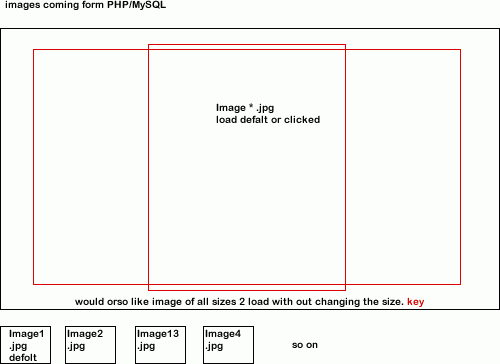
Im trying 2 make a image Viewer but not doing that well have looked around and just cant find one that i can get 2 work. Just hoping some one could point me in the right directions eg tutorial or os code that i can look at and make work have made a quick image of what im planning Hope some one can help PLEASE
-
-
Sorry for posting for help all the time but i keep getting stuck on my mysql im trying to send a pic name for mysql to php page with mysql where clause Item id = image id sort of thing im not any good at spelling by the way heres the code thanks all for reading and helping some code here function get_images_by_ref($items) { $query = "SELECT * FROM store WHERE id= " . $items['ref'] .""; $image_set = mysql_query($query); confirm_query($image_set); return $image_set; } some code here page 1 some code here <?php while ($items = mysql_fetch_array($item_set)) { ?> <?php $sel_image = get_images_by_ref($items['ref']); ?> <?php echo $sel_image; ?> <?php while ($image = mysql_fetch_row($sel_image)) { ?> <ul class="resultSetBox"> <li> <?php $items['Id'] ; ?> <div class="resultImageOut"> <?php echo $image['image_name']; ?> <img src="sto/thumbs/<?php echo $image['image_name']; ?>"> </div> <div class="resultTitle"> some code here </div> <div class="resultDis"> <?php echo $items['sm_description']; ?> </div> <div class="resultPriceBox"> <div class="resultPrices">£<?php echo $items['rrp']; ?>.00</div> Some code here </div> </li> </ul> <?php } ?> <?php } ?> Some code here sorry iv done so much changing and unchanging the code is all over the place thanks for helping
-
Thanks Chris that got in sorted ur ace
-
-
iv just cant see what is rong function get_images_by_ref($items) { $query = "SELECT * FROM store WHERE id= $items"; $image_set = mysql_query($query); confirm_query($image_set); return $image_set; } Please help it is doing my head my Database query failed: You have an error in your SQL syntax; check the manual that corresponds to your MySQL server version for the right syntax to use near '' at line 3 Thanks Pump
-
This is all the code i think results.php <div id="resultsPage"> <?php $sel_catergorie = get_catergorie_by_id($_GET['cat']) ; ?> <?php $sel_sub = get_sub_cat_by_id($_GET['sub']) ; ?> <?php $item_set = get_item_for_sub($sel_sub['Id']); ?> <div class="resultHome"> <h2><?php echo $sel_sub['menu_name']; ?></h2></br> <p><?php echo $sel_sub['content']; ?></p></br> </div> <?php while ($items = mysql_fetch_array($item_set)) { ?> <ul class="resultSetBox"> <li> <div class="resultTitle"> <?php echo "<a href=\"?page=product&itm=" . urlencode($items["Id"]) . "\">{$items["item_name"]} </a>"; ?> </div> <div class="resultPriceBox"> <div class="resultPrices">£<?php echo $items['rrp']; ?>.00</div> Paypal code gose here </div> <div class="resultDis"><?php echo $items['sm_description']; ?></div> <div class="resultImageOut"> </div> </li> </ul> <?php } ?> </div> and this is the functions.php page <?php // This file is the place to store all basic functions function confirm_query($result_set) { if (!$result_set) { die("Database query failed: " . mysql_error()); } } function get_all_subjects() { $query = "SELECT * FROM subjects ORDER BY position DESC"; $subject_set = mysql_query($query); confirm_query($subject_set); return $subject_set; } function get_pages_for_subject($subject_id) { $query = "SELECT * FROM pages WHERE subject_id = {$subject_id} ORDER BY position ASC"; $page_set = mysql_query($query); confirm_query($page_set); return $page_set; } function get_all_catergories() { $query = "SELECT * "; $query .= "FROM catergories "; $query .= "WHERE visible = 1 "; $query .= "ORDER BY position ASC"; $catergories_set = mysql_query($query); confirm_query($catergories_set); return $catergories_set; } function get_pages_for_sub_cat($catergorie_id) { $query = "SELECT * "; $query .="FROM sub_cat "; $query .=" WHERE catergorie_id = {$catergorie_id} "; $query .=" AND visible = 1 "; $query .=" ORDER BY position ASC"; $sub_cat_set = mysql_query($query); confirm_query($sub_cat_set); return $sub_cat_set; } function get_catergorie_by_id($catergorie_id) { $query = "SELECT * "; $query .= "FROM catergories "; $query .= "WHERE Id=" . $catergorie_id ." "; $query .= "LIMIT 1"; $result_set = mysql_query($query); confirm_query($result_set); //REMEMBER: // if no rows are returned, fetch_array will return false if ($catergories = mysql_fetch_array($result_set)) { return $catergories; } else { return NULL; } } function get_sub_cat_by_id($sub_cat_id) { $query = "SELECT * "; $query .= "FROM sub_cat "; $query .= "WHERE Id=" . $sub_cat_id ." "; $query .= "LIMIT 1"; $result_set = mysql_query($query); confirm_query($result_set); //REMEMBER: // if no rows are returned, fetch_array will return false if ($sub_cat = mysql_fetch_array($result_set)) { return $sub_cat; } else { return NULL; } } function find_selected_page() { global $sel_catergorie; global $sel_sub; if (isset($_GET['cat'])) { $sel_catergorie = get_catergorie_by_id($_GET['cat']); $sel_sub= NULL; } elseif (isset($_GET['sub'])) { $sel_catergorie= NULL; $sel_sub = get_sub_cat_by_id($_GET['sub']) ; } else { $sel_catergorie = NULL; $sel_sub = NULL; } } function get_item_for_sub($sel_sub) { $query = "SELECT * FROM stock WHERE position = " . $sel_catergorie['Id'] . " AND sub_pos = " . $sel_sub['Id'] . ""; $item_set = mysql_query($query); confirm_query($item_set); return $item_set; } function get_products($sel_item) { $query = "SELECT * "; $query .= "FROM stock "; $query .= "WHERE Id= $sel_item"; $product_set = mysql_query($query); confirm_query($product_set); return $product_set; } ?>
-
-
Thanks Yakindo for the like that will save me loads of time. The Arrys come from the top of the page in the GET_ function i think lol and spelling should be fine thanks PS iv been trying 2 put something like this : function get_item_for_sub($sel_sub, $sel_catergorie) { // putting 2 arrys in here $query = "SELECT * FROM stock WHERE position = " . $sel_catergorie['Id'] . " AND sub_pos = " . $sel_sub['Id'] . ""; $item_set = mysql_query($query); confirm_query($item_set); return $item_set; }
-
-
Hi Im making my 1st big website and im having problems with the WHERE clause. im trying 2 get the items 2 list on a page where position = 1 and sub_position = 2 for eg. and just cant get it 2 work code in functions is function get_item_for_sub($sel_sub) { $query = "SELECT * "; $query .= " FROM stock "; $query .= " WHERE position = {$sel_catergorie['Id']} "; $query .= " AND sub_pos = {$sel_sub['Id']}"; $item_set = mysql_query($query); confirm_query($item_set); return $item_set; } and code on the page is <div id="resultsPage"> <?php $sel_catergorie = get_catergorie_by_id($_GET['cat']) ; ?> <?php $sel_sub = get_sub_cat_by_id($_GET['sub']) ; ?> <?php $item_set = get_item_for_sub($sel_sub['Id']); ?> <div class="resultHome"> <h2><?php echo $sel_sub['menu_name']; ?></h2></br> <p><?php echo $sel_sub['content']; ?></p></br> </div> <?php while ($items = mysql_fetch_array($item_set)) { ?> <ul class="resultSetBox"> <li> <div class="resultTitle"> <?php echo "<a href=\"?page=product&itm=" . urlencode($items["Id"]) . "\">{$items["item_name"]} </a>"; ?> </div> <div class="resultPriceBox"> <div class="resultPrices">£<?php echo $items['rrp']; ?>.00</div> Paypal code gose here </div> <div class="resultDis"><?php echo $items['sm_description']; ?></div> <div class="resultImageOut"> </div> </li> </ul> <?php } ?> </div> PS iv taken some code out that dose not need 2 be seen for this topic Thanks all
-
Thanks RowThanks Row Im making my profile as we speak and will look into the skeleton and bootatraps Thanks