ma_anse
Members
-
Joined
-
Last visited
-
Thanks for the reply, however i think you have missed my point entirely, i have the required classes to create the spread sheet, and can create a spreadsheet no problem at all.. What i am struggling with is how to get the required data into the spreadsheet. I can get it to export a single weeks data but not multiple weeks and still sort it in the same way. My spread sheet is to look something like this.... Name-------Total Hours-------Rate------Week1-------week2-----week3------week4------week5 john-------------8----------------4.92----------2---------------1-------------2--------------2--------------2 john-------------12---------------5.62----------3---------------2-------------3--------------2--------------2 sarah------------5----------------4.92----------1---------------1-------------1--------------1--------------1 i have the php to give me the required date ranges but im not sure how to structure the query and how to use the result set to create this.
-
Hi guys, Im having a little trouble here, Im trying to query a DB to gather total hours worked for a month period but split into individual weeks to export to an excel spreadsheet with 4/5 weekly columns. This is the query i have but im not sure how i should be using the result. $sql = "SELECT user_id, name , sum(hours_worked) AS sum_hours , location, sum(lunch) AS sum_lunch , sum(break) AS sum_break , sick, holiday , clock_status.pay_rate AS pay_rate , amend_time BETWEEN '$period1' AS week1 , amend_time BETWEEN '$period2' AS week2 , amend_time BETWEEN '$period3' AS week3 , amend_time BETWEEN '$period4' AS week4 FROM clock_status , staff WHERE auth = 1 and clock_status.user_id = staff.staff_number and clock_status.location = '3301' GROUP BY user_id, week1, week2, week3, week4, pay_rate "; and this is the while loop: while($d = mysql_fetch_array($query)){ $id = $row-1; $objPHPExcel->getActiveSheet()->setCellValue('B' . $row, $d['user_id']); $objPHPExcel->getActiveSheet()->setCellValue('C' . $row, $d['name']); $objPHPExcel->getActiveSheet()->setCellValue('E'.$row, '=I'.$row); $objPHPExcel->getActiveSheet()->setCellValue('F' . $row, $rate); $objPHPExcel->getActiveSheet()->setCellValue('G'.$row, '=IF(F'.$row.'='.$low.',0.53,0)+IF(F'.$row.'='.$high.',0.64,0)'); $objPHPExcel->getActiveSheet()->setCellValue('H'.$row, '=SUM(E'.$row.'*F'.$row.')+E'.$row.'*G'.$row.''); $objPHPExcel->getActiveSheet()->setCellValue('I' . $row, $d['sum_hours']); $objPHPExcel->getActiveSheet()->setCellValue('J' . $row, $d['sum_hours']); $objPHPExcel->getActiveSheet()->setCellValue('K' . $row, $d['sum_hours']); $objPHPExcel->getActiveSheet()->setCellValue('L' . $row, $d['sum_hours']); $row++; } Its the weeks 1-4 and the columns i,j,k,l, im stuck on, how do i get the information for the weeks into those columns??
-
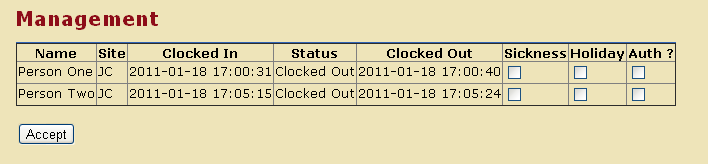
Hi guys, Just after a bit of help. I seem to have hit a brick wall and don't know how to continue my project now. What im trying to do is query my db (mysql) to display multiple rows from within table 1, i then want to be able to tick a box and add that data to the row displayed (extra fields exist).... This is how the form looks in chrome... This is the Query but im not sure how to handle it from here... <?php $query = "SELECT * FROM clock_status , staff WHERE auth = 0 and clock_status.user_id = staff.staff_number and DATE(date_time) = DATE(NOW()) ORDER BY date_time ASC"; // (YEARWEEK(date_time)=YEARWEEK(CURRENT_TIMESTAMP) $result = mysql_query($query); echo "<table border='1'> <tr> <th>Name</th> <th>Site</th> <th>Clocked In</th> <th>Status</th> <th>Clocked Out</th> <th>Sickness</th> <th>Holiday</th> <th>Auth ?</th> "; while ($row = mysql_fetch_assoc($result)) { echo "<tr>"; echo "<form id=\"auth\" action=\"manager_amend.php\" method=\"post\">"; echo "<td>" .$row['name']."</td>"; echo "<td>" .$row['location']."</td>"; echo "<td>" .$row['date_time']."</td>"; if ($row['status'] == "1") { echo "<td>" ."Clocked In"."</td>"; } else { echo "<td>" ."Clocked Out"."</td>"; } echo "<td>" .$row['amend_time']."</td>"; echo "<td>" ."<input type=\"checkbox\" name=\"sickness\" value=\"yes\">" . "</td>"; echo "<td>" ."<input type=\"checkbox\" name=\"holiday\" value=\"yes\">" . "</td>"; echo "<td>" ."<input type=\"checkbox\" name=\"auth\" value=\"yes\">" . "</td>"; } echo "</tr>"; echo "</table>"; ?> <br /> <input type="submit" name="submit" value="Accept"> </form> Anyone have any suggestions where i can go from here? Thanks in advance. Mark.
-
Hi jock, Thanks for the reply, i feel a little silly with this one because i managed to get it to work and it was such a simple thing. '$from = "webmaster@domain.com"' Completely missed that line. Maybe i should read a few books eh??
-
Hi Guys, Hopefully this will be something simple. Ive written a nice little contact form using php to process it, everything seems to be working brilliantly except for one little thing. When i receive an email from my form in outlook, the from field says "anonymous". When i open up the email the address is an anonymous@random-numbers.domain.com type. Is there anything i can put in my php script to correct this as i don't have access to my 'php.ini'. Thanks in advance.
-
Hi Guys, Im looking for a little help. Ive set-up a shopping cart and managed to get it branded and all that jazz but i haven't had a lot of interest. I seem to be getting traffic but no buyers. So i was wondering if anyone could point me in the direction of a survey type pop-up just so i can get some feed back. Ive seen some pages where you get a small box in the middle of the screen and the original content is dimmed (or greyed out) much like what the light box scripts do when an image is clicked. I have had a look around the web and cant seem to find anything that doesn't require signing up with a company that controls the survey. I would rather do this in house. Any help would be greatly appreciated.. Thanks in advance.
-
Hi Andy, Thanks for the quick reply, it works brilliantly. I knew it would be something simple, just couldn't see it for looking. Thanks again. Mark.
-
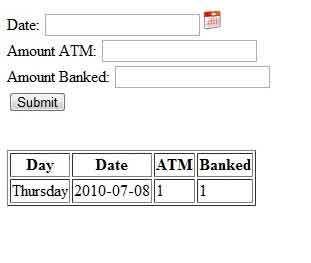
Hi guys, just after a little help here Ive been making a form that inserts data into an sql data base, that all seems to work ok. Now im trying to show a query on the page with the form but its not giving me all the results. when the query runs it gives me only the first entry in the db, although when i run the same query in phpmyadmin i get all the queried results. I wonder if someone could take a look and help me find where im going wrong. <html> <head> <title></title> <script language="javascript" src="cal2.js"> /* Xin's Popup calendar script- Xin Yang (http://www.yxscripts.com/) Script featured on/available at http://www.dynamicdrive.com/ This notice must stay intact for use */ </script> <script language="javascript" src="cal_conf2.js"></script> </head> <body> <form action="process.php" method="post"> <br /> Date: <input type="text" name="date" /><a href="javascript:showCal('Calendar1')"><img src="cal.png" alt="Date Picker" style="width:20;height:20;" ></a><br /> Amount ATM: <input type="text" name="atm" /><br /> Amount Banked: <input type="text" name="banked" /><br /> <input type="submit" /> </form> <br /> <?php $con = mysql_connect("localhost","user","pass"); if (!$con) { die('Could not connect: ' . mysql_error()); } mysql_select_db("finance", $con); $result = mysql_query('SELECT Day, Date, ATM, Banked FROM atm WHERE (YEARWEEK(date)=YEARWEEK(CURRENT_TIMESTAMP)) ORDER BY Date'); echo "<table border='1'> <tr> <th>Day</th> <th>Date</th> <th>ATM</th> <th>Banked</th>"; $row = mysql_fetch_row($result); //echo "$row[0] $row[1] $row[2] $row[3]<br>"; echo "<tr>"; echo "<td>" .$row[0]."</td>"; echo "<td>" .$row[1]."</td>"; echo "<td>" .$row[2]."</td>"; echo "<td>" .$row[3]."</td>"; echo "</table>"; mysql_close($con); ?> </body> </html> This is the result: Thanks in advance
-
thanks for the reply..... Forgot to mention that the website isnt hosted in the same location as the ftp server......
-
hi guys, Just after some advice, I have a website and i have an FTP server, the FTP server is accessible from the web via a static ip. What i want to be able to do is add go to www.mywebsite.com/ftp and login using a given set of usernames and passwords to allow files to be downloaded and uploaded. Is this at all possible? And if so any duggestions of how i would go about it.... Im by no means a PHP expert but i can work with it. Any help would be greatly appreciated..... thanks in advance. Mark.
-
Ok, thanks for that ill give it a go. Am i going about this in a long complex way? surely there is a simpler way of doing this? Id be happy to have some suggestions..... thanks in advance.
-
Hi guys im after a little help, Ive been asked to set up a form for people to enter their details for them to be recorded into a CSV. I seem to have got that working right but i cant seem to get the validation working as it should. Basically if i leave the form blank and click submit i should get an error message but nothing happens. Also if selected fields are left blank i dont get a message either. Im sure im missing something simple but as im no php expert i seem to be getting a bit lost. here is the code <!DOCTYPE html PUBLIC "-//W3C//DTD XHTML 1.0 Transitional//EN" "http://www.w3.org/TR/xhtml1/DTD/xhtml1-transitional.dtd"> <html xmlns="http://www.w3.org/1999/xhtml"> <head> <meta http-equiv="Content-Type" content="text/html; charset=utf-8" /> <title>Untitled Document</title> <style type="text/css"> @import url(style.css); </style> </head> <body> <div> <img id="background" src="bg.png" alt="" title="" /> </div> <div id="scroller"> <div id="content"> <?php if(!isset($_POST['Submit'])){ $message = 'Fill out the form'; $aClass = 'normFrmClass'; ?> <h3>Complete the form below to register your card.</h3> <form name="form1" method="post" action="<?=$_SERVER['PHP_SELF'];?>" id="form1"> <table id="table" class="formatTblClass"> <tr> <td>First Name:</td> <td><input name="firstname" "class="<?=$aClass;?>"" type="text" id="firstname" value=""></td> </tr> <tr> <td>Last Name:</td> <td><input name="lastname" "class="<?=$aClass;?>"" type="text" id="lastname" value=""></td> </tr> <tr> <td>Address Line 1:</td> <td><input name="address1" "class="<?=$aClass;?>"" type="text" id="address1" value=""></td> </tr> <tr> <td>Address Line 2:</td> <td><input name="address2" "class="<?=$aClass;?>"" type="text" id="address2" value=""></td> </tr> <tr> <td>Town:</td> <td><input name="town" "class="<?=$aClass;?>"" type="text" id="town" value=""></td> </tr> <tr> <td>City:</td> <td><input name="city" "class="<?=$aClass;?>"" type="text" id="city" value=""></td> </tr> <tr> <td>Postcode:</td> <td><input name="postcode" "class="<?=$aClass;?>"" type="text" id="postcode" value=""></td> </tr> <tr> <td>Member Number:</td> <td><input name="loynum" "class="<?=$aClass;?>"" type="text" id="loynum" value="" maxlength="5"></td> </tr> <tr> <td></td> <td><input type="submit" name="Submit" value="Submit" ></td> </tr> </table> </form> <?php }else{ $firstname = $_POST['firstname']; $lastname = $_POST['lastname']; $address1 = $_POST['address1']; $address2 = $_POST['address2']; $town = $_POST['town']; $city = $_POST['city']; $postcode = $_POST['postcode']; $loynum = $_POST['loynum']; if(empty($firstname) || empty($lastname) || empty($address1) || empty($town) || empty($city) || empty($postcode) || empty($loynum)){//show the form $message = 'Fill in areas in red!'; $aClass = 'errorClass'; ?> <h3>Complete the form below to register your card.</h3> <form name="form1" method="post" action="<?=$_SERVER['PHP_SELF'];?>" id="form1"> <table id="table" class="formatTblClass"> <tr> <td>First Name:</td> <td><input name="firstname" "class="<?=$aClass;?>"" type="text" id="firstname" value=""></td> </tr> <tr> <td>Last Name:</td> <td><input name="lastname" "class="<?=$aClass;?>"" type="text" id="lastname" value=""></td> </tr> <tr> <td>Address Line 1:</td> <td><input name="address1" "class="<?=$aClass;?>"" type="text" id="address1" value=""></td> </tr> <tr> <td>Address Line 2:</td> <td><input name="address2" "class="<?=$aClass;?>"" type="text" id="address2" value=""></td> </tr> <tr> <td>Town:</td> <td><input name="town" "class="<?=$aClass;?>"" type="text" id="town" value=""></td> </tr> <tr> <td>City:</td> <td><input name="city" "class="<?=$aClass;?>"" type="text" id="city" value=""></td> </tr> <tr> <td>Postcode:</td> <td><input name="postcode" "class="<?=$aClass;?>"" type="text" id="postcode" value=""></td> </tr> <tr> <td>Member Number:</td> <td><input name="loynum" "class="<?=$aClass;?>"" type="text" id="loynum" value="" maxlength="5"></td> </tr> <tr> <td></td> <td><input type="submit" name="Submit" value="Submit" ></td> </tr> </table> </form> <?php }else{ //this is where the creating of the csv takes place $cvsData = $firstname . "," . $lastname . "," . $address1 . "," . $address2 . "," . $town . "," . $city . "," . $postcode . "," . $loynum ."\n"; //write to the file $fp = fopen("members.csv","a"); // $fp is now the file pointer to file $filename if($fp){ fwrite($fp,$cvsData); // Write information to the file fclose($fp); // Close the file //echo "File saved successfully"; $message = 'Submission successfull. Thank you!'; $aClass = 'normFrmClass'; ?> <h3>Complete the form below to register your card.</h3> <form name="form1" method="post" action="<?=$_SERVER['PHP_SELF'];?>" id="form1"> <table id="table" class="formatTblClass"> <tr> <td>First Name:</td> <td><input name="firstname" "class="<?=$aClass;?>"" type="text" id="firstname" value=""></td> </tr> <tr> <td>Last Name:</td> <td><input name="lastname" "class="<?=$aClass;?>"" type="text" id="lastname" value=""></td> </tr> <tr> <td>Address Line 1:</td> <td><input name="address1" "class="<?=$aClass;?>"" type="text" id="address1" value=""></td> </tr> <tr> <td>Address Line 2:</td> <td><input name="address2" "class="<?=$aClass;?>"" type="text" id="address2" value=""></td> </tr> <tr> <td>Town:</td> <td><input name="town" "class="<?=$aClass;?>"" type="text" id="town" value=""></td> </tr> <tr> <td>City:</td> <td><input name="city" "class="<?=$aClass;?>"" type="text" id="city" value=""></td> </tr> <tr> <td>Postcode:</td> <td><input name="postcode" "class="<?=$aClass;?>"" type="text" id="postcode" value=""></td> </tr> <tr> <td>Member Number:</td> <td><input name="loynum" "class="<?=$aClass;?>"" type="text" id="loynum" value="" maxlength="5"></td> </tr> <tr> <td></td> <td><input type="submit" name="Submit" value="Submit" ></td> </tr> </table> </form> <?php } else { //echo "Error saving file!"; $message = 'Error saving file! ' . ' ' . 'Fill in areas in red!'; $aClass = 'errorClass'; ?> <h3>Complete the form below to register your card.</h3> <form name="form1" method="post" action="<?=$_SERVER['PHP_SELF'];?>" id="form1"> <table id="table" class="formatTblClass"> <tr> <td>First Name:</td> <td><input name="firstname" "class="<?=$aClass;?>"" type="text" id="firstname" value=""></td> </tr> <tr> <td>Last Name:</td> <td><input name="lastname" "class="<?=$aClass;?>"" type="text" id="lastname" value=""></td> </tr> <tr> <td>Address Line 1:</td> <td><input name="address1" "class="<?=$aClass;?>"" type="text" id="address1" value=""></td> </tr> <tr> <td>Address Line 2:</td> <td><input name="address2" "class="<?=$aClass;?>"" type="text" id="address2" value=""></td> </tr> <tr> <td>Town:</td> <td><input name="town" "class="<?=$aClass;?>"" type="text" id="town" value=""></td> </tr> <tr> <td>City:</td> <td><input name="city" "class="<?=$aClass;?>"" type="text" id="city" value=""></td> </tr> <tr> <td>Postcode:</td> <td><input name="postcode" "class="<?=$aClass;?>"" type="text" id="postcode" value=""></td> </tr> <tr> <td>Member Number:</td> <td><input name="loynum" "class="<?=$aClass;?>"" type="text" id="loynum" value="" maxlength="5"></td> </tr> <tr> <td></td> <td><input type="submit" name="Submit" value="Submit" ></td> </tr> </table> </form> <?php } }//end if }//end if ?> </div> </div> </body> </html> Appologies for the length of code but im not sure where the error is occuring. Any help would be greatly appreciated.
-
Hi guys, Im looking for a hosting package that can accomodate 3 domains (possibly more in the future). At a low price but with a good rep. Im only helping out with the 3 websites as favours so there isnt a lot in it for me, also the people im helping arent expecting to pay a fortune for hosting. I dont know a lot about hosting but the only issue i have come up against using a free host is that i cant use sendmail..... So that would be required with my new host. Any suggerstions would be appreciated.
-
Hi guys, i know its probably been asked like a million times but i cant seem to find a simple answer...... Here goes, A Friend of mine has asked me to take over their website as they have been waiting 2 years for anything other than an under construction page from there current host. Im no kind of expert but have used 123-reg in the past with a few small projects. So i have gone ahead and transfered the domain to 123-reg (transfer is in progress). One thing i didnt think of checking is what actually happens with the email address linked to the domain. Is that transfered with it or does it need to be re-created - if so any ideas if it will be chargable or not? thanks in advance.
-
Hi guys, Hopefully just a quick question..... How do you guys test your designs in different browsers without having them all installed? Someone suggested IETester but that seems to be broken or atleast broken in windows 7...... Any suggestions?