
Skip to content
View in the app

A better way to browse. Learn more.

Web Designer Forum

A full-screen app on your home screen with push notifications, badges and more.

To install this app on iOS and iPadOS
  1. Tap the Share icon in Safari
  2. Scroll the menu and tap Add to Home Screen.
  3. Tap Add in the top-right corner.
To install this app on Android
  1. Tap the 3-dot menu (⋮) in the top-right corner of the browser.
  2. Tap Add to Home screen or Install app.
  3. Confirm by tapping Install.

dougstar

Members
  • Joined

  • Last visited

  1. Hi can anyone please advise how to move this image across the screen i've been asked to set animation duration every 11 to 20 seconds max then set the % from 5 to 10 %, i am a CSS student and struggling with this one at the moment Many thanks Doug
  2.    dougstar reacted to a post in a topic: image map
  3.    dougstar reacted to a post in a topic: image map
  4.    dougstar reacted to a post in a topic: image map
  5.    dougstar reacted to a post in a topic: image map
  6.    dougstar reacted to a post in a topic: image map
  7.    dougstar reacted to a post in a topic: image map
  8.    dougstar reacted to a post in a topic: image map
  9. dougstar replied to dougstar's topic in General Chat
    wow many thanks for your help im struggling through but getting there
  10.    dougstar reacted to a post in a topic: image map
  11.    dougstar reacted to a post in a topic: image map
  12. dougstar replied to dougstar's topic in General Chat
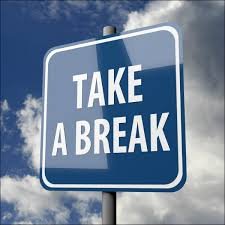
    thanks for your help much appreciated, but i think they want a square section only within the sign clickable. called a square hotspot?
  13. dougstar posted a topic in General Chat
    Hello All, Can someone please advise, i have an image map as per photo attached 225x225 px and i need to create a rectangular hotspot so when clicked on transferred to http://www,kitkat.com. (website). Im a student and learning.
  14. thank you apperciated
  15. Hello im having trouble creating an image link for example if i wanted the facebook image how do i create a link to the page please help thank you


Account

Navigation

Search

Search

Configure browser push notifications

Chrome (Android)
  1. Tap the lock icon next to the address bar.
  2. Tap Permissions → Notifications.
  3. Adjust your preference.
Chrome (Desktop)
  1. Click the padlock icon in the address bar.
  2. Select Site settings.
  3. Find Notifications and adjust your preference.