Skip to content
View in the app

A better way to browse. Learn more.

Web Designer Forum

A full-screen app on your home screen with push notifications, badges and more.

To install this app on iOS and iPadOS
  1. Tap the Share icon in Safari
  2. Scroll the menu and tap Add to Home Screen.
  3. Tap Add in the top-right corner.
To install this app on Android
  1. Tap the 3-dot menu (⋮) in the top-right corner of the browser.
  2. Tap Add to Home screen or Install app.
  3. Confirm by tapping Install.

anil101

Members
  • Joined

  • Last visited

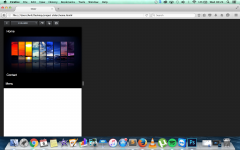
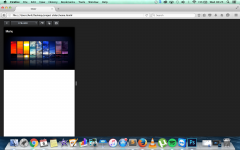
  1. Hi thanks for that it fixed my problem however the image slider does not drop below the expanded menu, Many thanks
  2. Im currently working on the website i have attached my work. Yea i posted in the forum to learn for next time so any help will be fantastic. project Anil.zip
  3. HI I have created a responsive dropdown where at 580px my menu bar becomes a drop down. The problem im getting is when the menu drops down, the image slider underneath it is blocking the menu. I need my image slider to go underneath my dropdown menu when i open it. Print screens below of my problem.

Account

Navigation

Search

Search

Configure browser push notifications

Chrome (Android)
  1. Tap the lock icon next to the address bar.
  2. Tap Permissions → Notifications.
  3. Adjust your preference.
Chrome (Desktop)
  1. Click the padlock icon in the address bar.
  2. Select Site settings.
  3. Find Notifications and adjust your preference.