Connovar
Members
-
Joined
-
Last visited
-
oh wow, i didn't realise that, to be honest its just for a college project so its not a huge deal, and it seems to be running quite nicely, I do intend to sit down and learn java this summer, but right now college is taking up all my time changing that property worked for me though, so for the time being it will have to do. Really appreciate it!
-
Hi I am trying to leanr to do parallax scrolling, i did this tutorial that worked for vertical parallax - <!doctype html> <html> <head> <meta charset="utf-8"> <style type="text/css"> body { margin:0px; background:url("BlueOrca/Images/background.jpg") fixed; } #content_layer { position: absolute; } #prlx_lyr_1 { position: fixed; background: url("BlueOrca/Images/logo2.png") no-repeat 0px 200px; width: 100%; height: 800px; } </style> <script> function parallax(){ var prlx_lyr_1 = document.getElementById('prlx_lyr_1'); prlx_lyr_1.style.top = -(window.pageYOffset / 4)+'px'; } window.addEventListener("scroll", parallax, false); </script> <title>Untitled Document</title> </head> <body> <div id="prlx_lyr_1"></div> <div id="content_layer"><script> for(var i=1; i < 50; i++){ document.write('<h1>This is dummy line '+i+'</h1>'); } </script></div> </body> </html> But i am wanting to do horizontal parallax, i thought if i change the pageYOffset to pageXOffset, thats all that would be needed but apparently not, I dont know javascript very well but i thought thats all that was needed, can someone help? Thanks
-
Hi, I have never used Wordpress before and I was informed to create a child theme for this to avoid it all screwing up when there is an update. So im using a theme called Fyre, and i created a folder called Fyre-child in the themes section in ftp folder. I made a CSS file, added in - /* Theme Name: Fyre Child Description: Child theme for Fyre theme Author: Ross Stewart Template: Fyre */ @import url("../Fyre/style.css"); Saved it, went onto wordpress, uploaded the new child theme instead of the parent, Changed a colour from green to blue, copied the code into the css file, and nothing happened. I am not sure what I have done wrong as it looks like i have followed it all correctly. http://ultimadesignsolutions.co.uk/ This is the website, so i tried to change the green to blue, blue its not saving at all, tried finding the answer everywhere but to no avail, please someone help me
-
i have done what you said and it does work butter, but the banner has been cropped can this be fixeD?
-
So going forward i need to start working in percentages? is that just for container divs or do you mean everything should be in percentages? This is my first website, and the owners know i am new at it, and are happy with what they have, I have raelised i need to do a lot of stuff diferently going forward, I am studying this at college but unfortuantely my lecturer does not know how to code which makes things very difficult to learn as I have learning difficulties so i prefer one on one teaching methods >.< Do you have any sources that would be useful to me going forward? Thank you for your time
-
please someone help! i am really at a loss and dont know what to do
-
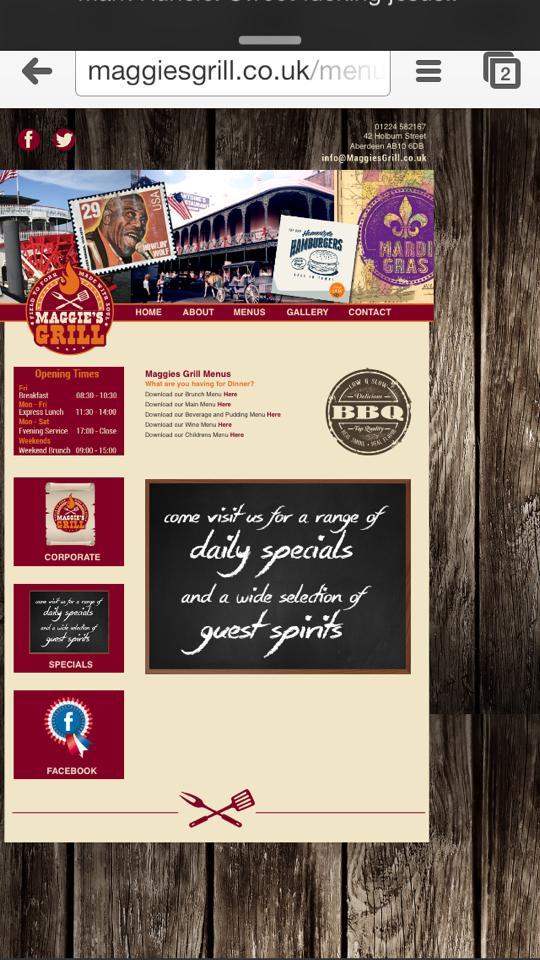
Hello I have been working on a site for a client, and I have near enuogh finished the website, when i went to test it on mobile its stuck to the left and the size of it is ha little bit over the place, i gogoled what to do and tried something with a <meta name="viewport" content="width=480"> but it didnt work and i am at a loss of what to do to mak it fit the whole screen on all mobile, tablet devices. The website is http://www.maggiesgrill.co.uk/menus.html I am dyslexic so sorry for spelling, if anyoen does decde to help can please be clear as i struggle to read text in front of me. thank you for the help

-
Hi people, sorry to bother you all but i really need help here. I have never used Jquery before but my client has requested a light box gallery in there gallery page. I am using Dreamweaver and i found a tutorial using the Dreamweaver widgets, but apparently they don't exist any more so after lots of searching i found this tutorial. - http://lokeshdhakar.com/projects/lightbox2/ So i downloaded it and loaded up the 2 JQuery forms and the CSS form onto Dreamweaver, but i do not know how to connect the JQuery page and the CSS page to the HTML pages that i have, if this makes sense? Overall i would actually prefer to have a gallery that doesn't require JQuery at al and is ujst html and CSS but i am struggling to find one, also my client wants to be able to upload pictures himself at a later date, he knows basic html code so its not difficult for him to copy and paste the code and change the image itself. Can anyone help me with either explaingin how to add the Jquery to my html or showing me a very simplictic gallery that has the lgiht box effect? ps. sorry i spelling is bad i am dyslexic
-
-
OMG! Thank you so much! you have made my world!
-
Ok I think i Followed your orders correctly (sorry i am dyslexic - wrong occupation lol!) The scroll bar has now gone, but the image isnt centered the lady on the left sahould be above the logo, but on my laptop she is way to the right. http://wwww.http://godownstairs.co.uk/ I really appreciate this hepl though, I emailed my lecturer, but he is busy
-
On top of what i just wrote, ive been playing with it on the home page http://www.godownstairs.co.uk and it now looks centred on the smaller resolution But you can scroll right to the left, how can i fix this.
-
Hi Everyone, Just joined. Recently finished my 1st year of college and decided to get into the graphic design/web design world. Got myself some clients, and got stuck pretty quickly, so I have joined in the hope that some of you lovely people can maybe help. I just posted a topic http://www.webdesignerforum.co.uk/topic/79441-help-with-positioning/ So if anyone can take 2 minutes out of their day and give me a hand it would be much appreciated!! Many Thanks, Con
-
Hello all, just joined. I am struggling with a website i am working on - http://www.godownstairs.co.uk/about.html I have an image that is 1920px wide and i want it centred without having to scroll left and right, I was working away quite happily until i tested it on a smaller resolution monitor (im 1920x1080) and it was well off. I am not sure what i am doing wrong. I put everything below the image into a div container with these figures - #container { margin: 0 auto; width: 960px; text-align: left; } and the headerimage is - .headerimage { background-image: url("images/headerimage.jpg"); height: 357px; left: -8px; margin: 0 auto; position: relative; width: 1920px; } I really am not sure what I am doing wrong can someone please help me as I am on a deadline!! ( I have just been doing it on the about page, the other 4 pages are even further off!! ) Thanks, Con