
Skip to content
View in the app

A better way to browse. Learn more.

Web Designer Forum

A full-screen app on your home screen with push notifications, badges and more.

To install this app on iOS and iPadOS
  1. Tap the Share icon in Safari
  2. Scroll the menu and tap Add to Home Screen.
  3. Tap Add in the top-right corner.
To install this app on Android
  1. Tap the 3-dot menu (⋮) in the top-right corner of the browser.
  2. Tap Add to Home screen or Install app.
  3. Confirm by tapping Install.

Me4u2260

Members
  • Joined

  • Last visited

  1. I guess if we stick to the question and help me find solution for my problem would be better than suggesting on usage of java script, html, aand flash.
  2. I feel more comfortable playing with flash. and plus flash provides more flexible option than static codes do. Coming Back to the point, I would appreciate a reply to the question that I post.
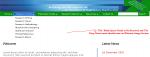
  3. I have been facing problem with my flash drop down menu as the drop down menu is not over laying on text and image section of website, .
Account

Navigation

Search

Search

Configure browser push notifications

Chrome (Android)
  1. Tap the lock icon next to the address bar.
  2. Tap Permissions → Notifications.
  3. Adjust your preference.
Chrome (Desktop)
  1. Click the padlock icon in the address bar.
  2. Select Site settings.
  3. Find Notifications and adjust your preference.