k3rt90
Members
-
Joined
-
Last visited
Everything posted by k3rt90
-
So upon .click i want to change the h3.portraits background image and then have it change back when i click again. $(document).ready(function(){ $("#portraits .container").hide(); var up = "../images/btn-portraits-hide.png"; var down = "../images/btn-portraits-show.png"; $(".portraits").click(function(){ var icon = $('.portraits', this); $(this).next("#portraits .container").slideToggle("slow"); icon.attr("src", this.attr("src") == up ? down : up); }); }); <div id="portraits"> <h3 class="portraits">Portraits</h3> <div class="container"></div> </div>
-
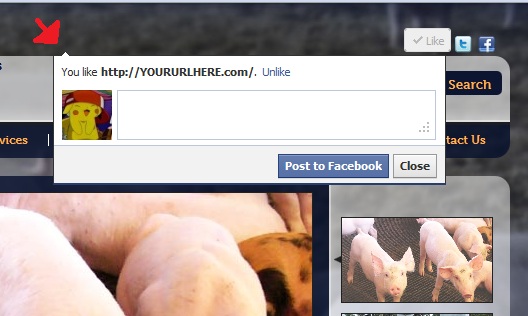
Hey Guys, I am trying to customize, a fb like button to fit a design, and i can't edit anyhting inside the iframe... i have positioned it where i want to to be but i need to position the "nub" to the right hand side, which is in the iframe.

-
Hello, My callback funciton doesn't seem to be working at the end of the CalculateDistances function, what am i doing wrong? <script type="text/javascript"> //<![CDATA[ var address = null; $(function () { $('.number').each(function (i) { i++; $(this).text(i); }); address = <%= Postcode %>; }); //]]> </script> <script type="text/javascript"> $(function () { initialise(); }); var geocoder; var map; var bounds = new google.maps.LatLngBounds(); var startAddress; var location1, location2; function initialise() { geocoder = new google.maps.Geocoder(); var latlng = new google.maps.LatLng(-34.397, 150.644); var myOptions = { zoom: 3, center: latlng, mapTypeId: google.maps.MapTypeId.ROADMAP }; map = new google.maps.Map(document.getElementById("map_canvas"), myOptions); location1 = getLatLngForAddress("Sydney, NSW"); location2 = getLatLngForAddress("Brisbane, QLD"); codeAddress(); calculateDistances(); } // startAddress > location1 //startAddress function calculateDistances() { var measureDistance = new google.maps.DistanceMatrixService(); measureDistance.getDistanceMatrix({ origins: location1, destinations: location2, travelMode: google.maps.TravelMode.DRIVING, unitSystem: google.maps.UnitSystem.METRIC, avoidHighways: false, avoidTolls: false }, callback); }; function callback(response, status) { console.log('callback'); if (status != google.maps.DistanceMatrixStatus.OK) { alert('Error was: ' + status); } else { var origins = response.originAddresses; var destinations = response.destinationAddresses; var outputDiv = document.getElementById('outputDiv'); outputDiv.innerHTML = ''; //deleteOverlays(); for (var i = 0; i < origins.length; i++) { var results = response.rows[i].elements; addMarker(origins[i], false); for (var j = 0; j < results.length; j++) { addMarker(destinations[j], true); outputDiv.innerHTML += origins[i] + " to " + destinations[j] + ": " + results[j].distance.text + " in " + results[j].duration.text + "<br />"; } } } } var markersArray = []; var destinationIcon = "http://chart.apis.google.com/chart?chst=d_map_pin_letter&chld=D|FF0000|000000"; var originIcon = "http://chart.apis.google.com/chart?chst=d_map_pin_letter&chld=O|FFFF00|000000"; function addMarker(location, isDestination) { var icon; if (isDestination) { icon = destinationIcon; } else { icon = originIcon; } geocoder.geocode({'address': location}, function(results, status) { if (status == google.maps.GeocoderStatus.OK) { bounds.extend(results[0].geometry.location); map.fitBounds(bounds); var marker = new google.maps.Marker({ map: map, position: results[0].geometry.location, icon: icon }); markersArray.push(marker); } else { alert("Geocode was not successful for the following reason: " + status); } }); } function deleteOverlays() { if (markersArray) { for (i in markersArray) { markersArray[i].setMap(null); } markersArray.length = 0; } } function codeAddress() { var address = startAddress = <%= Postcode %> + ", Australia"; geocoder.geocode({ 'address': address }, function(results, status) { if (status == google.maps.GeocoderStatus.OK) { map.setCenter(results[0].geometry.location); // bounds.extend(results[0].geometry.location); // mapfitBounds(bounds); var marker = new google.maps.Marker({ map: map, position: results[0].geometry.location }); } else { alert("Geocode was not successful for the following reason: " + status); } }); } function getLatLngForAddress(address) { geocoder.geocode({ 'address': address }, function(results, status) { if (status == google.maps.GeocoderStatus.OK) { map.setCenter(results[0].geometry.location); var marker = new google.maps.Marker({ map: map, position: results[0].geometry.location }); } else { alert("Geocode was not successful for the following reason: " + status); } }); } </script> Any help would be amazing!!!
-
Hello, i'm trying to get a google map working by the post code you put in....... but so fair that map wont even display... <script type="text/javascript"> $(function () { initialise(); }); var geocoder; var map; function initialise() { geocoder = new google.maps.Geocoder(); var latlng = new google.maps.LatLng(-29.5328037, 145.491477); var myOptions = { zoom: 4, center: latlng, mapTypeId: google.maps.MapTypeId.ROADMAP } map = new google.maps.Map(document.getElementById("map_canvas"), myOptions); function codeAddress() { //var address = document.getElementById("address").value; geocoder.geocode({ 'address': address }, function(results, status) { if (status == google.maps.GeocoderStatus.OK) { map().setCenter(results[0].geometry.location); var marker = new google.maps.Marker({ map: map, position: results[0].geometry.location }); } else { alert("Geocode was not successful for the following reason: " + status); } }); } </script>
-
i have three divs with the class of item in a row and i'm trying to get the last one to not display a border using the seudo class last child: #latestnews .item { width: 220px; height: 135px; overflow: hidden; border-right: #e0e0e0 1px solid; float: left; margin-right: 20px; } #latestnews .item:last-child { border: none; } layout: <div id="latestnews"> <h5 class="h5-ourlatestnews">latest news</h5> <div class="item"> <h6>30 july 2011</h6> <h5>Trufle & Wine Dinner</h5> <p>Unique truffle & matched wine dinner with The Cosmopolitan Hotel, Aussie Truffle Dogs' Georgie Patterson and Passing Clouds. Spaces limited, Booking essential. <a href="">Read more...</a></p> </div> <div class="item"> <h6>30 july 2011</h6> <h5>Trufle & Wine Dinner</h5> <p>Unique truffle & matched wine dinner with The Cosmopolitan Hotel, Aussie Truffle Dogs' Georgie Patterson and Passing Clouds. Spaces limited, Booking essential. <a href="">Read more...</a></p> </div> <div class="item"> <h6>30 july 2011</h6> <h5>Trufle & Wine Dinner</h5> <p>Unique truffle & matched wine dinner with The Cosmopolitan Hotel, Aussie Truffle Dogs' Georgie Patterson and Passing Clouds. Spaces limited, Booking essential. <a href="">Read more...</a></p> </div> anything?
-
figured it out, turns out all i needed to do was go home and sleep haha
-
The html isn't really relevant as i am using asp to hook into our cms
-
are you trying the jquery method or just the css method? if just the .css you'll need to create relevant classes to hold the images. yeah and importing jquery would help too haha
-
position: relative on the thumbnail image thumbnail a .bigimage { display: none; width: 100px height: 100px; position: absolute; } thumbnail a:hover .bigimage { display: block; } or you could show/hide or fadeIn/fadeOut the div using jquery, would still need it positioned absolutly above everthing else though. $(function (){ $('#thumb').mouseOver(function () { $('#bigimage').fadeIn, "slow"); )}; )}; The jquery is probs wrong, but its osmething like that, look it up with jquery fadeIn or something.
-
Hey Guys i'm having some issues with the triple level drop down menu: Heres the code: #navigation { float: right; width: 736px; margin-top: -25px; } #navigation ul { list-style-type: none; padding-top: 20px; font-weight: bold; padding-bottom: 30px; padding-left: 0; margin-left: 15px; display: inline; position: relative; } #navigation li { display: inline; line-height: 1; height: 10px; position: relative; background: url('images/img-nav-bg.gif') no-repeat right; } #navigation a { line-height: 1; color: #ffb24f; margin: 0 6px; padding: 6px 12px; text-decoration: none; } #navigation a:hover { background: #05070c; color: #fff; border-radius: 5px; } #navigation ul li a.AspNet-Menu-Selected { background: #05070c; color: #fff; border-radius: 5px; } #navigation ul li a.AspNet-Menu-ChildSelected { background: #05070c; color: #fff; } #navigation ul .nav-contactus { background: none; } #navigation ul ul { display: none; width: 236px; height: auto; background: #0a132f; text-align: left; } #navigation li:hover ul { display: block; position: absolute; z-index: 2; left: 0; top: 25px; padding: 0; margin: 0; } #navigation ul ul li { background: none; display: block; height: 20px; margin: 0; } #navigation ul ul a { display: block; padding: 5px 3px; margin: 0; } #navigation ul ul a:hover { background: #0a0a0b; display: block; width: 230px; margin: 0; padding: 5px 3px; border-radius: 0; } #navigation ul ul ul { display: none; width: 236px; height: auto; background: #0a132f; } #navigation ul ul li:hover li { display: block; position: absolute; width: 230px; left: 232px; top: -26px; z-index: 2; } and a video of the isssue... There is a gap between the li a:hover of the main nav and the drop down box so when you go to roll onto the dropdown box it goes away(unless you do it really fast) the ul ul ul li doesn't display a background color(but on hover it does) and i have the third level ul displaying when i roll over the bottom link of the second ul and this creates a navigational disco strobe like effect :S haha. Can anyone help me with this? Video: ALSO: IN ie7-ie8 contact us <----- nav button drops down under the nav, here's an image of that:

-
all fixed nevermind
-
and the main nav "ul" the hover state '#navigation ul li a:hover' background is not staying when i roll onto the drop down menu...... any chance anyone knows whats going on with that as well?
-
awesome! that worked well, I have set an individual width on the drop down menus now using the first nav class names, working in ie9 but not ie7. again here is a screen and the code: #navigation .nav-resources ul li a { width: 106px; } #navigation .nav-aboutus ul li a { width: 91px; } #navigation .nav-services ul li a { width: 89px; }

-
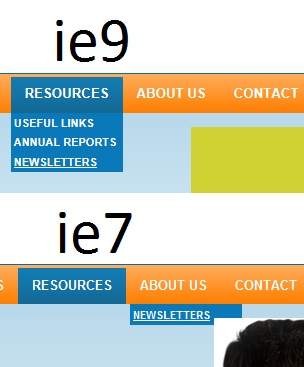
Hey guys i have a drop down menu problem in ie7.... here is the difference and here is the css... #navigation ul { text-transform: uppercase; width: 992px; position: relative; list-style-type: none; font-size: 0.833em; margin: 0 auto; text-shadow: 1px 1px 2px #4f4f4f; } #navigation li { position: relative; display: block; float: left; line-height: 1; } #navigation a { color: #fff; text-decoration: none; } #navigation a:hover { text-decoration: none; } #navigation ul li a { line-height: 39px; padding: 12px 14px; background: url('images/img-nav-bg.gif') repeat-x; } #navigation ul li a:hover, #navigation ul li:hover, #navigation ul li.AspNet-Menu-Selected a, #navigation ul li.AspNet-Menu-ChildSelected a { background: url('images/img-nav-bg-hover.gif') repeat-x; } #navigation ul li.AspNet-Menu-ChildSelected ul li a { background: url('images/img-dropdown-bg.png') repeat; } #navigation ul ul li .AspNet-Menu-ParentSelected { background: url('images/img-dropdown-bg.png') repeat; } #navigation ul ul { display: none; width: 110px; } #navigation ul li:hover ul { display: block; position: absolute; z-index: 99; } #navigation ul ul li a:hover, #navigation ul ul li.AspNet-Menu-Selected a { text-decoration: underline; background: url('images/img-dropdown-bg.png') repeat; } #navigation ul ul li.AspNet-Menu-ParentSelected a { background: url('images/img-dropdown-bg.png') repeat; } #navigation ul ul li a { display: block; background: url('images/img-dropdown-bg.png') repeat; width: 106px; margin: 0; padding: 0 3px; text-align: left; text-shadow: none; float: left; height: auto; line-height: 1.8; } any help would be awesome!

-
thanks i'll give it a crack!
-
Hello, I have a main menu built as a list and a drop down as the list inside that.... <ul> <li> <ul> <li></li> </ul> </li> </ul> i need to use jquery to get the width of the main nav <li> and apply it to the drop down menu ul ul. anyhting?
-
Hey guys, I'm looking for something like this http://www.smoothdivscroll.com/clickableLogoParade.htm but some sort of ease in ease out when you put your mouse over the images.... any help would be greatly appreciated
-
got it working, its going out to the right"Out" and coming left"In".... it isn't scrolling through my images though. (Images are set up through a cms dynamic data source.) And i want the in and out to happen at the same time. <script type="text/javascript"> $(function () { $('div.image').cycle({ fx: 'custom', sync: 0, speed: 200, timeout: 300, pause: 1, animIn: { left: 0, top: 0 }, animOut: { speed: 200, timeout: 300, left: 622 } // fx: 'scrollRight', // speed: 3500, // pause: 1, // timeout: 10500, // random: 1, // easing: 'easeOutCirc' }); }); </script>
-
Hey Guys, I have an image slider panel on a website i am developing at the moment using the .cycle plugin. This is what i have: $(function () { $('div.image').cycle({ fx: 'scrollLeft', speed: 1500, pause: 1, timeout: 5000, random: 1, easing: 'easeOutCubic' }); }); Is is possible to set the fx"In" to scrollLeft and the fx"Out" to scroll right? Cheers, K3rt90
-
i did try that, but it had issues with the header being outside the wrapper
-
this is the demo file of that issue. test_ulock3.html
-
good stuff! thanks heaps man [!edit] got over excited... When then content is less, it follows the wrapper up the page (away from the bottom. Any way to fix this... haha
-
Yeah i tried that, thanks anyway though it does fix it, but i should have specified that i want the footer to stay at the bottom of the page even if the #container height exceeds the screen resolution. This attachment more shows my problem, setting the position to fixed for the footer doesn't work either, because then the content goes under it. test_ulock2.html
-
Hey Guys, I am having trouble trying to figure out how to get my footer to stick to the bottom of the page, i understanding the method of using 100% height and width for everything and that works well, until......... i put my header in. The attached page has the styles included. Any help would be greatly appreciated. Cheers, k3rt90. test_ulock.html
-
i cheated and put it back in the wrapper and put padding on the left hand side so that it still centers the main content properly , i will have i play around with what you have said though j-hocks. Thanks heaps for your replies