JohnyKuleczka
Members
-
Joined
-
Last visited
Everything posted by JohnyKuleczka
-
I had the same problem, and I got an answer: set the vertical-align: to top; I hope I understood well what you mean PS: I don't see any gasps there Site looks great
-
Sorry for misunderstanding, but I just don't know the English lanuage that good ;P My problem is better to see there, the menu and the text in the right column are in the middle of whole collumn, how to place it on the top? - thanks for that advice - I'll take care of it later, but thanks too Thanks for any help one more time :*
-
Hey all! It's me again Please visit this site. The columns at the right and the left have text centered, while the css says it is aligned to the left and the right. The css file is there. Please tell me how to place this text on the top of the collumn. Btw, maybe there is sth that you would like me to change on this website, that it made it better? ;] Thanks, JonhyKuleczka
-
Ohhh.... nevermind xD
-
Very nice design, I like it! It looks clean and informative. Good job ;D
-
Oh, it did work. The more questions I ask, the more I notice I have to learn... So silly problem and an "easy" (not for me of course ) solution. Thanks again, JohnyKuleczka BTW. I still got the problem with borders of that table placed on this site. I've got #lewy { width:20%; height:auto; float:left; border-left:thin; text-align:center; border:1px #CCCCCC; } #srodek { width:60%; height:auto; float:none; background-color:#CCCCCC; text-align:justify; border:1px #CCCCCC solid; } #prawy { width:20%; height:auto; float:right; border-right:thin; text-align:center; border:1px #CCCCCC; } And in html <table id="table" align="center" cellspacing="2"> <tr> <td id="lewy">Miejsce</td> <td id="srodek">Miejsce</td> <td id="prawy">Miejsce</td> </tr> </table> Whats wrong, that there are no borders ?
-
How to change background color? It's code of the document: * { margin: 0; padding: 0; [b]background-color:ccffff;[/b] } To prove that the bg is still white see here (outdated....) Please help! Thanks, JohnyKuleczka PS: Sorry for the name of the topic, not "#FFFFFF", but "#CCFFFF".
-
I reccomend visiting website that explains step by step how to do it Check it out here. Hope that helps, JohnyKuleczka
-
Oh, it looks great! Thanks a lot Dizi! I'll try it when i'll have some time (I just wanted the upload option for all signed up people and coppermine has it )
-
Hello all! I'd like to create an image gallery that is password protected (with sign up option) and that allows visitors to upload images. I know that is a lot of work, but I need some help I looked for it on the www.hotscripts.com but didn't find anything. Thanks all, JohnyKuleczka
-
Ok, thanks you all! Badmotherz your method works even better ! PS: and now I know that it's "negative" margin, not minus JohnyKuleczka
-
Thanks Mikec1uk ! That works! I didn't know that I can set margins to minus value People are learning whole life Thanks, JohnyKuleczka
-
Hey all! That's my second post and I think that this one would have at least one answer (not like the previosu one ) I've got a problem: I am making a website and at the top of it I'd like to be a headergoing through whole window. When I write: #header { background-image:url(head.jpg); background-repeat:repeat-x; height:150px; margin-left:0px; margin-right:0px; margin-top:0px; } there still are some margins (example here (don't look at the advertisements- only left side and the right side)) How to solve this problem? Please help. Thanks, JohnyKuleczka
-
Hi all! I'm Michael and I live in Poland I like sth about coding websites etc., but I must say that I'm not so good in that. What I love is making some signatures etc. in PhotoShopCS2 and recently I am taking part in a school competition for a WebSite. That's all about me See you !
-
Ok, I've already dealed with the problem: writing on the table cell filled with an image. But I am still waiting (for teh most important for me) for an answer: Can I use this script on a website built using tables? Please reply a.s.a.p
-
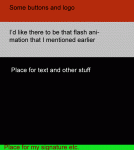
First of all, I would like to say hello to all of you I really must say that I fell in love with this forum! Many interesting advices and great users :* (I'm from Poland, so I hope you will forgive me any mistake I make) I am taking part in a school competition for the best website for our school. I would like to make it in Photoshop CS2 (layout). I don't want to start, because I really don't know what to do with all those images made with slices... When I cut background and PS put it into a table I don't know how to write text on it (that would be very helpful, because site is updated often and changing text in PS is no so comfortable). I'd like the site to be quite small, too. Loading all the images is not as fast as loading background color and text. I was thinking about a script took from www.hotscripts.com It's called "Ajax dynamic page content from PHP backend." Can I use it with my website ? The next thing I don't know how to deal with is a stupid idea of my teacher is voting for representative of our school self-goverment (don't know if it's a good exression ). I think that the best would be a postcard, where they would have to write their name and then vote. It's difficult to do, because everyone could vote as somebody else. At last I was wondering if someone could give me a hand in doing sth like banner for my site, but in flash. I mean a few pictures that are in *.swf file with some effects. PS: I concocted that the layout of my website would be sth like that(attached file): (resolution: 760x850) colors bright, happy. I hope that everybody understood what I said. Thank you for any help, JohnyKuleczka