jayaraman
Members
-
Joined
-
Last visited
Everything posted by jayaraman
-
-
hope this helps HTML <ul id="menu"> <li> <a href="#">Menu 1</a> </li> <li><a href="#">Menu 2</a> <ul class="sub-menu"> <li><a href="#">Sub Menu 1</a></li> <li><a href="#">Sub Menu 2</a></li> <li><a href="#">Sub Menu 3</a></li> <li><a href="#">Sub Menu 4</a></li> </ul> </li> <li><a href="#">Menu 3</a></li> </ul> CSS /*Initialize*/ ul#menu, ul#menu ul.sub-menu { padding:0; margin: 0; } ul#menu li, ul#menu ul.sub-menu li { list-style-type: none; display: inline-block; } /*Link Appearance*/ ul#menu li a, ul#menu li ul.sub-menu li a { text-decoration: none; color: #fff; background: #666; padding: 5px; display:inline-block; } /*Make the parent of sub-menu relative*/ ul#menu li { position: relative; } /*sub menu*/ ul#menu li ul.sub-menu { display:none; position: absolute; top: 30px; left: 0; width: 100px; } ul#menu li:hover ul.sub-menu { display:block; }
-
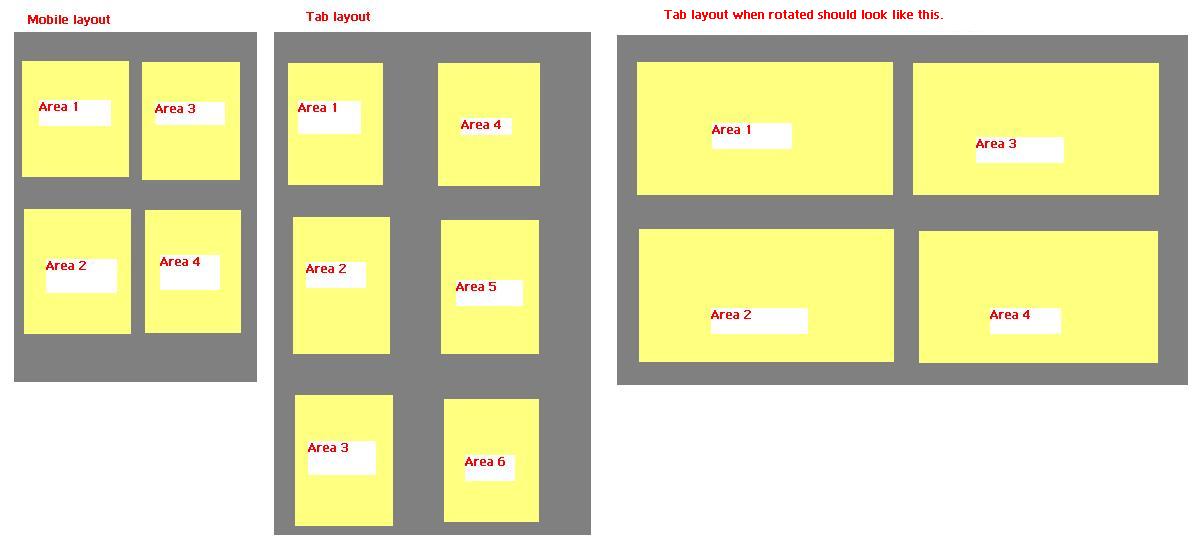
Hello experts, i am working on app which can be viewed on mobile and tab. i want a fluid layout to arrange the div as shown in the attachment. when it comes to tab it should work in both the ways as shown in the attachment. have used the following code to achieve it Css: div#multicolumn1{ -moz-column-count: 2; -moz-column-gap: 50%; -webkit-column-count: 2; -webkit-column-gap: 50%; column-count: 3; column-gap: 50%; background-color:#333; height:480px; width:650px;} .child{ background-color:#ccc; margin:10px; width:300px; height:220px; display:block; position:relative; } HTML: <div id="multicolumn1"> <div class="child">Hello</div> <div class="child">Test text text text text text text text text text text </div> <div class="child">3</div> <div class="child">4 text text text text text text text text </div> <div class="child">5</div> <div class="child">6 text text text text </div> <div class="child">7 text text text text </div> <div class="child">8 text text text text </div> </div> but its not working when i rotate the layout. Thanks in advance
-
for a gaming site this is too simple yar may be you can make it little more rich, you can check any game company website or templates then get an idea as how they have presented it then if you start designing then it will be great i think.
-
thanks a lot to everyone so even i feel i should go with the second design.... EvaBrown ya i do accept with your point but adding a white here in the design isnt possible i think then it will become a usual stuff i think, anyway thanks
-
may be u can reduce the size of the arrow for next and previous having just 2 posts in a page may not leave the reader happy because he has to slide through the rest of the pages to find the hidden content which no one will be interested in more than few clicks. so think of few more options where user can easily reach the page r topic they are interested in.
-
@Gibson thanks for your comment. but can you please tell me in what style the first one and d second one can be enhanced... In the second one(new_interface1) by mistake i enabled the sublinks for the works tab, but any way thats how i will be displaying the sub links, where as in the first interface i will be displaying it on top of the description text.
-
thanks a lot mates even i was not soo convinced for with the first one so only created d second one then was confused as which one is good hahaa.... as Lev said i found both to be good in their own ways Thanks again
-
Hello guys, finally i have tried to design my personal site i have created 2, i feel both r good in their own ways so your suggestion please suggest the comments with the interface name so that it will be helpful for me thanks in advance.


-
helloo all... i was just browsing thro and i found this function interesting and its done using jquery... any clues as how this output can be achieved as in this site... sonystyle dot com dot cn 1. on mouse over we can see a slider with a button on button click it expands to the top as a list of items 2. the scroller below that, its a user designed scroller how can i get that? 3. bg image keeps changing i think they would have done this with different z-index values... thank u
-
what do you mean by that?
-
hahaa thanks mate my first post as a ans and it works fine im happy
-
think this is what you are exactly looking for... http://jqueryfordesigners.com/slider-gallery/
-
u forgot to add margin and padding values for ur h1 h1 { font-family: helvetica; margin: 0; padding: 0; } think this will work
-
div1 class name--.sign_toggle div2 class name--.toggle_container <script type="text/javascript" src="js/jquery-latest.js"></script> <script type="text/javascript"> $(document).ready(function(){ $(".toggle_container").hide(); $(".reason_but").click(function(){ $(".toggle_container").slideToggle("slow"); $(".sign_toggle").slideToggle("slow"); }); $(".home_but").click(function(){ $(".toggle_container").slideToggle("slow"); $(".sign_toggle").slideToggle("slow"); }); }); </script> i got this working guys and little more css to be added too..... i had 2 cs file in one the normal css to define the contents and in another css i had the following .toggle_container[style]{ display: block !important; } and its working fine:) but the problem is i want the first page to be occupying 100% height now the problem im facing is the sliding page is not sliding up to the top i know the concept, i have to override the class of the top div and get the sliding div in but i dont know how to do it jquery
-
hellooo.... i wanted to slide a div from top to bottom on a button click i have the main container with the button with the following css #container { margin:0 auto; padding:0; width:800px; } #close_but { margin-top:10px; left:300px; position:relative; } the below container holds all the content that i need and need to scroll from top to bottom #container_contents { margin:0 auto; padding:0; width:800px; } i tried this example www dot sohtanaka dot com /web-design/ simple-accordion-w-css-and-jquery/ (please remove spaces) but the css is written with a common name, is it like only if we have a common name we can achieve this output? i am looking for a output similar to tumblr web site when you click on 30 reasons the content slides down how can i achieve this?
-
-
-
-
Can anyone please tell me the font used in the image attached. thank you

-
-
-
-
Hello guys, i wanted to achieve the output as shown in the pic, i want the cure to be using image and i am not sure as how to achieve this output in the bottom of the page where the imgae is touching the bottom border and the corner also arounded... please let me know about it. also tell me how to assign a image for a submit button using css.... thank u
-