gfc9596
Members
-
Joined
-
Last visited
Everything posted by gfc9596
-
This very basic javascript should (i beleieve) display a hidden layer. But it doesn't work..... <script type="text/javascript"> function showLayer() { document.getElementById('index_log').style.visibility="visible"; } </script> can anybody tell me what is wrong?
-
i notice that the rotator has a border on the home page and not on the destination page. It also looks like there is a margin somewhere on the rotator in the home page which doesn't appear on the destination page. Not being an expert i'm just clutching at straws, but i betcha some of the more experienced guys can give you a fix.
-
I'm not really up on HTML 5 - i'm still learning and have not really looked at it yet. I assume that HTML 5 is now the version everyone is using? Will it mean re-learning?
-
so i need to know how to code for every type of DOCTYPE? or is there a standard that everyone generally uses?
-
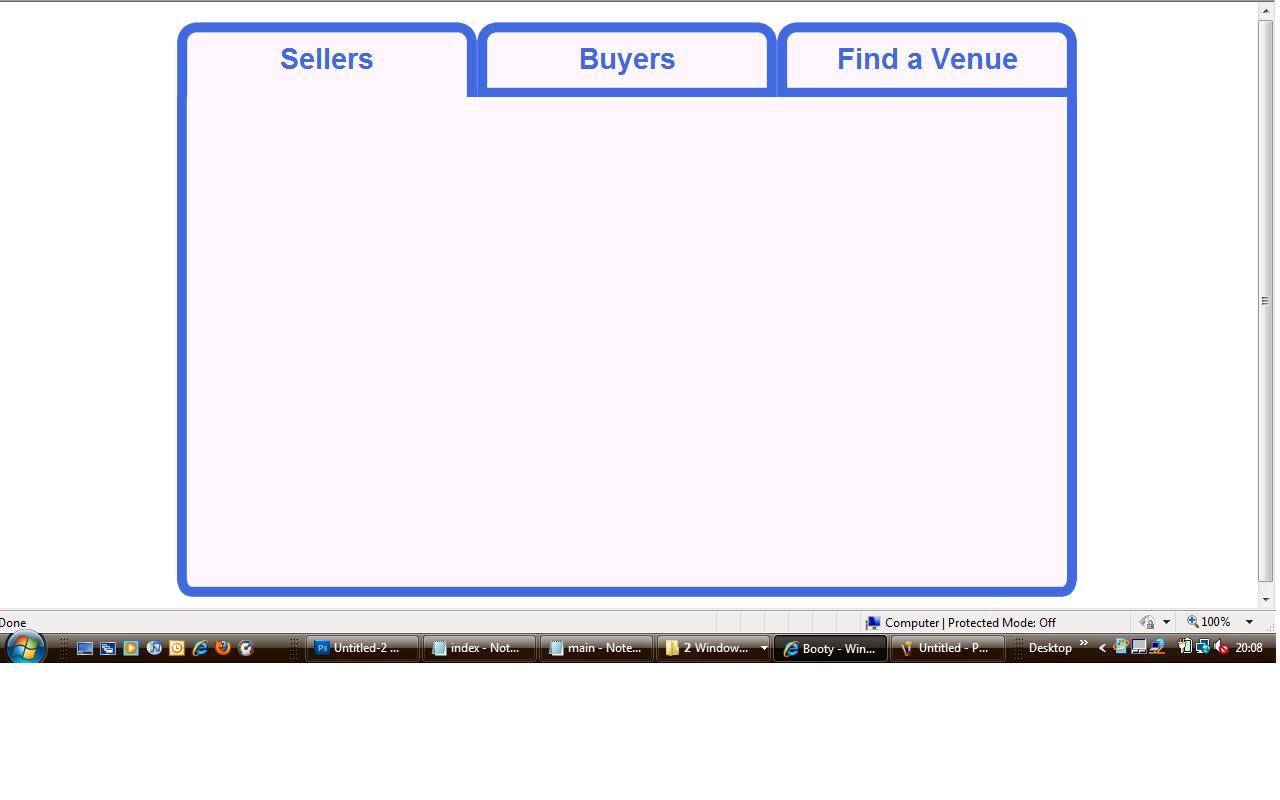
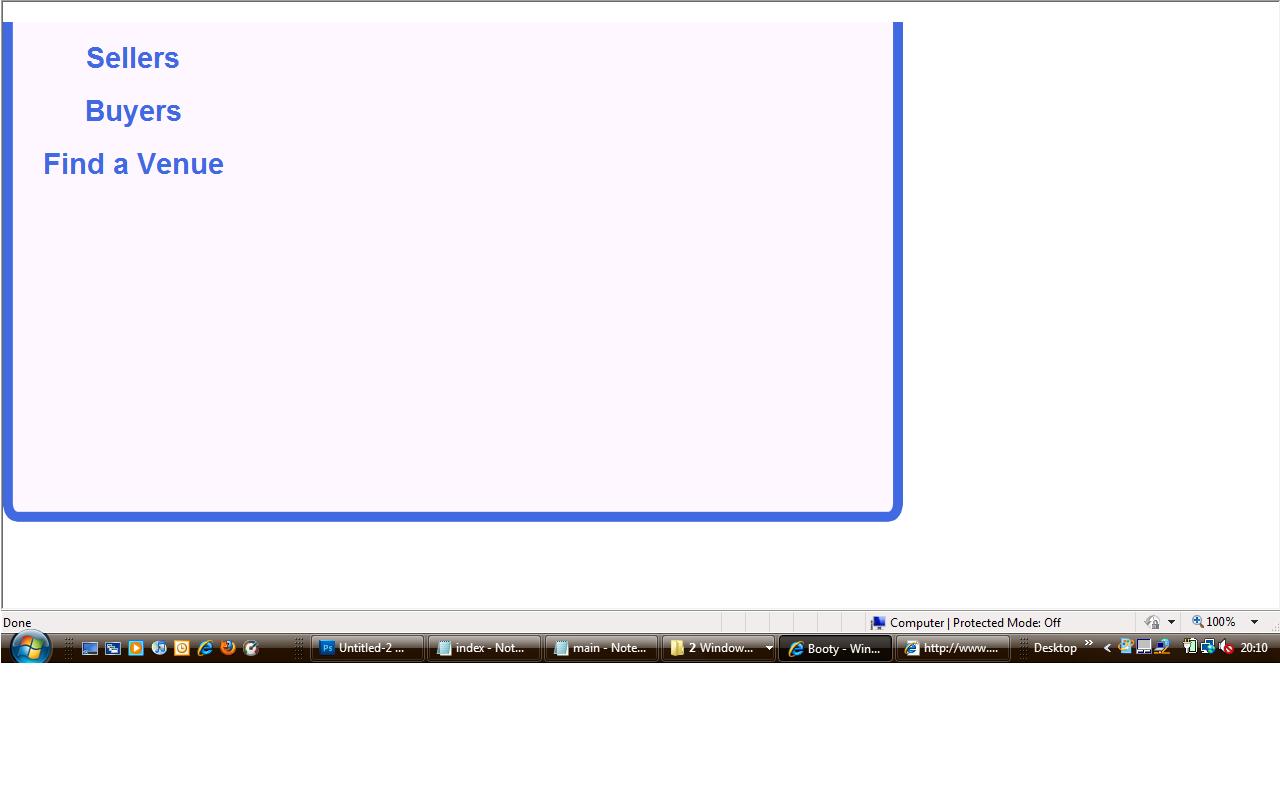
Can anybody explain to me why adding the following DOCTYPE to my page causes the layout to change from picture 1 to picture 2? <!DOCTYPE html PUBLIC "-//W3C//DTD XHTML 1.0 Transitional//EN" "http://www.w3.org/TR/xhtml1/DTD/xhtml1-transitional.dtd"> <html xmlns="http://www.w3.org/1999/xhtml"> Please forgive the very basicness of the site layout - it's a basic project for a basic purpose.


-
I have a table in my database similar to the one shown below pcode | cases | packets | order_id| ---------------------------------- F0570 | 2 | 1 | 45671 | ----------------------------------- F0570 | 1 | 3 | 45672 | ----------------------------------- F0570 | 4 | 2 | 45673 | ----------------------------------- What i am trying to do is use php/mysql to tell me how many cases and packets there are for each product code. I can obviously see that there are 7 cases and 6 packets ordered for this particular product. But what i am trying to do is transfer this into another table which will produce a picking list (below) but i can't work out how to get the totals for each product. I have tried COUNT and SUM but get really odd results that don't help pcode | cases | packets | ------------------------- FO570 | 7 | 6 | -------------------------
-
thanks, the point about browser compatibility makes me understand the benefits.
-
Exactly what i thought, i always like to check to make sure my coding validates - but it seems pointless having the logo that easily available. Does it really make people trust your sites, or visit your sites anymore? I wouldn't imagine so
-
Does it really matter if you get your coding validated by W3C and then put their little logo on your pages? Is there any realy significance to this? I don't think that your average web user who has no clue how the page is constructed will have any interest in seeing that little logo. Can anybody enlighten me as to the possible significance?
-
Ok.....very basic Javascript for the hidden layer <script language ="JavaScript" type="text/javascript"> <!-- function showLayer() { document.getElementById("info").style.visibility="visible"; } function hideLayer() { document.getElementById("info").style.visibility="hidden"; } //--> Basic PHP to select the products from the database (excuse my basic PHP).... $q3 = "select * from products where pcode = '$row2[pcode]'"; $r3 = mysqli_query($cxn,$q3) or die ('Error Q3 customer log'); while($row3 = mysqli_fetch_assoc($r3)) { include("gp.inc"); echo "<table width='70%' style='float: left;'> <tr> <td width='40%' onMouseOver='showLayer('info');">$row3[description]</td> The <td> with the description listed is where i want the layer to appear above with product info.......
-
Can anybody help me with this little problem i've got. I have a product catalogue in a mysql database which can be queried and return the products a customer is looking for. I want to have a hidden layer which appears when the user hovers over the product description which brings up the price, stock and order button. I have no problem getting the hidden layer to pop up, but i can't seem to get the product information to appear in the box. I am using PHP/MySql to query the database, and obviously the layer is a javascript (onMouseOver) function. Any help / advice would be greatly appreciated
-
I can't post a link because it's just on my computer but i'll post the code if that helps?
-
Hi Guys, Please could somebody tell me why an invisible element i have stacked using the z-index property is making the element beneath it stretch to the size of the stacked element? It's supposed to pop up when a user rolls over a certain area of my sidebar (which is 200px wide) the element to pop up is 350px wide. I thought if i used the z-index the element on top shouldn't affect the bottom Any ideas?
-
Yes, all is as it should be!
-
$Wrd = new COM("Word.Application"); $template_file = "C:/invoice.doc"; $Wrd->Documents->Open($template_file); $Wrd->visible = false; $WrdDoc = $Wrd->Documents->Add(); $total = 0; $table = $WrdDoc->Table->Add($Wrd->Selection->Range, 1, 6);; //get first table in document ..........I won't put all the boring middle bit in........ $Wrd->ActiveDocument->SaveAs("C:/invoice$num.doc"); $Wrd->Application->Quit; $Wrd = null; The middle bit basically gathers the necessary information from the database and generates an invoice using bookmarks and by adding rows I'm not entirely sure of the library because i've just been reading articles online and adjusting to suit my needs - probably really bad practice in know!! Like i say it all worked perfectly with my old computer but now doesn't work at all
-
Let me explain, i'm quite new to this and managed to develop a couple of scripts which worked beatifully on my old computer (Windows XP) now i've gone on to windows 7 the script continually gives me errors such as Fatal error: Uncaught exception 'com_exception' with message '<b>Source:</b> Microsoft Word<br/><b>Description:</b> Word cannot print. There is no printer installed.' in C:\xampp\htdocs\simples\test.php:16 Stack trace: #0 C:\xampp\htdocs\simples\test.php(16): variant->PrintOut() #1 {main} thrown in C:\xampp\htdocs\simples\test.php on line 16 or the other one it constantly gives me is exactly the same as above - but instead of "variant->PrintOut()" it's variant SaveAs which is the problem. Just so ou know also, there is a printer installed - it worked fine until i upgarded!!! I know this has digressed from my original post - but i am baffled as to why my scripts which worked perfectly on my old computer now dont work at all!!! I am using apache as the web server (same as before) nothing has changed other than it being windows 7 not XP......HELP!!! Plus it gives similar errors when i'm trying to open my template document from the script as well - again worked perfectly before migrating to windows 7. I have read loads of posts online about people not being able to access files/directories etc on windows 7 i have checked all my priveleges etc and they're all fine
-
Hi Guys i was wondering if you could help me, i want to set some ms word table cell widths to a certain size via PHP to dynamically generate my invoices. I need three cells to be 10% each of the table width, one cell to be 40% and two to be 15%. Is there any way of doing this? I've looked on msdn but it isnt really much use. I have the table set up perfectly to include all the rows etc but they are all bunched up and id no good. I want to specify the cell sizes so that the information prints properly.
-
I think you're misunderstanding me, i want the document to be set to autofit the contents because there is no need for me to do anything manually. Is there nowhere i can read up on using COM?
-
Ya, well i've got the document created perfectly but want to format the table within it because i don't want all the cells the same size. One cell would contain a description and then the next just a single number, it's an invoice that is generated. and i don't want product names pushed over two lines i want the cell to auto fit the text
-
sorry.......i mean to autofit the contents of the cell
-
Does anybody know how to set table cells to autofit using php com for ms word tables? I thought it was AllowAutoFit = true but obviously i am wrong!!
-
I have tried every path i can think of - very frustrating.....
-
Yea this is what i'm thinking because it gives the same error on another script of the same kind. Is there anyway i can over ride these settings?
-
The script works perfectly on one computer but not on another. It's a problem with saving the file - which is the command on that line....... $Wrd->ActiveDocument->SaveAs("C:/$DocName"); As i say it all works perfectly on an older computer but with my new one (Windows 7) it doesn't want to allow the file to be saved
-
Can anybody help me? I have a script which i've developed using php COM which generates a word document and saves it. However, this script works perfectly on my computer at work but now i'm back home it gives the following error message. Fatal error: Uncaught exception 'com_exception' with message '<b>Source:</b> Microsoft Word<br/><b>Description:</b> Command failed' in C:\xampp\htdocs\simples\generate.php:40 Stack trace: #0 C:\xampp\htdocs\simples\generate.php(40): variant->SaveAs('c:/newdoc.doc') #1 {main} thrown in C:\xampp\htdocs\simples\generate.php on line 40 Could this be to do with administrator priveliges or something? Probably a dumb question but i'm relatively new to all this. Any help would be appreciated