ghandil
Members
-
Joined
-
Last visited
-
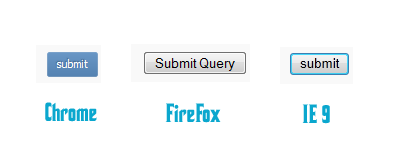
I styled buttons on css as below and it looks nice in chrome but erratic in Firefox. here's the css code: .readon span, .readon .button, input[type="button"], input[type="submit"], input[type="reset"], input[type="file"]::-webkit-file-upload-button, button {display: block;padding: 0 9px;height: 25px;line-height: 22px;cursor: pointer;overflow: visible;font-weight: normal;position: relative;white-space: normal;border: 1px solid rgba(225, 225, 225, 0.2); border-radius: 2px;font-size: 1em;text-transform: uppercase;transition: background-position 0.3s linear;color: white; text-shadow: -1px -1px 1px rgba(0, 0, 0, 0.3); background-color:#558BC2; background-image:url(../images/overlays/dark/readon.png); font-family:tahoma;float:right;} .readon span:hover, .readon .button:hover, input[type="button"]:hover, input[type="submit"]:hover, input[type="reset"]:hover, input[type="file"]::-webkit-file-upload-button:hover, button:hover {background-position: 0 -223px;} this is how it displays in Chrome/IE/firefox: There is the live site if you want to check: http://goo.gl/SnGVM Thanks in advance

-
Any answer will be so appreciated
-
Hi there, I've learnt html and css 2 since three years ago and designed many joomla templates and html sites. As I learned these experimentally and maybe there are some tips and tricks that I don't know because didn't learn them systematic; Would you guide me to fill dark points on my mind about html (I don't know what version is it) and css 2 and learn them neat and skillful? any kind of resource will be good (sites, books, videos, ...) But they should be systematic and principled also comprehensive. Also while there are new versions of html and css (HTML5, CSS3), You oblige me if recommend recourse (of course systematic and principled also comprehensive here too) and tell me if I should learn previous versions completely before start learning them or not? P.s: I don't have any Idea what's difference between HTML and HTML5 or CSS2 and CSS3 and Do newer versions support previous versions or not. Thanks for taking the time for read this. Regards...
-
Hi, I use a slider (sliderku module using mootools javascript library) on a joomla site and it works fine on all page except search and web links pages. You may see it on search page at this address : http://goo.gl/Hy5iY Also You can see every thing is fine on homepage here : http://goo.gl/ezjxU I checked the source and understood that two javascript files haven't been included in header of these specific two pages : search and web links. <script type="text/javascript" src="/j/media/system/js/mootools.js"></script> <script type="text/javascript" src="/j/media/system/js/caption.js"></script> But why? Regards...
-
Hi, How to load joomla modules horizontally in a template position? they load vertically and below each other by default. I tried "horz" option as below but it doesn't work : <jdoc:include type="modules" name="user3" style="horz" /> Thanks in advance
-
Hi, I used the scrolling sample in my template from here : jQuery Scrollable Tool It utilizes jQuery selector. As default we only able to scroll this by click. Is there anyway to enable it self scrolling and of course click scrolling at the same time? the code is as below : script> // execute your scripts when the DOM is ready. this is mostly a good habit $(function() { // initialize scrollable $(".scrollable").scrollable(); }); </script> Thanks in advance
-
Thanks a lot so I have 4 different picture at the end. Thanks again
-
 ghandil reacted to a post in a topic:
one background image for hover links with different width (size)
-
Thanks for quick reply may I use your trick for "mouse over" only? How?
-
Hi I have a menu with some links and also a background image that's as wide as widest link. so how should I style a:hover declaration that the background shrinks from its center and both sides of it is shown for narrow links anyway? background image is like this : Regards...
-
Thaksssss a lot dear ashley Your tricks works
-
Hi, I want to set a background like below for a module : but due to various heights; I created an image with maximum height (600px): So how could I define this background to show both its top and bottom on shorter heights? my modules are with xhtml style ( DIV ) I remember that we do this by table-layout: auto; and some other css properties on table styled modules in mambo. But the problem is that here, modules are in DIV format and "table-layout: auto;" doesn't work on it Report this post Regards...
-
Hi , I have mambo 4.6.5 on my source site and joomla 1.5 on destination site. I'm going to move users from first one to second. so I install userport component on joomla 1.5 and then went to mambo database and select my users with this Query : SELECT name, username, email, password FROM mos_users and export them to a CSV file which is all "userport" needs. some of user's name are Persian and UTF-8 . as you see in below some of texts are disassemble due to UTF-8 unicode while they have shown correctly in Backend and frontend section of mambo. mambo database (click to enlarge) The problems is here : when i import my users in joomla 1.5 via userport, the texts that seems disassemble in database (But shows correctly in mambo simultaneity !) ; are as when shows in mambo database and remain ill in joomla administrator : (click to enlarge) What's the solution? Thanks
-
Anyone can help me please?
-
Hi, I use both jquey plugin and mootools plugin in a web page so they conflict each other and my mootools plugin does not work. I read sporadic about jQuery.noConflict(); but I don't know how to use it in my script. could you please give me final code integrated with jQuery.noConflict(); ? this is the script : var jkpanel={ controltext: 'panel', $mainpanel: null, contentdivheight: 0, openclose:function($, speed){ this.$mainpanel.stop() //stop any animation if (this.$mainpanel.attr('openstate')=='closed') this.$mainpanel.animate({top: 0}, speed).attr({openstate: 'open'}) else this.$mainpanel.animate({top: -this.contentdivheight+'px'}, speed).attr({openstate: 'closed'}) }, init:function(file, height, speed){ jQuery(document).ready(function($){ jkpanel.$mainpanel=$('<div id="dropdownpanel"><div class="contentdiv"></div><div class="control">'+jkpanel.controltext+'</div></div>').prependTo('body') var $contentdiv=jkpanel.$mainpanel.find('.contentdiv') var $controldiv=jkpanel.$mainpanel.find('.control').css({cursor: 'wait'}) $contentdiv.load(file, '', function($){ var heightattr=isNaN(parseInt(height))? 'auto' : parseInt(height)+'px' $contentdiv.css({height: heightattr}) jkpanel.contentdivheight=parseInt($contentdiv.get(0).offsetHeight) jkpanel.$mainpanel.css({top:-jkpanel.contentdivheight+'px', visibility:'visible'}).attr('openstate', 'closed') $controldiv.css({cursor:'hand', cursor:'pointer'}) }) jkpanel.$mainpanel.click(function(){jkpanel.openclose($, speed)}) }) } } //Initialize script: jkpanel.init('path_to_content_file', 'height of content DIV in px', animation_duration) jkpanel.init('index.htm', '80px', 1000) Thank you
-
This is the way : Go to module manager and make a copy of say, Main Menu Assign that module copy to a unused position like menu_dropdown Assign that module copy to appear in all pages Create a new article which only content is {load_position menu_dropdown} You should have enabled the Content - Load Module plugin Now find the article url, example index.php?option=com_content&view=article&id=57&Itemid=26 and add &tmpl=component at the end. So that url looks like index.php?option=com_content&view=article&id=57&Itemid=26&tmpl=component this url should be the first parameter to jkpanel.init NOTE: You should be careful that the article doesn't show up normally, maybe by archiving it. source