Agent-Zero1
Members
-
Joined
-
Last visited
-
This is my second website so I am still a newbie to web building. www.inthepouch.com The footer colour (curve) does not match the content div. Although when I look at the file in both Dreamweaver and Photoshop the colour blends perfectly. I have used the same colour codes in both applications. However once site is viewed in Safari, Firefox and Explorer there is a noticeable difference. Can anyone explain this, please Cheers
-
Is there away to us the colours from adobe illustrator to Hex colours on a web site. Here is what I have for code and it doesn't seem to be working. I <html> <head> <style type="text/css"> body { background-color:rgb(231,211,172)"; } h1 { color:rgb(120,0,102)"; text-align:center; } p { font-family: "Arial, Helvetica, sans-serif"; font-size:20px; } </style> </head> <body> <h1>TEST</h1> <p>These are colours.</p> </body> </html> Is it my code or is it a colour problem

-
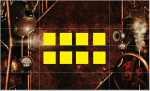
I am a total newbie and a few questions for you pros out there THis picture need it to fill the whole background without repeating. Then in the center I want to have a bunch of pictures. (yellow boxes) How do I do this??

-
Cheers mate this site is exactly what I was looking for
-
Greetings and Salutations I found this site through Stumble Upon and found the forums really interesting and informative, so I joined. So I am a complete newbie to designing web pages and will have lots of questions please bare with me. See you in the forums CHEERS
-
How do I create a weather updater like the ones that you see on yahoo's "my yahoopage" ? Is there HTML code for something like that or is it more advanced programming that is needed? Cheers