sash_007
Privileged
-
Joined
-
Last visited
Everything posted by sash_007
-
hello i did this and got this error Fatal error: Maximum execution time of 60 seconds exceeded in C:\wamp\apps\phpmyadmin3.2.0.1\libraries\relation.lib.php on line 9

-
Hello geek hope i am going rght

-
ya
-
thanks so in this case according to the example i have to make 2 tables ?
-
ya i have your_databse user-sash_007 pass-none
-
so i have to make a results.php to display the data but how do i have any relation between the two data.html <!DOCTYPE html PUBLIC "-//W3C//DTD XHTML 1.0 Transitional//EN" "http://www.w3.org/TR/xhtml1/DTD/xhtml1-transitional.dtd"> <html xmlns="http://www.w3.org/1999/xhtml" xml:lang="en" lang="en"> <head> <title>Database </title> </head> <body> <form action="insert.php" method="post"> Value1: <input type="text" name="field1-name"><br/> Value2: <input type="text" name="field2-name"><br/> Value3: <input type="text" name="field3-name"><br/> Value4: <input type="text" name="field4-name"><br/> Value5: <input type="text" name="field5-name"><br/> <input type="submit"> </form> </body> </html> insert.php <?php $username="sash_007"; $password=""; $database="your_databse"; $field1-name=$_POST['Value1']; $field2-name=$_POST['Value2']; $field3-name=$_POST['Value3']; $field4-name=$_POST['Value4']; $field5-name=$_POST['Value5']; mysql_connect (localhost,$username,$password); @mysql_select_db($database) or die ("Unable to select database"); $query = "INSERT INTO tablename VALUES ('','$field-name','$field2-name','field3-name','field4-name','field5-name'); mysql_query($query); mysql_close(); ?> result.php <?php $username="sash_007"; $password=""; $database="your_databse"; mysql_connect(localhost,$username,$password); @mysql_select_db($database) or die("Unable to select database"); $query="SELECT * VALUES"; $result=mysql_query($query); $num=mysql_numrows($result); mysql_close(); echo "<b><center>Database Outout</center></b><br/><br/>" $i=0; while ($i < $num) { $field1-name=mysql1_result ($result,$i,"field1-name"); $field2-name=mysql1_result ($result,$i,"field2-name"); $field3-name=mysql1_result ($result,$i,"field3-name"); $field4-name=mysql1_result ($result,$i,"field4-name"); $field5-name=mysql1_result ($result,$i,"field5-name"); echo "<b>$field1-name<br/> $field2-name</b><br/>$field3-name<br/>$field4-name<br/>$field5-name<hr><br/>"; $i++; } ?> the what is the name of this page <html> <body> <?php $username="username"; $password="password"; $database="your_database"; mysql_connect(localhost,$username,$password); @mysql_select_db($database) or die( "Unable to select database"); $query="SELECT * FROM tablename"; $result=mysql_query($query); $num=mysql_numrows($result); mysql_close(); ?> <table border="0" cellspacing="2" cellpadding="2"> <tr> <th><font face="Arial, Helvetica, sans-serif">Value1</font></th> <th><font face="Arial, Helvetica, sans-serif">Value2</font></th> <th><font face="Arial, Helvetica, sans-serif">Value3</font></th> <th><font face="Arial, Helvetica, sans-serif">Value4</font></th> <th><font face="Arial, Helvetica, sans-serif">Value5</font></th> </tr> <?php $i=0; while ($i < $num) { $f1=mysql_result($result,$i,"field1"); $f2=mysql_result($result,$i,"field2"); $f3=mysql_result($result,$i,"field3"); $f4=mysql_result($result,$i,"field4"); $f5=mysql_result($result,$i,"field5"); ?> <tr> <td><font face="Arial, Helvetica, sans-serif"><?php echo $f1; ?></font></td> <td><font face="Arial, Helvetica, sans-serif"><?php echo $f2; ?></font></td> <td><font face="Arial, Helvetica, sans-serif"><?php echo $f3; ?></font></td> <td><font face="Arial, Helvetica, sans-serif"><?php echo $f4; ?></font></td> <td><font face="Arial, Helvetica, sans-serif"><?php echo $f5; ?></font></td> </tr> <?php $i++; } ?> </body> </html> am i going right?
-
Hello friends, i was just following this tutorialof how to input data from a form inside a database but seems to be lost somewhere After i make the form and insert.php they havent mentioned to create a VALUES table in the database? sorry am i right?
-
Hello friends, I am just wondering what makes a url look like this http://www.dafont.com/new.php?page=4 and though there is rewrite url method available why do these sites keep this type of url
-
Hello friends, want some feedback on these logos

-
ya xml sitemaps are more important as far as seo is concerned
-
sorry to interrupt but did u actually closed the form div? <div id="form_div">
-
i agree with snowy a logo should be simple less is more although u have got good drawing skills apply it hope that helps
-
hey moon, Thanks for ur advice i actually used channels for selecting the hairs and used gausssian blur to blur the edges but may be i need more refining to achive the result and get rid of those white areas anyways thanks
-
Hello friends, Just need some thoughts on this photoretouch



-
thanks everyone for feedback

-
Hello friends, Are there any program or site where i can check how a site looks on higher resolution?
-
as said above your site needs redesign
-
Hello firends, Need feedback on this logo Hats Boutique their website http://www.hatsboutique.co.uk/

-
Hello friends, what you think of these ebook covers


-
Hello friends, I have added breadcrumb navigation to mypage but its is'nt showing i have use the following php <div id="content"><!-- content start --> <?php session_start(); include("includes/Breadcrumb.inc.php"); $trail = new Breadcrumb(); $trail->add('Home', $_SERVER['PHP_SELF'], 0); //Sample CSS echo " <style> #breadcrumb ul li{ list-style-image: none; display:inline; padding: 0 3px 0 0; margin: 3px 0 0 0; } #breadcrumb ul{ margin:0;padding:0; list-style-type: none; padding-left: 1em; } </style> "; //Now output the navigation. $trail->output(); ?> <div class="col1 item itemOdd" id="contentBlock"> <div class="c7"> and used this include <?php /* * Breadcrumb navigation class * Mick Sear * http://www.ecreate.co.uk * * The key to using this is to decide on a $level for each page. (array, starting position 0) * This determines where in the trail a link will be placed. So, I normally make the homepage level 0, * then every page that can be accessed from the top level nav becomes level 1, and every page * from that second level becomes level 2, and so on. When users return to a higher level (e.g. level 1) * the surplus links are removed. Only one page can occupy a $level in the crumb trail. * There might be several routes to a page. In which case, the trail will reflect the route that the * user actually took to get to that page. */ class Breadcrumb{ var $output; var $crumbs = array(); var $location; /* * Constructor */ function Breadcrumb(){ if ($_SESSION['breadcrumb'] != null){ $this->crumbs = $_SESSION['breadcrumb']; } } /* * Add a crumb to the trail: * @param $label - The string to display * @param $url - The url underlying the label * @param $level - The level of this link. * */ function add($label, $url, $level){ $crumb = array(); $crumb['label'] = $label; $crumb['url'] = $url; if ($crumb['label'] != null && $crumb['url'] != null && isset($level)){ while(count($this->crumbs) > $level){ array_pop($this->crumbs); //prune until we reach the $level we've allocated to this page } if (!isset($this->crumbs[0]) && $level > 0){ //If there's no session data yet, assume a homepage link $this->crumbs[0]['url'] = "/index.php"; $this->crumbs[0]['label'] = "Home"; } $this->crumbs[$level] = $crumb; } $_SESSION['breadcrumb'] = $this->crumbs; //Persist the data $this->crumbs[$level]['url'] = null; //Ditch the underlying url for the current page. } /* * Output a semantic list of links. See above for sample CSS. Modify this to suit your design. */ function output(){ echo "<div id='breadcrumb'><ul><li>Click trail: </li>"; foreach ($this->crumbs as $crumb){ if ($crumb['url'] != null){ echo "<li> > <a href='".$crumb['url']."' title='".$crumb['label']."'>".$crumb['label']."</a></li> "; } else { echo "<li> > ".$crumb['label']."</li> "; } } echo "</ul></div>"; } } ?> source of this help
-
Hello friends, I was just wondering how can i make a search engine likethat
-
^ has a cool website
-
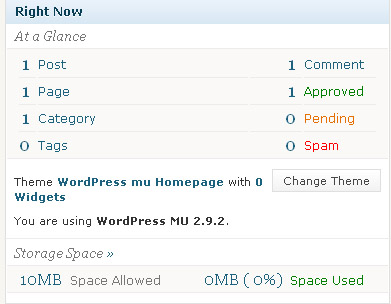
i didnt meant that i know i can host multiple blogs on multiple domains or subdoamins but that needs to install wp each time which would take extar space but i wanted to know that if anyone has usedwordpress multiuser as i have installed wp multiuser and in the admin area i can see only i am allowed 10mb space so how is this space allocated can i increase this space ? is this space allocated for a single blog?
-
Hello friends, Just wondering can i install a fresh wp and have a new blog under my new subdomain just came up with thiswp mu
-
you mean the whole community will wake up when u do so