bfbf
Members
-
Joined
-
Last visited
-
Manged to get them all in .xml. Of course they are all set out differently though
-
Hi I have some .xml files and one API. I would like to integrate them into a database and show them as a table. I have lots of web design experience but have never done any back end parts of websites. Is this a challenging task. Are there any programs that will help. Cheers Ben
-
I am also interested if there are any good free hosts out there. My parents are starting a B&B as a retirement project so wanted to set them up a website. Will only have about 20 visitors a week I expect. I already have a domain name. Just want a host where adverts don't pop up everywhere really and accepts .css and .html.
-
-
Ye well this is way over and above what we have to do, I just love the user feedback that gives you when filling out a form, makes it so much easier IMO. Really we just need a form that does not really work so I have some interest ye. There is only 2 of us in out class using css layouts I am not really planning on doing it as a carrier or anything, I just love to know how to work as many programs as posible. I am best with computer hardware and software problems really (normally help on this fourm), but knowing how to make websites, use photoshop, edit movies are all things I want to learn too. Problem is I am not very artisically minded, so my main aim is just to work out how they work
-
Ye I was aiming for live validation - thanks I will check out that link!
-
Do you not think I have tried google already haha So many sites seem to use it but finding a tutorial on it is near imposable Quite a large noob question but what should I put in this label tag, I am used to dreamweaver doing all the complicated by its self I am afraid :mellow Thanks for your help I will Google doing it with jquery if that is going to be easiest but will that mix ok with my java?
-
I have had a look though and did not spot anything - but then again the css files don't seem to open? dw got them open now will look through! thanks No problem any help would be amazing, speed is not needed I have attached my files if that helps in anyway. Copy_of_Student_Website.zip
-
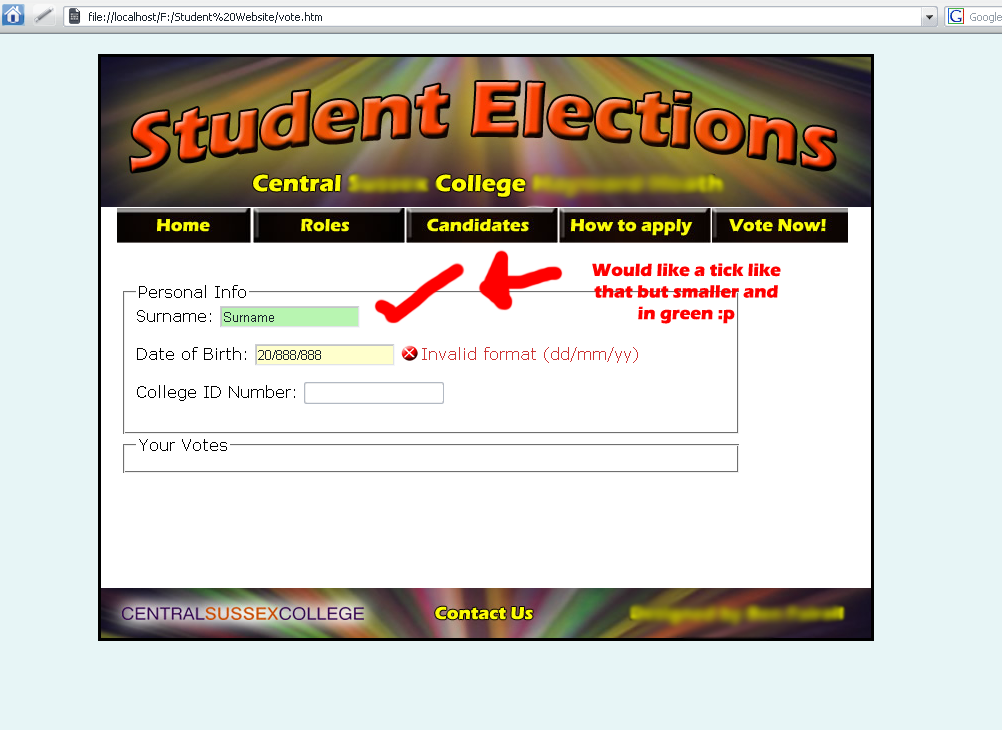
I have got it knowing if it meets certain criteria or not - as can be seen by the green box in my screen shot but then getting an image to load because that criteria has been met is harder. Not knowing any java does not help I did start fiddling with the Java parts earlier and it just destroyed everything On the Adobe demo site the part of the code with the image in is all my form parts are in one div but I tried inserting the <img src="images/ok.gif" title="Valid" alt="Valid" class="validMsg" border="0"/> but that did nothing expect load it all the time...
-
I am new so hello! I am currently doing IT at college and this unit is on websites, So far I have a perfectly working site doing everything I want except 1 thing my poor form I am probs over complicating it quite a lot, but I would like ticks to come up when it is valid and a cross and an error message to come up when it is not. So far I have Spry text fields, which go green when it is valid and had a horrible box and a default message when they were wrong. I looks now I would like it with errors now with a css background image and a slightly nicer font and no border, so just got a tick to sort out when it is valid. My issue is just getting a tick when it is correct. an image will explain it better - is attached! The red bit I drew on if you can't tell I want it like this website http://labs.adobe.com/technologies/spry/de...ormsvalidation/ and in fact your registration page on this site! Thankyou for any help Ben