
Skip to content
View in the app

A better way to browse. Learn more.

Web Designer Forum

A full-screen app on your home screen with push notifications, badges and more.

To install this app on iOS and iPadOS
  1. Tap the Share icon in Safari
  2. Scroll the menu and tap Add to Home Screen.
  3. Tap Add in the top-right corner.
To install this app on Android
  1. Tap the 3-dot menu (⋮) in the top-right corner of the browser.
  2. Tap Add to Home screen or Install app.
  3. Confirm by tapping Install.

Jeff254

Members
  • Joined

  • Last visited

  1. Jeff254 replied to Jeff254's topic in WordPress
    Ok Thanks for the help, I highly appreciate it
  2.    Jeff254 reacted to a post in a topic: PHP Assistance
  3.    Jeff254 reacted to a post in a topic: PHP Assistance
  4. Jeff254 replied to Jeff254's topic in WordPress
    Around 50 clients, I think forms is the way to go since it'll be easier to key in the data. Finally, do I need to create two pages one for keying in the data ( backend ) and the other to display the data on private pages?
  5. Jeff254 replied to Jeff254's topic in WordPress
    One more thing, each client has to view the information of the day, so I was thinking of adding a datepicker field. Is it possible to link the day selected with the information on the table and how
  6.    Jeff254 reacted to a post in a topic: PHP Assistance
  7. Jeff254 replied to Jeff254's topic in WordPress
    Thanks for the guidelines, I'm really grateful. One question if I may ask is do I need to create different databases for each client
  8.    Jeff254 reacted to a post in a topic: PHP Assistance
  9. Jeff254 joined the community
  10. Jeff254 posted a topic in WordPress
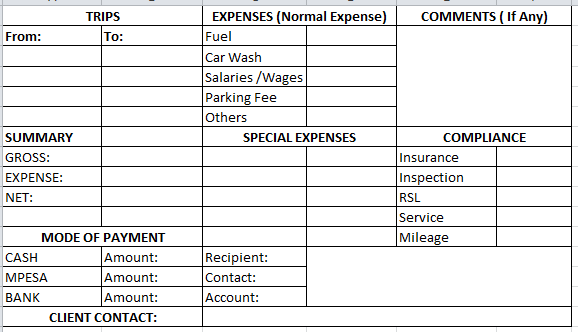
    Hi, so basically I'm trying to add this table to my front end clients private pages so that I can key in information at the end of the day. They should be able to view a monthly record of the information dependent on the day selected but I cant figure out which way to go about this. All I'm asking for is some guidelines. Please Help

Account

Navigation

Search

Search

Configure browser push notifications

Chrome (Android)
  1. Tap the lock icon next to the address bar.
  2. Tap Permissions → Notifications.
  3. Adjust your preference.
Chrome (Desktop)
  1. Click the padlock icon in the address bar.
  2. Select Site settings.
  3. Find Notifications and adjust your preference.