ireneiturbide
Members
-
Joined
-
Last visited
-
Hey, thank you for your help. I think initially either I got the wrong string or it was some problem with the machine itself... Anyway, this is what the twitter string should look like: <a class="twitter-timeline" data-width="80%" data-height="300" data-theme="light" href="https://twitter.com/vinos_icex?lang=en">Tweets by Vinos de Espana</a> <script async src="http://platform.twitter.com/widgets.js" charset="utf-8"></script>
-
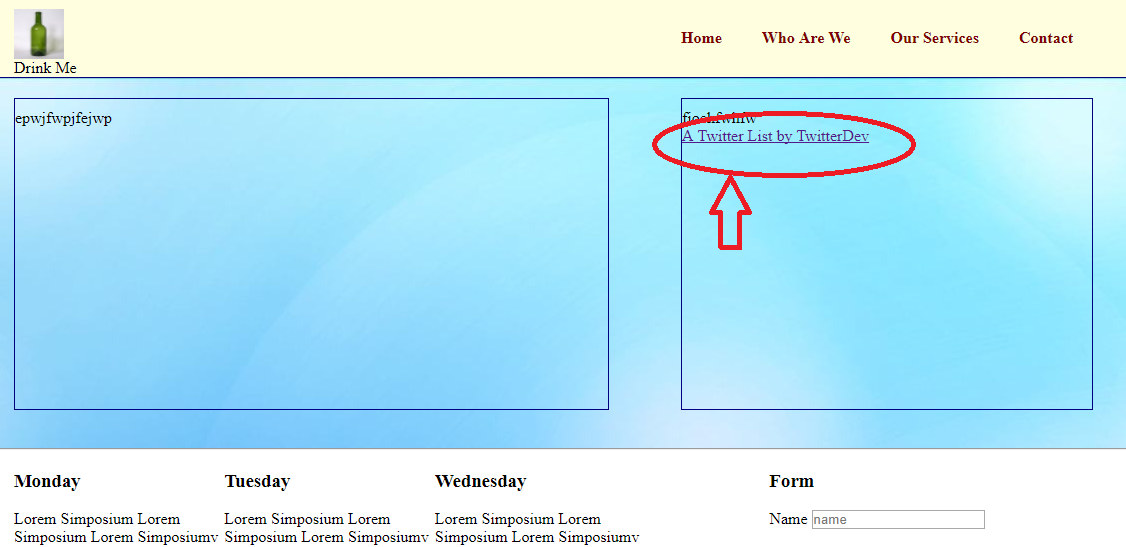
Hi All, I have tried to embed a twitter account in my website (it is not live, I recently started doing some projects). In the png attachment you can see what I get Also, I am attaching what the html looks like, in case the link is not correctly placed.... Could you please let me know why I am getting the link on the html document and it is not actually displaying the twitter timeline? I have been watching some videos today on You Tube, to find out but I am still clueless. If you need any additional info, please let me know. Thanks, Irene index.html css.css