mr108
Members
-
Joined
-
Last visited
-
-
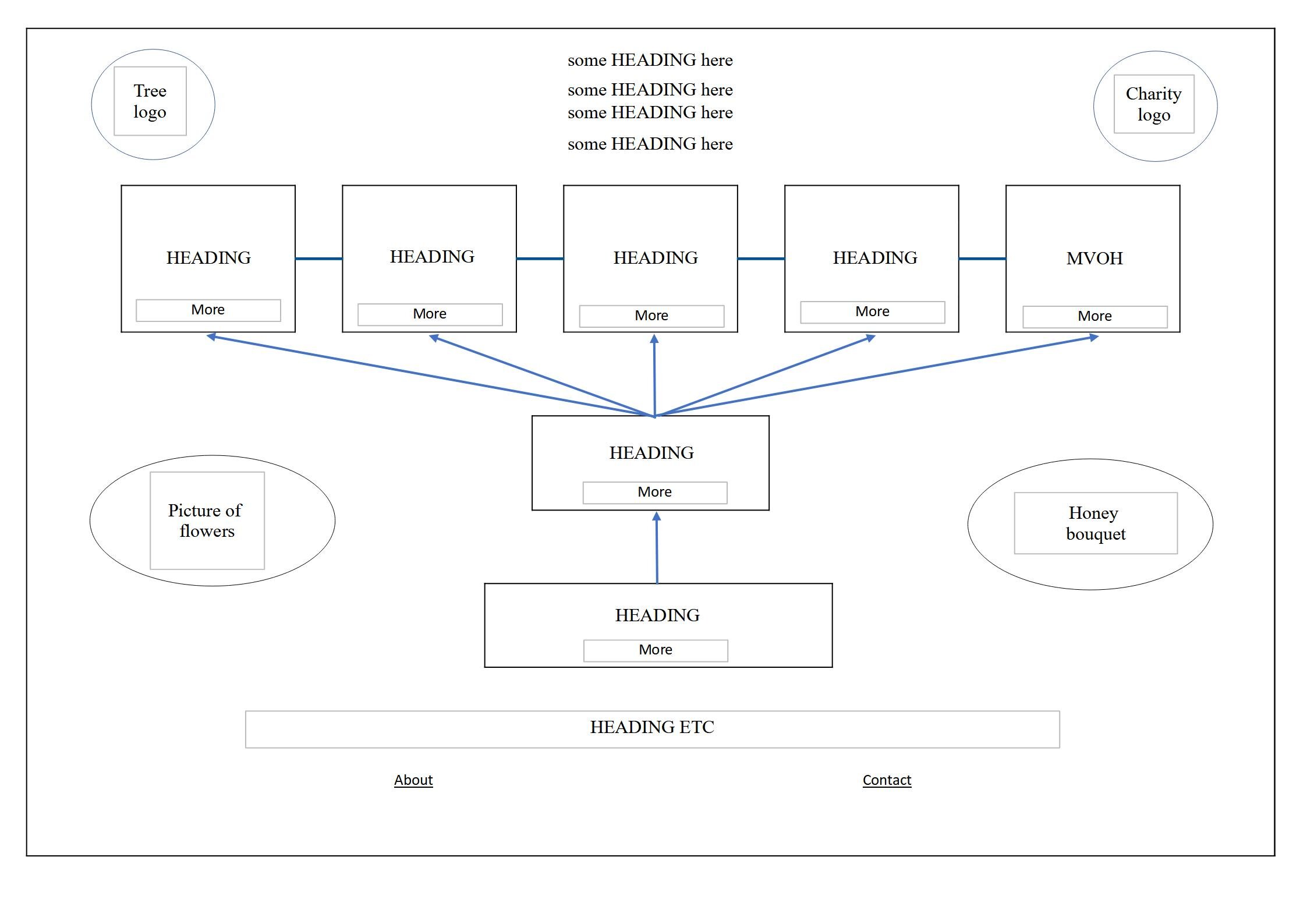
Hello, I have a draft for a Home page - see attached file. Which WordPress theme is best to use to easily create such a Home page either as a landing page or presentation page. The number of sections on that page will be more in the final design. I would prefer to use a free theme if such is available, but consider paid one as well. Thanks! Maharishi Peace Village.html
-
Yes, and it's resolved.
-
I'm not selling anything. But the fact that you have no idea what that website is about just shows that there are things you have no knowledge about. No harm, not everybody is all knowing. Your statements are contradictory. If you have no idea what it is all about, then you can't say that it fails. This ends our useless discussion.
-
Is this your website: aerin.co.uk ?
-
I found out the answer to this: When anyone finds faults or is criticizing anything or anyone without basis, then usually the fault is on his side. So I had a look at your website aerin.co.uk and found LOTS of faults that no respectable web designer would leave unfixed. So there you are!
-
Well, this is just a rough draft, far from complete, there will be more text explaining the topics, more pages, improved design, in other words still lots of work. So no one is expecting that you understand anything from it at this stage. But it seems you are very quick to judge even though my question was just to modify the Hamburger menu and nothing else.
-
-
What Additional CSS should I use in order to add word MENU below the icon for Hamburger menu? Or as alternative to replace the Hamburger Menu with the word MENU? Note that my Menu Alignment in Customizer is on the Right. website: https://meditationyoga.in/mahon/
-
Hello, I have a draft for a Home page - see the attachment. Which WordPress theme is best to use to easily create such a Home page, either as a landing page or regular Home page. I would prefer to use a free theme if such is available. Thanks!

-
Thanks, Yes, it's a nice site and I hope I'll be able to fix the bug with the help of some experts here. The bug description is here: http://www.webdesignerforum.co.uk/topic/85748-bug-in-the-portfolio-display/
-
Yes, I can see in the stats that 33% of the hits are from mobile browsers and 0.2% from tablets, while the stats for screen resolutions show 45% with small resolutions.
-
Thanks again, it's very useful to get feedback and opinion of others about these things. I figured out why that Contact Form drop-down shows up automatically. When the connection is slow then automatically google transcodes the pages (ONLY on mobile phones with slow connection) into lighter, faster to load page, see here: you can see the difference in load speed here: https://www.webpagetest.org/result/161118_K5_a665540a263c7f0cc262c4b8b1028773/ and the menu and the navigation is also changed. There is a link, at the bottom, to load the Original page if one wants to view it that way. Now I disabled that black drop-down form since there is a Contact page as well anyway. Yes, portfolio themes are usually built for desktops but the majority of the visitors (60% - 70% on my friend's site) are still using the computers and not small mobile gadgets. Interesting thing with the scrolling that you mentioned - when that page is transcoded some of the portfolio items are shown just that way. For example "Who is she 2012" and "Bleak House 1992" (the 2nd and 4th on the top from the left on desktop version or from the top when viewing on the phone). I don't know why not all the Portfolio items are shown in the same way. Swipe gestures are useful, for sure, but even simpler is to tap on the image and that takes you to the next one - that's what currently is implemented in this version. In any case my friend who is the site owner will most likely keep the theme since she likes it very much and I'll try to get the bug fixed somehow...
-
Thanks fisicx, What phone and browser are you using? (It works OK on my phone, Samsung J7, in Chrome, Firefox and inbuilt browsers.) What is not working on your phone? The portfolio grid display on the main page or navigation or anything else? I'll appreciate any feedback so I know what is broken. The theme author does not even respond on the emails from envato.com Market place where his theme is sold, that's why I'm trying to fix it myself with the help of people on forum. Do you have any suggestions for a better portfolio theme?
-
Hello, I'm helping a friend with her WordPress website and the portfolio display on a that site most likely has a bug. The site is here: http://terrybraunstein.com/portfolio1/ When you select one of the Portfolio Categories, e.g. 'Sculpture' (last on the right) and click on the second item from the top-left ('Ladder Dreams') and once it opens, if you click on the 'Next' button in the top-right corner to view next item in the 'Sculpure' category, then completely unrelated item from 'Artists Books' category comes up - ('My Bookhouse:...'). And if you click on 'Previous' button instead when viewing 'Ladder Dreams' then 'Empty Nest – 1988' which is from 'Photography' Category comes up. The right navigation should be that when you are in a 'Sculpture' Category, then the 'Next' or 'Previous' buttons will take you to the next/previous series of images in that Category. I had a look at the code of the single-portfolio.php file which is part of that WP theme and which I guess is managing the display of the single portfolio item and the navigation on it. I guess the bug must be somewhere in the places where the 'next' and 'prev' appear, and where the assignment of the post's id is set. But I don't know anything about php coding so it's not possible for me to determine where the changes have to be done. Any idea what and where I have to make the changes? The code is below. Thanks Marek <?php get_header(); ?> <?php if ( have_posts() ) while ( have_posts() ) : the_post(); ?> <?php $desired_width = 813; $desired_height = 613; $current_post_id = $post->ID; $terms = get_the_terms($current_post_id, 'portfolio_category', 'string'); $num_of_terms = count($terms); $content_post = get_post($current_post_id); $content = $content_post->post_content; $content = apply_filters('the_content', $content); $content = str_replace(']]>', ']]>', $content); $post = get_post($current_post_id); // Prev and Next Post IDs $adjacent_ids = onioneye_get_next_and_prev_ids($current_post_id); $prev_id = $adjacent_ids[0]; $next_id = $adjacent_ids[1]; // Metabox Values $image_list = get_post_meta($current_post_id, 'onioneye_image_list', true); $client = get_post_meta($current_post_id, 'onioneye_client', true); $project_url = get_post_meta($current_post_id, 'onioneye_item_url', true); $is_pub_date_displayed = get_post_meta($current_post_id, 'onioneye_publication_date', true); $video_embed_code = get_post_meta($current_post_id, 'onioneye_embed_code', true); $no_of_columns = 0; if($is_pub_date_displayed) { $no_of_columns++; } if($terms) { $no_of_columns++; } if($client) { $no_of_columns++; } if($project_url) { $no_of_columns++; } ?> <div class="portfolio-item-wrapper group"> <div class="single-portfolio-item group"> <div class="mobile-nav-container"> <h1 class="item-title"><?php echo get_the_title($current_post_id); ?></h1> <div class="mobile-post-nav group"> <?php if($prev_id && $next_id) { ?> <a class="next-portfolio-post mobile-nav-btn" rel="next" href="#" data-post_id="<?php echo esc_attr($next_id); ?>"> <span><?php esc_html_e( 'Next post', 'onioneye' ); ?></span> </a> <a class="prev-portfolio-post mobile-nav-btn" rel="prev" href="#" data-post_id="<?php echo esc_attr($prev_id); ?>"> <span><?php esc_html_e( 'Prev post', 'onioneye' ); ?></span> </a> <?php } else if ($prev_id) { ?> <div class="next-nav-placeholder mobile-nav-btn"> <span><?php esc_html_e( 'Next post', 'onioneye' ); ?></span> </div> <a class="prev-portfolio-post mobile-nav-btn" href="#" data-post_id="<?php echo esc_attr($prev_id); ?>"> <span><?php esc_html_e( 'Prev post', 'onioneye' ); ?></span> </a> <?php } else if ($next_id) { ?> <a class="next-portfolio-post mobile-nav-btn" href="#" data-post_id="<?php echo esc_attr($next_id); ?>"> <span><?php esc_html_e( 'Next post', 'onioneye' ); ?></span> </a> <div class="prev-nav-placeholder mobile-nav-btn"> <span><?php esc_html_e( 'Prev post', 'onioneye' ); ?></span> </div> <?php } ?> </div><!-- /.mobile-post-nav --> </div><!-- /.mobile-nav-container --> <section class="item-content"> <?php if(!empty($image_list)) { ?> <div class="metabox-media-files"> <?php if(!empty($image_list) && count($image_list) === 1) { $portfolio_img_url = reset($image_list); $portfolio_img_id = key($image_list); $img_meta = wp_get_attachment_image_src($portfolio_img_id, 'full-size'); $image_full_width = $img_meta[1]; $image_full_height = $img_meta[2]; $alt_attr = get_post_meta($portfolio_img_id, '_wp_attachment_image_alt', true); $img_caption = get_post($portfolio_img_id)->post_excerpt; /* find the "desired height" of the current thumbnail, relative to the desired width */ if($image_full_width && $image_full_height) { $desired_height = floor($image_full_height * ($desired_width / $image_full_width)); } $thumb = onioneye_get_attachment_id_from_src($portfolio_img_url); $image = onioneye_vt_resize($thumb, '', $desired_width, $desired_height, true); if( $image_full_width > $desired_width || $image_full_height > $desired_height ) { ?> <div style="max-width: <?php echo esc_attr($desired_width) . 'px'; ?>"> <div class="single-img-height" style="height: 0; padding-bottom: <?php echo onioneye_get_loader_height($desired_width, $desired_height); ?>"> <div class="single-img-container"> <img class="single-img single-img-ajax" src="<?php echo esc_url($image[url]); ?>" width="<?php echo esc_attr($desired_width); ?>" height="<?php echo esc_attr($desired_height); ?>" alt="<?php echo esc_attr($alt_attr); ?>" /> <?php if($img_caption) { ?> <p class="oy-flex-caption"><?php echo $img_caption; ?></p> <?php } ?> </div> <div class="single-img-loader"></div> </div> </div> <?php } else { ?> <div style="max-width: <?php echo esc_attr($image_full_width) . 'px'; ?>"> <div class="single-img-height" style="height: 0; padding-bottom: <?php echo onioneye_get_loader_height($image_full_width, $image_full_height); ?>"> <div class="single-img-container"> <img class="single-img single-img-ajax" src="<?php echo esc_url($portfolio_img_url); ?>" width="<?php echo esc_attr($image_full_width); ?>" height="<?php echo esc_attr($image_full_height); ?>" alt="<?php echo esc_attr($alt_attr); ?>" /> <?php if($img_caption) { ?> <p class="oy-flex-caption"><?php echo $img_caption; ?></p> <?php } ?> </div> <div class="single-img-loader"></div> </div> </div> <?php } } else if(!empty($image_list) && count($image_list) >= 1) { ?> <div class="oy-flex-container"> <div class="oy-flexslider"> <ul class="oy-slides"> <?php foreach ($image_list as $portfolio_img_id => $portfolio_img_url) { $img_meta = wp_get_attachment_image_src($portfolio_img_id, 'full-size'); $image_full_width = $img_meta[1]; $image_full_height = $img_meta[2]; $alt_attr = get_post_meta($portfolio_img_id, '_wp_attachment_image_alt', true); $img_caption = get_post($portfolio_img_id)->post_excerpt; /* find the "desired height" of the current thumbnail, relative to the desired width */ if($image_full_width && $image_full_height) { $desired_height = floor($image_full_height * ($desired_width / $image_full_width)); } $thumb = onioneye_get_attachment_id_from_src($portfolio_img_url); $image = onioneye_vt_resize( $thumb, '', $desired_width, $desired_height, true ); // If the original width of the thumbnail doesn't match the width of the slider, resize it; otherwise, display it in original size if( $image_full_width > $desired_width || $image_full_height > $desired_height ) { ?> <li> <img class="oy-slider-img" src="<?php echo esc_url($image[url]); ?>" width="<?php echo esc_attr($desired_width); ?>" height="<?php echo esc_attr($desired_height); ?>" alt="<?php echo esc_attr($alt_attr); ?>" /> <?php if($img_caption) { ?> <p class="oy-flex-caption"><?php echo $img_caption; ?></p> <?php } ?> </li> <?php } else { ?> <li> <img class="oy-slider-img" src="<?php echo esc_url($portfolio_img_url); ?>" width="<?php echo esc_attr($image_full_width); ?>" height="<?php echo esc_attr($image_full_height); ?>" alt="<?php echo esc_attr($alt_attr); ?>" /> <?php if($img_caption) { ?> <p class="oy-flex-caption"><?php echo $img_caption; ?></p> <?php } ?> </li> <?php } // end else } // end foreach ?> </ul><!-- /.oy-slides --> <div class="oy-flex-img-loader"></div> </div><!-- /.oy-flexslider --> </div><!-- /.oy-flex-container --> <?php } // end else if ?> </div><!-- END .metabox-media-files --> <?php } ?> <?php if($video_embed_code) { ?> <div class="video-embed"> <?php echo stripslashes(htmlspecialchars_decode($video_embed_code)); ?> </div> <?php } ?> <?php if($content) { ?> <div class="item-description"> <?php echo $content; ?> </div> <?php } ?> </section><!-- /.item-content --> <aside class="item-sidebar group"> <ul class="post-nav group"> <li><span class="close-post"> </span></li> <?php if($prev_id && $next_id) { ?> <li><a class="next-portfolio-post" rel="next" href="#" data-post_id="<?php echo esc_attr($next_id); ?>"> </a></li> <li><a class="prev-portfolio-post" rel="prev" href="#" data-post_id="<?php echo esc_attr($prev_id); ?>"> </a></li> <?php } else if ($prev_id) { ?> <li><a class="prev-portfolio-post" href="#" data-post_id="<?php echo esc_attr($prev_id); ?>"> </a></li> <?php } else if ($next_id) { ?> <li><a class="next-portfolio-post" href="#" data-post_id="<?php echo esc_attr($next_id); ?>"> </a></li> <?php } ?> </ul><!-- /.post-nav --> <h1 class="item-title"><?php echo get_the_title($current_post_id); ?></h1> <div class="project-meta group <?php echo esc_attr('oy-' . $no_of_columns . '-cols'); ?>"> <?php if($terms) { ?> <ul class="item-categories item-metadata group"> <li><?php esc_html_e( 'Categories', 'onioneye' ); ?><span> →</span></li> <?php $i = 0; foreach($terms as $term) { if($i + 1 == $num_of_terms) { echo '<li class="item-term">' . esc_html($term -> name) . '</li>'; } else { echo '<li class="item-term">' . esc_html($term -> name) . '<span class="cat-comma">, </span></li>'; } $i++; } ?> </ul> <?php } ?> <?php if($is_pub_date_displayed) { ?> <ul class="item-date item-metadata"> <li><?php esc_html_e('Date', 'onioneye'); ?><span> →</span></li> <li><?php echo mysql2date( __( 'F Y', 'onioneye' ), $post->post_date ); ?></li> </ul> <?php } ?> <?php if( $client ) { ?> <ul class="item-client item-metadata"> <li><?php esc_html_e('Client', 'onioneye'); ?><span> →</span></li> <li><?php echo esc_html($client); ?></li> </ul> <?php } ?> <?php if( $project_url ) { ?> <ul class="item-url item-metadata"> <li><?php esc_html_e( 'Project URL', 'onioneye' ); ?><span> →</span></li> <li><a href="<?php echo esc_url($project_url); ?>"><?php esc_html_e( 'Visit site', 'onioneye' ); ?></a></li> </ul> <?php } ?> </div><!-- /.project-meta --> </aside><!-- /.item-sidebar --> <div class="portfolio-border"> </div> </div><!-- /.single-portfolio-item --> </div><!-- /.portfolio-item-wrapper --> <?php get_template_part('includes/portfolio'); ?> <?php endwhile; ?> <?php get_footer(); ?>
-
Hello, I'm helping a friend with her website http://terrybraunstein.com/portfolio1/ and came across some problem which I'll describe in a separate post under PHP section. I'm totally unfamiliar with PHP coding but hope that I can find some help here. Thanks! Marek