
Skip to content
View in the app

A better way to browse. Learn more.

Web Designer Forum

A full-screen app on your home screen with push notifications, badges and more.

To install this app on iOS and iPadOS
  1. Tap the Share icon in Safari
  2. Scroll the menu and tap Add to Home Screen.
  3. Tap Add in the top-right corner.
To install this app on Android
  1. Tap the 3-dot menu (⋮) in the top-right corner of the browser.
  2. Tap Add to Home screen or Install app.
  3. Confirm by tapping Install.

Jon H

Members
  • Joined

  • Last visited

Everything posted by Jon H

  1. thanks for your help by the way i will update the pic when i have made some changes
  2. oh dose it :-? a myt of got the idear of the footer of omex media(witch i am doing with my freind, the layout you are probaly talking about) but i am still making the layout so there is time for change if it does look 2 much like omex media
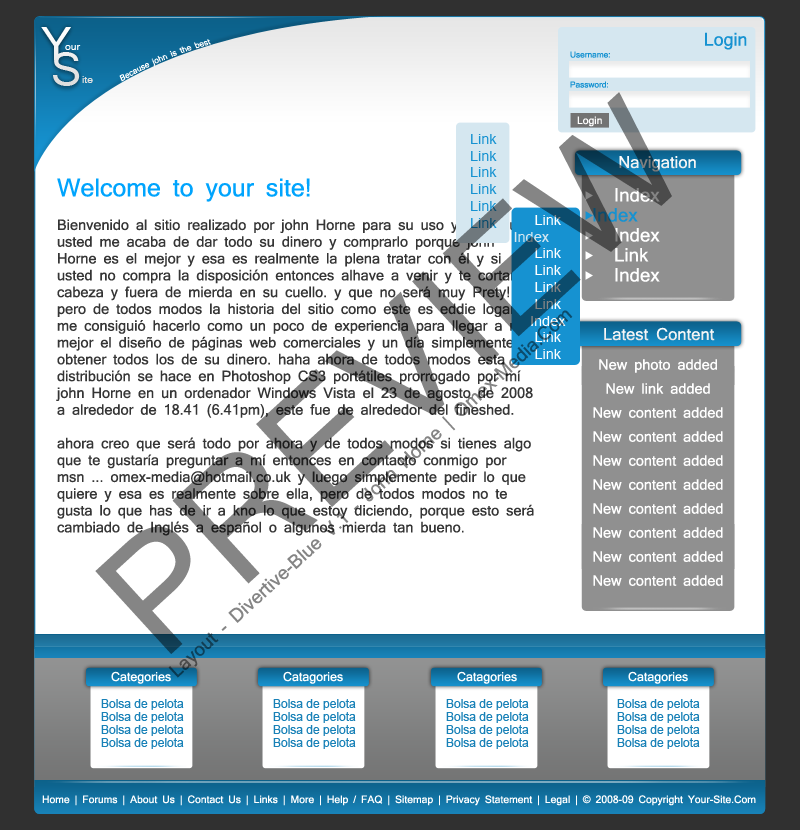
  3. Hello, my name is John Horne and I am a web developer from Glasgow, Scotland. And I have been working on a new template to sell; I’m not too sure about it though so please take some time to have a look and comment on it please. Here is the link to another preview of it... http://i185.photobucket.com/albums/x69/kpd...ive-Blue-V1.png Thank you!
Account

Navigation

Search

Search

Configure browser push notifications

Chrome (Android)
  1. Tap the lock icon next to the address bar.
  2. Tap Permissions → Notifications.
  3. Adjust your preference.
Chrome (Desktop)
  1. Click the padlock icon in the address bar.
  2. Select Site settings.
  3. Find Notifications and adjust your preference.