
Skip to content
View in the app

A better way to browse. Learn more.

Web Designer Forum

A full-screen app on your home screen with push notifications, badges and more.

To install this app on iOS and iPadOS
  1. Tap the Share icon in Safari
  2. Scroll the menu and tap Add to Home Screen.
  3. Tap Add in the top-right corner.
To install this app on Android
  1. Tap the 3-dot menu (⋮) in the top-right corner of the browser.
  2. Tap Add to Home screen or Install app.
  3. Confirm by tapping Install.

chihiro

Members
  • Joined

  • Last visited

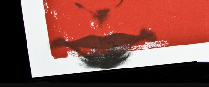
  1. i am uploading photography images of print work. you can see on the image that the white edges are rough Original the image is around 30 MB.Can I export it from flash for web,or I have to do it in Photoshop,please? I dont know but he images quility gets really strange,should I exported as png,or gif,.?

  2. hi i would like to ask you,why when i save images for Internet (for my web portfolio) from Photoshop thought Save for Web and import them in Flash they appear with rough ends ,not straight and clear as in the original version ,please? I m saving them in couple of versions some with Hight quality or medium but its all the same.... please help me what could I do that it doest occur that thing,please Thank you
Account

Navigation

Search

Search

Configure browser push notifications

Chrome (Android)
  1. Tap the lock icon next to the address bar.
  2. Tap Permissions → Notifications.
  3. Adjust your preference.
Chrome (Desktop)
  1. Click the padlock icon in the address bar.
  2. Select Site settings.
  3. Find Notifications and adjust your preference.